

page-agent
JavaScript in-page GUI agent. Control web interfaces with natural language.
- 29.6k estrellas
- 2.6k forks
- 113 issues abiertos
- Lenguaje: TypeScript
- Licencia: MIT
- actualizado
Instalación
git clone https://github.com/alibaba/page-agent && cp page-agent/*.md ~/.claude/agents/- Clone the repository and copy the agent .md definitions into ~/.claude/agents (or .claude/agents inside a project).
- Start a new Claude Code session to load the agents.
- Delegate work to them with the Task/Agent tool or by name.
Nota editorial
Page Agent is a TypeScript library from Alibaba that embeds a GUI automation agent directly inside a webpage using plain JavaScript, requiring no browser extension, headless browser, or Python runtime. It works by parsing the DOM as text rather than taking screenshots, which means it can operate with standard text-based LLMs rather than multimodal models. Developers integrate it via a single script tag or the `page-agent` npm package, then call `agent.execute()` with natural language instructions like "Click the login button." It supports bring-your-own-LLM configuration, including models such as Qwen via Alibaba's DashScope API. An optional Chrome extension extends its reach across multiple browser tabs for multi-page workflows, and a beta MCP server allows external agent clients, including Claude Desktop, to drive the browser through the MCP protocol. Primary beneficiaries include SaaS developers building in-product AI copilots, teams automating complex form workflows in ERP or CRM systems, and accessibility tooling authors who want natural language control over any web interface.
5 items en este repositorio
Clean up local git branches and remotes accumulated from PR reviews. Use when the user asks to clean branches, remove stale remotes, or tidy up the local git state.
Maintain the supported LLM model list: add a new model, or run routine maintenance to verify availability and discover new models worth adding. Use when the user asks to add/support a model, update the model list, or check model availability.
Conduct a thorough pre-implementation discussion before making significant changes. Use when the user wants to discuss, plan, or evaluate a change before implementing it — especially when they say words like 'discuss', 'evaluate', 'plan', or 'let's talk about'.
Create a branch, commit existing local changes, push them, and open a pull request. Use when submitting current work as a PR.
Update docs/CHANGELOG.md from git history, GitHub releases, and code diffs. Use when: writing release notes, syncing the latest changelog entry, summarizing a new tag, or keeping changelog wording concise and consistent.
Resumen de Subagents
Page Agent







The GUI Agent Living in Your Webpage. One script gives any web page its own AI agent.
🌐 English | 中文
🚀 Demo | 📖 Docs | 📢 HN Discussion | 𝕏 Follow on X
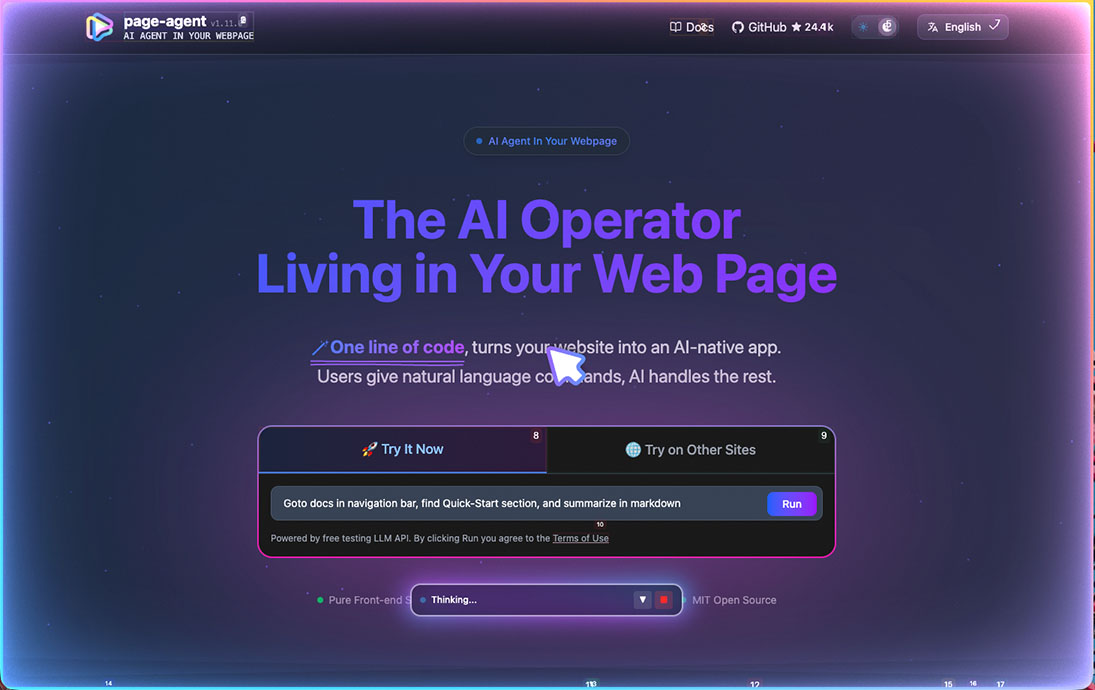
✨ Features
🎯 Easy integration
No need for
browser extension/python/headless browser.Just in-page javascript. Everything happens in your web page.
📖 Text-based DOM manipulation
No screenshots. No multi-modal LLMs or special permissions needed.
🧠 Bring your own LLMs
Works with most mainstream models, including locally deployed ones. See supported models.
🐙 Optional chrome extension for multi-page tasks.
And an MCP Server (Beta) to control it from outside
💡 Use Cases
SaaS AI Copilot — Ship an AI copilot in your product in lines of code. No backend rewrite.
Smart Form Filling — Turn 20-click workflows into one sentence. Perfect for ERP, CRM, and admin systems.
Accessibility — Make any web app accessible through natural language. Voice commands, screen readers, zero barrier.
Multi-page Agent — Extend your own web agent's reach across browser tabs via the Chrome extension.
MCP - Allow your agent clients to control your browser.
🚀 Quick Start
One-line integration
Fastest way to try PageAgent with our free Demo LLM:
<script
    src="https://cdn.jsdelivr.net/npm/page-agent@1.12.4/dist/iife/page-agent.demo.js"
    crossorigin="anonymous"
></script>

<!-- China CDN mirror if you can't access jsDelivr -->
<!-- https://registry.npmmirror.com/page-agent/1.12.4/files/dist/iife/page-agent.demo.js -->
⚠️ For technical evaluation only. This demo CDN uses our free testing LLM API. By using it, you agree to its terms.
Add
?autoInit=falseto load the script without creating the demo agent automatically. You can then instantiate it withnew window.PageAgent(...)and your own LLMs.
NPM Installation
npm install page-agentimport { PageAgent } from 'page-agent'
const agent = new PageAgent({
model: 'qwen3.5-plus',
baseURL: 'https://dashscope.aliyuncs.com/compatible-mode/v1',
apiKey: 'YOUR_API_KEY',
language: 'en-US',
})
await agent.execute('Click the login button')For more programmatic usage, see 📖 Documentations.
🤝 Contributing
We welcome contributions from the community! See CONTRIBUTING.md for guidelines and docs/developer-guide.md for local development workflows.
Built something cool with PageAgent? Share it in Show and Tell. 🙌
Please read the maintainer's note on principles and current state.
Contributions generated entirely by bots or AI without substantial human involvement will not be accepted.
⚖️ License
👏 Acknowledgments
This project builds upon the excellent work of browser-use.
PageAgent is designed for client-side web enhancement, not server-side automation.
DOM processing components and prompt are derived from browser-use:

Browser Use <https://github.com/browser-use/browser-use>
Copyright (c) 2024 Gregor Zunic
Licensed under the MIT License

We gratefully acknowledge the browser-use project and its contributors for their
excellent work on web automation and DOM interaction patterns that helped make
this project possible.
⭐ Star this repo if you find PageAgent helpful!
Lo que la gente pregunta sobre page-agent
¿Qué es alibaba/page-agent?
alibaba/page-agent es subagents para el ecosistema de Claude AI. JavaScript in-page GUI agent. Control web interfaces with natural language. Tiene 29.6k estrellas en GitHub y su última actualización registrada es del 2026-10-21.
¿Cómo se instala page-agent?
Puedes instalar page-agent clonando el repositorio (https://github.com/alibaba/page-agent) o siguiendo las instrucciones del README en GitHub. ClaudeWave también te ofrece bloques de instalación rápida en esta misma página.
¿Es seguro usar alibaba/page-agent?
Nuestro agente de seguridad ha analizado alibaba/page-agent y le ha asignado un Trust Score de 100/100 (tier: Verified). Revisa el desglose completo de comprobaciones superadas y flags en esta página.
¿Quién mantiene alibaba/page-agent?
alibaba/page-agent es mantenido por alibaba. La última actividad registrada en GitHub es del 2026-10-21, con 113 issues abiertos.
¿Hay alternativas a page-agent?
Sí. En ClaudeWave puedes explorar subagents similares en /categories/agents, ordenados por popularidad o actividad reciente.
¿Mantienes este repo? Muestra su Trust Score en tu README
La insignia muestra el Trust Score y el veredicto actuales de este repositorio y enlaza a esta página. Sigue los datos del catálogo: nadie puede comprar ni editar la puntuación que enseña.
[](https://claudewave.com/en/repo/alibaba-page-agent)<a href="https://claudewave.com/en/repo/alibaba-page-agent"><img src="https://claudewave.com/api/badge/alibaba-page-agent" alt="ClaudeWave Trust Score for alibaba/page-agent" width="320" height="64"></a>