

MCP server for .NET: Roslyn code navigation, refactoring and affected-test selection, plus build and test tools. Install with dnx DotNetDevMCP.
- ✓Actively maintained (<30d)
- ✓Clear description
- ✓Topics declared
- ✓Documented (README)
- !Licence file present but not machine-readable
git clone https://github.com/csa7mdm/DotNetDevMCPResumen de MCP Servers
# DotNetDevMCP
<!-- mcp-name: io.github.csa7mdm/dotnetdevmcp -->
An [MCP](https://modelcontextprotocol.io) server that gives AI coding agents real .NET tooling: Roslyn code intelligence, `dotnet build`/`test`, affected-test selection, and an orchestrator that runs those tools concurrently as a dependency graph.
[](https://github.com/csa7mdm/DotNetDevMCP/actions/workflows/build.yml)
[](https://www.nuget.org/packages/DotNetDevMCP)
[](https://www.nuget.org/packages/DotNetDevMCP)
[](https://github.com/csa7mdm/DotNetDevMCP/blob/main/LICENSE)
[](https://dotnet.microsoft.com/download/dotnet/10.0)
Agents working on .NET code usually get by with `grep` and shelling out to `dotnet`. That means they read files instead of symbols, edit text instead of syntax trees, and run one command at a time. DotNetDevMCP replaces that with 37 tools by default (53 with the optional groups below enabled) that use the compiler's view of your solution and can run builds, tests and analysis in parallel.
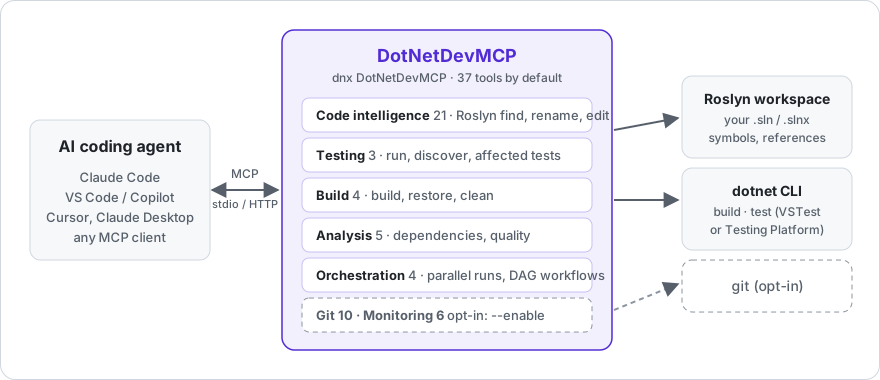
New here? The [wiki](https://github.com/csa7mdm/DotNetDevMCP/wiki) has a [first-session tutorial](https://github.com/csa7mdm/DotNetDevMCP/wiki/Tutorial), setup for every MCP client, and troubleshooting.
## Install
Requires the [.NET 10 SDK](https://dotnet.microsoft.com/download/dotnet/10.0).
**Claude Code**
```bash
claude mcp add dotnetdevmcp -- dnx DotNetDevMCP --yes
```
**VS Code / Visual Studio** (`.mcp.json` or `.vscode/mcp.json`)
```json
{
"servers": {
"dotnetdevmcp": {
"type": "stdio",
"command": "dnx",
"args": ["DotNetDevMCP", "--yes"]
}
}
}
```
**Claude Desktop / Cursor / any stdio client** (`mcpServers` form)
```json
{
"mcpServers": {
"dotnetdevmcp": {
"command": "dnx",
"args": ["DotNetDevMCP", "--yes", "--", "--load-solution", "C:/src/MyApp/MyApp.sln"]
}
}
}
```
`dnx` downloads the package from NuGet.org on first run. Prefer a permanent install? `dotnet tool install -g DotNetDevMCP`, then use `dotnetdevmcp` as the command.
Pass `--load-solution <path>` to have Roslyn load your solution at startup, or let the agent call `SharpTool_LoadSolution` when it needs to. `--http --port 3001` serves Streamable HTTP instead of stdio (localhost only, no authentication: see [Security](#security)). `--clean-env` starts `dotnet` and `git` with a minimal environment so tokens and cloud credentials in environment variables aren't passed on. `dotnetdevmcp --help` lists everything.
Git and Monitoring tools (see the table below) are off by default - a shell an agent already has covers them, and every registered tool costs context tokens in every session. Pass `--enable git,monitoring` (comma-separated and/or repeated, e.g. `--enable git --enable monitoring`) to turn either or both on.
By default, the Roslyn edit tools (`SharpTool_RenameSymbol`, `OverwriteMember`, `AddMember`, `MoveMember`, `FindAndReplace`, `CreateRoslynDocument`, `OverwriteRoslynDocument`, `ManageUsings`, `ManageAttributes`) never touch git - they apply changes to disk and return the usual compile-check output, nothing else. Pass `--git-commit-edits` to opt into the old behavior: each edit creates a `sharptools/<timestamp>` branch (if you aren't already on one) and commits the change, which is also what `SharpTool_Undo` needs in order to revert. Without the flag, `SharpTool_Undo` returns an explanatory error instead of failing obscurely. (`--disable-git` still exists but is a no-op now that git integration is opt-in by default.)
## What the agent gets
| Group | Tools | What they do |
|---|---|---|
| Code intelligence (Roslyn) | 21 | Load a solution; search and view definitions; find references and implementations; add, overwrite, move and rename members; manage usings and attributes; find-and-replace with syntax awareness; complexity analysis; undo. Forked from [SharpTools](https://github.com/kooshi/SharpToolsMCP). |
| Testing | 3 | `dotnet_test_run` (one `dotnet test` per project or solution, TRX parsed into per-test results with messages and stack traces), `dotnet_test_discover`, and `dotnet_test_affected`: Roslyn walks references from your changed files to the test methods that reach them, and runs only those. |
| Build | 4 | `dotnet build`, `restore`, `clean`, build with MSBuild properties. Structured error/warning output. |
| Analysis | 5 | Project dependency graph, circular-dependency detection, quality metrics, outdated-package scan. |
| Orchestration | 4 | `orchestrate_parallel` runs any of the server's own tools concurrently; `execute_workflow` runs them as a DAG. Resource limits and metrics. |
| Git *(opt-in)* | 10 | Status, branches, checkout, stage, commit, diff, log, push, pull. Enable with `--enable git`. |
| Monitoring *(opt-in)* | 6 | Process performance metrics, GC stats, resource utilization, health check, profiling sessions. Enable with `--enable monitoring`. |
Things you can say to an agent with this server attached:
- "Load `MyApp.sln`, find every implementation of `IOrderRepository`, and rename `GetById` to `FindById` across the solution."
- "Run only the tests affected by what I just changed, and show me the failures with stack traces."
- "Build the API and the worker projects at the same time, then run both test projects."
- "Which projects have circular dependencies?"
## Orchestration
The tools above are individually useful. The orchestrator is what makes them fast. Any tool on the server can be dispatched by name, in parallel or as a dependency graph, from a single call:
```json
{
"name": "execute_workflow",
"arguments": {
"workflowName": "ci",
"steps": [
{ "name": "build-tests", "toolName": "dotnet_build", "arguments": { "projectPath": "tests/Api.Tests/Api.Tests.csproj" } },
{ "name": "build-worker", "toolName": "dotnet_build", "arguments": { "projectPath": "src/Worker/Worker.csproj" } },
{ "name": "test-api", "toolName": "dotnet_test_run", "arguments": { "path": "tests/Api.Tests/Api.Tests.csproj", "noBuild": true }, "dependsOn": ["build-tests"] },
{ "name": "deps", "toolName": "dotnet_detect_circular_dependencies", "arguments": { "projectPath": "src/Api/Api.csproj" } }
]
}
}
```
`build-tests`, `build-worker` and `deps` start immediately; `test-api` waits for `build-tests`. Steps are throttled by a resource manager (default: processor count, adjustable with `configure_resource_limits`). Failures are reported per step; a failed dependency stops its dependents.
Under the hood this is `ConcurrentExecutor` / `WorkflowEngine` / `ResourceManager`, plain C# classes in `DotNetDevMCP.Orchestration` that can be used without MCP.
## Numbers
Measured with BenchmarkDotNet on an i7-10750H, .NET 10.0.9. The orchestration benchmarks use `Task.Delay` stand-ins for I/O-bound work, so they measure the engine's overhead and scheduling, not `dotnet` itself.
| Scenario (20 ops × 50 ms) | Mean | vs sequential |
|---|---:|---:|
| Sequential | 1,237 ms | 1.00 |
| `ConcurrentExecutor`, throttled to 5 | 246 ms | 0.20 |
| `ConcurrentExecutor`, unthrottled (12 cores) | 123 ms | 0.10 |
| `WorkflowEngine` with dependencies | 185 ms | 0.15 |
| `Task.WhenAll` (lower bound) | 62 ms | 0.05 |
| Workflow with a mix of dependent and independent steps | Mean | vs sequential |
|---|---:|---:|
| Sequential | 308 ms | 1.00 |
| `WorkflowEngine` | 185 ms | 0.60 |
## Affected tests
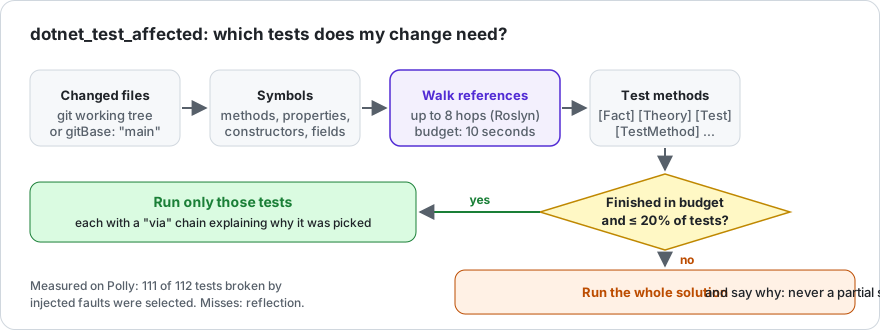
After an edit, the agent usually reruns the whole suite. `dotnet_test_affected` asks Roslyn instead: take the symbols declared in the changed files, follow references (up to `maxDepth` hops, default 8) until you land in a method with `[Fact]`, `[Theory]`, `[Test]`, `[TestCase]` or `[TestMethod]`, then run exactly those. Changed files default to the git working tree, or `gitBase: "main"` for a branch. `dryRun: true` lists the tests without running them; `framework: "net10.0"` runs one target framework of multi-targeted test projects.
The walk has a time budget (`maxSelectionSeconds`, default 10). A change to code that everything depends on reaches too much to trace cheaply; then the whole solution runs instead and the response says so (`selectionComplete: false`). The same happens when the selection is more than 20% of all tests (`maxSelectedFraction`), where a filtered run is no faster. You never get a silently partial selection. Runs are killed after `timeoutSeconds` (default 600) so a hanging test cannot hang the agent; the response names the test modules that never finished. `maxDepth: 3` narrows more changes but misses more tests. Works with VSTest and with Microsoft.Testing.Platform (`"test": { "runner": "Microsoft.Testing.Platform" }` in global.json).
On this repository, editing `ConcurrentExecutor.cs` selects 22 of 44 tests (the `ConcurrentExecutorTests` plus the `OrchestrationServiceTests` that reach it through `OrchestrationService`). Measured through the MCP tool, build included, i7-10750H:
| | Tests | Wall |
|---|---:|---:|
| `dotnet test` from a shell | 44 | 9 s |
| `dotnet_test_run` | 44 | 8.3 s |
| `dotnet_test_affected` (change to `ConcurrentExecutor.cs`) | 22 | 6.6 s |
The suite here is small, so the saving is small. On a real library the picture is clearer: [benchmarks/polly]Lo que la gente pregunta sobre DotNetDevMCP
¿Qué es csa7mdm/DotNetDevMCP?
+
csa7mdm/DotNetDevMCP es mcp servers para el ecosistema de Claude AI. MCP server for .NET: Roslyn code navigation, refactoring and affected-test selection, plus build and test tools. Install with dnx DotNetDevMCP. Tiene 0 estrellas en GitHub y su última actualización registrada es del 2026-09-24.
¿Cómo se instala DotNetDevMCP?
+
Puedes instalar DotNetDevMCP clonando el repositorio (https://github.com/csa7mdm/DotNetDevMCP) o siguiendo las instrucciones del README en GitHub. ClaudeWave también te ofrece bloques de instalación rápida en esta misma página.
¿Es seguro usar csa7mdm/DotNetDevMCP?
+
Nuestro agente de seguridad ha analizado csa7mdm/DotNetDevMCP y le ha asignado un Trust Score de 80/100 (tier: Trusted). Revisa el desglose completo de comprobaciones superadas y flags en esta página.
¿Quién mantiene csa7mdm/DotNetDevMCP?
+
csa7mdm/DotNetDevMCP es mantenido por csa7mdm. La última actividad registrada en GitHub es del 2026-09-24, con 8 issues abiertos.
¿Hay alternativas a DotNetDevMCP?
+
Sí. En ClaudeWave puedes explorar mcp servers similares en /categories/mcp, ordenados por popularidad o actividad reciente.
Despliega DotNetDevMCP en tu cloud
Lleva este repo a producción en minutos. Cada plataforma genera su propio entorno con variables de entorno editables.
¿Mantienes este repo? Añade un badge a tu README
Pega el badge en tu README de GitHub para mostrar que está auditado por ClaudeWave. Cada badge enlaza de vuelta a esta página y muestra el Trust Score actual.
[](https://claudewave.com/repo/csa7mdm-dotnetdevmcp)<a href="https://claudewave.com/repo/csa7mdm-dotnetdevmcp"><img src="https://claudewave.com/api/badge/csa7mdm-dotnetdevmcp" alt="Featured on ClaudeWave: csa7mdm/DotNetDevMCP" width="320" height="64" /></a>Más MCP Servers

Fair-code workflow automation platform with native AI capabilities. Combine visual building with custom code, self-host or cloud, 400+ integrations.

User-friendly AI Interface (Supports Ollama, OpenAI API, ...)

An open-source AI agent that brings the power of Gemini directly into your terminal.

Real-time global intelligence dashboard. AI-powered news aggregation, geopolitical monitoring, and infrastructure tracking in a unified situational awareness interface

🕷️ An adaptive Web Scraping framework that handles everything from a single request to a full-scale crawl! Don't be shy, join here: https://discord.gg/EMgGbDceNQ and follow here for daily tips and tricks: https://x.com/Scrapling_dev

The fastest path to AI-powered full stack observability, even for lean teams.