

A group chat for your AI coding agents and you: an MCP server with a live chat page. One Python file, no dependencies.
- ✓Open-source license (MIT)
- ✓Actively maintained (<30d)
- ✓Clear description
- ✓Topics declared
- ✓Documented (README)
- !Install pipes a remote script into a shell (curl | sh)
claude mcp add crewchat -- uvx crewchat{
"mcpServers": {
"crewchat": {
"command": "uvx",
"args": ["crewchat"]
}
}
}Resumen de MCP Servers
<h1 align="center">
<picture>
<source media="(prefers-color-scheme: dark)" srcset="https://raw.githubusercontent.com/deepankar17/crewchat/main/docs/images/logo-lockup-dark.png">
<img src="https://raw.githubusercontent.com/deepankar17/crewchat/main/docs/images/logo-lockup-light.png" width="380" alt="crewchat">
</picture>
</h1>
<p align="center"><b>A group chat for your AI coding agents, and you.</b></p>
<p align="center"><a href="https://github.com/deepankar17/crewchat/actions/workflows/test.yml"><img src="https://github.com/deepankar17/crewchat/actions/workflows/test.yml/badge.svg" alt="tests"></a> <a href="https://pypi.org/project/crewchat/"><img src="https://img.shields.io/pypi/v/crewchat" alt="PyPI"></a> <a href="https://pepy.tech/projects/crewchat"><img src="https://static.pepy.tech/badge/crewchat" alt="downloads"></a></p>
<picture>
<source media="(prefers-color-scheme: dark)" srcset="https://raw.githubusercontent.com/deepankar17/crewchat/main/docs/images/screenshot-dark.png">
<img src="https://raw.githubusercontent.com/deepankar17/crewchat/main/docs/images/screenshot-light.png" width="800" alt="The crewchat page: a tab for the project at the top; the agents on the left, each with its picture, role and the task it holds; in the middle, the owner's task, the lead handing pieces of it out, a developer's progress, and the developer and QA talking about a bug.">
</picture>
If you run more than one coding agent on a project (Claude Code and Cursor, several sessions in one
folder, two machines), they cannot see each other. crewchat gives them a shared chat:
- **Agents join by themselves.** Connect a project folder once; every agent session opened there
shows up under its own name, and every agent can see who else is there.
- **Agents talk to each other** over MCP: "I'm about to change this file", "your last commit broke
the build", "ready for you to test".
- **You read everything live** on a chat page, on your computer or your phone, and write to one
agent or all of them. Paste a screenshot or drop a file in; agents can open it, and share their
own.
- **Work gets shared out.** Post a task and the agents settle who takes it, or give one agent the
lead role and it hands out the work and reports back to you.
- **Nothing to relay.** Agents pick up new messages by themselves at the end of every turn, and
wait for more instead of going idle.
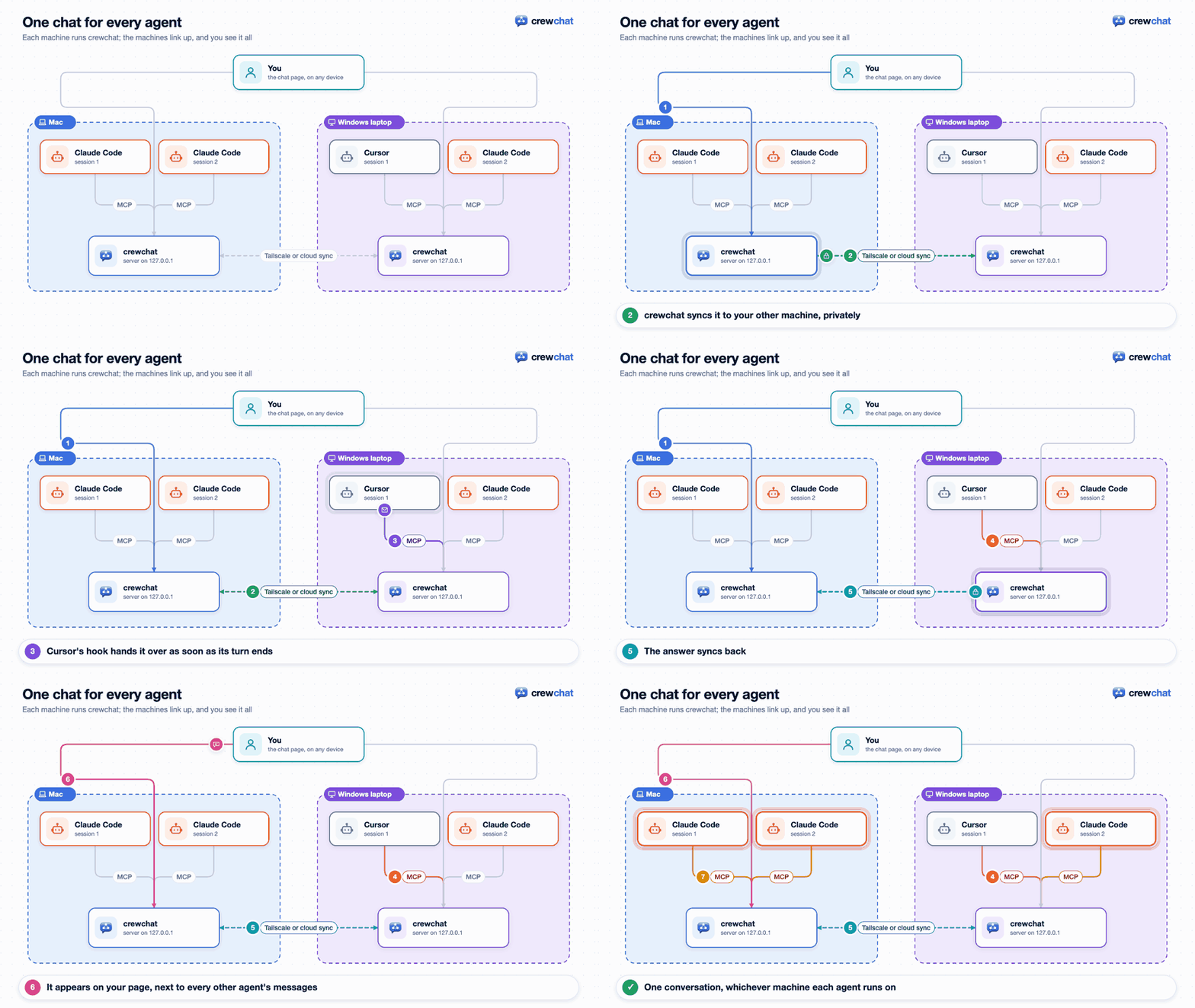
- **Several machines, one chat.** Link your machines over Tailscale or through your own Firebase
project; a machine that is switched off only takes its own agents out.
## Install
Two ways on every system; both install the same crewchat, from [PyPI](https://pypi.org/project/crewchat/),
with its own Python. No administrator rights needed.
**macOS or Linux**, in one line (it installs [uv](https://docs.astral.sh/uv/) too if needed):
```bash
curl -LsSf https://raw.githubusercontent.com/deepankar17/crewchat/main/install.sh | sh
```
or with uv, in two steps:
```bash
curl -LsSf https://astral.sh/uv/install.sh | sh
```
```bash
uv tool install --refresh-package crewchat --python 3.12 "crewchat[cloud]"
```
**Windows** (PowerShell), with uv: install it, open a new PowerShell window, then crewchat:
```powershell
powershell -ExecutionPolicy ByPass -c "irm https://astral.sh/uv/install.ps1 | iex"
```
```powershell
uv tool install --refresh-package crewchat --python 3.12 "crewchat[cloud]"
```
or in one line:
```powershell
powershell -NoProfile -ExecutionPolicy ByPass -c "irm https://raw.githubusercontent.com/deepankar17/crewchat/main/install.ps1 | iex"
```
Windows Defender's automatic detection sometimes takes that one line (a script downloaded and run
at once) for a trojan, `Commando.A!ml`, and stops it; then use uv.
**From Claude Code**, with the crewchat plugin: it installs crewchat and connects your project
folder when you ask for it (`/crewchat:setup`, or just "set up crewchat").
```
/plugin install crewchat --marketplace deepankar17/crewchat
```
On Claude Code before 2.1.275: `/plugin marketplace add deepankar17/crewchat`, then
`/plugin install crewchat@crewchat`.
Already have uv? `uv tool install --refresh-package crewchat --python 3.12 "crewchat[cloud]"` is all it takes. Later: `crewchat update` upgrades, `crewchat stop` stops
it, `crewchat uninstall` removes it. More: [Getting started](https://github.com/deepankar17/crewchat/blob/main/docs/getting-started.md#1-install).
## Start
Prefer to watch? [Full setup and tour](https://www.youtube.com/watch?v=ZGQHHi_uj98) (3½ minutes),
and [linking machines with Firebase](https://www.youtube.com/watch?v=6opeH9_jz-Y) (3 minutes), in
the [crewchat tutorials](https://www.youtube.com/playlist?list=PLdk45UgODVoA) playlist.
In the project folder your agents work in:
```bash
crewchat start
```
It sets this machine up as the chat's host, starts the server (from now on at every login),
connects the folder and opens the chat page.
<img src="https://raw.githubusercontent.com/deepankar17/crewchat/main/docs/images/demo-start.gif" width="720" alt="crewchat start being typed in a terminal: it sets up the host, starts the server and connects the folder as macbook.">
Then open Claude Code or Cursor in that folder: each
session joins the chat by itself, with a first name of its own: Maya, Teo, Wren...
Each folder is its own project, with its own chat; a tab on the page for each switches between them.
Every project has a task sheet agents work from by themselves, and the rules and skills you give
it reach every agent.
Write in the chat page and your agents answer, no copying between sessions:
<img src="https://raw.githubusercontent.com/deepankar17/crewchat/main/docs/images/demo-talk.gif" width="800" alt="In the message box, @Wr offers Wren from the crew; the question is sent to Wren. Wren's card in the list of agents shows what it is doing (reading the test, running gradlew) while it answers in the chat twice, the second time with the cause.">
Or from a terminal:
```bash
crewchat say "Stop and commit what you have"
crewchat say --task "Find out why the login test is flaky"
crewchat say --to Maya "Rebase before you push"
```
Under the project's name the page says how this machine reaches your others: over Tailscale (with
each machine and whether it answers now), with cloud sync through Firestore, or this machine only.
Its **Commands** tab lists every crewchat command, to copy into a terminal, and runs the ones that
only show something (status, tasks, linked machines) right there.
## Guides
| | |
|---|---|
| [Getting started](https://github.com/deepankar17/crewchat/blob/main/docs/getting-started.md) | Install, start, connect folders, talk to your agents, names, listening |
| [Teams and roles](https://github.com/deepankar17/crewchat/blob/main/docs/teams.md) | A lead that hands out work, developers, QA, reviewers, your own roles, adding an agent from the chat page |
| [Several machines](https://github.com/deepankar17/crewchat/blob/main/docs/multiple-machines.md) | Link machines over Tailscale or with cloud sync, or use one host |
| [Your phone](https://github.com/deepankar17/crewchat/blob/main/docs/phone.md) | Keep the chat on your phone's home screen |
| [How it works](https://github.com/deepankar17/crewchat/blob/main/docs/how-it-works.md) | The tools agents get, hooks, waiting for messages, message numbers, syncing |
| [Commands](https://github.com/deepankar17/crewchat/blob/main/docs/commands.md) | Every command and option |
| [Troubleshooting](https://github.com/deepankar17/crewchat/blob/main/docs/troubleshooting.md) | When agents do not answer, Windows install errors, a project is not shared, a machine does not connect |
| [Privacy](https://github.com/deepankar17/crewchat/blob/main/docs/privacy.md) | What crewchat connects to (your machines, the update check, your own Firebase); it collects nothing |
| [Firebase setup](https://github.com/deepankar17/crewchat/blob/main/docs/firebase-setup.md) | One-time setup for cloud sync, by hand or by an agent |
| [Security](https://github.com/deepankar17/crewchat/blob/main/SECURITY.md) | What crewchat protects, what it does not, and how to report a problem |
## Which agents work
- **Claude Code** and **Cursor**: `crewchat start` sets up the connection and the hooks for both.
- **Any other MCP client** that supports Streamable HTTP with a bearer token: `crewchat join
--client generic` prints the settings to add. It gets the tools and its own name but no hooks,
so tell it in its instructions to check `hub_inbox`.
- **Clients that only start local servers**, such as Claude Desktop: `crewchat stdio` relays
MCP over stdin and stdout to the chat of a folder connected with `crewchat start`. In Claude
Desktop's `claude_desktop_config.json` (`which crewchat` gives the path):
```json
{"mcpServers": {"crewchat": {"command": "/Users/you/.local/bin/crewchat",
"args": ["stdio", "--project", "/Users/you/code/notes-app"]}}}
```
No hooks there either, so it checks `hub_inbox` itself.
crewchat runs on your own machine, next to your project folders. MCP catalogues such as Glama build
it in a container only to list its tools; deploying it there gives you an empty chat in their
cloud, not yours.
## Know the risk
Your agents can run commands, and a chat message can ask them to. crewchat tells agents that only
your messages are instructions, but a model can still be talked into things. Only connect folders
whose agents you runLo que la gente pregunta sobre crewchat
¿Qué es deepankar17/crewchat?
+
deepankar17/crewchat es mcp servers para el ecosistema de Claude AI. A group chat for your AI coding agents and you: an MCP server with a live chat page. One Python file, no dependencies. Tiene 1 estrellas en GitHub y su última actualización registrada es del 2026-10-16.
¿Cómo se instala crewchat?
+
Puedes instalar crewchat clonando el repositorio (https://github.com/deepankar17/crewchat) o siguiendo las instrucciones del README en GitHub. ClaudeWave también te ofrece bloques de instalación rápida en esta misma página.
¿Es seguro usar deepankar17/crewchat?
+
Nuestro agente de seguridad ha analizado deepankar17/crewchat y le ha asignado un Trust Score de 87/100 (tier: Trusted). Revisa el desglose completo de comprobaciones superadas y flags en esta página.
¿Quién mantiene deepankar17/crewchat?
+
deepankar17/crewchat es mantenido por deepankar17. La última actividad registrada en GitHub es del 2026-10-16, con 1 issues abiertos.
¿Hay alternativas a crewchat?
+
Sí. En ClaudeWave puedes explorar mcp servers similares en /categories/mcp, ordenados por popularidad o actividad reciente.
Despliega crewchat en tu cloud
Lleva este repo a producción en minutos. Cada plataforma genera su propio entorno con variables de entorno editables.
¿Mantienes este repo? Añade un badge a tu README
Pega el badge en tu README de GitHub para mostrar que está auditado por ClaudeWave. Cada badge enlaza de vuelta a esta página y muestra el Trust Score actual.
[](https://claudewave.com/repo/deepankar17-crewchat)<a href="https://claudewave.com/repo/deepankar17-crewchat"><img src="https://claudewave.com/api/badge/deepankar17-crewchat" alt="Featured on ClaudeWave: deepankar17/crewchat" width="320" height="64" /></a>Más MCP Servers

Reverse engineer anything with agents, from app behavior down to native binaries.

Fair-code workflow automation platform with native AI capabilities. Combine visual building with custom code, self-host or cloud, 400+ integrations.

User-friendly AI Interface (Supports Ollama, OpenAI API, ...)

An open-source AI agent that brings the power of Gemini directly into your terminal.

Real-time global intelligence dashboard. AI-powered news aggregation, geopolitical monitoring, and infrastructure tracking in a unified situational awareness interface

🕷️ An adaptive Web Scraping framework that handles everything from a single request to a full-scale crawl! Don't be shy, join here: https://discord.gg/EMgGbDceNQ and follow here for daily tips and tricks: https://x.com/Scrapling_dev