

Polarion ALM MCP server for Claude, Cursor & Copilot — read and write documents, work items, and traceability links
claude mcp add polarion -- uvx mcp-server-polarion{
"mcpServers": {
"polarion": {
"command": "uvx",
"args": ["mcp-server-polarion"],
"env": {
"POLARION_URL": "<polarion_url>",
"POLARION_TOKEN": "<polarion_token>"
}
}
}
}POLARION_URLPOLARION_TOKENResumen de MCP Servers
# mcp-server-polarion
<!-- mcp-name: io.github.devemberx/mcp-server-polarion -->
A [Model Context Protocol (MCP)](https://modelcontextprotocol.io) server for **Polarion ALM**. Lets AI assistants read documents, work items, and traceability links — and create, update, and reorganize work items — directly from your Polarion instance.
[](https://github.com/devemberx/mcp-server-polarion/actions/workflows/ci.yml)
[](https://github.com/devemberx/mcp-server-polarion/actions/workflows/publish.yml)
[](https://pypi.org/project/mcp-server-polarion/)
[](https://www.python.org/)
[](LICENSE)
## Features
- **24 tools** covering read and write across documents, work items, traceability links, and comments.
- **Read** — render documents as Markdown, search with Lucene or SQL, walk incoming/outgoing links, resolve enum options.
- **Write** — create and update work items and documents, manage links, reorganize document structure, post comments.
- **Safe writes** — every write tool supports `dry_run`, and pre-write guards validate fields, enum values, and link targets before hitting Polarion.
- **Built for LLMs** — strict async, fully typed, pagination on every list tool, docstrings written as the assistant's manual.
## Quickstart
Requires [**uv**](https://docs.astral.sh/uv/) (see [Prerequisites](#prerequisites)). Fastest path — Claude Code:
```bash
claude mcp add mcp-server-polarion \
-e POLARION_URL=https://polarion.example.com \
-e POLARION_TOKEN=your-personal-access-token \
-- uvx mcp-server-polarion
```
Other clients (VS Code, Claude Desktop, Cursor) — see [Setup](#setup).
## Prerequisites
> **Polarion 2506 or higher** is required. Earlier versions lack REST API endpoints this server depends on.
This server is distributed as a Python package and requires [**uv**](https://docs.astral.sh/uv/) to run.
**Install uv** (if not already installed):
```bash
# macOS / Linux
curl -LsSf https://astral.sh/uv/install.sh | sh
# Windows
powershell -ExecutionPolicy ByPass -c "irm https://astral.sh/uv/install.ps1 | iex"
```
Or via pip:
```bash
pip install uv
```
No other installation is needed — `uvx mcp-server-polarion` downloads and runs the server automatically.
---
## Setup
### Environment Variables
| Variable | Description | Example |
|---|---|---|
| `POLARION_URL` | Base URL of your Polarion instance | `https://polarion.example.com` |
| `POLARION_TOKEN` | Personal Access Token for authentication | `your-personal-access-token` |
<details>
<summary><b>VS Code (GitHub Copilot)</b></summary>
Add to `.vscode/mcp.json`:
```json
{
"servers": {
"mcp-server-polarion": {
"type": "stdio",
"command": "uvx",
"args": ["mcp-server-polarion"],
"env": {
"POLARION_URL": "https://polarion.example.com",
"POLARION_TOKEN": "your-personal-access-token"
}
}
}
}
```
</details>
<details>
<summary><b>Claude Desktop</b></summary>
Add to `claude_desktop_config.json`:
```json
{
"mcpServers": {
"mcp-server-polarion": {
"command": "uvx",
"args": ["mcp-server-polarion"],
"env": {
"POLARION_URL": "https://polarion.example.com",
"POLARION_TOKEN": "your-personal-access-token"
}
}
}
}
```
</details>
<details>
<summary><b>Cursor</b></summary>
Add to Cursor MCP settings:
```json
{
"mcpServers": {
"mcp-server-polarion": {
"command": "uvx",
"args": ["mcp-server-polarion"],
"env": {
"POLARION_URL": "https://polarion.example.com",
"POLARION_TOKEN": "your-personal-access-token"
}
}
}
}
```
</details>
<details>
<summary><b>Claude Code</b></summary>
Register via the `claude mcp add` command:
```bash
claude mcp add mcp-server-polarion \
-e POLARION_URL=https://polarion.example.com \
-e POLARION_TOKEN=your-personal-access-token \
-- uvx mcp-server-polarion
```
</details>
## Tools
### Read
| Tool | Description |
|---|---|
| `list_projects` | List accessible projects |
| `list_documents` | List documents in a project |
| `list_work_items` | Search work items with Lucene or SQL queries |
| `get_sql_query_recipes` | Fetch copy-paste SQL recipes for advanced queries |
| `get_document` | Get document metadata, optionally with the raw body HTML |
| `read_document` | Render a document end-to-end as Markdown |
| `read_document_parts` | List a document's structural parts with embedded work item metadata |
| `get_work_item` | Get work item details with the body as raw HTML |
| `read_work_item` | Get work item details with the body as Markdown |
| `list_work_item_links` | List a work item's outgoing or incoming links |
| `list_document_comments` | List a document's comments with thread relationships |
| `list_document_enum_options` | Resolve valid enum ids for a document field |
| `list_work_item_enum_options` | Resolve valid enum ids for a work item field |
All list tools support pagination via `page_size` (1–100) and `page_number` parameters.
### Write
| Tool | Description |
|---|---|
| `create_work_items` | Create one or more work items in a single request |
| `update_work_item` | Update an existing work item |
| `create_document` | Create a new document |
| `update_document` | Update document metadata, body, or workflow status |
| `create_work_item_links` | Create one or more outgoing links from a source work item |
| `update_work_item_link` | Update `suspect` / `revision` on one outgoing link |
| `delete_work_item_links` | Delete one or more outgoing links from a source work item |
| `move_work_item_to_document` | Attach a work item to a document at a chosen position |
| `move_work_item_from_document` | Detach a work item from its document |
| `create_document_comments` | Add one or more comments or replies to a document |
| `update_document_comment` | Resolve or re-open a document comment |
## Example Prompts
<details>
<summary><b>Discovery & search</b></summary>
> "List the projects I can access, then show the documents in project MCPT with their types."
> "List the documents in space 'Specifications' of project MCPT."
> "Find every approved requirement in project MCPT whose title starts with 'Auth' and show me their owning document."
> "Search project MCPT for work items where the custom field 'verification_method' is 'Test' — grab the SQL recipes first if you need a join."
> "Find all work items in the SRS module of project MCPT that were changed in the last sprint."
</details>
<details>
<summary><b>Reading & summarizing</b></summary>
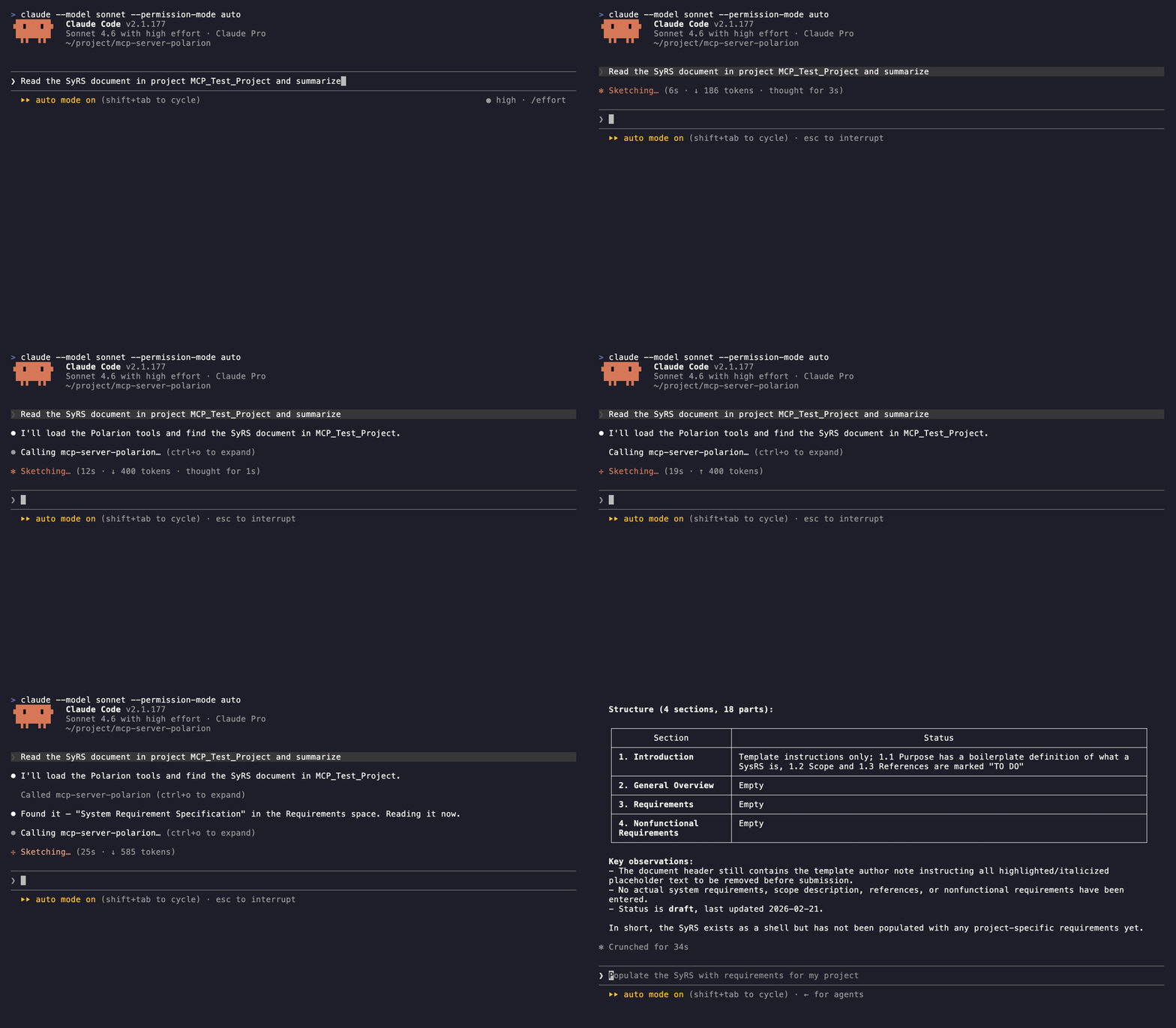
> "Read the SRS document of project MCPT and summarize each open requirement."
> "Show me the structural outline of the SRS document — headings and the work items under each."
> "Read work item MCPT-042 as Markdown and explain what it asks for."
> "Show the outgoing and incoming links for MCPT-042 and flag any child task that is still open."
> "Which requirements in the SRS document have no 'verifies' back link from a test case?"
> "List the open comment threads on the SRS document and who started each."
</details>
<details>
<summary><b>Creating & editing</b></summary>
> "Create a task in project MCPT titled 'Refactor authentication module' and link it to MCPT-042 as 'relates_to'."
> "Create three test-case work items in project MCPT from this checklist and link each one to MCPT-042 as 'verifies'."
> "Add a new requirement under section 3.2 of the SRS document with the body I just drafted."
> "Update the description of MCPT-042 with the revised text I'll paste, keeping the existing formatting."
> "Add a comment on the SRS document asking the owner to clarify section 4, then reply to thread T-12 marking it resolved."
</details>
<details>
<summary><b>Workflow & reorganization</b></summary>
> "List the valid status values for a defect in project MCPT, then move MCPT-077 to 'in_review'."
> "Bump MCPT-042's priority to 90, set severity to 'major', and approve the workflow."
> "Change MCPT-201 from a task to a requirement and re-apply its previous status."
> "Move MCPT-201 into the SRS document right after MCPT-150."
> "Detach MCPT-077 from its document so I can rework it as a standalone task."
> "Mark the 'blocks' link from MCPT-042 to MCPT-099 as suspect, then delete the stale 'relates_to' link to MCPT-010."
</details>
## License
[MIT](LICENSE)Lo que la gente pregunta sobre mcp-server-polarion
¿Qué es devemberx/mcp-server-polarion?
+
devemberx/mcp-server-polarion es mcp servers para el ecosistema de Claude AI. Polarion ALM MCP server for Claude, Cursor & Copilot — read and write documents, work items, and traceability links Tiene 1 estrellas en GitHub y se actualizó por última vez today.
¿Cómo se instala mcp-server-polarion?
+
Puedes instalar mcp-server-polarion clonando el repositorio (https://github.com/devemberx/mcp-server-polarion) o siguiendo las instrucciones del README en GitHub. ClaudeWave también te ofrece bloques de instalación rápida en esta misma página.
¿Es seguro usar devemberx/mcp-server-polarion?
+
devemberx/mcp-server-polarion aún no ha sido auditado por nuestro agente de seguridad. Revisa el repositorio original en GitHub antes de usarlo en producción.
¿Quién mantiene devemberx/mcp-server-polarion?
+
devemberx/mcp-server-polarion es mantenido por devemberx. La última actividad registrada en GitHub es de today, con 0 issues abiertos.
¿Hay alternativas a mcp-server-polarion?
+
Sí. En ClaudeWave puedes explorar mcp servers similares en /categories/mcp, ordenados por popularidad o actividad reciente.
Despliega mcp-server-polarion en tu cloud
Lleva este repo a producción en minutos. Cada plataforma genera su propio entorno con variables de entorno editables.
¿Mantienes este repo? Añade un badge a tu README
Pega el badge en tu README de GitHub para mostrar que está auditado por ClaudeWave. Cada badge enlaza de vuelta a esta página y muestra el Trust Score actual.
[](https://claudewave.com/repo/devemberx-mcp-server-polarion)<a href="https://claudewave.com/repo/devemberx-mcp-server-polarion"><img src="https://claudewave.com/api/badge/devemberx-mcp-server-polarion" alt="Featured on ClaudeWave: devemberx/mcp-server-polarion" width="320" height="64" /></a>Más MCP Servers

Fair-code workflow automation platform with native AI capabilities. Combine visual building with custom code, self-host or cloud, 400+ integrations.

User-friendly AI Interface (Supports Ollama, OpenAI API, ...)

An open-source AI agent that brings the power of Gemini directly into your terminal.

The fastest path to AI-powered full stack observability, even for lean teams.

🕷️ An adaptive Web Scraping framework that handles everything from a single request to a full-scale crawl!

⭐AI-driven public opinion & trend monitor with multi-platform aggregation, RSS, and smart alerts.🎯 告别信息过载,你的 AI 舆情监控助手与热点筛选工具!聚合多平台热点 + RSS 订阅,支持关键词精准筛选。AI 智能筛选新闻 + AI 翻译 + AI 分析简报直推手机,也支持接入 MCP 架构,赋能 AI 自然语言对话分析、情感洞察与趋势预测等。支持 Docker ,数据本地/云端自持。集成微信/飞书/钉钉/Telegram/邮件/ntfy/bark/slack 等渠道智能推送。