

Automate your mobile devices with natural language commands - an LLM agnostic mobile Agent 🤖
git clone https://github.com/droidrun/mobilerun && cp mobilerun/*.md ~/.claude/agents/Resumen de Subagents
<picture align="center"> <source media="(prefers-color-scheme: dark)" srcset="./static/mobilerun-dark.png"> <source media="(prefers-color-scheme: light)" srcset="./static/mobilerun.png"> <img src="./static/mobilerun.png" width="full"> </picture> <p align="center"> <strong>Mobilerun is an open-source framework for controlling Android and iOS devices with LLM agents.</strong><br> It gives agents mobile-native tools to inspect UI state, understand screenshots, tap, swipe, type, plan multi-step workflows, and return results through a CLI or Python API. </p> <div align="center"> <a href="https://docs.mobilerun.ai">📕 Documentation</a> · <a href="https://cloud.mobilerun.ai">☁️ Mobilerun Cloud</a> [](https://github.com/droidrun/mobilerun/stargazers) [](https://mobilerun.ai) [](https://x.com/mobilerun_ai) [](https://discord.gg/ZZbKEZZkwK) [](https://mobilerun.ai/benchmark) <picture> <source media="(prefers-color-scheme: dark)" srcset="https://api.producthunt.com/widgets/embed-image/v1/top-post-badge.svg?post_id=983810&theme=dark&period=daily&t=1753948032207"> <source media="(prefers-color-scheme: light)" srcset="https://api.producthunt.com/widgets/embed-image/v1/top-post-badge.svg?post_id=983810&theme=neutral&period=daily&t=1753948125523"> <a href="https://www.producthunt.com/products/droidrun-framework-for-mobile-agent?embed=true&utm_source=badge-top-post-badge&utm_medium=badge&utm_source=badge-droidrun" target="_blank"><img src="https://api.producthunt.com/widgets/embed-image/v1/top-post-badge.svg?post_id=983810&theme=neutral&period=daily&t=1753948125523" alt="Droidrun - Give AI native control of physical & virtual phones. | Product Hunt" style="width: 200px; height: 54px;" width="200" height="54" /></a> </picture> [Deutsch](https://zdoc.app/de/droidrun/mobilerun) | [Español](https://zdoc.app/es/droidrun/mobilerun) | [français](https://zdoc.app/fr/droidrun/mobilerun) | [日本語](https://zdoc.app/ja/droidrun/mobilerun) | [한국어](https://zdoc.app/ko/droidrun/mobilerun) | [Português](https://zdoc.app/pt/droidrun/mobilerun) | [Русский](https://zdoc.app/ru/droidrun/mobilerun) | [中文](https://zdoc.app/zh/droidrun/mobilerun) </div> <p align="center"> <img src="./static/mobilerun-demo.gif" alt="Mobilerun automating a phone with natural language" width="320"> </p> - 🤖 Control Android and iOS devices with natural language commands - 🔀 Use OpenAI, Anthropic, Gemini, Ollama, DeepSeek, OpenRouter, and OpenAI-compatible models - 🧠 Run direct tasks or enable reasoning mode for complex multi-step automation - 💻 Automate from the CLI, a terminal UI, Docker, or Python code - 🐍 Extend agents with custom tools, structured output, app cards, and credentials - 📸 Combine accessibility trees with screenshots for visual understanding - Trace execution with Arize Phoenix or Langfuse Use the framework when you want to run the agent on your machine. Use [Mobilerun Cloud](https://cloud.mobilerun.ai) when you want a ready-to-go solution for your local phones or cloud-hosted virtual/physical phones, managed infrastructure, and API-driven device workflows without running the agent on your local machine. [Check out our benchmark results](https://mobilerun.ai/benchmark). ## 📦 Installation > **Note:** Python 3.14 is not currently supported. Please use Python `>=3.11,<3.14`. Install Mobilerun with [`uv`](https://docs.astral.sh/uv/): ```bash # CLI usage uv tool install mobilerun ``` ```bash # CLI + Python integration uv pip install mobilerun ``` Most LLM providers are included by default. For Anthropic support, install the optional extra: ```bash uv tool install "mobilerun[anthropic]" ``` ## 🚀 Quickstart ```bash uv tool install mobilerun mobilerun setup mobilerun configure mobilerun run "Open settings and turn on dark mode" ``` Before starting, make sure you have [ADB](https://developer.android.com/studio/releases/platform-tools) installed and an Android device with Developer options and USB debugging enabled. iOS setup is supported separately through the iOS Portal flow. ### 1. Install the Portal on your device ```bash mobilerun setup ``` This installs the Mobilerun Portal app, enables its accessibility service, and prepares the device for local control. ### 2. Verify the connection ```bash mobilerun ping ``` You should see confirmation that the Portal is installed and accessible. ### 3. Configure your LLM provider ```bash mobilerun configure ``` The wizard walks you through choosing a provider, auth method, and model. You can also use provider environment variables such as `GOOGLE_API_KEY`, `OPENAI_API_KEY`, or `ANTHROPIC_API_KEY`. ### 4. Run your first command ```bash mobilerun run "Open the settings app and tell me the Android version" ``` Useful run options: ```bash mobilerun run "Open settings and turn on dark mode" mobilerun run "What app is currently open?" --vision mobilerun run "Find a contact named John and send him an email" --reasoning mobilerun run "Take a screenshot" --ios mobilerun run "Open Settings" --steps 30 --debug ``` Read the full [framework documentation](https://docs.mobilerun.ai/framework/quickstart). [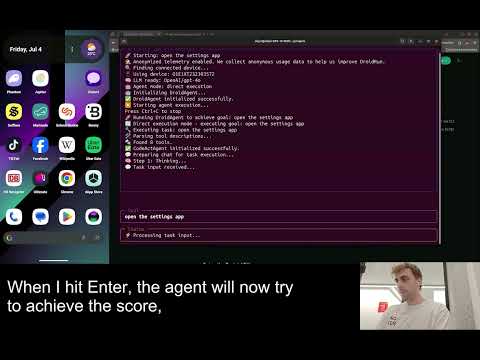](https://www.youtube.com/watch?v=4WT7FXJah2I) ## ⚙️ Features - **CLI:** Run one-off natural language tasks, inspect devices, replay macros, and debug from the terminal. - **Python API:** Build custom mobile automation workflows with Python and use custom tools. - **Android and iOS support:** Control Android through the Portal app or target iOS through the iOS Portal flow. - **Portal-based control:** Use UI trees, screenshots, text input, gestures, app launching, and device state from the Portal runtime. - **Vision mode:** Send screenshots to the LLM with `--vision`, or use screenshot-only control with `--vision-only` (useful for the apps that do not have a11y tree information). - **Reasoning mode:** Use `--reasoning` for manager-executor planning on longer or more complex tasks. - **Tracing and telemetry:** Debug execution with Arize Phoenix, Langfuse, saved trajectories, and detailed logs. - **Structured output:** Return structured data from mobile workflows. - **App cards and custom tools:** Add app-specific guidance to make agent perform better on your use-cases. - **Docker:** Run Mobilerun in a container for repeatable local environments. ## ☁️ Framework vs Cloud | | Mobilerun Framework | Mobilerun Cloud | | --- | --- | --- | | Best for | Running agents locally on your own machine and devices | Ready-to-go local phone control, hosted real or virtual devices, API workflows, and managed device operations | | Runtime | Your machine | Mobilerun-managed infrastructure | | Interface | CLI, Docker, and Python API | Dashboard, REST API, SDKs, and hosted devices | Use the framework when you want full local control of the agent runtime. Use [Mobilerun Cloud](https://cloud.mobilerun.ai) when you want managed devices, fleet workflows, or cloud APIs without running the agent locally. Learn more in the [framework overview](https://docs.mobilerun.ai/framework/overview) and the [cloud docs](https://docs.mobilerun.ai). ### Which should I choose? - Choose **Mobilerun Framework** for local agent execution and code-level control. - Choose **Mobilerun Cloud** for managed phones, APIs, and scale without running agents locally. ### Cloud Device Types | Device type | What it is | Best for | | --- | --- | --- | | Personal | Your own hardware connected to Mobilerun Cloud | Quick automation on devices you own | | Cloud Phone (Hosted) | Instantly available cloud-hosted phone | Scalable hosted automation | | Physical Phone (Hosted) | Real hardware with stronger identity characteristics | Workflows that need high device authenticity and trust | ## 🎬 Demo Videos ### Book accommodation from a prompt Shows multi-step navigation, text input, and app-state reasoning while Mobilerun searches for accommodation. <a href="https://youtu.be/VUpCyq1PSXw"> <img src="./static/demo-apartment-search.gif" alt="Mobilerun booking accommodation from a prompt" width="800"> </a> ### Find trending content Shows browsing, app navigation, and result extraction from a natural-language task. <a href="https://youtu.be/7V8S2f8PnkQ"> <img src="./static/demo-reddit-trends.gif" alt="Mobilerun finding trending content from a prompt" width="800"> </a> ### Maintain an app streak Shows a short recurring mobile workflow that can be automated from a prompt. <a href="https://youtu.be/B5q2B467HKw"> <img src="./static/demo-duolingo-streak.gif" alt="Mobilerun maintaining an app streak from a prompt" width="800"> </a> ## 💡 Example Use Cases - Mobile app QA and regression testing - Guided workflows for non-technical users - Repetitive task automation on mobile devices - Event-driven automation from schedules, notifications, or custom triggers - Data extraction from native mobile apps - Running automations on multiple devices at once ## 📚 Documentation - [Framework quickstart](https://docs.mobilerun.ai/framework/quickstart) - [Mobilerun cloud quickstart](https://docs.mobilerun.ai/quickstart) - [Device setup](https://docs.mobilerun.ai/framework/guides/device-setup) - [CLI guide](https://docs.mobilerun.ai/framework/guides/cli) - [SDK reference](https://docs.mobilerun.ai/framework/sdk/reference) - [Custom tools](https://docs.mobilerun.ai/framework/features/custom-tools) - [Agent architecture](https://docs.mobilerun.ai/framework/concepts/architecture) - [Structured output](h
Lo que la gente pregunta sobre mobilerun
¿Qué es droidrun/mobilerun?
+
droidrun/mobilerun es subagents para el ecosistema de Claude AI. Automate your mobile devices with natural language commands - an LLM agnostic mobile Agent 🤖 Tiene 8.9k estrellas en GitHub y se actualizó por última vez yesterday.
¿Cómo se instala mobilerun?
+
Puedes instalar mobilerun clonando el repositorio (https://github.com/droidrun/mobilerun) o siguiendo las instrucciones del README en GitHub. ClaudeWave también te ofrece bloques de instalación rápida en esta misma página.
¿Es seguro usar droidrun/mobilerun?
+
droidrun/mobilerun aún no ha sido auditado por nuestro agente de seguridad. Revisa el repositorio original en GitHub antes de usarlo en producción.
¿Quién mantiene droidrun/mobilerun?
+
droidrun/mobilerun es mantenido por droidrun. La última actividad registrada en GitHub es de yesterday, con 34 issues abiertos.
¿Hay alternativas a mobilerun?
+
Sí. En ClaudeWave puedes explorar subagents similares en /categories/agents, ordenados por popularidad o actividad reciente.
Despliega mobilerun en tu cloud
Lleva este repo a producción en minutos. Cada plataforma genera su propio entorno con variables de entorno editables.
¿Mantienes este repo? Añade un badge a tu README
Pega el badge en tu README de GitHub para mostrar que está auditado por ClaudeWave. Cada badge enlaza de vuelta a esta página y muestra el Trust Score actual.
[](https://claudewave.com/repo/droidrun-mobilerun)<a href="https://claudewave.com/repo/droidrun-mobilerun"><img src="https://claudewave.com/api/badge/droidrun-mobilerun" alt="Featured on ClaudeWave: droidrun/mobilerun" width="320" height="64" /></a>Más Subagents

The agent harness performance optimization system. Skills, instincts, memory, security, and research-first development for Claude Code, Codex, Opencode, Cursor and beyond.

The agent that grows with you

Java 面试 & 后端通用面试指南,覆盖计算机基础、数据库、分布式、高并发、系统设计与 AI 应用开发

Build Agentic workflows, RAG pipelines, with rich AI model and tool support on one collaborative workspace. Deploy on cloud, VPC, or self-hosted, so teams move from prototype to production without rebuilding the stack.

The agent engineering platform.

Turn any codebase, with its docs, SQL schemas, configs, and PDFs, into a queryable knowledge graph. A /graphify skill for Claude Code, Cursor, Codex, and Gemini CLI: local deterministic AST parsing, every edge explained, no vector store.