

MCP server that turns a FigJam board into queryable LLM context — read via the Figma API, clustered with geometry + vision. No PDF export.
- ✓Open-source license (MIT)
- ✓Actively maintained (<30d)
- ✓Clear description
- ✓Topics declared
- ✓Documented (README)
claude mcp add figjam-mcp -- npx -y figjam-context-mcp{
"mcpServers": {
"figjam-mcp": {
"command": "npx",
"args": ["-y", "figjam-context-mcp"],
"env": {
"FIGMA_ACCESS_TOKEN": "<figma_access_token>",
"LLM_BASE_URL": "<llm_base_url>",
"LLM_API_KEY": "<llm_api_key>"
}
}
}
}FIGMA_ACCESS_TOKENLLM_BASE_URLLLM_API_KEYResumen de MCP Servers
# figjam-context-mcp
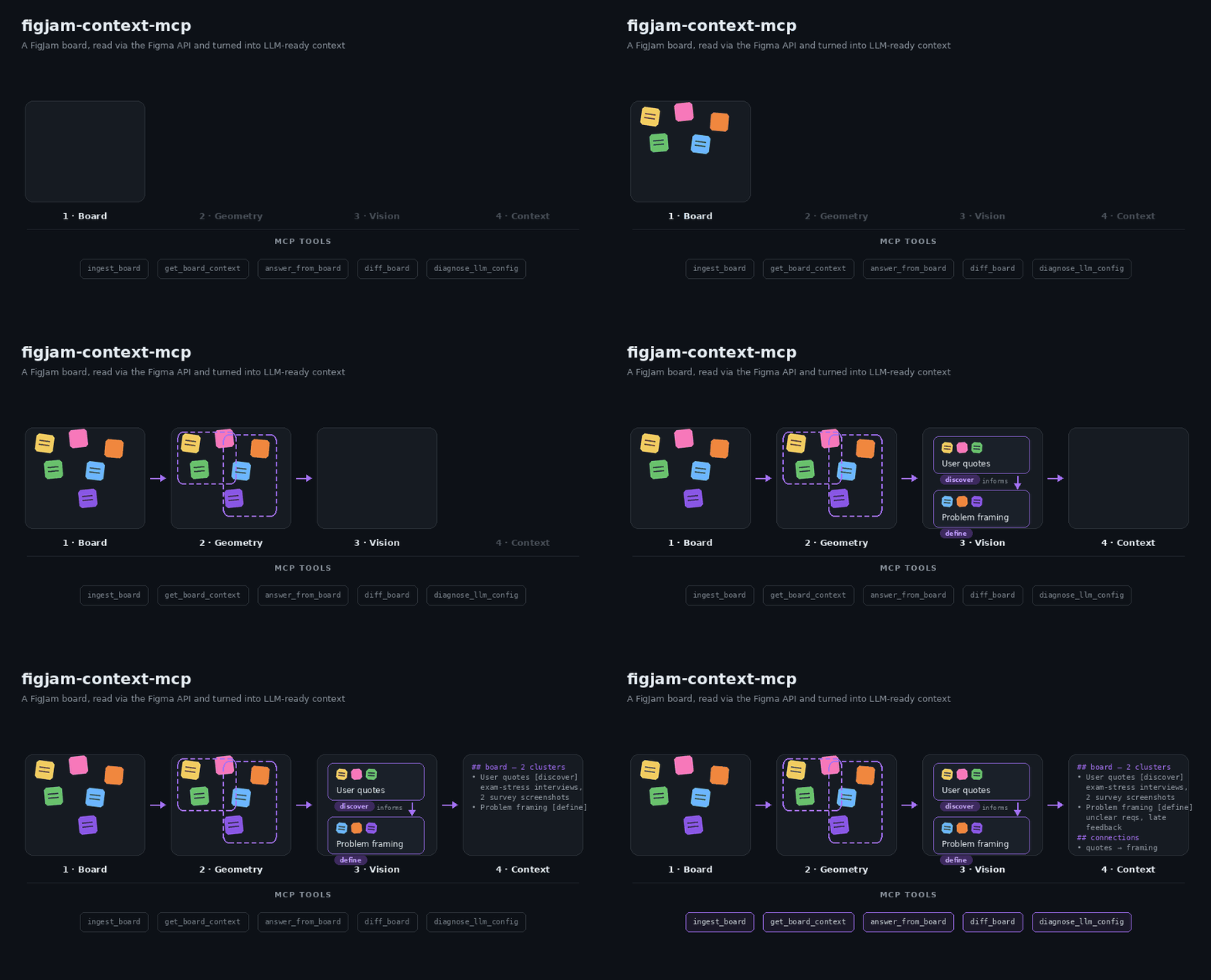
A local MCP server that turns FigJam boards into source-cited context for LLMs.
It reads a board through the Figma REST API, groups stickies, tables, images and
arrows into clusters, and answers questions with links back to the original nodes.
## Why
Workshop boards hold research notes, decisions and open questions, but an LLM
cannot read a canvas. Screenshots and PDF exports lose tables, arrow direction
and the link to the source. This server keeps the board's structure and cites
every answer to the nodes it came from.
## Tools
| Tool | What it does | LLM call |
| --- | --- | --- |
| `ingest_board` | Reads a board, clusters it and saves a local snapshot. Re-ingests reuse unchanged clusters. | In `balanced` (default) and `max_quality` mode |
| `get_board_context` | Returns paginated, source-linked context, optionally for a topic or exact node IDs. Use it for overviews, summaries and documentation. | No |
| `answer_from_board` | Answers one specific question (a number, status or decision) from the most relevant excerpts, with node-level citations or an insufficient-evidence result. Not meant for whole-board summaries. | Yes |
| `diff_board` | Compares two snapshots: new, removed and changed clusters, nodes, table cells and arrows. | No |
| `diagnose_llm_config` | Tests the configured models with small text and image JSON checks. | Yes |
## Quick start
Requires Node.js 22.12 or later.
1. Create a Figma personal access token under **Settings → Security → Personal
access tokens** with the scope `file_content:read`. Add `file_metadata:read`
so re-ingests of an unchanged board skip the download. The token's account
needs access to the board.
2. Optional: create an OpenRouter key at
[openrouter.ai/keys](https://openrouter.ai/keys). It enables image
interpretation, `answer_from_board` and `diagnose_llm_config`. Without it, use
`ingestMode: "max_speed"` with `get_board_context` and `diff_board`.
3. Add the server to your MCP client:
```json
{
"mcpServers": {
"figjam-context": {
"command": "npx",
"args": ["-y", "figjam-context-mcp"],
"env": {
"FIGMA_ACCESS_TOKEN": "your-figma-token",
"LLM_BASE_URL": "https://openrouter.ai/api/v1",
"LLM_API_KEY": "your-openrouter-key"
}
}
}
}
```
For Claude Code:
```bash
claude mcp add figjam-context -e FIGMA_ACCESS_TOKEN=your-figma-token -e LLM_BASE_URL=https://openrouter.ai/api/v1 -e LLM_API_KEY=your-openrouter-key -- npx -y figjam-context-mcp
```
Then ask your assistant to ingest a board URL, for example *"Ingest
https://www.figma.com/board/FILE_KEY/Name and list the open questions."*
The `boardId` of every later call is the file key from that URL.
All settings: [configuration](https://github.com/ecestnrkl/figjam-mcp/blob/main/docs/configuration.md).
Problems: [troubleshooting](https://github.com/ecestnrkl/figjam-mcp/blob/main/docs/troubleshooting.md).
## How it works
1. **Read.** `ingest_board` downloads the board through the Figma REST API. If
Figma reports the same version as the last ingest, the download is skipped.
2. **Normalize.** Nodes become text, table cells, images and connectors, with
their pages and sections.
3. **Cluster.** Nearby nodes are grouped by rotation-aware distance. Arrows
between groups become directed relations.
4. **Interpret.** In `balanced` mode, clusters with images or little text get a
vision-model summary within a 40-second budget; the rest keep their extracted
text. Unfinished clusters continue on the next ingest.
5. **Serve.** The snapshot is saved to a private local cache.
`get_board_context` searches it (BM25 over original text, table cells and
names), `answer_from_board` answers with citations and `diff_board` compares
snapshots.
## Models and cost
The default preset `student-free` uses free OpenRouter models: text goes to
`nvidia/nemotron-3-super-120b-a12b:free` and then `openrouter/free`; images go to
`openrouter/free`, which picks a free model that accepts images and structured
outputs. The free default is best effort: free models change, hit rate limits
and time out.
- OpenRouter allows free models 20 requests per minute and 50 requests per day,
or 1,000 per day once you have bought at least 10 credits
([limits](https://openrouter.ai/docs/api-reference/limits)).
- Figma limits file downloads and image renders by seat and plan: Dev and Full
seats on paid plans get 10–20 requests per minute, View and Collab seats and
files in Starter plans at most 20 per month
([rate limits](https://developers.figma.com/docs/rest-api/rate-limits/)).
One render request covers up to 18 screenshots (about three clusters), so a
default ingest usually needs at most four; `max_speed` needs none.
- For a team, configure your own model: `LLM_BASE_URL` takes any
OpenAI-compatible endpoint, and `LLM_TEXT_MODELS` / `LLM_VISION_MODELS` set
the model lists.
- Run `diagnose_llm_config` after every model change. It checks JSON replies
and image understanding with synthetic inputs.
## Privacy
- The server reads from Figma and never changes a board.
- `balanced` and `max_quality` ingests send board text and screenshots to the
configured LLM provider. `answer_from_board` sends the question and selected
excerpts. `max_speed` with `get_board_context` and `diff_board` sends nothing
to an LLM provider.
- Snapshots stay in a private per-user cache on your machine. Delete the cache
directory to remove them.
- Explicit credentials such as `Passwort: …` or API keys are redacted before they
reach the cache, tool output or an LLM provider
([`FIGJAM_MCP_REDACT_CREDENTIALS`](docs/configuration.md#privacy)). This is a
safety net, not a guarantee: screenshots are not redacted, so keep credentials
off the board.
- Keep tokens in the client's environment. A token passed as a tool argument can
appear in client logs.
## Limitations
- Image interpretation gets 40 seconds per ingest by default; large boards need
several ingests to interpret every image cluster.
- A client that cancels an ingest, for example after a 60-second timeout, gets
no partial result.
- Free models are best effort. Citations show where an answer comes from, not
that its conclusion is right.
- Search is lexical; synonyms without shared words do not match.
- Local stdio only; no hosted or multi-user mode.
Measured results: [evaluation](https://github.com/ecestnrkl/figjam-mcp/blob/main/docs/evaluation.md).
## Development
```bash
git clone https://github.com/ecestnrkl/figjam-mcp.git
cd figjam-mcp
npm ci
cp .env.example .env # add your tokens
npm run check # typecheck, tests, build, package validation
npm run package:smoke # install the packed package and exercise all tools
npm run eval:retrieval # offline retrieval and diff evaluation
npx @modelcontextprotocol/inspector --config inspector.config.json
```
See [CONTRIBUTING.md](https://github.com/ecestnrkl/figjam-mcp/blob/main/CONTRIBUTING.md)
and the [changelog](https://github.com/ecestnrkl/figjam-mcp/blob/main/CHANGELOG.md).
## License
[MIT](https://github.com/ecestnrkl/figjam-mcp/blob/main/LICENSE) © 2026 ecestnrkl
Lo que la gente pregunta sobre figjam-mcp
¿Qué es ecestnrkl/figjam-mcp?
+
ecestnrkl/figjam-mcp es mcp servers para el ecosistema de Claude AI. MCP server that turns a FigJam board into queryable LLM context — read via the Figma API, clustered with geometry + vision. No PDF export. Tiene 1 estrellas en GitHub y su última actualización registrada es del 2026-10-19.
¿Cómo se instala figjam-mcp?
+
Puedes instalar figjam-mcp clonando el repositorio (https://github.com/ecestnrkl/figjam-mcp) o siguiendo las instrucciones del README en GitHub. ClaudeWave también te ofrece bloques de instalación rápida en esta misma página.
¿Es seguro usar ecestnrkl/figjam-mcp?
+
Nuestro agente de seguridad ha analizado ecestnrkl/figjam-mcp y le ha asignado un Trust Score de 95/100 (tier: Verified). Revisa el desglose completo de comprobaciones superadas y flags en esta página.
¿Quién mantiene ecestnrkl/figjam-mcp?
+
ecestnrkl/figjam-mcp es mantenido por ecestnrkl. La última actividad registrada en GitHub es del 2026-10-19, con 1 issues abiertos.
¿Hay alternativas a figjam-mcp?
+
Sí. En ClaudeWave puedes explorar mcp servers similares en /categories/mcp, ordenados por popularidad o actividad reciente.
Despliega figjam-mcp en tu cloud
Lleva este repo a producción en minutos. Cada plataforma genera su propio entorno con variables de entorno editables.
¿Mantienes este repo? Añade un badge a tu README
Pega el badge en tu README de GitHub para mostrar que está auditado por ClaudeWave. Cada badge enlaza de vuelta a esta página y muestra el Trust Score actual.
[](https://claudewave.com/repo/ecestnrkl-figjam-mcp)<a href="https://claudewave.com/repo/ecestnrkl-figjam-mcp"><img src="https://claudewave.com/api/badge/ecestnrkl-figjam-mcp" alt="Featured on ClaudeWave: ecestnrkl/figjam-mcp" width="320" height="64" /></a>Más MCP Servers

Reverse engineer anything with agents, from app behavior down to native binaries.

Fair-code workflow automation platform with native AI capabilities. Combine visual building with custom code, self-host or cloud, 400+ integrations.

User-friendly AI Interface (Supports Ollama, OpenAI API, ...)

An open-source AI agent that brings the power of Gemini directly into your terminal.

Real-time global intelligence dashboard. AI-powered news aggregation, geopolitical monitoring, and infrastructure tracking in a unified situational awareness interface

🕷️ A Web Scraping framework that handles everything from a single request to a full-scale crawl! Don't be shy, join here: https://discord.gg/EMgGbDceNQ and follow here for daily tips and tricks: https://x.com/Scrapling_dev