

- ✓Open-source license (MIT)
- ✓Actively maintained (<30d)
- ✓Documented (README)
- !No description
claude mcp add crispy-profiling -- npx -y crispy{
"mcpServers": {
"crispy-profiling": {
"command": "npx",
"args": ["-y", "crispy"]
}
}
}Resumen de MCP Servers
# 🥓 crispy-profiling
**Snapshot testing for React re-renders — deterministic, runtime-proven, with the fix.**
[](https://github.com/edgeorgie/crispy-profiling/actions/workflows/ci.yml)
[](https://www.npmjs.com/package/crispy-profiling)
[](LICENSE)
[](https://scorecard.dev/viewer/?uri=github.com/edgeorgie/crispy-profiling)
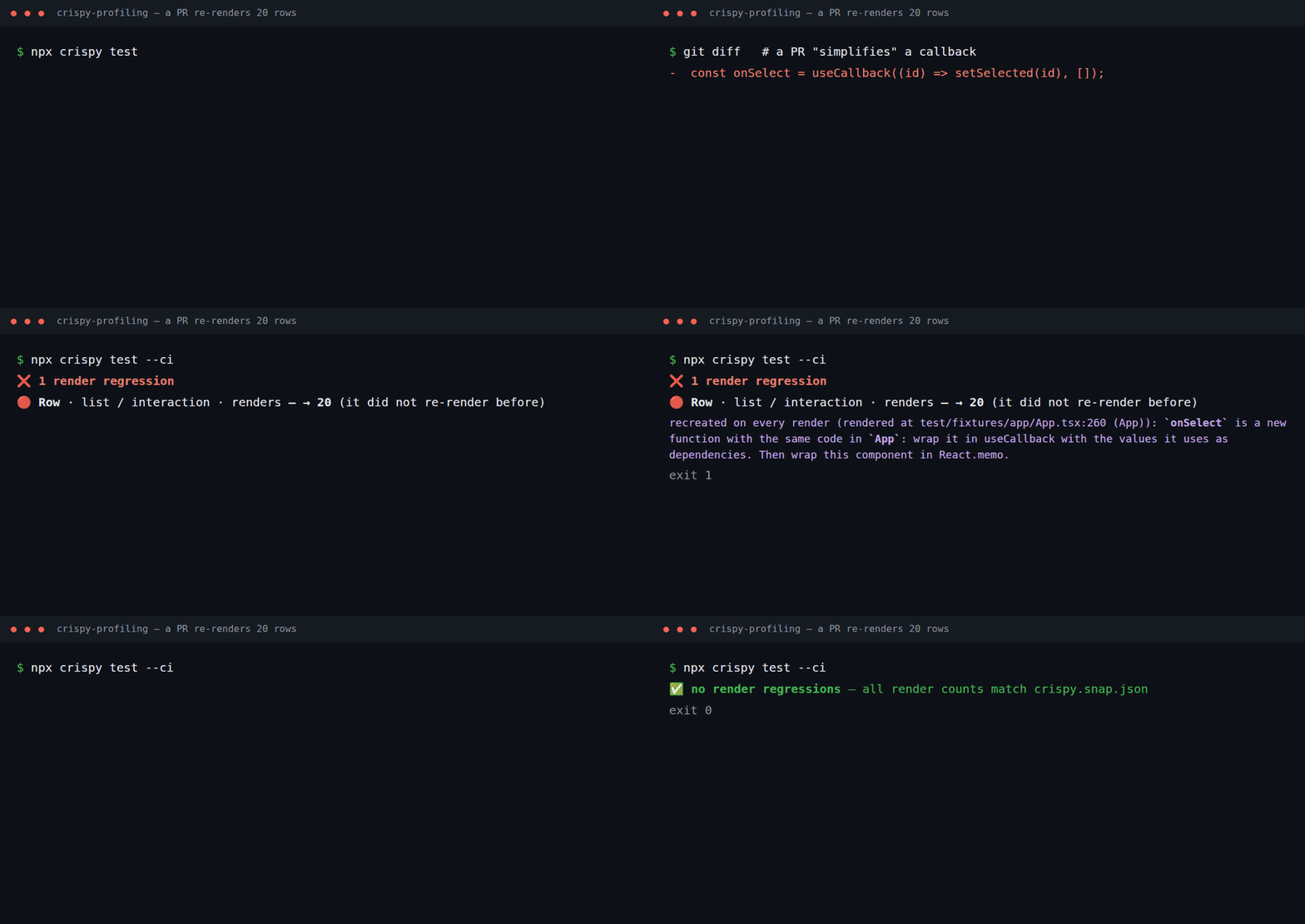
> **Status: early (0.x), improving every week.** Validated on five open-source apps (Redux
> Essentials, Next.js App Router Playground, Excalidraw, shadcn-admin, react-admin): it found a
> fixable re-render problem in each. See [Known limitations](#known-limitations) and the
> [changelog](CHANGELOG.md). Bug reports, wrong hints and case studies are the most valuable
> contribution right now.
crispy-profiling opens your React app in headless Chromium, runs the interactions you describe, and
tells you **which components rendered, how many times, why** (props / state / context / parent) and
**which renders were avoidable**. Render counts are deterministic, so two reports of the same scenario
only differ when the code changed. That makes it a reliable feedback loop for:
- **AI coding agents**: an MCP server and an [Agent Skill](skills/react-render-profiling/SKILL.md)
so Claude Code, Cursor, Codex, Copilot & co. can *measure* a re-render fix instead of guessing.
- **CI**: render budgets and baseline comparison that fail a PR when a component starts re-rendering.
- **You**: a CLI that answers "why does this re-render?" without opening DevTools.
No code changes in your app: it uses the same hook React DevTools uses. Tested on React 19 and
validated on 18.3 and 19.0 apps; React 16.8–17 expose the same hook but are not tested.
## Quick start
```bash
npm i -D crispy-profiling
npx crispy install # downloads the matching Chromium (once)
npx crispy init # detects Next.js/Vite, the dev URL and your dev command → crispy.config.json
npx crispy test # starts your dev server, records crispy.snap.json → commit it
```
From then on, `npx crispy test` (locally, in CI or from an AI agent) fails when a component starts
re-rendering, and tells you why and how to fix it:
```text
| 🔴 regressed | list / interaction | Row | renders | — → 20 | recreated on every render (rendered at
src/App.tsx:222 (App)): `onSelect` is a new function with the same code in `App`: wrap it in
useCallback with the values it uses as dependencies. Then wrap this component in React.memo. |
```
For a one-off look at a flow, `npx crispy run` prints every component with its causes and a fix:
```text
| Component | Renders | Avoidable | Callback | Causes (props/state/context/unstable/callback/parent) | Rendered at | Why / how to fix |
| Row | 20 | 0 | 20 | 0/0/0/0/20/0 | `src/App.tsx:222 (App)` | `onSelect` is a new function with the same code in `App`: wrap it in useCallback… |
| Status | 1 | 1 | 0 | 0/0/0/1/0/0 | `src/App.tsx:178 (App)` | `style` is recreated with equal data in `App`: hoist it out of the component or wrap it in useMemo… |
| App | 1 | 0 | 0 | 0/1/0/0/0/0 | `src/main.tsx:12` | state updates here cause 23 avoidable render(s) below (`Row`, `Header`, `Status`)… |
```
Every phase starts with **Root causes — fix these first**: the few components that recreate a
value, recreate a context value or update state that re-renders unchanged children, ranked by the
avoidable renders they cause, with the child where one `React.memo` would stop most of a cascade.
_"Rendered at" and `definedIn` are mapped back to your original source files and lines through the
source maps your dev server or bundler serves (Vite, webpack, Turbopack); without source maps they
refer to the code the browser runs._
Works with Vite and Next.js (Turbopack and webpack dev servers); framework internals such as the
Next.js dev overlay are filtered out. Profile the development build.
## Render snapshots (`crispy test`)
Like Jest snapshots, but for re-renders. Commit the expected render counts of your key flows; every
PR — written by a person or an AI agent — is checked against them at runtime.
```bash
npx crispy test # 1st run: writes crispy.snap.json → commit it
npx crispy test # later: fails if any component renders more (or more avoidably)
npx crispy test -u # accept intended changes / lock in improvements
npx crispy test --ci # in CI: a missing snapshot fails instead of being written (auto-detected; --no-ci to opt out)
```
When something regresses you get the component, the cause, where it is rendered and the fix (see
[Quick start](#quick-start)).
`crispy.snap.json` has one line per component, so the PR diff shows exactly which counts changed:
```json
"interaction": {
"commits": 1,
"components": {
"App": { "renders": 1, "avoidable": 0 },
"Header": { "renders": 1, "avoidable": 1 }
}
}
```
Rules: any increase in commits, renders or avoidable renders fails (`snapshot.tolerance` allows
slack), and every metric is checked independently, so an improvement never hides a regression.
Counts that varied between runs are stored as `[min, max]` ranges and only fail outside them
(`-u` keeps the known range instead of narrowing it). Decreases pass and suggest `-u`. New UI
passes and is reported (record it with `-u`); if it already renders avoidably it is flagged ⚠️
(set `snapshot.failOnNewAvoidable` to fail instead). A known component that starts re-rendering
in a phase still fails. A rename, even combined with a move to another file, with the same counts
is reported as 🔁 renamed, not as a regression.
`crispy test` never edits the committed file on its own; the
snapshot always covers every component (even with `topComponents`); budgets still apply.
## Configuration
`crispy.config.json` ([JSON Schema](schema/crispy.config.schema.json)):
```json
{
"$schema": "./node_modules/crispy-profiling/schema/crispy.config.schema.json",
"baseUrl": "http://localhost:5173",
"runs": 3,
"scenarios": [
{
"name": "search",
"path": "/products",
"steps": [
{ "action": "type", "selector": "#search", "value": "shoes" },
{ "action": "phase", "name": "sort" },
{ "action": "click", "selector": "text=Price: low to high" }
],
"budgets": {
"interaction": { "maxAvoidableRenders": 0, "components": { "ProductCard": { "maxRenders": 20 } } }
}
}
]
}
```
| Field | Default | Description |
| --- | --- | --- |
| `baseUrl` | — | Origin of the running app. |
| `runs` | `3` | Runs per scenario; the report keeps median/min/max and flags unstable counts. |
| `settleMs` | `300` | A step is "settled" after this long without React commits **and** without in-flight network requests. |
| `maxSettleMs` | `10000` | Max wait per step. Pages that never settle (polling, animations) produce a warning in the report instead of hanging. |
| `cpuThrottle` | `1` | Slow the CPU down (e.g. `4`) to check counts on a slow CI runner or low-end device. Counts should not change. |
| `clock` | `false` | Control timers with a fake clock (`setTimeout`, `setInterval`, `requestAnimationFrame`, `Date`, `performance`) so polling/animated apps give deterministic counts. |
| `timeoutMs` | `30000` | Max time for navigation, a step or settling. |
| `timings` | `false` | Add component self time + LCP/CLS/long tasks. Off by default: timings are not reproducible. |
| `topComponents` | `0` | Keep only the N most-rendered components per phase (`0` = all). |
| `viewport` | `1280×800` | Browser viewport. |
| `browser` | headless | `executablePath`, `channel` (e.g. `"chrome"`), `headless`. `CRISPY_CHROMIUM_PATH` also works. |
| `includeInternals` | `false` | Show framework/library internals (components defined in `node_modules` that only library code renders, e.g. Next.js router internals). Library components your code renders directly are always shown. |
| `webServer` | — | `{ "command": "npm run dev" }`: crispy starts your dev server, waits for `baseUrl` (or `url`) and stops it afterwards; a server already running there is reused. `crispy init` fills it in. |
| `login` | — | `{ "path": "/login", "steps": [...] }`: sign in once before profiling (never counted). Use `"${E2E_PASSWORD}"` to read secrets from the environment. |
| `storageState` | — | A saved session file (cookies + localStorage), e.g. from `crispy login` for SSO/OAuth logins. Keep it out of git. |
| `random` | `seeded` | `Math.random` returns the same sequence in every run, so fake data, IDs and animations render the same way. `native` keeps the browser's. |
| `snapshot` | `crispy.snap.json`, `0`, `false` | `file` (relative to the config file), `tolerance` and `failOnNewAvoidable` used by `crispy test`. |
| `compare` | `10%`, `1` | `rendersIncreasePct` and `minRendersDelta` used by `compare`. |
**Steps:** `click`, `hover`, `fill`, `type`, `press`, `select` (a `<select>` option), `drag`
(`selector` to `to`, or by `dx`/`dy`, with pointer `steps`), `scroll`, `waitFor` (`state`:
`visible`, `hidden`, `attached`, `detached`), `wait`, `goto`, `phase`.
`type` presses one key at a time and waits for React to finish (including deferred values and
transitions) before the next key, so concurrent features give the same counts on fast and slow CPUs.
Renders before the first step are recorded in phase `load`; renders during steps go to
`interaction` unless you name phases yourself with `{ "action": "phase", "name": "..." }`.
**Budgets** (per phase): `maxCommiLo que la gente pregunta sobre crispy-profiling
¿Qué es edgeorgie/crispy-profiling?
+
edgeorgie/crispy-profiling es mcp servers para el ecosistema de Claude AI con 0 estrellas en GitHub.
¿Cómo se instala crispy-profiling?
+
Puedes instalar crispy-profiling clonando el repositorio (https://github.com/edgeorgie/crispy-profiling) o siguiendo las instrucciones del README en GitHub. ClaudeWave también te ofrece bloques de instalación rápida en esta misma página.
¿Es seguro usar edgeorgie/crispy-profiling?
+
Nuestro agente de seguridad ha analizado edgeorgie/crispy-profiling y le ha asignado un Trust Score de 77/100 (tier: Trusted). Revisa el desglose completo de comprobaciones superadas y flags en esta página.
¿Quién mantiene edgeorgie/crispy-profiling?
+
edgeorgie/crispy-profiling es mantenido por edgeorgie. La última actividad registrada en GitHub es del 2026-10-05, con 1 issues abiertos.
¿Hay alternativas a crispy-profiling?
+
Sí. En ClaudeWave puedes explorar mcp servers similares en /categories/mcp, ordenados por popularidad o actividad reciente.
Despliega crispy-profiling en tu cloud
Lleva este repo a producción en minutos. Cada plataforma genera su propio entorno con variables de entorno editables.
¿Mantienes este repo? Añade un badge a tu README
Pega el badge en tu README de GitHub para mostrar que está auditado por ClaudeWave. Cada badge enlaza de vuelta a esta página y muestra el Trust Score actual.
[](https://claudewave.com/repo/edgeorgie-crispy-profiling)<a href="https://claudewave.com/repo/edgeorgie-crispy-profiling"><img src="https://claudewave.com/api/badge/edgeorgie-crispy-profiling" alt="Featured on ClaudeWave: edgeorgie/crispy-profiling" width="320" height="64" /></a>Más MCP Servers

Fair-code workflow automation platform with native AI capabilities. Combine visual building with custom code, self-host or cloud, 400+ integrations.

User-friendly AI Interface (Supports Ollama, OpenAI API, ...)

An open-source AI agent that brings the power of Gemini directly into your terminal.

Real-time global intelligence dashboard. AI-powered news aggregation, geopolitical monitoring, and infrastructure tracking in a unified situational awareness interface

🕷️ An adaptive Web Scraping framework that handles everything from a single request to a full-scale crawl! Don't be shy, join here: https://discord.gg/EMgGbDceNQ and follow here for daily tips and tricks: https://x.com/Scrapling_dev

The fastest path to AI-powered full stack observability, even for lean teams.