

Google Analytics 4 MCP server: 27 read tools.
- ✓Open-source license (Apache-2.0)
- ✓Actively maintained (<30d)
- ✓Clear description
- ✓Documented (README)
claude mcp add google-analytics -- npx -y @getmcpads/google-analytics-mcp-server{
"mcpServers": {
"google-analytics": {
"command": "npx",
"args": ["-y", "@getmcpads/google-analytics-mcp-server"],
"env": {
"GA4_CLIENT_SECRET": "<ga4_client_secret>",
"GA4_REFRESH_TOKEN": "<ga4_refresh_token>"
}
}
}
}GA4_CLIENT_SECRETGA4_REFRESH_TOKENResumen de MCP Servers
<div align="center">
# Google Analytics 4 MCP server
### Understand what happens after the click.
Explore traffic, conversions, funnels and property configuration through a read-only MCP server.
[](https://github.com/get-mcp-ads/google-analytics-mcp-server/releases/latest)
[](https://github.com/get-mcp-ads/google-analytics-mcp-server/actions/workflows/ci.yml)
[](https://smithery.ai/servers/hello-6k33/getmcpads-google-analytics)
[](LICENSE)
[](package.json)
[Watch the demo](https://www.getmcpads.com/home/film/get-mcp-ads-film-1080p.mp4) · [What's new](#whats-new) · [Install](#install-this-release) · [Tool reference](#tools) · [Try hosted getmcpads](https://www.getmcpads.com/tools/ga4?utm_source=github&utm_medium=readme&utm_campaign=google-analytics)
[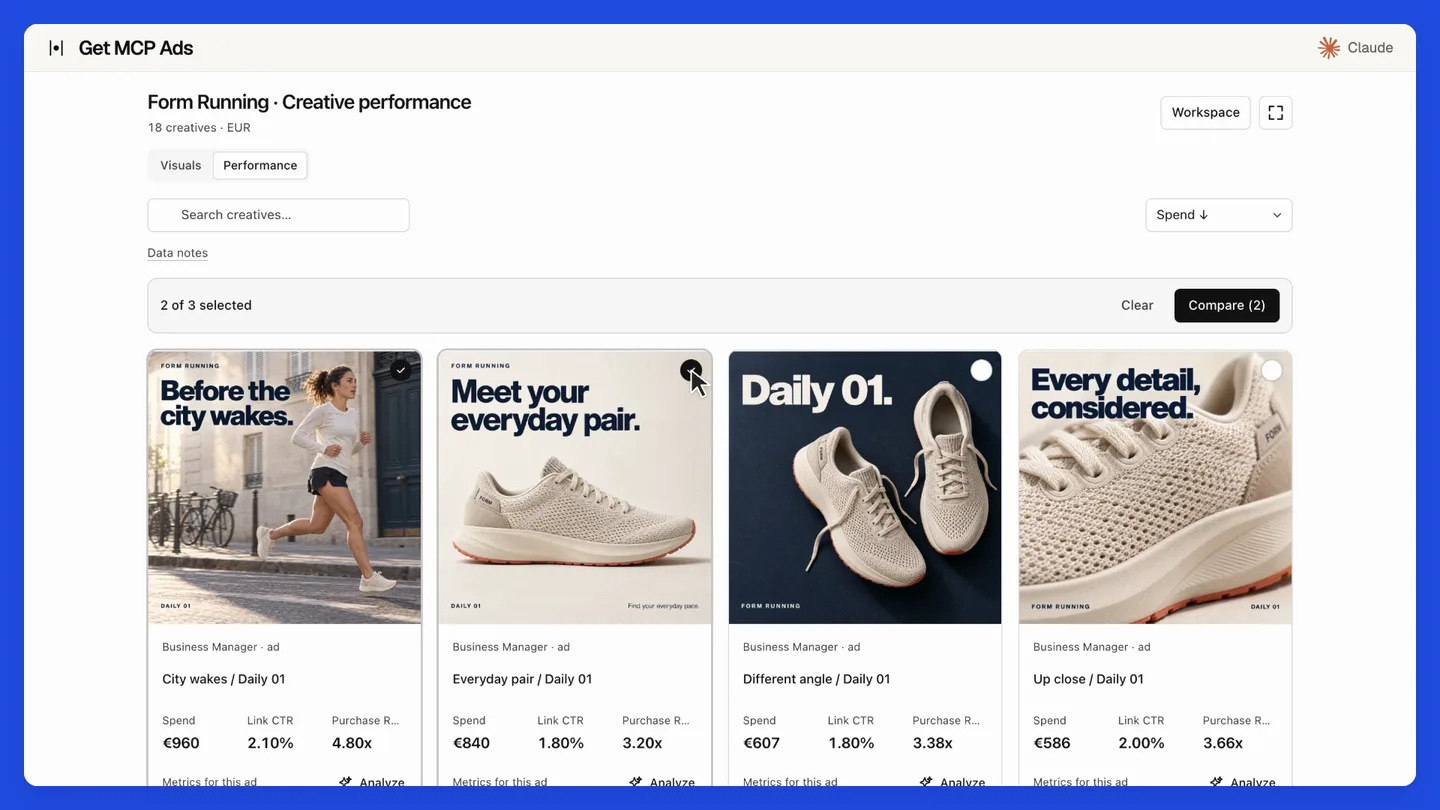](https://www.getmcpads.com/home/film/get-mcp-ads-film-1080p.mp4)
**[Play the 27-second product film](https://www.getmcpads.com/home/film/get-mcp-ads-film-1080p.mp4)**
</div>
The film demonstrates hosted getmcpads with staged data. Its creative galleries and MCP Apps interface belong to the hosted product. This repository provides the standalone native API tools.
**27 read tools** · Read-only by design.
Run locally with your own platform credentials and a client that supports stdio MCP, such as Claude Desktop, Claude Code or Cursor. Your requests go directly to the platform. For managed connections, including supported ChatGPT setups, use the hosted option.
## What's new
**[v2.0.1: Native tools and security update](https://github.com/get-mcp-ads/google-analytics-mcp-server/releases/tag/v2.0.1) · September 20, 2026**
- Confirm the current native 27-tool read catalog against the hosted implementation.
- Retain standalone OAuth and redirect protections; no hosted account-selection or application database dependency is introduced.
- Require Node.js 22.12 or newer and check Node 22/24 in CI.
- Update vulnerable dependencies and regenerate the MCP catalog.
[Full changelog](CHANGELOG.md) · [Source synchronization details](SOURCE_SYNC.md) · [All releases](https://github.com/get-mcp-ads/google-analytics-mcp-server/releases)
### Upgrade notes
Requires **Node.js 22.12 or newer**. CI covers Node 22 and 24. Version 2.0.1 drops Node 18 and 20 support. Hosted creative integrations and MCP Apps UI are outside this release.
## Install this release
This is a GitHub source release. npm and MCP Registry versions are published separately. The commands below select this exact version; unpinned `npx` examples later in this document select the version currently available on npm.
```bash
git clone --branch v2.0.1 --depth 1 https://github.com/get-mcp-ads/google-analytics-mcp-server.git
cd google-analytics-mcp-server
npm ci
npm run build
```
Configure your MCP client to run `node` with the absolute path to `dist/cli.js` and the platform credentials documented below.
> **Prefer a managed connection?** [Use Google Analytics 4 with hosted getmcpads](https://www.getmcpads.com/tools/ga4?utm_source=github&utm_medium=readme&utm_campaign=google-analytics). Connect your account, select the data your assistant may access and use the hosted MCP connection. See the site for current features and plans.
## What you get
| | |
|---|---|
| **27 read tools** | Reports, pivots, funnels, realtime, plus the Admin API: properties, data streams, custom definitions, key events, audiences |
| **Diagnostics** | Ecommerce, BigQuery export, server-side tagging, audience exports, quota snapshots |
| **51 metrics, 62 dimensions** | With a compatibility matrix that catches invalid combinations before they hit the API |
| **6 resources** | Live catalogues the model can read: metrics, dimensions, compatibility rules, 12 workflow recipes |
| **Identifier redaction** | User, email and device identifiers redacted by default on access bindings and audience exports, with explicit opt-in to see them |
| **No writes at all** | Not a flag, a property of the code. See below |
### Compatibility, checked before the call
GA4 rejects many metric and dimension combinations, and its errors rarely explain which pair
is at fault. This server carries the compatibility matrix, so `ga4_check_compatibility` and
`ga4_validate_query` let the model verify a combination before spending a call and a quota
token on it.
Quotas matter here more than on ad platforms: GA4 charges tokens per property per day, and a
few careless exploratory queries can exhaust them. `ga4_get_property_quotas_snapshot` shows
what is left.
---
## Read-only, and why it stays that way
There are no write tools, and no environment variable that adds any. Every tool calls a read
method of the Data API or the Admin API.
This is not caution for its own sake. A misread report is a wrong answer you can spot. A
mistaken write to an analytics property, a deleted audience or an edited data stream, corrupts
the record you use to judge everything else, and often silently. The other servers we publish
do have write tools, guarded by a mandatory preview. This one has none.
Our ad platform servers with guarded writes:
[Meta Ads](https://github.com/get-mcp-ads/meta-ads-mcp-server) ·
[Google Ads](https://github.com/get-mcp-ads/google-ads-mcp-server) ·
[TikTok Ads](https://github.com/get-mcp-ads/tiktok-ads-mcp-server)
---
## Personal data
Analytics data is not anonymous by default. A GA4 property can carry a `userId` you set
yourself, a device identifier, or a Google Signals pseudonymous ID. An MCP conversation sends
whatever a tool returns to a model.
**Identifiers are redacted by default wherever this server can return them**, and showing them
is an explicit opt-in, never the default.
| Tool | Behaviour |
|---|---|
| `ga4_list_admin_resources` | Access bindings have user and email identifiers redacted |
| `ga4_query_audience_export` | Identifier columns redacted, matched against the export's own dimension metadata |
| `ga4_get_audience_export_diagnostics` | Same redaction on the row sample |
Every one of these accepts `includePersonalIdentifiers: true` to return raw values, and
defaults to `false`.
Audience export rows are positional, so the redaction reads the export's dimension metadata to
find identifier columns. **If that metadata is missing, every value in the row is redacted**
rather than guessing which column is safe. Failing closed is the point.
**Report rows are not redacted.** `ga4_run_report` and the other reporting tools return what
you asked for. Altering the numbers a report returns would be worse than returning them.
So one decision stays yours: if your property carries a `userId` you consider personal, do not
request it as a report dimension in a conversation whose transcript leaves your machine.
---
## Getting credentials
Three values, obtained once.
### 1. OAuth client
In a [Google Cloud project](https://console.cloud.google.com/), enable the **Google Analytics
Data API** and the **Google Analytics Admin API**, then create an OAuth client under
**APIs & Services → Credentials**. Choose **Desktop app** for local use. Note the **client ID**
and **client secret**.
### 2. Refresh token
Run the OAuth consent flow once, signed in as a Google account with access to your GA4
properties, and keep the **refresh token**. The `analytics.readonly` scope is enough, and it
is the only one you should grant.
📖 [Google OAuth for installed apps](https://developers.google.com/identity/protocols/oauth2/native-app)
**The refresh token does not expire.** It is the sensitive value: anyone holding it can mint
access tokens indefinitely. Use an OAuth client dedicated to this server so you can revoke it
on its own.
### 3. Property ID, optional
Set `GA4_PROPERTY_ID` to avoid passing it on every call. Find it in GA4 under
**Admin → Property Settings**, or list them with `ga4_list_properties`.
Run **`ga4_health_check`** as your first call. It verifies the credentials and lists the
properties you can actually reach, without printing any secret.
---
## Setup
### Claude Desktop
`~/Library/Application Support/Claude/claude_desktop_config.json` (macOS)
or `%APPDATA%\Claude\claude_desktop_config.json` (Windows):
```json
{
"mcpServers": {
"google-analytics": {
"command": "npx",
"args": ["-y", "@getmcpads/google-analytics-mcp-server"],
"env": {
"GA4_CLIENT_ID": "your-client-id",
"GA4_CLIENT_SECRET": "your-client-secret",
"GA4_REFRESH_TOKEN": "your-refresh-token"
}
}
}
}
```
Restart Claude Desktop. Ask it: *"list my Google Analytics properties"*.
### Claude Code
```bash
claude mcp add google-analytics --env GA4_CLIENT_ID=... --env GA4_CLIENT_SECRET=... --env GA4_REFRESH_TOKEN=... -- npx -y @getmcpads/google-analytics-mcp-server
```
### Cursor
`.cursor/mcp.json` in your project, same shape as the Claude Desktop config above.
### From source
```bash
git clone https://github.com/get-mcp-ads/google-analytics-mcp-server.git
cd google-analytics-mcp-server
npm install && npm run build
cp .env.example .env # then fill in your credentials
npm start
```
### Configuration
| Variable | Default | Meaning |
|---|---|---|
| `GA4_CLIENT_ID` | none | **Required.** OAuth client ID |
| `GA4_CLIENT_SECRET` | none | **Required.** OAuth client secret |
| `GA4_REFRESH_TOKEN` | none | **Required.** From the consent flow |
| `GA4_PROPERTY_ID` | none | Optional default, saves passing it on every call |
| `LOG_LEVEL` | `info` | `debug`, `info`, `warn`, `error` |
Check yourLo que la gente pregunta sobre google-analytics-mcp-server
¿Qué es get-mcp-ads/google-analytics-mcp-server?
+
get-mcp-ads/google-analytics-mcp-server es mcp servers para el ecosistema de Claude AI. Google Analytics 4 MCP server: 27 read tools. Tiene 0 estrellas en GitHub y su última actualización registrada es del 2026-09-23.
¿Cómo se instala google-analytics-mcp-server?
+
Puedes instalar google-analytics-mcp-server clonando el repositorio (https://github.com/get-mcp-ads/google-analytics-mcp-server) o siguiendo las instrucciones del README en GitHub. ClaudeWave también te ofrece bloques de instalación rápida en esta misma página.
¿Es seguro usar get-mcp-ads/google-analytics-mcp-server?
+
Nuestro agente de seguridad ha analizado get-mcp-ads/google-analytics-mcp-server y le ha asignado un Trust Score de 87/100 (tier: Trusted). Revisa el desglose completo de comprobaciones superadas y flags en esta página.
¿Quién mantiene get-mcp-ads/google-analytics-mcp-server?
+
get-mcp-ads/google-analytics-mcp-server es mantenido por get-mcp-ads. La última actividad registrada en GitHub es del 2026-09-23, con 0 issues abiertos.
¿Hay alternativas a google-analytics-mcp-server?
+
Sí. En ClaudeWave puedes explorar mcp servers similares en /categories/mcp, ordenados por popularidad o actividad reciente.
Despliega google-analytics-mcp-server en tu cloud
Lleva este repo a producción en minutos. Cada plataforma genera su propio entorno con variables de entorno editables.
¿Mantienes este repo? Añade un badge a tu README
Pega el badge en tu README de GitHub para mostrar que está auditado por ClaudeWave. Cada badge enlaza de vuelta a esta página y muestra el Trust Score actual.
[](https://claudewave.com/repo/get-mcp-ads-google-analytics-mcp-server)<a href="https://claudewave.com/repo/get-mcp-ads-google-analytics-mcp-server"><img src="https://claudewave.com/api/badge/get-mcp-ads-google-analytics-mcp-server" alt="Featured on ClaudeWave: get-mcp-ads/google-analytics-mcp-server" width="320" height="64" /></a>Más MCP Servers

Fair-code workflow automation platform with native AI capabilities. Combine visual building with custom code, self-host or cloud, 400+ integrations.

User-friendly AI Interface (Supports Ollama, OpenAI API, ...)

An open-source AI agent that brings the power of Gemini directly into your terminal.

Real-time global intelligence dashboard. AI-powered news aggregation, geopolitical monitoring, and infrastructure tracking in a unified situational awareness interface

🕷️ An adaptive Web Scraping framework that handles everything from a single request to a full-scale crawl! Don't be shy, join here: https://discord.gg/EMgGbDceNQ and follow here for daily tips and tricks: https://x.com/Scrapling_dev

The fastest path to AI-powered full stack observability, even for lean teams.