

MCP server for Actual Budget. Query and manage your personal finances through Claude
- ✓Open-source license (MIT)
- ✓Actively maintained (<30d)
- ✓Clear description
- ✓Topics declared
- ✓Documented (README)
claude mcp add actual-budget-mcp -- npx -y actual-budget-mcp{
"mcpServers": {
"actual-budget-mcp": {
"command": "npx",
"args": ["-y", "actual-budget-mcp"],
"env": {
"ACTUAL_SERVER_URL": "<actual_server_url>",
"ACTUAL_PASSWORD": "<actual_password>"
}
}
}
}ACTUAL_SERVER_URLACTUAL_PASSWORDResumen de MCP Servers
# actual-budget-mcp
[](https://www.npmjs.com/package/actual-budget-mcp)
[](https://opensource.org/licenses/MIT)
[](https://nodejs.org/)
[](https://glama.ai/mcp/servers/henfrydls/actual-budget-mcp)
[](https://mcpservers.org/servers/henfrydls/actual-budget-mcp)
Talk to your budget. An MCP server that connects [Actual Budget](https://actualbudget.org/) to Claude. Ask where the money went, get real analysis back, and let it write without holding your breath.
Listed in the [official Actual Budget community projects](https://actualbudget.org/docs/community-repos/).
## Features
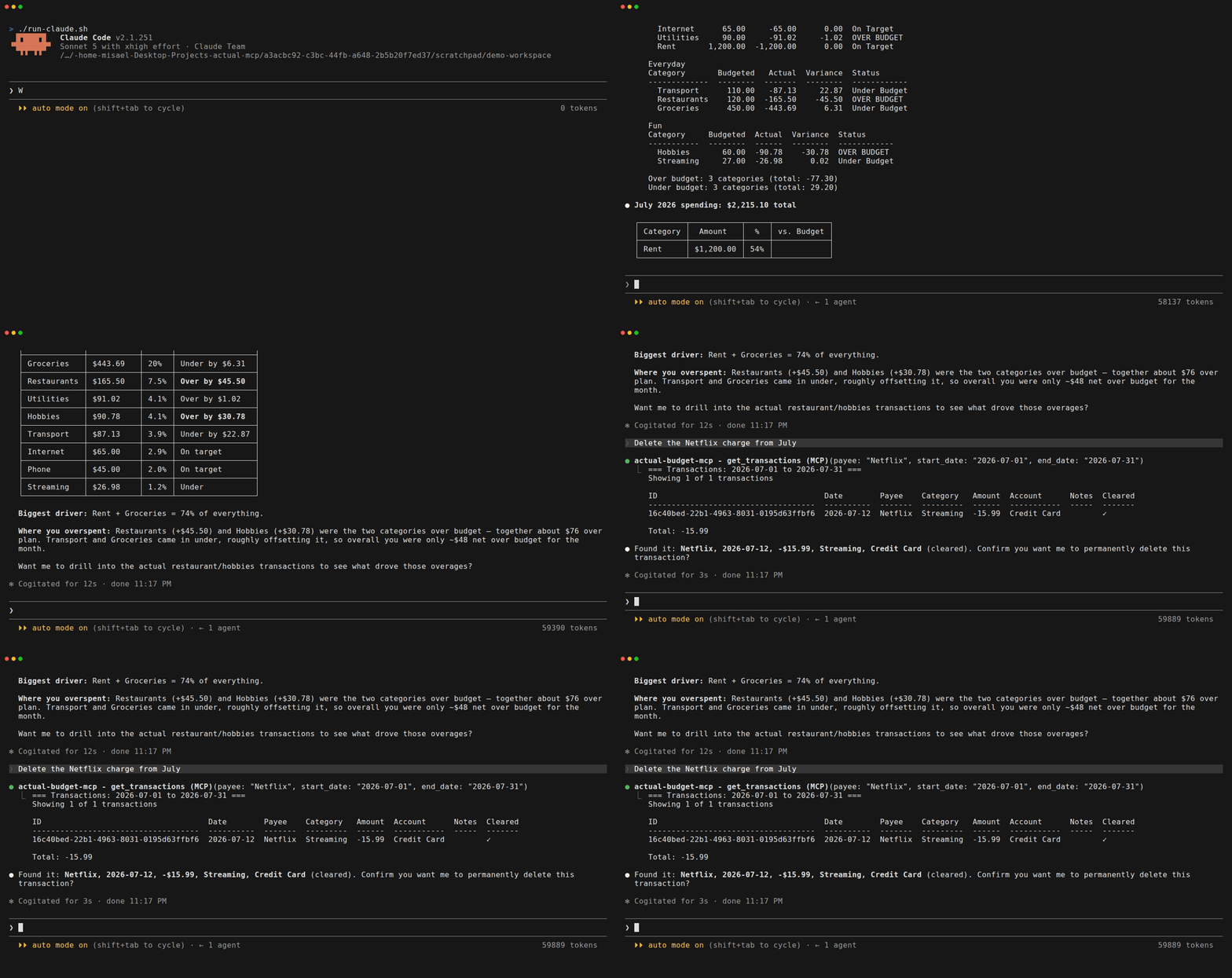
- **Real analysis, not just lookups** - Projections, category trends, budget vs actual, and month summaries
- **Writes you can trust** - Every delete previews what it will remove and waits for you to confirm; `ACTUAL_READ_ONLY=1` hides the write tools from the model entirely ([Safety](#safety))
- **Multi-currency that survives reality** - Splits and residual reconciliation, not just a currency symbol
- **Recovers from an out-of-sync budget** - `repair_sync` rebuilds the local sync state when `@actual-app/api` and your server disagree, the failure that otherwise leaves every tool erroring
- **Ask about your budget in plain language** - "How much did I spend on food this month?" or "Am I over budget on anything?"
- **Create and manage transactions** - Add expenses, transfers, and edits without opening the app
- **Manage categories, payees, and rules** - Full CRUD without opening the app
- **Use names, not IDs** - Say "Cartera" instead of `a1b2c3d4-...`, with helpful suggestions if ambiguous
- **Natural dates in English and Spanish** - "last month", "este mes", "hace 3 meses", "yesterday"
- **Clean formatted output** - Aligned tables and clear summaries, not raw JSON
- **Clear error messages** - If something's wrong, you'll know exactly what to fix
## Does it work with local models?
Yes. This is an MCP server, so it works with any client that speaks MCP, and the model
behind that client is the client's business, not this server's. Claude Desktop, Claude
Code, Cursor and VS Code are the ones documented below because they are the ones people
ask about, but anything that can run an MCP client, including a local setup pointed at
Ollama or LM Studio, talks to it the same way.
Your budget data goes to whatever model your client uses. If that matters to you, and for
a lot of people running Actual it does, a local model keeps it on your machine.
## Prerequisites
- [Actual Budget](https://actualbudget.org/) server running (local or remote)
- [Node.js](https://nodejs.org/) 20 or higher (see [Node.js requirement](#nodejs-requirement))
## Quick Start
The fastest way to get started - copy this into Claude Code or Claude Desktop:
```bash
Install the actual-budget-mcp MCP server from npm (https://github.com/henfrydls/actual-budget-mcp).
Configure it with these credentials:
- My Actual Budget server: http://localhost:5006
- Password: YOUR_PASSWORD
- Budget ID: YOUR_BUDGET_ID
```
Claude will configure everything for you.
## Installation
### Option 1: Claude Code (one command)
```bash
claude mcp add actual-budget-mcp -e ACTUAL_SERVER_URL=http://localhost:5006 -e ACTUAL_PASSWORD=your-password -e ACTUAL_BUDGET_ID=your-budget-id -- npx -y actual-budget-mcp
```
### Option 2: Claude Desktop
Add this to your `claude_desktop_config.json`:
**macOS:** `~/Library/Application Support/Claude/claude_desktop_config.json`
**Windows:** `%APPDATA%\Claude\claude_desktop_config.json`
```json
{
"mcpServers": {
"actual-budget-mcp": {
"command": "npx",
"args": ["-y", "actual-budget-mcp"],
"env": {
"ACTUAL_SERVER_URL": "http://localhost:5006",
"ACTUAL_PASSWORD": "your-password",
"ACTUAL_BUDGET_ID": "your-budget-sync-id"
}
}
}
}
```
### Option 3: Cursor
Go to **Cursor Settings > MCP > Add new MCP server** and add:
```json
{
"mcpServers": {
"actual-budget-mcp": {
"command": "npx",
"args": ["-y", "actual-budget-mcp"],
"env": {
"ACTUAL_SERVER_URL": "http://localhost:5006",
"ACTUAL_PASSWORD": "your-password",
"ACTUAL_BUDGET_ID": "your-budget-sync-id"
}
}
}
}
```
### Option 4: VS Code (GitHub Copilot)
Add this to your VS Code `settings.json`:
```json
{
"mcp": {
"servers": {
"actual-budget-mcp": {
"command": "npx",
"args": ["-y", "actual-budget-mcp"],
"env": {
"ACTUAL_SERVER_URL": "http://localhost:5006",
"ACTUAL_PASSWORD": "your-password",
"ACTUAL_BUDGET_ID": "your-budget-sync-id"
}
}
}
}
}
```
### Option 5: Docker
The image speaks stdio like every other option, so your client starts the
container and owns its lifetime:
```json
{
"mcpServers": {
"actual-budget-mcp": {
"command": "docker",
"args": [
"run", "-i", "--rm",
"--add-host=host.docker.internal:host-gateway",
"-v", "actual-budget-mcp-data:/data",
"-e", "ACTUAL_SERVER_URL",
"-e", "ACTUAL_PASSWORD",
"-e", "ACTUAL_BUDGET_ID",
"ghcr.io/henfrydls/actual-budget-mcp:latest"
],
"env": {
"ACTUAL_SERVER_URL": "http://host.docker.internal:5006",
"ACTUAL_PASSWORD": "your-password",
"ACTUAL_BUDGET_ID": "your-budget-sync-id"
}
}
}
}
```
Two things that bite everyone once:
- **Inside the container, `localhost` is the container.** Your Actual server is
not there. `host.docker.internal` (with the `--add-host` flag above, which is
what makes it resolve on Linux) reaches the host instead.
- **Mount `/data`.** That is the budget cache. Without a volume, every start
re-downloads your entire budget from the server.
### Option 6: From source (for contributors)
```bash
git clone https://github.com/henfrydls/actual-budget-mcp.git
cd actual-budget-mcp
npm install
cp .env.example .env # Edit with your credentials
npm run build
npm run test:connection # Verify it works
```
### Verify your setup
`--verify` reads the environment of the shell you run it in, and the install options above
put your credentials in your MCP client's configuration instead. So set them for the
command:
```bash
ACTUAL_SERVER_URL=http://localhost:5006 \
ACTUAL_PASSWORD=your-password \
ACTUAL_BUDGET_ID=your-sync-id \
npx -y actual-budget-mcp --verify
```
It connects, downloads the budget and prints how many accounts and category groups it
found. Running it without those variables reports them as missing, which is about the
command, not about your install.
**After changing your client's configuration, restart the client.** Claude Desktop, Claude
Code and the rest read MCP configuration at startup and will not pick up an edit until
they are restarted.
## Configuration
| Variable | Required | Description |
|----------|----------|-------------|
| `ACTUAL_SERVER_URL` | Yes | Your Actual Budget server URL (e.g., `http://localhost:5006`) |
| `ACTUAL_PASSWORD` | Yes* | Server password (set in Actual Budget under Settings). *Not needed if you use `ACTUAL_SESSION_TOKEN` |
| `ACTUAL_SESSION_TOKEN` | No | For servers behind **OIDC**, which have no password. Use this instead of `ACTUAL_PASSWORD`; if both are set, the token wins |
| `ACTUAL_BUDGET_ID` | Yes | Budget Sync ID (found in Settings > Show advanced settings) |
| `ACTUAL_ENCRYPTION_PASSWORD` | No | Only if your budget file is encrypted |
| `ACTUAL_DATA_DIR` | No | Where the budget cache lives. Defaults to your OS data directory (see below) |
| `ACTUAL_READ_ONLY` | No | Set to `1`/`true`/`yes` to run read-only. See [Safety](#safety) |
### Using a session token (OIDC servers)
If your Actual server signs you in through OIDC, there is no password to put in
`ACTUAL_PASSWORD` — the server issues a session token instead. Set
`ACTUAL_SESSION_TOKEN` to that token and leave the password unset.
To find it, in the browser where you are signed in to Actual:
1. Open your browser's developer tools
2. Go to **Application** (Chrome/Edge) or **Storage** (Firefox)
3. Expand **IndexedDB** → the **`actual`** database → the **`asyncStorage`** store
4. Copy the value of the key **`user-token`**
It is stored in IndexedDB, not Local Storage, so looking there is why people
often cannot find it.
Treat the token like a password: it grants the same access. It also expires — if
it does, the server says so and tells you to issue a new one, rather than
blaming a password you do not have.
### Where the cache is kept
Unless you set `ACTUAL_DATA_DIR`, the budget cache goes to the standard data
directory for your system:
| OS | Default location |
|----|------------------|
| Linux | `$XDG_DATA_HOME/actual-budget-mcp`, or `~/.local/share/actual-budget-mcp` |
| macOS | `~/Library/Application Support/actual-budget-mcp` |
| Windows | `%APPDATA%\actual-budget-mcp` |
It is a cache, not your data: deleting it only forces a fresh download on the
next run. It lives outside the temp directory on purpose, so a reboot does not
throw it away and make the next startup re-download your whole budget.
### Finding your Budget ID
1. Open Actual Budget
2. Open **Settings**: click the arrow next to your budget name, or use the sidebar, **More**, then **Settings**
3. Click **Show advanced settings**
4. Copy the **Sync ID**
**Take the Sync ID, not the Budget ID.** Actual shows both, one under the other, and they
are both UUIDs. `ACTUAL_BUDGET_ID` wants the one labelled **Sync ID**, despite the name of
thLo que la gente pregunta sobre actual-budget-mcp
¿Qué es henfrydls/actual-budget-mcp?
+
henfrydls/actual-budget-mcp es mcp servers para el ecosistema de Claude AI. MCP server for Actual Budget. Query and manage your personal finances through Claude Tiene 6 estrellas en GitHub y su última actualización registrada es del 2026-09-13.
¿Cómo se instala actual-budget-mcp?
+
Puedes instalar actual-budget-mcp clonando el repositorio (https://github.com/henfrydls/actual-budget-mcp) o siguiendo las instrucciones del README en GitHub. ClaudeWave también te ofrece bloques de instalación rápida en esta misma página.
¿Es seguro usar henfrydls/actual-budget-mcp?
+
Nuestro agente de seguridad ha analizado henfrydls/actual-budget-mcp y le ha asignado un Trust Score de 95/100 (tier: Verified). Revisa el desglose completo de comprobaciones superadas y flags en esta página.
¿Quién mantiene henfrydls/actual-budget-mcp?
+
henfrydls/actual-budget-mcp es mantenido por henfrydls. La última actividad registrada en GitHub es del 2026-09-13, con 1 issues abiertos.
¿Hay alternativas a actual-budget-mcp?
+
Sí. En ClaudeWave puedes explorar mcp servers similares en /categories/mcp, ordenados por popularidad o actividad reciente.
Despliega actual-budget-mcp en tu cloud
Lleva este repo a producción en minutos. Cada plataforma genera su propio entorno con variables de entorno editables.
¿Mantienes este repo? Añade un badge a tu README
Pega el badge en tu README de GitHub para mostrar que está auditado por ClaudeWave. Cada badge enlaza de vuelta a esta página y muestra el Trust Score actual.
[](https://claudewave.com/repo/henfrydls-actual-budget-mcp)<a href="https://claudewave.com/repo/henfrydls-actual-budget-mcp"><img src="https://claudewave.com/api/badge/henfrydls-actual-budget-mcp" alt="Featured on ClaudeWave: henfrydls/actual-budget-mcp" width="320" height="64" /></a>Más MCP Servers

Fair-code workflow automation platform with native AI capabilities. Combine visual building with custom code, self-host or cloud, 400+ integrations.

User-friendly AI Interface (Supports Ollama, OpenAI API, ...)

An open-source AI agent that brings the power of Gemini directly into your terminal.

Real-time global intelligence dashboard. AI-powered news aggregation, geopolitical monitoring, and infrastructure tracking in a unified situational awareness interface

🕷️ An adaptive Web Scraping framework that handles everything from a single request to a full-scale crawl!

The fastest path to AI-powered full stack observability, even for lean teams.