

Deterministic video composition from one JSON template — renders on Node, in the browser via WebAssembly, and fully on-device on React Native. No server, no upload, no generative model. Agent-callable over MCP.
- ✓Open-source license (MIT)
- ✓Actively maintained (<30d)
- ✓Clear description
- ✓Topics declared
- ✓Mature repo (>1y old)
- ✓Documented (README)
claude mcp add leclap -- npx -y @leclap/cli{
"mcpServers": {
"leclap": {
"command": "npx",
"args": ["-y", "@leclap/cli"]
}
}
}Resumen de MCP Servers
<div align="center">
<img src="apps/leclap-web/public/pwa-512x512.png" alt="LeClap" width="104" height="104" />
# LeClap
**Deterministic, on-device, agent-callable video — composed by prompt or by hand.**
Describe a video in one JSON _template_ — sections, filters, music, overlays — then render **that same template** on a phone (React Native, **on-device**) or in the **browser** (WebAssembly). No upload, no server, no generative model: the render is deterministic and reproducible, not sampled.
[](https://github.com/heristop/leclap/actions/workflows/ci.yml)
[](https://nodejs.org/en/)
[](https://pnpm.io/)
[](https://www.typescriptlang.org/)
[](https://opensource.org/licenses/MIT)
[](TRADEMARK.md)
[Quick start](#-quick-start) · [Templates](docs/template-configuration.md) · [Library API](packages/ffmpeg-video-composer/README.md) · [Architecture](docs/architecture.md) · [Docs](#-documentation)
</div>
---
## ✨ What is LeClap?
One JSON template. It renders on Node, in the browser via WebAssembly, and **natively on-device on React Native** — same template, same pipeline, reproducible run after run on a given platform. No upload, no server, no generative model.
## 🎥 Demo
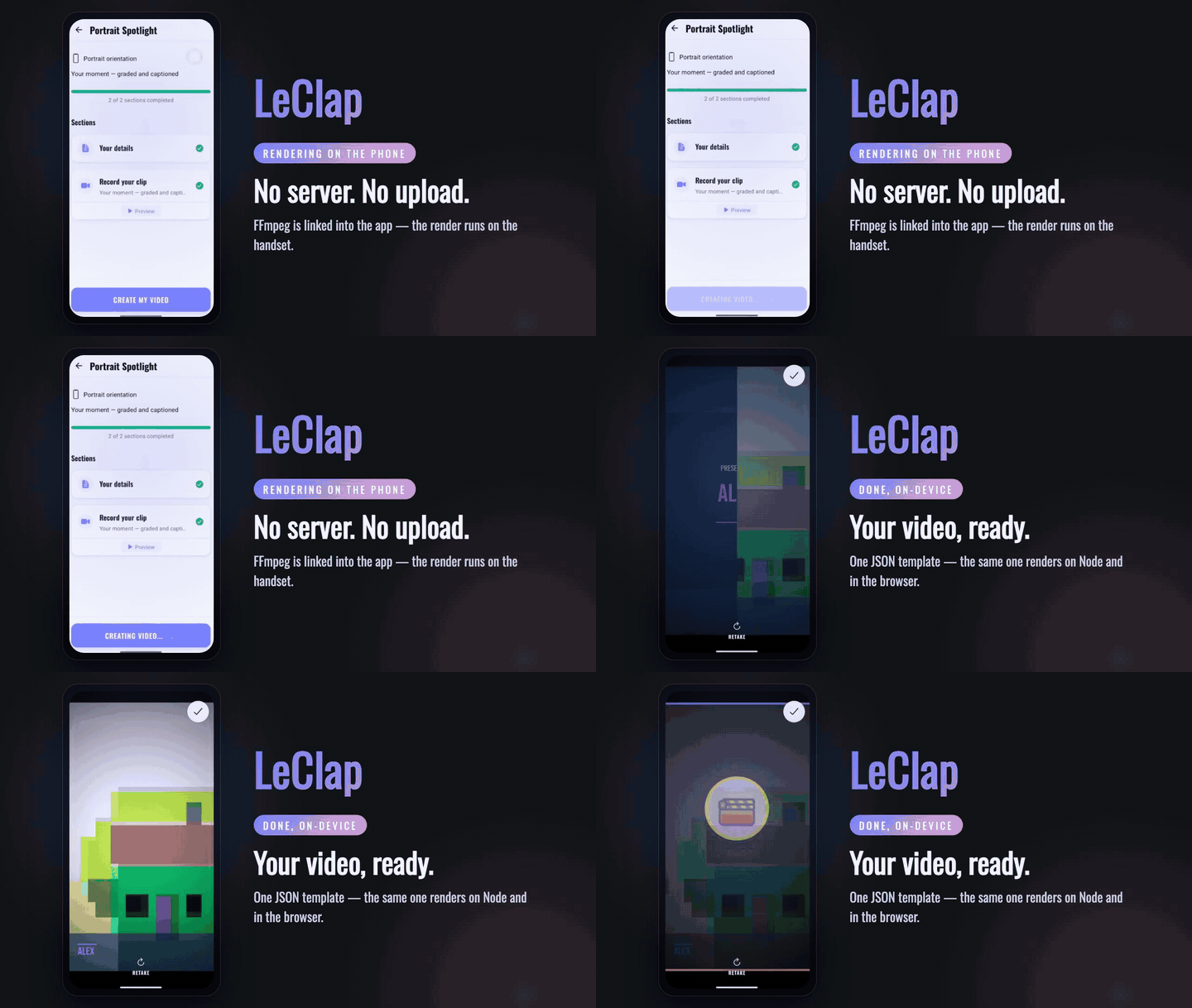
Two looks at LeClap — a finished clip rendered from a single JSON template, and the mobile app composing one fully **on-device**.
<table>
<tr>
<td align="center" width="60%" valign="top">
<strong>🎬 Template-driven render</strong><br />
<sub>one JSON template → a finished clip · <em>unmute for sound</em></sub>
<br /><br />
<video src="https://github.com/user-attachments/assets/19f59a73-d35a-470d-9c42-3945ba51e5ba" controls muted width="100%"></video>
</td>
<td align="center" width="40%" valign="top">
<strong>📱 On-device on Android</strong><br />
<sub>the app: capture → compose → render, on the phone</sub>
<br /><br />
<video src="https://github.com/user-attachments/assets/4337ccdc-efa5-4d58-b201-1b50630e8cda" controls muted width="260"></video>
</td>
</tr>
</table>
<div align="center">
</div>
## 🤔 Why LeClap?
Generative tools can't reproduce a result twice. Cloud renderers can't run in your user's pocket. Remotion renders without a server, but needs a browser engine to do it — LeClap links FFmpeg into the app itself.
| | **LeClap** | Remotion | Shotstack | Generative video |
| ----------------------------------- | :-------------------------------: | :------------------------------: | :---------------: | :----------------------: |
| Renders in a native app, no browser | ✅ React Native, FFmpeg linked in | ❌ needs a WebCodecs browser | ❌ cloud API | ❌ cloud API |
| Runs with no server | ✅ | ✅ in the browser, since 4.0.491 | ❌ cloud API | ❌ cloud API |
| Same input → same output | ✅ per platform¹ | ✅ if you avoid randomness | ⚠️ not documented | ❌ sampled, not rendered |
| Authored by an AI agent | ✅ MCP | ⚠️ an LLM writes React code | ✅ MCP (cloud) | ✅ prompt |
<sub>¹ Per platform, not across them: Node and the browser encode with libx264, Android with `libopenh264`, iOS with `h264_videotoolbox`, and the on-device build drops `boxblur` and rewrites `eq`→`lutyuv`. Same composition, different pixels.</sub>
**[LeClap vs Remotion →](https://leclap.dev/compare/remotion)** — the reasoning behind each row, the full caveats, every claim sourced to vendor docs, and when to pick Remotion instead.
## 🧰 Highlights
| Highlight | What it means |
| --------------------------------- | -------------------------------------------------------------------------------------------------------------------------------------------- |
| 🧩 **Template-driven** | One JSON descriptor → a complete video. No imperative FFmpeg wrangling. |
| 🌍 **Runs everywhere** | Node.js, browser (WASM), and React Native — one shared core, reproducible on each (the encoder differs per platform, see above). |
| 📹 **Capture → compose → render** | Record from the camera, trim/crop, mix music, add transitions, and render — captured, edited, and composed on-device. |
| 🤖 **Agent-callable** | An [MCP server](packages/leclap-mcp) lets an AI agent author & render a template — no LLM in the output path, so it's rendered, not sampled. |
| 🎨 **Premium out of the box** | A bundled [creative kit](packages/leclap-creative-kit) of polished, on-device-safe templates — by prompt or in the visual builder. |
| 🧱 **Typed & validated** | Zod-validated templates, strict TypeScript, dependency-injected architecture. |
## 🚀 Quick start
> 💡 **Recommended: [mise](https://mise.jdx.dev).** `mise install` provisions the exact pinned toolchain — **Node 24, pnpm 11, FFmpeg 8.1.1, and Rust** — so every contributor and CI run identical versions. Managing versions yourself? Bring **Node ≥ 24** and **pnpm 11**.
```bash
git clone https://github.com/heristop/leclap.git
cd leclap
mise install # Node 24, pnpm 11, FFmpeg 8.1.1 + Rust
pnpm install
```
Then pick an app:
```bash
pnpm app:web # web app — compiles videos in-browser (no server)
pnpm app:expo # Expo mobile app — compiles fully on-device (no server)
```
Or use the CLI — [`@leclap/cli`](packages/leclap-cli) is the `leclap` dev tool:
```bash
npx @leclap/cli init my-video # scaffold a starter project
npx @leclap/cli render template.json # render it (`leclap diagnose` checks your FFmpeg)
```
Or drive it from an AI agent: the [`@leclap/mcp`](packages/leclap-mcp) server exposes the engine as MCP tools — schema → validate → render — with no LLM in the output path.
## 📦 Monorepo
pnpm workspaces (`apps/*`, `packages/*`) — no turbo/nx. The root is a private orchestrator (`leclap`); `ffmpeg-video-composer`, `@leclap/cli`, and `@leclap/mcp` are published to npm. The web and mobile apps both run the same core — the mobile app drives it **fully on-device** via the embedded native engine (no server), the web app in-browser via WASM.
| Package | Description |
| --------------------------------------------------------- | -------------------------------------------------------------------------------- |
| [`ffmpeg-video-composer`](packages/ffmpeg-video-composer) | **The library** — cross-platform composition engine (Node, browser, WASM). |
| [`@leclap/cli`](packages/leclap-cli) | **The CLI** — the `leclap` dev tool: scaffold (`init`), `render`, `diagnose`. |
| [`@leclap/creative-kit`](packages/leclap-creative-kit) | Shared creative catalog — templates, partials, fonts, media, bundled assets. |
| [`@leclap/mcp`](packages/leclap-mcp) | MCP server — the engine as agent-callable tools (schema/validate/compose/probe). |
| [`@leclap/web`](apps/leclap-web) | React 19 + Vite + Tailwind — in-browser FFmpeg via WASM _(reference)_. |
| [`@leclap/expo`](apps/leclap-expo) | Expo / React Native — on-device compiles via the native engine _(reference)_. |
| [`ffmpeg-engine`](packages/ffmpeg-engine) | Rust engine embedding FFmpeg fftools for on-device compiles. |
## 🧩 Templates & library
A **template** is a Zod-validated JSON descriptor — a `global` block plus an ordered list of `sections`, each a clip with its own `inputs → maps → filters` pipeline and `{{ variable }}` placeholders. Start from a [creative-kit template](packages/leclap-creative-kit) and tweak text, colors, and media — by prompt (MCP) or in the visual builder.
- 📖 **[Template configuration reference](docs/template-configuration.md)** — global config, sections, the FFmpeg pipeline, placeholders.
- 📥 **[Use it as a library](packages/ffmpeg-video-composer/README.md)** — install, the `compile()` API, entry points (Node / browser / RN), and automatic FFmpeg detection.
## 📚 Documentation
- **[🌐 Descriptor reference (web)](https://leclap.pages.dev/doc)** — the full, schema-driven descriptor reference, one page per topic (sections, transitions, looks, grade, motion, audio, captions, filters, examples, JSON Schema).
- **[🧩 Template Configuration](docs/template-configuration.md)** — the template JSON reference.
- **[🏗 Architecture](docs/architecture.md)** — system architecture and design patterns.
- **[🔧 FFmpeg Fallback Strategy](docs/architecture.md#cross-platform-support)** — how automatic FFmpeg detection works.
- **[📱 On-Device Compilation](docs/on-device-compilation.md)** — the serverless Expo compile pipeline.
- **[🤖 AGENTS.md](AGENTS.md)** — repo layout, commands, and conventions for contributors and AI agents.
## 🤝 Contributing & LiLo que la gente pregunta sobre leclap
¿Qué es heristop/leclap?
+
heristop/leclap es mcp servers para el ecosistema de Claude AI. Deterministic video composition from one JSON template — renders on Node, in the browser via WebAssembly, and fully on-device on React Native. No server, no upload, no generative model. Agent-callable over MCP. Tiene 23 estrellas en GitHub y su última actualización registrada es del 2026-08-24.
¿Cómo se instala leclap?
+
Puedes instalar leclap clonando el repositorio (https://github.com/heristop/leclap) o siguiendo las instrucciones del README en GitHub. ClaudeWave también te ofrece bloques de instalación rápida en esta misma página.
¿Es seguro usar heristop/leclap?
+
Nuestro agente de seguridad ha analizado heristop/leclap y le ha asignado un Trust Score de 100/100 (tier: Verified). Revisa el desglose completo de comprobaciones superadas y flags en esta página.
¿Quién mantiene heristop/leclap?
+
heristop/leclap es mantenido por heristop. La última actividad registrada en GitHub es del 2026-08-24, con 8 issues abiertos.
¿Hay alternativas a leclap?
+
Sí. En ClaudeWave puedes explorar mcp servers similares en /categories/mcp, ordenados por popularidad o actividad reciente.
Despliega leclap en tu cloud
Lleva este repo a producción en minutos. Cada plataforma genera su propio entorno con variables de entorno editables.
¿Mantienes este repo? Añade un badge a tu README
Pega el badge en tu README de GitHub para mostrar que está auditado por ClaudeWave. Cada badge enlaza de vuelta a esta página y muestra el Trust Score actual.
[](https://claudewave.com/repo/heristop-leclap)<a href="https://claudewave.com/repo/heristop-leclap"><img src="https://claudewave.com/api/badge/heristop-leclap" alt="Featured on ClaudeWave: heristop/leclap" width="320" height="64" /></a>Más MCP Servers

Fair-code workflow automation platform with native AI capabilities. Combine visual building with custom code, self-host or cloud, 400+ integrations.

User-friendly AI Interface (Supports Ollama, OpenAI API, ...)

An open-source AI agent that brings the power of Gemini directly into your terminal.

Real-time global intelligence dashboard. AI-powered news aggregation, geopolitical monitoring, and infrastructure tracking in a unified situational awareness interface

The fastest path to AI-powered full stack observability, even for lean teams.

🕷️ An adaptive Web Scraping framework that handles everything from a single request to a full-scale crawl!