

- ✓Open-source license (MIT)
- ✓Actively maintained (<30d)
- ✓Documented (README)
- !No description
git clone https://github.com/hpdkhoa/poselab-mcpResumen de Tools
# Pose Lab
<!-- mcp-name: io.github.hpdkhoa/poselab-mcp -->
**Measured spatial answers for posing first-person arms and a rifle in Blender, over MCP.**
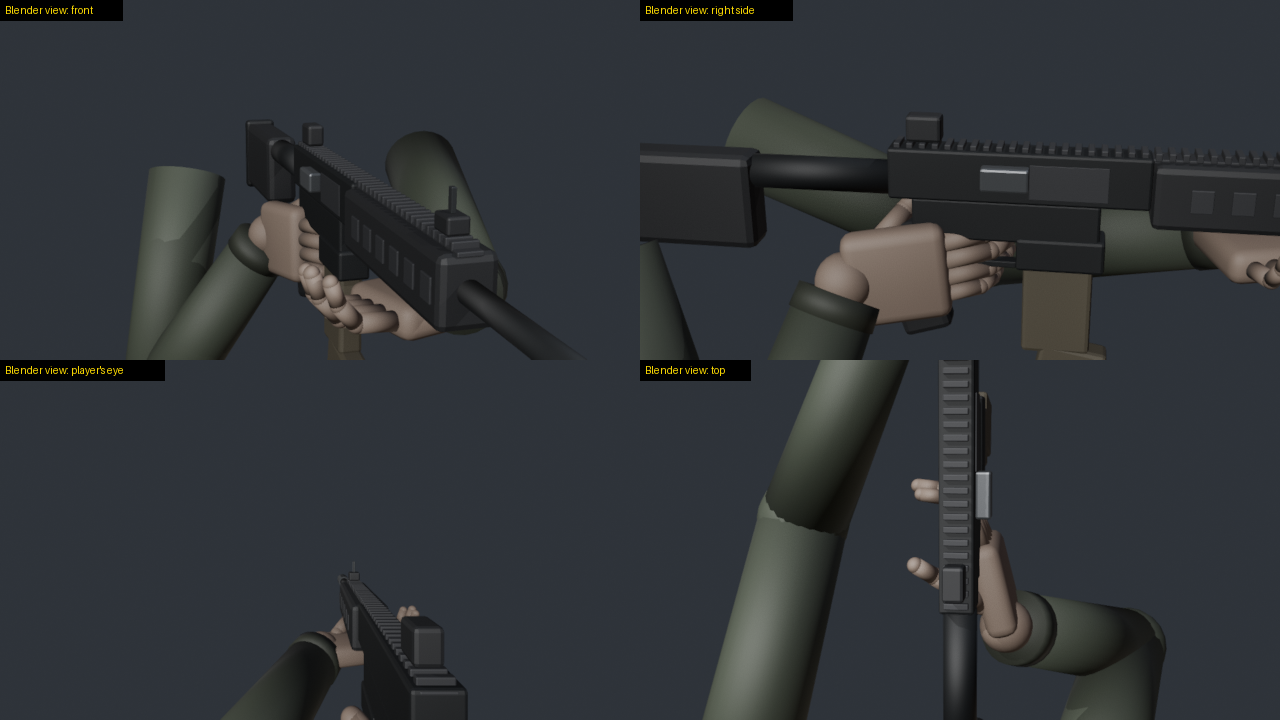
Models are weak at judging 3D space from pictures: which side of a rifle faces the eye, whether a finger sits inside
the receiver, whether any turn of the gun can ever show its ejection port. Pose Lab gives a model numbers instead. It
reports positions in named frames and how deep anything clips. It measures how squarely a surface faces the eye and
what the eye can see. Its solver searches rifle moves against goals and reports which goals no move can meet. For
animation, it scans a clip frame by frame against the same checks and mends what fails.
I built it while hand-making chamber checks for my first-person shooter. One question took me several full Blender
runs: can turning the rifle show its ejection port to the eye? With Pose Lab it is one `solve` call. On my game's AK
rig, turning alone met the goal in 0 of 60 samples. That is a fact of the geometry: the eye looks along the barrel.
Turning and moving the rifle met each goal on its own, but no sample of 400 met all four goals together. So that
check needs a new hand pose, not only a new rifle position. On the built-in sample rig, turning alone also met the port
goal in 0 of 60 samples, and turning and moving met every goal in 9 s.
## What it gives a model
| Tool | Answers |
|---|---|
| `list_rigs`, `load_rig`, `describe` | the rigs, the frames, the sign rules, named points, clips, moving parts |
| `pose_idle`, `pose_clip`, `move_part`, `snapshot` | put the rig in a pose: a clip at a time, the carrier drawn back, saved poses |
| `move_gun` | roll, swing, pitch and move the rifle; the hands keep their hold by arm IK |
| `reach` | a wrist onto a point by arm IK (try elbow poles to clear a forearm) |
| `where`, `distance` | positions in a named frame |
| `clearance` | how deep the rifle sits inside a forearm, palm or finger, measured to its surface, and where |
| `anatomy` | each arm against the human arm's limits: elbow, wrist and each finger joint, and every rule a pose breaks |
| `grip` | how each hand touches the rifle: with the palm, not the back of the hand; whether the palm itself holds it; how deep on each side |
| `arm_ranges` | the research behind those limits: each joint's AAOS range, its functional range, the value checked, and the sources |
| `faces_eye`, `visible`, `screen` | how squarely a surface faces the eye, how much of it the eye sees, where it falls on screen |
| `solve` | searches rifle moves against goals; reports each goal and how often any sample met it |
| `render` | a contact sheet: the player's eye and outside views, each tile labelled as a Blender view |
| `record_clip`, `load_clip` | a clip from keyed poses, or from a file: `.pose.json`, FBX or BVH |
| `scan_clip` | every frame against checks; the worst value, when, and the time spans that fail |
| `fix_clip` | mends what fails and reports the scan before and after, and what no fix can reach |
| `save_clip` | writes a clip as `.pose.json` bone data and as FBX for a game engine |
### Frames and signs
Every position goes in and comes out in a named frame, so no one has to guess axes:
* `gun`: the gun bone as it stands, Unreal-style axes, cm: +X the gun's left, +Y along the barrel, +Z up (the default)
* `arms`: the arms' space, Unreal-style axes, cm
* `view`: from the eye, cm: +X right, +Y forward, +Z up
Turns use the player's words: `roll` + turns the gun's right side up, `swing` + takes the muzzle left, `pitch` + the
muzzle up. Moves (`right`, `forward`, `up`) are in the view.
A hand round its grip touches the rifle on the idle pose already (a finger on the trigger, fingers round the
handguard). Call `clearance` at `pose_idle` for that baseline, and leave those segments out with `ignore` wildcards.
On the built-in sample the left thumb sits 2.7 cm inside the handguard at idle. `clearance` measures to the rifle's
surface (inside or out by ray parity), so it sees a body part inside a flat face between the mesh's corner points.
### Arm rules (`anatomy`)
A pose can clear the rifle and still be one no human arm can take. `anatomy` checks each arm against these limits:
| Joint | Rule |
|---|---|
| Shoulder | the elbow stays at least 2 cm below the shoulder while the hand works the gun |
| Elbow | a hinge, bent 5 to 150 degrees: never locked straight |
| Forearm | it carries the hand's roll (the radius turns over the ulna), so a rolled hand is not a bent wrist |
| Wrist | no twist of its own: the hand's twist about the forearm's line, against the idle grip's, at most 30 degrees |
| Wrist | within 30 degrees of the forearm's line; inside its joint range: flexion 80, extension 70, radial 20, ulnar 30 |
| Fingers | each joint curls only toward the palm: knuckle -30 to 100, middle joint -5 to 110, end joint -10 to 90 |
| Fingers | each finger stays in its own plane: the middle joint at most 15 degrees off its hinge, the end joint at most 25 off the middle joint's plane |
| Thumb | the knuckle bends -10 to 60 and the end joint -15 to 90, across the palm; the base spreads at most 80 from the index metacarpal and sits at most 20 behind the palm |
The wrist and elbow ranges are the AAOS normal values, from the AAOS 1965 table as reprinted in Greene and Heckman
1994. Other tables differ, by 10 to 25 degrees for the fingers and thumb. The 30 degree wrist line, the 5 degree elbow
minimum and the elbow under the shoulder are working rules for this game's look of a hand on a gun, not joint limits.
The wrist rule is stricter than daily tasks: Ryu 1991 found daily tasks use up to 60 degrees of extension and 40 of
ulnar deviation. The finger limits allow 10 more flexion than AAOS at the knuckle and the middle joint;
[docs/ANATOMY.md](docs/ANATOMY.md) says why the defaults stay that way. It gives each joint's standard and functional
range, the value checked, and the sources (AAOS; Eaton; Morrey 1981; Palmer 1985; Ryu 1991; Hume 1990; Bain 2015;
Soucie 2011). `arm_ranges` returns the same data to a model.
The `anatomy` reply lists, for each arm, the elbow's height under the shoulder, the elbow's bend, the wrist's bend split into
flexion and radial deviation, the wrist's twist, each finger joint's curl and twist, and `bad`: every rule the pose
breaks. Each rule reads the value as reported: angles to the degree, the elbow's height to 0.1 cm. A rig's
`limits`, `finger_limits` and `thumb_limits` entries in `rigs.json` override any value. `solve` takes `{"type": "anatomy"}` as a goal.
`move_gun`, `reach` and `fix_clip` place hands with a turn. They move the hand's twist into the forearm, so the wrist
joint only bends: a 60 degree rifle roll with the hands kept reads no wrist twist.
Fix a broken rule by moving the rifle, the grip or the elbow's pole. Do not bend a joint further.
The sample rig's idle grip breaks the wrist rule: the left wrist bends 44 degrees off the forearm and the right 58.
`fix_clip` with an `anatomy` check brings the left to 29. It leaves the right at 58: every turn that mends it puts
the rifle inside the back of the palm, so that hand needs a new grip or elbow, not a wrist turn.
### Hand contact (`grip`)
A hand holds the rifle with its palm and the palm sides of its fingers. `clearance` is usually run with the palms and
fingers left out, since a grip touches the rifle there. That also hides a hand on the wrong side. `grip` checks the
contact itself, for each hand:
| Rule | Default |
|---|---|
| A hand on the rifle faces it with the palm, not the back (`palm_faces_rifle` above 0) | within `hold_within_cm` 1.0 |
| A hand holding the rifle has its palm on it, not only a fingertip (`palm_gap_cm`) | `palm_within_cm` 1.5 |
| The rifle stays out of the back of the hand and the back of each finger | `back_max_cm` 0.1 |
| The palm side may press in a little: the capsules are rounder than a palm | `palm_max_cm` 1.0 |
Each finger segment's palm side is the side it curls toward. The thumb's pad faces sideways, so its contacts count
toward the palm side's depth only. The reply gives each hand's `touching` (some part within `hold_within_cm`),
`holding` (touching, the palm facing the rifle and its surface within `palm_within_cm`), `palm_gap_cm`,
`palm_faces_rifle`, `palm_contact_cm`, `back_contact_cm`, where the back contact is, and `bad`. With `hold` true, a hand
that is not holding breaks a rule. `solve` takes `{"type": "grip"}` as a goal and `scan_clip` as a check. On the sample
rig, a hand turned 180 degrees about its forearm fails it. So does the idle grip: the left thumb sits 2.8 cm inside the
handguard, the right palm presses 1.2 cm into the pistol grip, and the trigger finger's back sits 0.8 cm inside the
trigger guard. The sample stays as it is, so the benchmark's numbers keep their meaning.
## Motion: scan and fix clips
`scan_clip` plays a clip frame by frame and runs checks on each frame. The checks are the solver's goals
(`clearance`, `anatomy`, `grip`, `faces_eye`, `visible`, `on_screen`, `barrel`) and three more:
* `contact`: a point of the hand on its mark, such as a fingertip on the charging handle (`a`, `b`, `max_cm`)
* `hold`: how far a hand drifts on the rifle from its grip at `ref_s` (`side`, `max_cm`)
* `pop`: a sudden jump, as the fastest bone speed between frames (`bones`, `max_cm_per_s`)
Any check takes `during: [from_s, to_s]`. `fix_clip` then mends a copy of the clip:
* a pop: it blends the jumping frames again from the good frames round them
* a hold: it puts the hand back on its grip by arm IK
* a contact: it moves the wrist until the point touches its mark
* clearance: it swings each elbow about the shoulder to wrist line by the least angle that clears, wrist kept, and
eases that swing over the neighbouring frames
* anatomy: it swingsLo que la gente pregunta sobre poselab-mcp
¿Qué es hpdkhoa/poselab-mcp?
+
hpdkhoa/poselab-mcp es tools para el ecosistema de Claude AI con 0 estrellas en GitHub.
¿Cómo se instala poselab-mcp?
+
Puedes instalar poselab-mcp clonando el repositorio (https://github.com/hpdkhoa/poselab-mcp) o siguiendo las instrucciones del README en GitHub. ClaudeWave también te ofrece bloques de instalación rápida en esta misma página.
¿Es seguro usar hpdkhoa/poselab-mcp?
+
Nuestro agente de seguridad ha analizado hpdkhoa/poselab-mcp y le ha asignado un Trust Score de 77/100 (tier: Trusted). Revisa el desglose completo de comprobaciones superadas y flags en esta página.
¿Quién mantiene hpdkhoa/poselab-mcp?
+
hpdkhoa/poselab-mcp es mantenido por hpdkhoa. La última actividad registrada en GitHub es del 2026-10-08, con 0 issues abiertos.
¿Hay alternativas a poselab-mcp?
+
Sí. En ClaudeWave puedes explorar tools similares en /categories/tools, ordenados por popularidad o actividad reciente.
Despliega poselab-mcp en tu cloud
Lleva este repo a producción en minutos. Cada plataforma genera su propio entorno con variables de entorno editables.
¿Mantienes este repo? Añade un badge a tu README
Pega el badge en tu README de GitHub para mostrar que está auditado por ClaudeWave. Cada badge enlaza de vuelta a esta página y muestra el Trust Score actual.
[](https://claudewave.com/repo/hpdkhoa-poselab-mcp)<a href="https://claudewave.com/repo/hpdkhoa-poselab-mcp"><img src="https://claudewave.com/api/badge/hpdkhoa-poselab-mcp" alt="Featured on ClaudeWave: hpdkhoa/poselab-mcp" width="320" height="64" /></a>Más Tools

A single CLAUDE.md file to improve Claude Code behavior, derived from Andrej Karpathy's observations on LLM coding pitfalls.

An AI skill that provides design intelligence for building professional UI/UX across multiple platforms.

🪨 why use many token when few token do trick. Viral skill + proxy for coding agents that cuts 65% of tokens by talking like a caveman.

CLI proxy that reduces LLM token consumption by 60-90% on common dev commands. Single Rust binary, zero dependencies

The fastest, litest AI Gateway. Rust core with Python SDK. Call 100+ LLM APIs in OpenAI (or native) format with cost tracking, guardrails, load balancing, and logging [Bedrock, Azure, OpenAI, Anthropic, OpenAI, VertexAI, vLLM, Nvidia NIM]

Use Claude Code, Codex, VSCode, Pi, and OpenCode (and 6 other harnesses) for free (1.3B+ free tokens) from your terminal, app, IDE, or phone, and now from the browser with native browser sessions (multi-harness + multi-model) like OpenClaw (voice supported + ToS friendly)