

The browser your coding agent can come back to — visible, persistent, isolated workspaces over MCP.
- ✓Actively maintained (<30d)
- ✓Clear description
- ✓Topics declared
- ✓Documented (README)
- !Licence file present but not machine-readable
git clone https://github.com/hronaut/hronaut{
"mcpServers": {
"hronaut": {
"command": "node",
"args": ["/path/to/hronaut/dist/index.js"]
}
}
}Resumen de MCP Servers
# Hronaut Hronaut is a visible, persistent Electron browser that exposes durable agent workspaces through MCP. It keeps the browser open independently of any individual AI session, so people can watch, pause, and take over while agents work in separate local browser profiles. [](https://github.com/hronaut/hronaut/releases/latest) [](https://github.com/hronaut/hronaut/actions/workflows/ci.yml) [](https://github.com/hronaut/hronaut/actions/workflows/codeql.yml) [](https://hronaut.dev/download) [](LICENSE) [](https://skills.sh/hronaut/hronaut) [Website](https://hronaut.dev) · [Setup](https://hronaut.dev/setup) · [Browser MCP decision guide](https://hronaut.dev/browser-mcp-guide) · [Downloads](https://github.com/hronaut/hronaut/releases/latest) · [Issues](https://github.com/hronaut/hronaut/issues) · [Detailed reference](REFERENCE.md) ## Where Hronaut fits in your agent stack Hronaut is a local, visible MCP execution layer for agents that already have their own orchestration. The caller keeps workflow and orchestration state; Hronaut binds each browser command to a tool contract and a named local workspace with its own profile, account, origin, and tab context. People can watch, pause, approve, or take over, and the caller can require bounded browser evidence before it treats an external action as complete. | Responsibility | Owner | | --- | --- | | Plan the workflow and retain task state | Your SDK, agent framework, or application | | Define the requested browser operation | MCP tool contract and arguments | | Execute with a specific browser identity and site context | Hronaut workspace, profile, account, origin, and tab | | Approve or complete a consequential manual step | The person using visible Hronaut controls | | Decide whether the workflow may continue | The caller, using verified postcondition read-back | For example, a code-first agent can retain its own task state, ask Hronaut to submit a reviewed change in one named workspace, wait for human approval when required, and continue only after verified postcondition read-back confirms the external result. Hronaut is not an agent framework, hosted browser fleet, no-code platform, or universal production-safety guarantee. Use it when the browser should remain local, visible, and deliberately reusable; keep orchestration and final business decisions in the calling system. ## See Hronaut in action [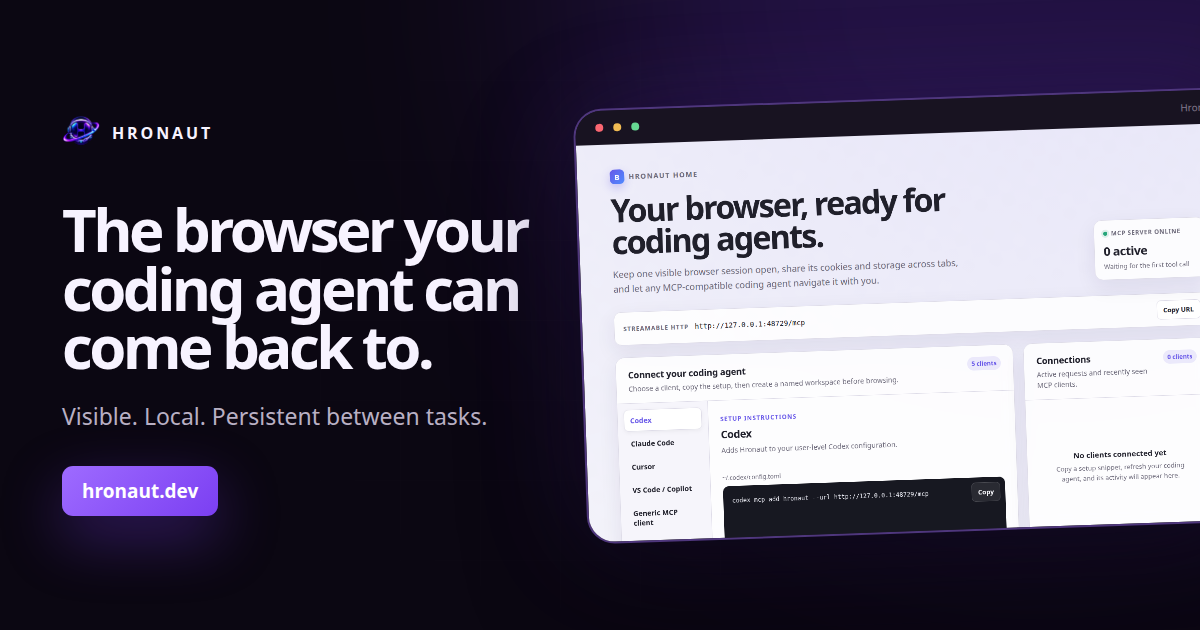](https://hronaut.dev/#demo) Watch the [35-second product overview](https://hronaut.dev/#demo), then download Hronaut for Windows, macOS, or Linux. Not sure which browser model fits your workflow? Read the source-backed [Browser MCP decision guide](https://hronaut.dev/browser-mcp-guide), which compares Hronaut with Playwright MCP, Chrome DevTools MCP, and an extension-based Browser MCP without claiming persistence is unique. ## Start in three steps 1. [Download the latest Hronaut](https://hronaut.dev/download) for Windows, macOS, or Linux and start it. 2. On Hronaut Home, choose your coding agent and copy its generated setup, or use the [generic setup guide](https://hronaut.dev/setup). The in-app setup always reflects the current local endpoint and authentication choice. 3. Ask the connected agent: `Using Hronaut, create a new isolated workspace named “Hronaut first run”, open https://example.com, take a semantic snapshot, and tell me the page heading. Use only that task workspace.` A successful run stays visible in Hronaut, creates an isolated workspace, and remains available after that coding-agent conversation ends. Ready for a real task? Use the [copy-ready starter workflows](STARTER_WORKFLOWS.md) for authenticated handoff, localhost QA, and responsive review without weakening Hronaut's workspace and privacy boundaries. For recurring work, run the [scheduled and triggered browser workflow](SCHEDULED_BROWSER_WORKFLOW.md). Its disposable Docker fixture shows which component owns triggers, browser authority, human takeover, retries, cancellation, and authoritative outcome reconciliation. Hronaut automates **web pages in its own browser**, not native desktop applications or other application windows. See [browser and native testing boundaries](AUTOMATION_BOUNDARIES.md#browser-pages-and-native-desktop-applications) to choose the right test surface, and [approval boundaries](AUTOMATION_BOUNDARIES.md#browser-approval-and-downstream-authorization) before consequential actions. ### Choose a persistent profile or Hronaut workspaces A dedicated persistent browser profile can be enough for one project and one identity. Playwright MCP supports this through `--user-data-dir`; persistence does not require Hronaut. Its [profile documentation](https://github.com/microsoft/playwright-mcp#user-profile) also explains separate profiles for concurrent browser instances. Choose Hronaut when you want named profiles managed together in a desktop browser, visible pause and takeover, or deliberate workspace resumption across compatible MCP clients. Each new workspace has separate website storage; bookmarks, history, download records, and remembered permissions remain application-wide. See the [workspace contract](REFERENCE.md#mcp-tools) for the exact boundaries. Hronaut adds a desktop application to run and maintain; its terms are in [License](#license). Try the [short first-run checks for both paths](STARTER_WORKFLOWS.md#choose-and-check-your-browser-setup) before committing to a workflow. Hronaut's [client connection guide](#connect-an-mcp-client) and Playwright MCP's [client setup instructions](https://github.com/microsoft/playwright-mcp#getting-started) cover their respective connections. Move reviewed setup between machines with [portable workspace templates](REFERENCE.md#portable-workspace-templates), without copying browser sign-ins. The [Support, recovery, and exit path](docs/SUPPORT_RECOVERY.md) explains how to reconnect a client, replace or remove a workspace, recover local data, and get help. ### Keep personal and agent work separate Open **Home** to find a project, switch to its tabs, or create a new space. The **Open** and **Archived** views keep ongoing and saved work easy to find. Search by workspace name or page title. Each workspace card shows direct agent access and any site restrictions; choose **Manage** to edit them. **Workspace options** can hide a workspace from the left sidebar or protect it from permanent deletion. Hidden workspaces stay accessible from Home, and protected workspaces can still be archived. The browser mute button works from Home before any website tabs exist. It silences existing and future tabs, survives restart, and restores individual tab mute choices when turned off. Choose **Archive** when you finish a task. Tabs and sign-ins remain saved, and **Undo archive** restores an accidental archive immediately. Use **Restore workspace** in the Archived view to pick up where you left off. Permanent deletion asks for confirmation and removes the workspace’s website data. Hronaut starts on Home without creating a Default workspace. Opening your first tab creates an isolated workspace. Obsolete base-profile data and unsupported persistence formats are discarded. - **Fork a workspace** to reuse its cookies and local storage in an independent profile. Choose any active or archived source; the fork starts with a blank tab and keeps the source's site restrictions. - **Disable direct agent access** when a workspace should stay under your control. Agents can still fork it, but cannot browse or change its original tabs. The fork receives a copy of its site data, so this setting does not prevent agents from reusing copied sign-ins. - **Copy or Move site data** with explicit source and destination controls. Move requires both workspaces archived and verifies the destination before removing transferred data from the source. Profiles with background site-worker storage cannot currently be moved. Transfers include cookies and local storage, not history, saved passwords, IndexedDB, cache, or downloaded files. They are one-time copies, not ongoing synchronization. Deleting a workspace permanently removes its browser profile; archiving keeps it for later. ### Works with your coding agent Connect through Hronaut's local Streamable HTTP MCP endpoint. Choose the focused guide for your client, or start with the [generic setup](https://hronaut.dev/setup): - **Terminal and desktop agents:** [Codex](https://hronaut.dev/codex-browser-mcp), [Claude Code](https://hronaut.dev/claude-code-browser-mcp), [Gemini CLI](https://hronaut.dev/gemini-cli-browser-mcp), [Goose](https://hronaut.dev/goose-browser-mcp), [OpenCode](https://hronaut.dev/opencode-browser-mcp), [Devin Local](https://hronaut.dev/devin-local-browser-mcp), [Mistral Vibe](https://hronaut.dev/mistral-vibe-browser-mcp), [Grok Build](https://hronaut.dev/grok-build-browser-mcp), [Qwen Code](https://hronaut.dev/qwen-code-browser-mcp), and [Warp](https://hronaut.dev/warp-browser-mcp). - **Editor agents:** [Cursor](https://hronaut.dev/cursor-browser-mcp), [VS Code / GitHub Copilot](https://hronaut.dev/github-copilot-browser-mcp), [Cline](https://hronaut.dev/cline-browser-mcp), [Zoo Code](https://hronaut.dev/zoo-code-browser-mcp), [Kiro](https://hronaut.dev/kiro-browser-mcp), [Kilo Code](https://hronaut.dev/kilo-code-browser-mcp), [JetBrains Junie](http
Lo que la gente pregunta sobre hronaut
¿Qué es hronaut/hronaut?
+
hronaut/hronaut es mcp servers para el ecosistema de Claude AI. The browser your coding agent can come back to — visible, persistent, isolated workspaces over MCP. Tiene 4 estrellas en GitHub y su última actualización registrada es del 2026-09-20.
¿Cómo se instala hronaut?
+
Puedes instalar hronaut clonando el repositorio (https://github.com/hronaut/hronaut) o siguiendo las instrucciones del README en GitHub. ClaudeWave también te ofrece bloques de instalación rápida en esta misma página.
¿Es seguro usar hronaut/hronaut?
+
Nuestro agente de seguridad ha analizado hronaut/hronaut y le ha asignado un Trust Score de 80/100 (tier: Trusted). Revisa el desglose completo de comprobaciones superadas y flags en esta página.
¿Quién mantiene hronaut/hronaut?
+
hronaut/hronaut es mantenido por hronaut. La última actividad registrada en GitHub es del 2026-09-20, con 10 issues abiertos.
¿Hay alternativas a hronaut?
+
Sí. En ClaudeWave puedes explorar mcp servers similares en /categories/mcp, ordenados por popularidad o actividad reciente.
Despliega hronaut en tu cloud
Lleva este repo a producción en minutos. Cada plataforma genera su propio entorno con variables de entorno editables.
¿Mantienes este repo? Añade un badge a tu README
Pega el badge en tu README de GitHub para mostrar que está auditado por ClaudeWave. Cada badge enlaza de vuelta a esta página y muestra el Trust Score actual.
[](https://claudewave.com/repo/hronaut-hronaut)<a href="https://claudewave.com/repo/hronaut-hronaut"><img src="https://claudewave.com/api/badge/hronaut-hronaut" alt="Featured on ClaudeWave: hronaut/hronaut" width="320" height="64" /></a>Más MCP Servers

Fair-code workflow automation platform with native AI capabilities. Combine visual building with custom code, self-host or cloud, 400+ integrations.

User-friendly AI Interface (Supports Ollama, OpenAI API, ...)

An open-source AI agent that brings the power of Gemini directly into your terminal.

Real-time global intelligence dashboard. AI-powered news aggregation, geopolitical monitoring, and infrastructure tracking in a unified situational awareness interface

🕷️ An adaptive Web Scraping framework that handles everything from a single request to a full-scale crawl! Don't be shy, join here: https://discord.gg/EMgGbDceNQ

The fastest path to AI-powered full stack observability, even for lean teams.