

Computer use for Hyprland - MCP server giving AI agents native hands on your Wayland desktop. No ydotool, no root, no portals.
- ✓Open-source license (MIT)
- ✓Actively maintained (<30d)
- ✓Clear description
- ✓Topics declared
- ✓Documented (README)
claude mcp add hypruse -- uvx hypruse{
"mcpServers": {
"hypruse": {
"command": "uvx",
"args": ["hypruse"]
}
}
}Resumen de MCP Servers
<!-- mcp-name: io.github.IlyasKhallouki/hypruse --> # hypruse **Computer use for [Hyprland](https://hypr.land).** An [MCP](https://modelcontextprotocol.io) server that gives AI agents native hands on your Wayland desktop: workspaces, windows, mouse, keyboard, screenshots. No ydotool daemon. No root. No portals. No X11. 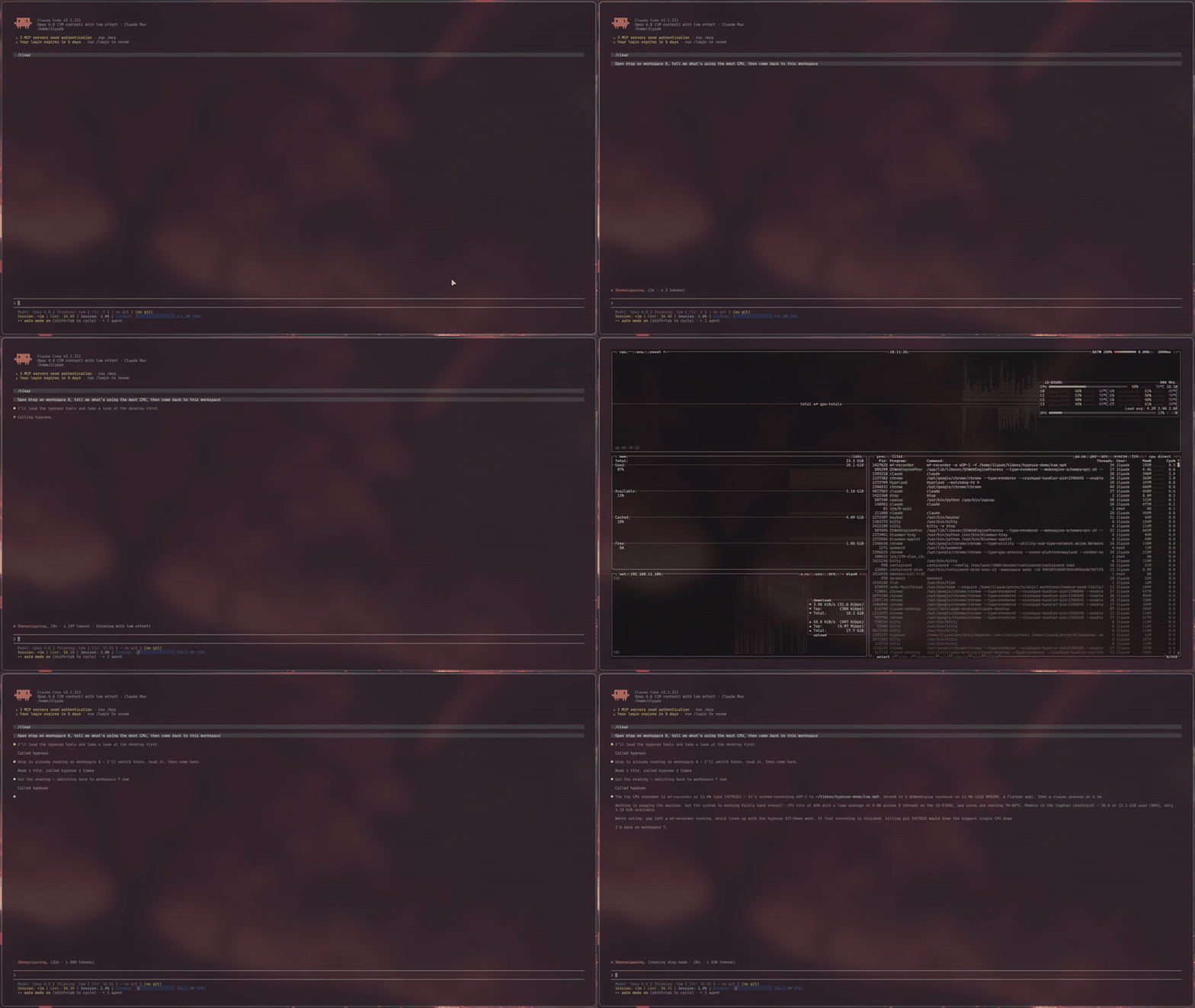 ## Why Computer use exists on macOS and Windows. On Linux there is effectively nothing: the Claude Desktop Linux beta explicitly ships **without** screen control, Anthropic's reference implementation is an X11 container, and the existing Wayland attempts lean on setuid uinput hacks or GNOME-only portals. Meanwhile Hyprland already exposes everything an agent needs, better than any accessibility bridge: a complete IPC surface for state and window management, and first-class Wayland protocols for input. hypruse just wires them to MCP: - **Semantic first.** `desktop` returns the real window/workspace tree (addresses, classes, titles, geometry) in one call. The agent switches workspaces and focuses windows the way you do (instantly, over IPC), not by squinting at pixels. - **Vision when it matters.** Screenshots of a monitor, an exact window crop, or a zoomed region, with the geometry/scale metadata to map any pixel back to a clickable coordinate: a coarse-to-fine loop [grounded in the GUI-agents research](#research). - **Native input.** Clicks and scrolls are spoken directly over the Wayland wire (`zwlr_virtual_pointer_v1`); typing goes through `wtype`'s virtual keyboard with a proper XKB keymap, unicode-safe on any layout. ## How it works ``` agent (Claude Code, or any MCP client) │ stdio ▼ hypruse ├── hyprctl -j ········▶ desktop state: monitors, workspaces, windows, layers ├── hyprctl dispatch ··▶ focus / move / close / launch / movecursor ├── grim ··············▶ screenshots: monitor, window crop, region ├── busctl (AT-SPI) ···▶ accessibility tree: named controls, current │ values, exact coords (ui / marks / click_ui) ├── wtype ·············▶ keyboard (zwp_virtual_keyboard_v1, real XKB keymap) └── raw Wayland wire ··▶ click & scroll (zwlr_virtual_pointer_v1) ``` Optional binaries gate two more tools: `imagemagick` draws the numbered overlay for `marks`, and `wl-clipboard` backs the opt-in `clipboard` tool. Design decisions: - **No ydotool / uinput.** That path needs a daemon, udev rules or root, and types US scancodes that break on other layouts. hypruse is just another Wayland client of your compositor, same standing as `wlrctl`. - **No portals.** `xdg-desktop-portal-hyprland` does not implement the RemoteDesktop portal (InputCapture is capture, not injection), so anything built on libei/portals silently degrades on Hyprland. hypruse doesn't try. - **Cursor positioning through the compositor's own cursor dispatcher** (global logical coordinates, exact on any monitor layout), with only button/axis events on the virtual pointer, sidestepping the known multi-monitor bugs of absolute virtual-pointer motion ([hyprwm/Hyprland#6749](https://github.com/hyprwm/Hyprland/issues/6749)). ## Tools | tool | what it does | |---|---| | `desktop` | One-call semantic snapshot: monitors, workspaces, windows (address/class/title/geometry), active window, cursor, and layer surfaces (launchers, bars, notification popups) with a best-effort kind and geometry. A listed layer is one the compositor tracks, not one you can see: transparent and dormant surfaces are reported too, so screenshot when visibility matters | | `screenshot` | Focused monitor, exact window crop by address, or `x,y,WxH` region; returns image + coordinate-mapping metadata; fast JPEG by default (`lossless=true` for PNG); `stable=true` waits for the frame to settle | | `zoom` | Native-resolution re-capture around an estimated point (optionally clamped to a window): the precision step before clicking small controls, same metadata contract | | `ui` | Read a window's accessibility tree (AT-SPI, GTK/Qt apps that expose one) and return clickable elements by name with exact global coordinates, no screenshot; reports current values too (typed text, slider position, checkbox state); falls back to vision when an app exposes nothing | | `marks` | Set-of-Marks capture: the window screenshot with every accessible control drawn as a numbered mark, plus a JSON legend (role, name, current value, exact click point per number); needs ImageMagick for the drawing, degrades to the legend alone without it | | `click_ui` | Click a control by accessible NAME or by a `marks` number in one call: the coordinate comes from the tree, the click goes through the real pointer (visible, same safety guarantees); an ambiguous name returns the candidates instead of guessing | | `pointer` | move / click / drag / scroll (discrete wheel notches) in global coordinates | | `keyboard` | Type literal text (unicode-safe) or press app-level combos (`ctrl+shift+t`, `esc`, `F5`); optional `window` address focuses the target first so keystrokes land in the right app. Compositor binds (`super+...`) go through `use_bind`, not here | | `hypr` | Switch workspace, focus/move/close windows, fullscreen, floating (pure IPC, milliseconds; `close_window` also waits up to 1s for the destroy event, so its result and `then=` observation reflect the close instead of racing it) | | `launch` | Start an app (optionally silent on another workspace), block on its actual `openwindow` event, return its address; detects single-instance apps (browsers) whose window ignores exec rules and moves it to the requested workspace | | `binds` | The user's own keybinds, decoded (`SUPER+Q`, action, description); the agent runs one with `use_bind` | | `use_bind` | Execute a keybind by combo (`SUPER+F`), running its bound action, so the agent drives the owner's own launchers and shortcuts. Not available for binds in a Lua `hyprland.lua`: those are anonymous closures Hyprland exposes no way to call, so `binds` shows them as action `lua` and `use_bind` says so instead of failing cryptically | | `sequence` | Run an ordered list of actions (pointer/keyboard/click_ui/hypr/wait_for) in one call; stops the moment the desktop changes in a way the current step did not expect, so a click/type/enter micro-sequence costs one round-trip instead of several | | `wait_for` | Block on real compositor events (window open/close, workspace change, title change, layer surfaces appearing/closing, urgency, screen sharing on/off) with a match filter and timeout; a filtered wait whose condition already holds (window already gone, workspace already active, layer already mapped) answers instantly with `already: true` instead of missing an event that fired before it subscribed. Replaces sleep-and-hope in multi-step automations | | `clipboard` | Read or write the text clipboard via `wl-clipboard`; opt-in, exists only with `HYPRUSE_CLIPBOARD=1` in the server env | The acting tools (`pointer`, `keyboard`, `click_ui`, `hypr`, `use_bind`, `sequence`) take an optional `then` argument that appends the result to the same call, so the agent sees the effect without a second round-trip: `then='desktop'` adds a fresh semantic snapshot (~20 ms, cheap, best for window/focus changes), `then='screenshot'` a stable capture (best for visual changes), `then='ui'` the acted-on window's controls with their current values (a few hundred exact tokens, best after typing or toggling; `click_ui` reads the window it clicked even if the click handed focus to a dialog, the others read the focused window), `then='none'` nothing (the default everywhere except `sequence`, which defaults to `'desktop'`). Every tool is also a shell verb (`hypruse desktop`, `hypruse click_ui Save --window 0x...`) for agents that run commands instead of MCP, with a skill that teaches them: see [Shell verbs and the agent skill](#shell-verbs-and-the-agent-skill). ## Features The tools group into five capabilities, ordered most-reliable-and-cheapest first. An agent that reaches for them in this order is both faster and more accurate, and many tasks never need a screenshot at all. ### 1. Semantic desktop control (start here) `desktop` returns the entire window and workspace tree in one call: every window's address, class, title, and geometry, the active window, the cursor, and any layer surfaces the compositor is tracking (launchers, bars, notification popups). `hypr` and `launch` then act on it over IPC in milliseconds: switch workspace, focus/move/close/fullscreen/float a window by address, or start an app. **Use it well:** never take a screenshot to find or arrange windows. Read `desktop`, act on the address you want. `launch` blocks on the real `openwindow` event and hands back the new window's address, so there is nothing to poll or guess; it also relocates single-instance apps (browsers) that ignore workspace rules. ### 2. Click controls by name, no pixels When an app exposes an accessibility tree (most GTK and Qt apps), you can target controls by name instead of by pixel. `ui` lists every control with its exact global coordinate, and reports the current value of the controls that carry one: the text in a field, a slider's percentage, a checkbox's state. `click_ui` resolves a name and clicks it in one call, through the real cursor (so the beacon and every safety guarantee still apply). `marks` draws numbered marks over a screenshot with a legend, for when you want to see the options first and then `click_ui(mark=N)`. **Use it well:** reach for `click_ui name="Save"` before estimating any pixel, since it is exact and spends no image. Read a form's state with `ui` (did the box actually tick?) instead of screenshotting it. An ambiguous name returns the candidates rather than guessing. When an app exposes no tree (terminals, canvas apps, Electron/Chrome without `-
Lo que la gente pregunta sobre hypruse
¿Qué es IlyasKhallouki/hypruse?
+
IlyasKhallouki/hypruse es mcp servers para el ecosistema de Claude AI. Computer use for Hyprland - MCP server giving AI agents native hands on your Wayland desktop. No ydotool, no root, no portals. Tiene 24 estrellas en GitHub y su última actualización registrada es del 2026-09-13.
¿Cómo se instala hypruse?
+
Puedes instalar hypruse clonando el repositorio (https://github.com/IlyasKhallouki/hypruse) o siguiendo las instrucciones del README en GitHub. ClaudeWave también te ofrece bloques de instalación rápida en esta misma página.
¿Es seguro usar IlyasKhallouki/hypruse?
+
Nuestro agente de seguridad ha analizado IlyasKhallouki/hypruse y le ha asignado un Trust Score de 95/100 (tier: Verified). Revisa el desglose completo de comprobaciones superadas y flags en esta página.
¿Quién mantiene IlyasKhallouki/hypruse?
+
IlyasKhallouki/hypruse es mantenido por IlyasKhallouki. La última actividad registrada en GitHub es del 2026-09-13, con 0 issues abiertos.
¿Hay alternativas a hypruse?
+
Sí. En ClaudeWave puedes explorar mcp servers similares en /categories/mcp, ordenados por popularidad o actividad reciente.
Despliega hypruse en tu cloud
Lleva este repo a producción en minutos. Cada plataforma genera su propio entorno con variables de entorno editables.
¿Mantienes este repo? Añade un badge a tu README
Pega el badge en tu README de GitHub para mostrar que está auditado por ClaudeWave. Cada badge enlaza de vuelta a esta página y muestra el Trust Score actual.
[](https://claudewave.com/repo/ilyaskhallouki-hypruse)<a href="https://claudewave.com/repo/ilyaskhallouki-hypruse"><img src="https://claudewave.com/api/badge/ilyaskhallouki-hypruse" alt="Featured on ClaudeWave: IlyasKhallouki/hypruse" width="320" height="64" /></a>Más MCP Servers

Fair-code workflow automation platform with native AI capabilities. Combine visual building with custom code, self-host or cloud, 400+ integrations.

User-friendly AI Interface (Supports Ollama, OpenAI API, ...)

An open-source AI agent that brings the power of Gemini directly into your terminal.

Real-time global intelligence dashboard. AI-powered news aggregation, geopolitical monitoring, and infrastructure tracking in a unified situational awareness interface

🕷️ An adaptive Web Scraping framework that handles everything from a single request to a full-scale crawl!

The fastest path to AI-powered full stack observability, even for lean teams.