

A Jira-lite MCP server that enforces planning-first workflows for AI-assisted development — tickets as markdown files, your AI agent as the interface.
- ✓Open-source license (MIT)
- ✓Actively maintained (<30d)
- ✓Clear description
- ✓Documented (README)
git clone https://github.com/ivanlai/primer-mcpResumen de MCP Servers
<!-- mcp-name: io.github.ivanlai/primer-mcp -->
# primer-mcp
> **Beta** — the core workflow is stable and tested, but the tool is new. Expect rough edges.
A Jira-lite MCP server that guides planning-first workflows for AI-assisted development — tickets as markdown files, your AI agent as the interface.
## Why
Getting real value from AI coding agents takes more than prompting — it takes shaping what they build, engineering the workflow around them, and deploying something that holds up in practice. Left to their own devices, agents jump straight to implementation. Primer-mcp makes them plan first: state why the work matters, record decisions and weigh trade-offs, break it into stories and tasks, then complete and verify each one. The tickets are plain markdown with YAML frontmatter, committed alongside your code — no external service, no database, fully visible in your repo and conveniently browsable with tools like [Obsidian](https://obsidian.md).
## Quick start
Requires Python 3.12+ and [uv](https://docs.astral.sh/uv/getting-started/installation/).
Add to your MCP client config (e.g. Claude Code `settings.json`, Claude Desktop `claude_desktop_config.json`):
```json
{
"mcpServers": {
"primer-mcp": {
"command": "uvx",
"args": ["primer-mcp"]
}
}
}
```
That's it — your MCP client downloads and runs primer-mcp automatically. You don't need to install anything manually.
Tell your AI agent what you want to build — it handles the rest. The server guides the agent through a planning-first workflow: why the work matters, decisions, stories, tasks, completion. Not sure what to do next? Ask your agent — it reads the current state and knows what comes next.
### Manual install (optional)
If you prefer to install primer-mcp as a standalone tool (e.g. for the `list-actionable` CLI command):
```bash
uv tool install primer-mcp
# Update to latest
uv tool upgrade primer-mcp
# Uninstall
uv tool uninstall primer-mcp
```
## What it looks like
A typical session — you describe the work, the agent handles the planning:
```
You: I want to add user authentication.
Agent: You have EP-001: "Launch the app" — auth fits under that.
Or I can create a separate epic if this is a bigger initiative.
You: EP-001 is fine.
Agent: Before we build, we should decide on the auth approach.
A few common options:
1. JWT with refresh tokens — stateless, good for mobile/SPAs
2. Server-side sessions — simple, but needs sticky storage
3. OAuth2 only — delegates to a provider, less to maintain
...
You: Option 1 — we need mobile support.
Agent: I'll record that decision so we don't revisit it later.
→ Recorded ADR-003: "Use JWT with refresh tokens"
Rejected: server-side sessions (no mobile support),
OAuth2 only (need local accounts too)
Breaking this into stories.
→ Created ST-005: "Login and registration endpoints"
→ Created ST-006: "Token refresh and revocation"
And tasks for the first story:
→ Created TK-010: "Add /register endpoint with validation"
→ Created TK-011: "Add /login endpoint returning JWT pair"
→ Created TK-012: "Write integration tests for auth flow"
You: Let's start with TK-010.
Agent: → Started TK-010
[implements the register endpoint]
Done — added POST /register with email/password validation,
password hashing, and duplicate-email check.
→ Completed TK-010
You: Looks good, verify it.
Agent: → Verified TK-010 (evidence: "all tests pass — a1b2c3d")
TK-011 is next. Want me to continue?
```
Every ticket is a markdown file in `primer/`, committed alongside your code. The `export_graph` tool visualises how they connect:
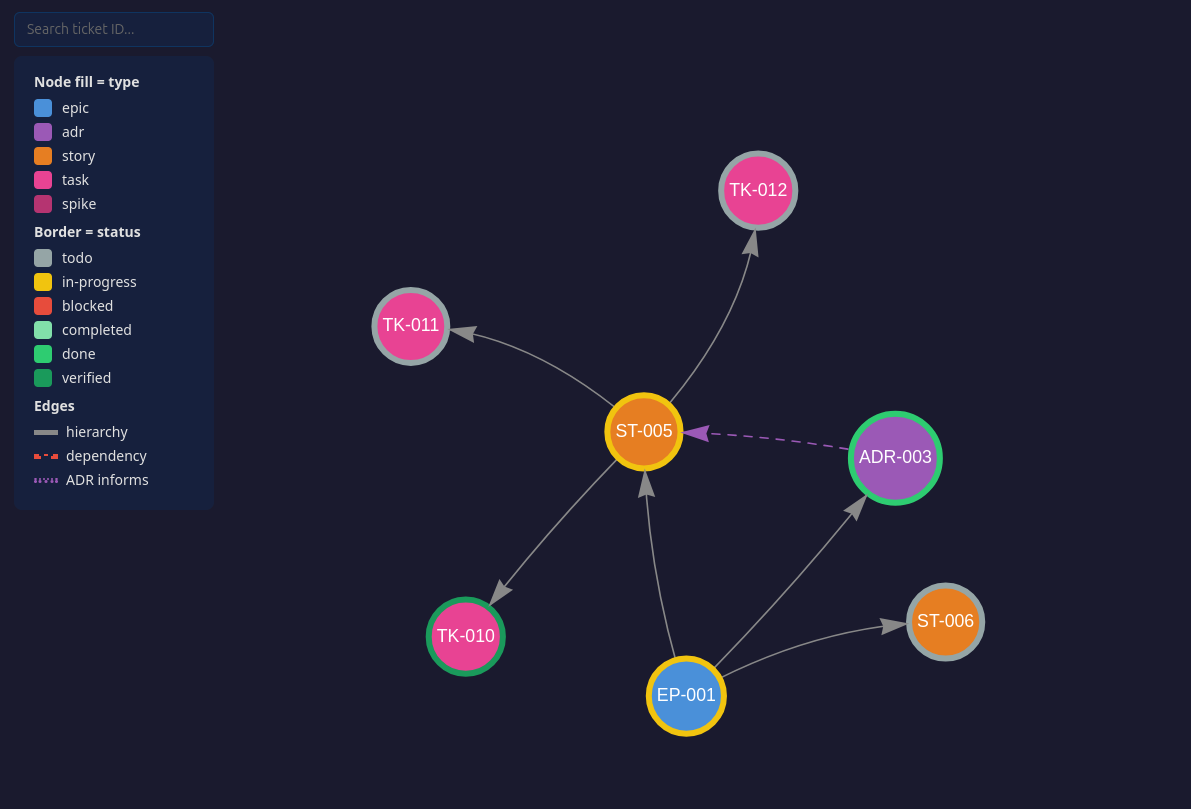
*Clone the repo and open [assets/demo-graph.html](assets/demo-graph.html) for the interactive version — click any node to see its full ticket.*
Since tickets are plain markdown with wikilinks, you can also open `primer/` as an [Obsidian](https://obsidian.md) vault for a live graph that updates as tickets change — no need to re-export.
## Tools
Your AI agent calls these tools automatically — you don't need to invoke them directly. You can also ask your agent to call a specific tool if you want more control.
### Setup
| Tool | What it does |
|------|-------------|
| `init_project` | Create the `primer/` ticket store and add the workflow section to CLAUDE.md |
### Planning
| Tool | What it does |
|------|-------------|
| `plan_epic` | Create an epic — the top-level container for a body of work |
| `record_adr` | Record an architecture decision: context, decision, rejected alternatives, consequences |
| `create_story` | Create a story under an epic — a deliverable with acceptance criteria |
| `create_task` | Create a task under a story — a concrete unit of work with a testable outcome |
| `create_spike` | Create a spike — a timeboxed investigation to answer a question |
### Execution
| Tool | What it does |
|------|-------------|
| `start_task` | Move a task to in-progress |
| `complete_task` | Mark a task completed with notes on what was done |
| `verify_task` | Verify a completed task with evidence (point at the commit) |
| `complete_spike` | Close a spike with findings |
### Query
| Tool | What it does |
|------|-------------|
| `list_actionable` | List what can be acted on right now, with epic context and recommendations |
| `get_ticket` | Read a ticket by ID with its full body |
| `list_tickets` | List tickets, filterable by type or status |
| `update_ticket` | Amend a ticket's status, dependencies, body sections, or external refs |
### Export
| Tool | What it does |
|------|-------------|
| `export_graph` | Generate a self-contained HTML file visualising the project as an interactive graph |
## Prompts
| Prompt | What it does |
|--------|-------------|
| `plan_story` | Walk through a planning conversation before creating a story |
| `export_jira` | Export primer-mcp tickets to Jira via a Jira MCP server |
| `import_jira` | Import a Jira epic and its hierarchy into primer-mcp |
## Agent instructions
When your project is initialized (automatically on first use, or via `init_project`), this section is appended to your agent config file (CLAUDE.md, AGENTS.md) to guide the agent. If you prefer to add it manually:
```markdown
## primer-mcp
This project uses primer-mcp for planning-first development.
Tickets are markdown files under `primer/` — they are yours to read and edit.
Prefer the tools for creating and updating them: they allocate IDs, follow the templates
and guide the workflow. Hand-edit where the tools fall short.
- Plan before code. Recommended flow: Epic -> ADR -> Story -> Task,
suggest rather than enforce — skip steps when it makes sense.
- Unsure what to do next? Call `list_actionable`.
- Completion is two-phase: `complete_task` with notes, then `verify_task`
with evidence (point at the commit, not the output). Both are
recommended — the tools will nudge you if you skip a step.
- After tickets creation or changes, offer to regenerate the project graph with `export_graph`.
- Before committing, check that completion notes on finished tickets
still reflect the actual work — update both the frontmatter
`completed_notes` and the `## Completion Notes` section if needed.
- Before implementing new work, propose a ticket and parent. Small fixes (1–2
tasks) go under the standing bug-fix story; larger efforts get their
own story. The user can decline.
```
## Graduating to Jira
primer-mcp tickets map directly to Jira concepts (Epic, Story, Task, ADR). When a project outgrows local markdown files, use the `export_jira` prompt with any Jira MCP server to push tickets to Jira. The `external_ref` field on each ticket tracks the Jira key, so re-exports update existing issues instead of creating duplicates. `import_jira` goes the other direction.
## This repo dogfoods itself
The `primer/` directory in this repo is the project's own backlog, created with the tools in `src/` and committed deliberately — a tool that tells you to commit your ticket store should commit its own. Browse it on GitHub to see what a real store looks like before installing:
- `primer/adrs/` — design decisions, including rejected alternatives and why
- `primer/stories/` and `primer/tasks/` — what is done, what is next, and verification evidence
**It is project management, not part of the package.** The wheel ships `src/primer_mcp` only, and `primer/` is excluded from the distribution. Your own `primer/` is created automatically when you start planning.
## License
MIT
Lo que la gente pregunta sobre primer-mcp
¿Qué es ivanlai/primer-mcp?
+
ivanlai/primer-mcp es mcp servers para el ecosistema de Claude AI. A Jira-lite MCP server that enforces planning-first workflows for AI-assisted development — tickets as markdown files, your AI agent as the interface. Tiene 0 estrellas en GitHub y su última actualización registrada es del 2026-08-18.
¿Cómo se instala primer-mcp?
+
Puedes instalar primer-mcp clonando el repositorio (https://github.com/ivanlai/primer-mcp) o siguiendo las instrucciones del README en GitHub. ClaudeWave también te ofrece bloques de instalación rápida en esta misma página.
¿Es seguro usar ivanlai/primer-mcp?
+
Nuestro agente de seguridad ha analizado ivanlai/primer-mcp y le ha asignado un Trust Score de 87/100 (tier: Trusted). Revisa el desglose completo de comprobaciones superadas y flags en esta página.
¿Quién mantiene ivanlai/primer-mcp?
+
ivanlai/primer-mcp es mantenido por ivanlai. La última actividad registrada en GitHub es del 2026-08-18, con 0 issues abiertos.
¿Hay alternativas a primer-mcp?
+
Sí. En ClaudeWave puedes explorar mcp servers similares en /categories/mcp, ordenados por popularidad o actividad reciente.
Despliega primer-mcp en tu cloud
Lleva este repo a producción en minutos. Cada plataforma genera su propio entorno con variables de entorno editables.
¿Mantienes este repo? Añade un badge a tu README
Pega el badge en tu README de GitHub para mostrar que está auditado por ClaudeWave. Cada badge enlaza de vuelta a esta página y muestra el Trust Score actual.
[](https://claudewave.com/repo/ivanlai-primer-mcp)<a href="https://claudewave.com/repo/ivanlai-primer-mcp"><img src="https://claudewave.com/api/badge/ivanlai-primer-mcp" alt="Featured on ClaudeWave: ivanlai/primer-mcp" width="320" height="64" /></a>Más MCP Servers

Fair-code workflow automation platform with native AI capabilities. Combine visual building with custom code, self-host or cloud, 400+ integrations.

User-friendly AI Interface (Supports Ollama, OpenAI API, ...)

An open-source AI agent that brings the power of Gemini directly into your terminal.

Real-time global intelligence dashboard. AI-powered news aggregation, geopolitical monitoring, and infrastructure tracking in a unified situational awareness interface

The fastest path to AI-powered full stack observability, even for lean teams.

🕷️ An adaptive Web Scraping framework that handles everything from a single request to a full-scale crawl!