

MCP server for desktop UI automation — screenshots, windows, mouse, keyboard, UI Automation, OCR
- ✓Actively maintained (<30d)
- ✓Clear description
- ✓Topics declared
- ✓Documented (README)
- !Licence file present but not machine-readable
git clone https://github.com/JeenyJAI/mcp-test-utils{
"mcpServers": {
"mcp-test-utils": {
"command": "node",
"args": ["/path/to/mcp-test-utils/dist/index.js"]
}
}
}Resumen de MCP Servers
# MCP Test Utils
[](https://github.com/JeenyJAI/mcp-test-utils/releases) [](#tools-21)
MCP server for automated desktop UI testing. A single binary — no runtime, no dependencies, no installation.
> **Windows x64 only.** macOS and Linux support is planned.
Gives AI agents eyes and hands: screenshots, window management, mouse, keyboard, UI Automation, OCR, file search.
## Why
AI agents can trigger actions in applications but can't see the screen. This server bridges that gap:
```
Agent triggers action → takes screenshot → sees the result →
switches window → clicks a button → verifies → writes report
```
Fully autonomous, no user involvement required.
## Demo
> **3.25.1** — a VS Code form filled, submitted and verified in a couple of minutes. [Watch on YouTube →](https://youtu.be/2md9g19WjUM)
[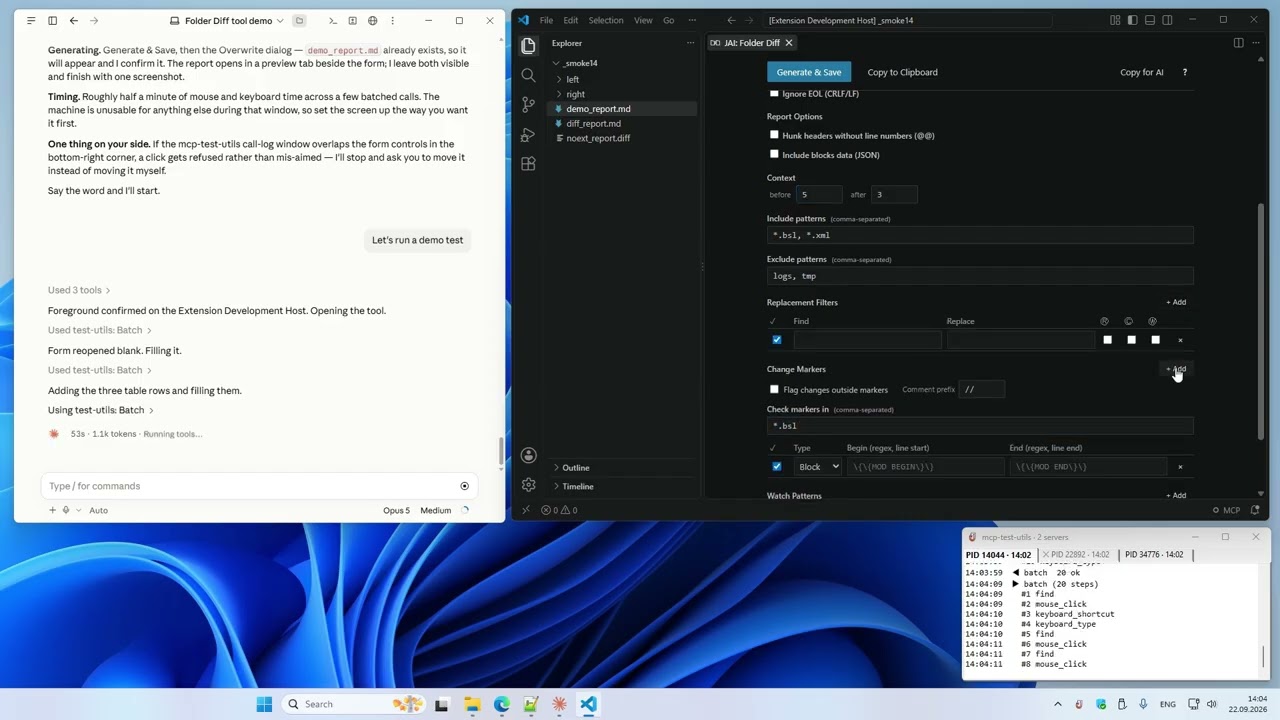](https://youtu.be/2md9g19WjUM)
> **3.10.1** — setup, configuration and the basic tools: 10 tasks in one take. [Watch on YouTube →](https://www.youtube.com/watch?v=kiICWA5zQTk)
## MCP Test Utils vs Anthropic Computer Use
Claude Cowork now includes built-in [Computer Use](https://claude.com/blog/dispatch-and-computer-use) — Claude takes screenshots and clicks through interfaces visually. It works with zero setup. MCP Test Utils takes a different approach: instead of guessing where to click from a screenshot, it reads the actual UI structure through Windows APIs.
| | MCP Test Utils | Computer Use |
|---|---|---|
| **Click precision** | Exact — UI Automation API | Visual estimate from screenshot |
| **Speed & token cost** | Fast, low cost — text responses | Slower, costly — image on every step |
| **UI structure** | Full tree: roles, states, coordinates | Not available |
| **OCR** | Word-level coordinates, multi-language | Not available (model vision only) |
| **Window management** | API-based, window-relative coords | Visual navigation |
| **File search** | Ripgrep engine built-in | Not available |
| **Session logging** | JSONL + screenshots, live log in the tray | Not available |
| **Verified clicks** | By element id, refused if covered | Visual estimate |
| **Waiting & batching** | `wait_for`, `batch` with `assert` | Not available |
| **Visual analysis** | ✅ Same Claude model, full-res 1:1 | ✅ Same Claude model |
| **Setup** | Download binary, add to config | Built-in, one toggle |
| **Mobile / Dispatch** | — | ✅ Tasks from phone |
| **Cross-platform** | Windows (macOS/Linux planned) | macOS + Windows |
MCP Test Utils is faster, more precise, and cheaper per action. Computer Use is easier to start and works across platforms. They complement each other.
## Platforms
| Platform | Status |
|---|---|
| Windows x64 | ✅ Full support |
| macOS arm64 | ⏳ Planned |
| Linux x64 | ⏳ Planned |
## Tools (21)
### Vision
| Tool | Description |
|---|---|
| `take_screenshot` | Screenshot of the entire desktop with configurable quality |
| `take_window_screenshot` | Screenshot of a specific window (screen or window capture mode) |
| `read_screen_text` | OCR the entire screen (Windows.Media.Ocr) |
| `read_region_text` | OCR a screen region with precise word coordinates |
### Window Management
| Tool | Description |
|---|---|
| `list_windows` | List windows with id, title, app, position, size, minimized, focused |
| `focus_window` | Bring a window to front, restore if minimized |
### Input
| Tool | Description |
|---|---|
| `mouse_click` | Click (left / right / middle) on a UI element by id, or at screen / window-relative coordinates |
| `mouse_move` | Move cursor to a point or to a UI element |
| `mouse_drag` | Drag from point A to point B |
| `mouse_scroll` | Scroll the mouse wheel |
| `keyboard_type` | Type text (full Unicode — Latin, Cyrillic, CJK, emoji) |
| `keyboard_press` | Press a key (Enter, Tab, F1–F12, arrows, etc.) |
| `keyboard_shortcut` | Key combinations (Ctrl+S, Alt+F4, Ctrl+Shift+P, etc.) |
### Structured UI Access
| Tool | Description |
|---|---|
| `list_ui_elements` | UI Automation tree — buttons, fields, menus with ids, values, states and exact coordinates; filters by name, value, class |
### Waiting and Batching
| Tool | Description |
|---|---|
| `wait_for` | Wait for a window, an element or its state instead of sleeping |
| `batch` | Run up to 20 tool calls in one request, with `find` and `assert` steps |
### File Search
| Tool | Description |
|---|---|
| `search_in_files` | Search text or regex in files within allowed directories (like VS Code Find in Files) |
| `find_files` | Find files and directories by name pattern (glob), like "Go to File" |
### Agent Guide
| Tool | Description |
|---|---|
| `get_usage_guide` | Compact workflow guide for LLM agents — precision clicking, coordinate metadata, quality tips |
### Session Logging
| Tool | Description |
|---|---|
| `enable_logging` | Start recording tool calls to JSONL + screenshots (opt-in) |
| `disable_logging` | Stop recording, get session stats |
## Installation
1. Download the binary from [Releases](https://github.com/JeenyJAI/mcp-test-utils/releases).
2. Add it to your MCP client config. Example below is for Claude Desktop — for other clients, refer to their documentation.
**Claude Desktop:** `%APPDATA%\Claude\claude_desktop_config.json`
```json
{
"mcpServers": {
"test-utils": {
"command": "D:\\path\\to\\mcp-test-utils.exe"
}
}
}
```
3. Restart Claude Desktop.
4. In chat, try: _"Take a screenshot"_ — the agent will return an image of your desktop.
### With Logging and File Search (optional)
```json
{
"mcpServers": {
"test-utils": {
"command": "D:\\path\\to\\mcp-test-utils.exe",
"env": {
"MCP_LOG_DIR": "D:\\path\\to\\logs",
"MCP_LOG_MAX_MB": "500",
"MCP_LOG_RETAIN_DAYS": "30",
"MCP_SEARCH_DIRS": "D:\\Projects\\app1;D:\\Projects\\app2"
}
}
}
}
```
## Quality Presets
Screenshots support configurable quality to balance detail and token cost:
| Preset | Scale | Format | Use Case |
|---|---|---|---|
| `full` | 100% | JPEG q90 | Maximum detail |
| `standard` | 50% | JPEG q70 | Balanced (default) |
| `compact` | 50% | PNG | When PNG is needed |
| `minimal` | 25% | Grayscale | Lowest token cost |
| `custom` | 10–100% | JPEG / PNG / Grayscale | Full control |
## Environment Variables
| Variable | Description | Default |
|---|---|---|
| `MCP_LOG_DIR` | Path for log sessions. Without it, logging tools are hidden | — |
| `MCP_LOG_MAX_MB` | Session size limit (warning on exceed) | `500` |
| `MCP_LOG_RETAIN_DAYS` | Auto-delete sessions older than N days. `0` to disable | `30` |
| `MCP_SEARCH_DIRS` | Allowed directories for `search_in_files` (`;` on Windows, `:` on macOS/Linux). Without it, the tool is hidden | — |
| `MCP_NOTIFY` | `off` hides the tray icon and the live call log window | — |
## Tray Log
The server shows a tray icon with a live log of tool calls — one tab per session, errors in red. `MCP_NOTIFY=off` hides it; the window position is kept in `%LOCALAPPDATA%\mcp-test-utils\notify.json`.
## How It Works
MCP Test Utils is a JSON-RPC 2.0 server communicating over stdin/stdout. Any MCP-compatible client launches the binary, sends tool calls, and receives structured responses (text, base64 images). Tested with Claude Desktop.
The server uses native Windows APIs directly — Win32 GDI for screenshots, `SendInput` for mouse and keyboard, UI Automation COM API for element inspection, WinRT `Windows.Media.Ocr` for text recognition. File search uses the ripgrep engine (`grep-regex`, `grep-searcher`, `ignore`) — cross-platform, no external dependencies. No PowerShell, no external tools, no network access.
## Use Cases
- **Automated QA** — agent navigates the app, clicks through flows, takes screenshots at each step, writes a test report
- **Desktop automation** — fill forms, copy data between windows, run workflows
- **Accessibility audit** — scan UI Automation tree for missing labels or roles
- **Visual regression** — screenshot comparison across releases
- **Data extraction** — OCR text from applications that don't expose APIs
- **Code search** — find patterns across multiple projects without leaving the agent session
## Security
- Responds only to requests from the MCP client
- Opens no network ports
- Writes nothing to disk except opt-in logging and the tray window settings (`%LOCALAPPDATA%\mcp-test-utils\notify.json`)
- Sends no data externally
- **Screenshots capture the entire screen** — make sure no sensitive information is visible
- **File search is sandboxed** — only directories in `MCP_SEARCH_DIRS` are accessible
## Support us
Free and unrestricted. If you find it useful — [jeenyjai.github.io](https://jeenyjai.github.io/)
## License
Copyright 2026 JeenyJAI. All rights reserved.
<!-- mcp-name: io.github.JeenyJAI/mcp-test-utils -->
---
🚀 Created with [Claude](https://claude.ai)
Lo que la gente pregunta sobre mcp-test-utils
¿Qué es JeenyJAI/mcp-test-utils?
+
JeenyJAI/mcp-test-utils es mcp servers para el ecosistema de Claude AI. MCP server for desktop UI automation — screenshots, windows, mouse, keyboard, UI Automation, OCR Tiene 0 estrellas en GitHub y su última actualización registrada es del 2026-09-22.
¿Cómo se instala mcp-test-utils?
+
Puedes instalar mcp-test-utils clonando el repositorio (https://github.com/JeenyJAI/mcp-test-utils) o siguiendo las instrucciones del README en GitHub. ClaudeWave también te ofrece bloques de instalación rápida en esta misma página.
¿Es seguro usar JeenyJAI/mcp-test-utils?
+
Nuestro agente de seguridad ha analizado JeenyJAI/mcp-test-utils y le ha asignado un Trust Score de 80/100 (tier: Trusted). Revisa el desglose completo de comprobaciones superadas y flags en esta página.
¿Quién mantiene JeenyJAI/mcp-test-utils?
+
JeenyJAI/mcp-test-utils es mantenido por JeenyJAI. La última actividad registrada en GitHub es del 2026-09-22, con 0 issues abiertos.
¿Hay alternativas a mcp-test-utils?
+
Sí. En ClaudeWave puedes explorar mcp servers similares en /categories/mcp, ordenados por popularidad o actividad reciente.
Despliega mcp-test-utils en tu cloud
Lleva este repo a producción en minutos. Cada plataforma genera su propio entorno con variables de entorno editables.
¿Mantienes este repo? Añade un badge a tu README
Pega el badge en tu README de GitHub para mostrar que está auditado por ClaudeWave. Cada badge enlaza de vuelta a esta página y muestra el Trust Score actual.
[](https://claudewave.com/repo/jeenyjai-mcp-test-utils)<a href="https://claudewave.com/repo/jeenyjai-mcp-test-utils"><img src="https://claudewave.com/api/badge/jeenyjai-mcp-test-utils" alt="Featured on ClaudeWave: JeenyJAI/mcp-test-utils" width="320" height="64" /></a>Más MCP Servers

Fair-code workflow automation platform with native AI capabilities. Combine visual building with custom code, self-host or cloud, 400+ integrations.

User-friendly AI Interface (Supports Ollama, OpenAI API, ...)

An open-source AI agent that brings the power of Gemini directly into your terminal.

Real-time global intelligence dashboard. AI-powered news aggregation, geopolitical monitoring, and infrastructure tracking in a unified situational awareness interface

🕷️ An adaptive Web Scraping framework that handles everything from a single request to a full-scale crawl! Don't be shy, join here: https://discord.gg/EMgGbDceNQ and follow here for daily tips and tricks: https://x.com/Scrapling_dev

The fastest path to AI-powered full stack observability, even for lean teams.