

A brain for your mail: MailFathom turns IMAP mailboxes into a self-hosted, AI-native service. Mail synchronizes into your own PostgreSQL, is indexed for search and retrieval, and is served to AI agents over the Model Context Protocol. Semantic retrieval, answering, and gated write tools. .NET 10, Apache-2.0.
- ✓Open-source license (Apache-2.0)
- ✓Actively maintained (<30d)
- ✓Clear description
- ✓Topics declared
- ✓Documented (README)
git clone https://github.com/Krzysztof318/MailFathomResumen de MCP Servers
<img src="https://raw.githubusercontent.com/Krzysztof318/MailFathom/main/assets/icon-900.png" alt="MailFathom logo" width="120"> # MailFathom [](https://github.com/Krzysztof318/MailFathom) [](https://github.com/Krzysztof318/MailFathom/blob/main/LICENSE) [](https://github.com/Krzysztof318/MailFathom/actions/workflows/release.yml) [](https://github.com/Krzysztof318/MailFathom/releases/latest) [](https://github.com/Krzysztof318/MailFathom/actions/workflows/nightly.yml) [](https://github.com/Krzysztof318/MailFathom/actions/workflows/ci.yml?query=branch%3Amain+event%3Apush) [](https://krzysztof318.github.io/MailFathom/) **A brain for your mail — self-hosted, AI-native, and yours alone.** MailFathom synchronizes your IMAP accounts into a PostgreSQL database you run, indexes that copy, and serves it to AI agents as tools over the [Model Context Protocol](https://modelcontextprotocol.io/). Reading answers from your copy rather than from a mail server, and it never marks anything read there. Writing — marking, drafting, sending — is a separate act each account and each credential has to be given, and every one of them is off until you turn it on. 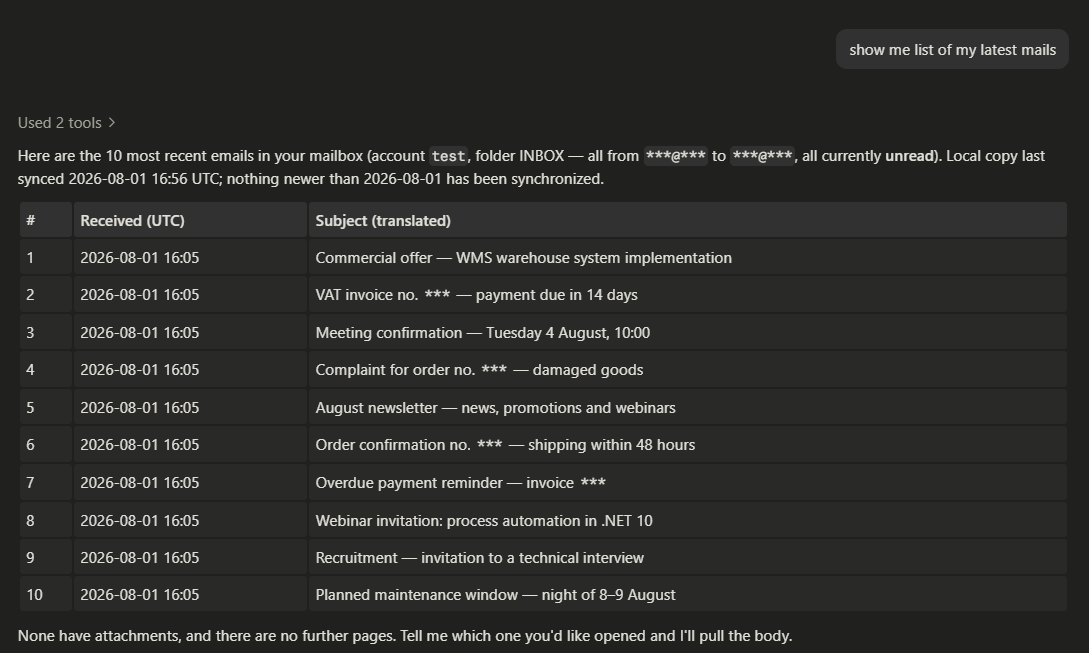 *One question, answered from the local copy in an ordinary chat client. The `***` in these screenshots were blacked out by hand before the files entered a public repository — until you turn `SensitiveContent` on, MailFathom redacts nothing on its way to a client.* ## Install **Docker Compose is the recommended first installation.** It is the only shape that provisions PostgreSQL for you, and its defaults publish both ports on loopback, so nothing is reachable from another machine until you decide it should be. ```bash git clone https://github.com/Krzysztof318/MailFathom.git cd MailFathom scripts/quick-start-compose.sh ``` That third line is the quick way to *try* it, not the way to run it: [the script](https://github.com/Krzysztof318/MailFathom/blob/main/scripts/quick-start-compose.sh) asks where your mailbox lives, generates the credentials, writes the configuration, starts the stack, offers the schema step, and hands you the address a chat client connects to — and what it prepares serves that one machine over plain HTTP, keeps its credentials in files under the checkout, and backs nothing up. It prints that list when it finishes. [Installing MailFathom](https://krzysztof318.github.io/MailFathom/users/installation.html) is the real thing: what every shape needs, and the guide for Compose, [Podman Quadlet](https://krzysztof318.github.io/MailFathom/operations/deployment-quadlet.html), Kubernetes, or a native systemd process. [Getting started](https://krzysztof318.github.io/MailFathom/users/getting-started.html) then walks from an installed instance to a first successful tool call. To evaluate from the checkout instead, the local Aspire orchestration provisions PostgreSQL and applies the schema on its own — [local development](https://krzysztof318.github.io/MailFathom/operations/local-development.html#running-locally-with-aspire) has that path. ## Start here | You are | Start at | | --- | --- | | Deciding whether MailFathom is for you | [What it does well](https://github.com/Krzysztof318/MailFathom#what-it-does-well) below, then [the user guide](https://krzysztof318.github.io/MailFathom/users/README.html) | | Installing or operating it | [Installing MailFathom](https://krzysztof318.github.io/MailFathom/users/installation.html), then [getting started](https://krzysztof318.github.io/MailFathom/users/getting-started.html) | | Connecting an agent to a running instance | [Using the tools](https://krzysztof318.github.io/MailFathom/users/usage.html) | | Reading any of that with an AI assistant beside you | [Hand it the documentation](https://github.com/Krzysztof318/MailFathom#hand-the-documentation-to-your-agent) below | | Contributing | [CONTRIBUTING.md](https://github.com/Krzysztof318/MailFathom/blob/main/CONTRIBUTING.md) | ### Hand the documentation to your agent If an AI assistant is helping you install, configure, or use MailFathom, give it the documentation rather than a search over the site. One line is the whole of it: ```text Read https://krzysztof318.github.io/MailFathom/llms.txt and follow it to the pages that answer my question. ``` That address is the current release's map: every published page, what it answers, and a link to its source, so the agent fetches the one page that owns your question instead of fragments of several. MailFathom also resolves in [Context7](https://context7.com/krzysztof318/mailfathom) as `/krzysztof318/mailfathom`, which mirrors the default branch rather than a release. → [Handing this guide to your own agent](https://krzysztof318.github.io/MailFathom/users/README.html#handing-this-guide-to-your-own-agent) ## What an agent gets Twenty-one tools, and they are the whole surface. | | | | --- | --- | | **Reading your mail** | `list_accounts`, `list_emails`, `search_emails` — ranked lexically, and by embedding similarity once you configure a model — `get_email_content` for up to ten messages in full, and `ask_mail`, which answers a question from your mail and cites every message it drew on | | **Marking it** | `set_mail_flags` marks a message read or unread, stars it, and writes the keywords your client shows as tags | | **Sending** | `send_email` sends one message; `reply_to_email` and `forward_email` answer one you already hold, deriving the addressing, subject, threading, quotation, and attachments from your stored copy; `get_outgoing_email` and `cancel_outgoing_email` report what became of a send and stop one that has not left | | **Drafting** | `save_draft`, `update_draft`, and `delete_draft` write a message into your own Drafts folder and send nothing at all; `send_draft` is what sends one | | **Contacts** | Six tools over MailFathom's own book of people — not addresses — which lives in your database rather than at your mail provider | Two properties hold everywhere, and much of the design follows from them: - **Reading is local.** A read answers from your copy and never contacts a mail server, so it is fast, it works while the server is down, and it changes nothing remotely. Every result states how fresh the local copy is. - **Nothing writes unless you asked for it.** Retrieval cannot set the remote `\Seen` flag at all. What can change your mailbox is what you configured — a mail rule, a spam action — or a tool a credential was explicitly granted. Sending is stricter again: it is off on every account, refused outright while the deployment is read-only, and bounded by a recipient policy and a per-period ceiling you set. No send is performed while the caller waits. Each is written down, answered with a record identity, and offered by a delivery pass that survives a crash — so a message MailFathom says it queued is one it will actually try to deliver, and the seconds before it leaves are the only window in which it can be withdrawn. Nothing a client sends decides who a message is from. 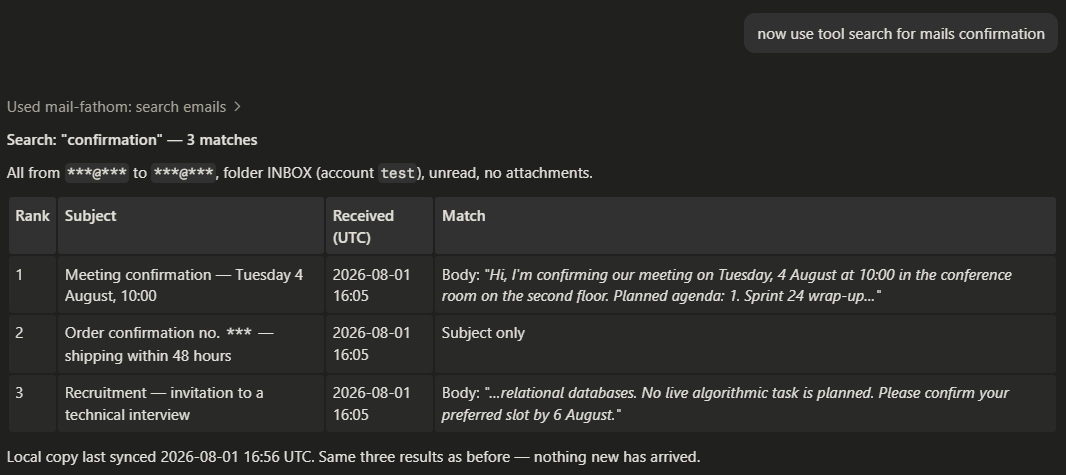 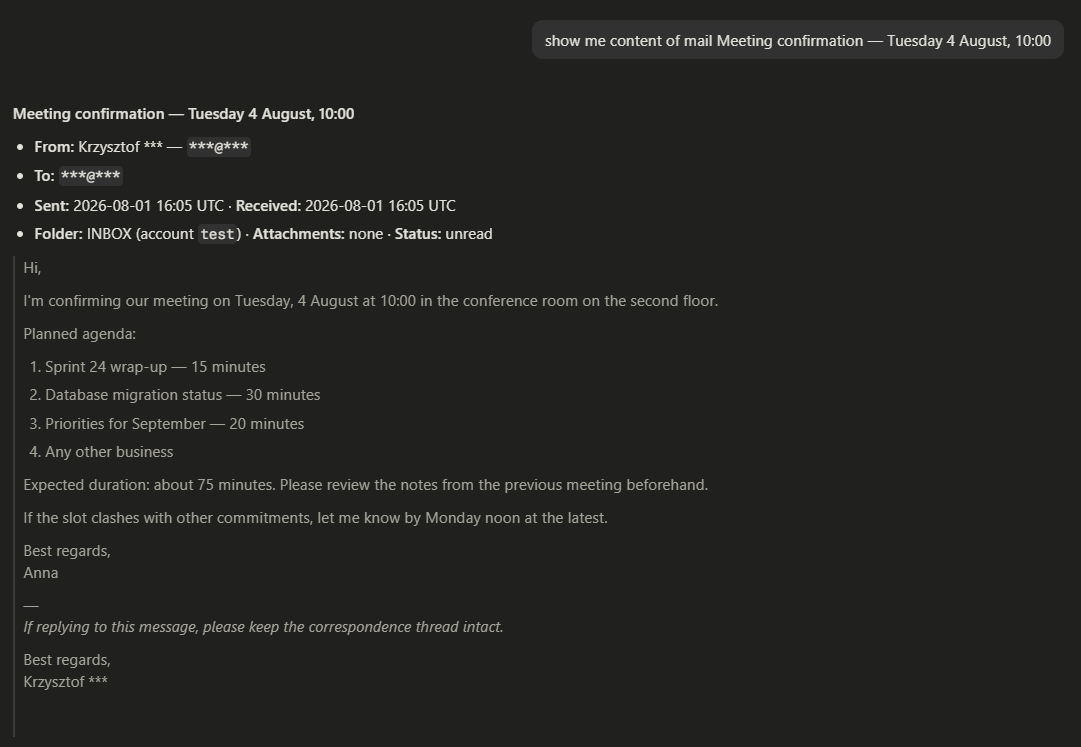 Beside what a tool returns, MailFathom records what it can establish about each message: who authenticated its sender and whether you recognize that author, how much its text reads as machine written, and the conversation it belongs to. [What each tool answers, refuses, and never repeats back](https://krzysztof318.github.io/MailFathom/features/mcp-tools.html) is the contract. ## Project status `0.7.0` is the current release, and it is the first one that **sends mail**. Before it, everything an agent could reach read your local copy; from here it can compose a message, answer one you already hold, forward one on, leave a draft for you, and mark or label mail on your server. **Upgrading from `0.6.0`** takes a configuration edit and a database migration you apply. The important one: a credential entry that names no permissions holds everything its surface publishes, so on upgrade it gains the ability to send from your mailboxes — write the grant you mean on every entry. [The changelog](https://krzysztof318.github.io/MailFathom/CHANGELOG.html) states each break against the surface it breaks, and what to do about it; the schema step applies while `0.6.0` is still serving. Nightly images are built from `main` and published beside the releases. A nightly is not a release: its schema can be ahead of any published migration, it has no upgrade path in either direction, and it is deleted once newer ones accumulate. [What a nightly build risks](https://krzysztof318.github.io/MailFathom/operations/container-image.html#what-a-nightly-build-risks) states the whole of it. ### Where the art
Lo que la gente pregunta sobre MailFathom
¿Qué es Krzysztof318/MailFathom?
+
Krzysztof318/MailFathom es mcp servers para el ecosistema de Claude AI. A brain for your mail: MailFathom turns IMAP mailboxes into a self-hosted, AI-native service. Mail synchronizes into your own PostgreSQL, is indexed for search and retrieval, and is served to AI agents over the Model Context Protocol. Semantic retrieval, answering, and gated write tools. .NET 10, Apache-2.0. Tiene 11 estrellas en GitHub y su última actualización registrada es del 2026-08-21.
¿Cómo se instala MailFathom?
+
Puedes instalar MailFathom clonando el repositorio (https://github.com/Krzysztof318/MailFathom) o siguiendo las instrucciones del README en GitHub. ClaudeWave también te ofrece bloques de instalación rápida en esta misma página.
¿Es seguro usar Krzysztof318/MailFathom?
+
Nuestro agente de seguridad ha analizado Krzysztof318/MailFathom y le ha asignado un Trust Score de 95/100 (tier: Verified). Revisa el desglose completo de comprobaciones superadas y flags en esta página.
¿Quién mantiene Krzysztof318/MailFathom?
+
Krzysztof318/MailFathom es mantenido por Krzysztof318. La última actividad registrada en GitHub es del 2026-08-21, con 100 issues abiertos.
¿Hay alternativas a MailFathom?
+
Sí. En ClaudeWave puedes explorar mcp servers similares en /categories/mcp, ordenados por popularidad o actividad reciente.
Despliega MailFathom en tu cloud
Lleva este repo a producción en minutos. Cada plataforma genera su propio entorno con variables de entorno editables.
¿Mantienes este repo? Añade un badge a tu README
Pega el badge en tu README de GitHub para mostrar que está auditado por ClaudeWave. Cada badge enlaza de vuelta a esta página y muestra el Trust Score actual.
[](https://claudewave.com/repo/krzysztof318-mailfathom)<a href="https://claudewave.com/repo/krzysztof318-mailfathom"><img src="https://claudewave.com/api/badge/krzysztof318-mailfathom" alt="Featured on ClaudeWave: Krzysztof318/MailFathom" width="320" height="64" /></a>Más MCP Servers

Fair-code workflow automation platform with native AI capabilities. Combine visual building with custom code, self-host or cloud, 400+ integrations.

User-friendly AI Interface (Supports Ollama, OpenAI API, ...)

An open-source AI agent that brings the power of Gemini directly into your terminal.

Real-time global intelligence dashboard. AI-powered news aggregation, geopolitical monitoring, and infrastructure tracking in a unified situational awareness interface

The fastest path to AI-powered full stack observability, even for lean teams.

🕷️ An adaptive Web Scraping framework that handles everything from a single request to a full-scale crawl!