

Skim a video
- ✓Open-source license (MIT)
- ✓Actively maintained (<30d)
- ✓Topics declared
- ✓Documented (README)
claude mcp add boson-video -- uvx boson-video{
"mcpServers": {
"boson-video": {
"command": "uvx",
"args": ["boson-video"]
}
}
}Resumen de MCP Servers
# Boson-Video
**Get the point of any video without watching all of it.** Paste a YouTube link or drop a video
file. Every line of the summary, the transcript and the screen text carries the second it came
from, and questions are answered from the video and checked against it.
<!-- mcp-name: io.github.linboxin/boson-video -->
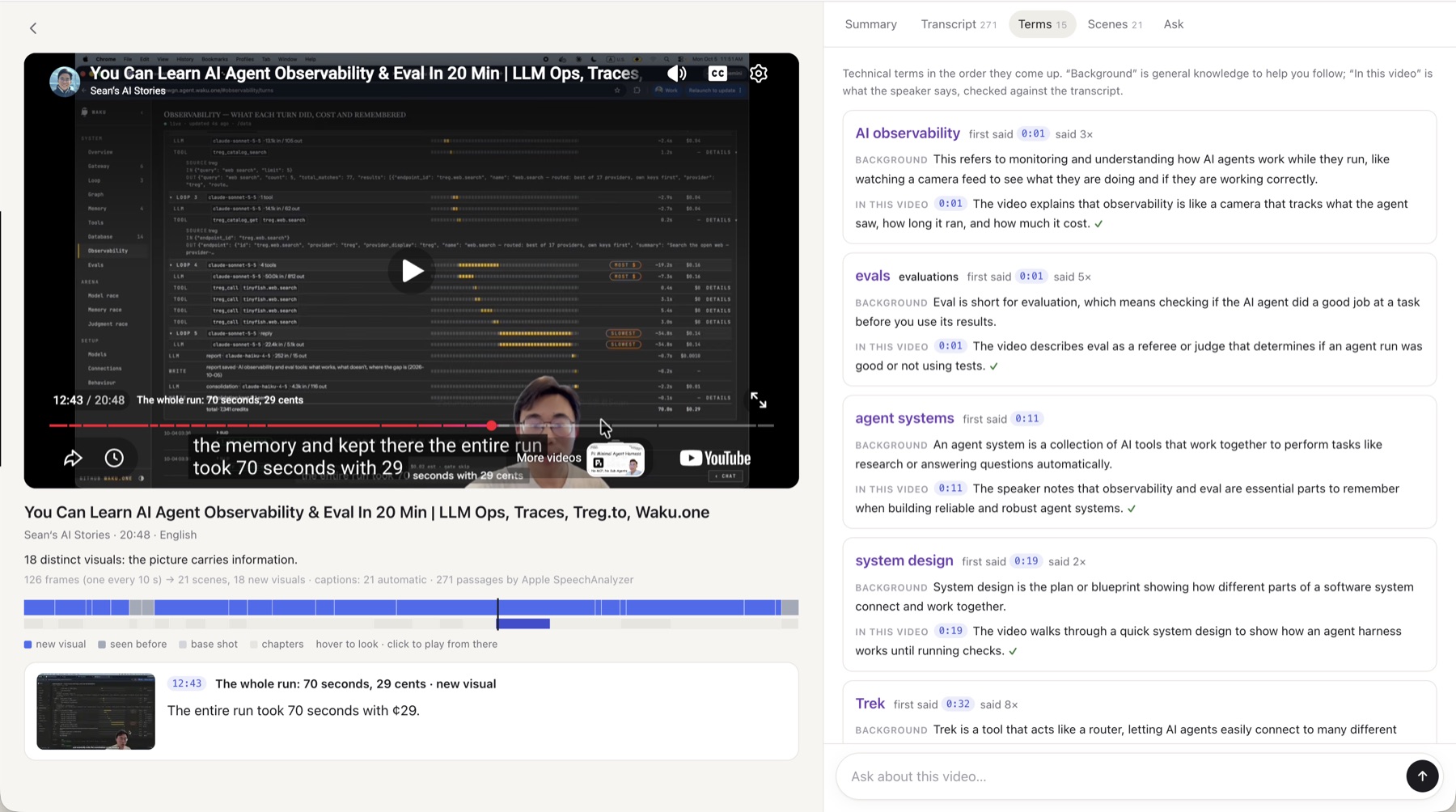
- **The ribbon:** the whole video on one strip (scenes, chapters, most replayed). Hover to see any second's frame and words.
- **Summary:** sections with their frames; every sentence timed and checked (✓ ? ✗).
- **Transcript:** the original with English beneath, technical terms explained, on-screen text read in.
- **Ask:** answers that cite their moments and show the frames, with background kept apart.
- **Your own AI:** the same document as an MCP plugin for Claude, Cursor, Codex and more.
Built for long talks, lectures and finance videos in a language you half know (Chinese and English today).
## In your own AI
One line, nothing else to install ([uv](https://docs.astral.sh/uv/) runs it):
```bash
claude mcp add boson-video -- uvx boson-video mcp
```
Claude Desktop (`claude_desktop_config.json`) or Cursor (`.cursor/mcp.json`):
```json
{ "mcpServers": { "boson-video": { "command": "uvx", "args": ["boson-video", "mcp"] } } }
```
Codex (`~/.codex/config.toml`):
```toml
[mcp_servers.boson-video]
command = "uvx"
args = ["boson-video", "mcp"]
```
Then ask your AI about any YouTube link. It opens the video, reads the transcript, looks at the
frames that matter at full resolution, searches, and checks its claims, citing every moment. No
keys needed. Everything runs on your computer. Details: [docs/plugin.md](https://github.com/linboxin/Boson-Video/blob/main/docs/plugin.md).
## Run the page
```bash
uvx boson-video web # http://127.0.0.1:8770; the first run prints your invite code
```
Keys make it fuller: `INCEPTION_API_KEY` (Mercury writes the summary, the English and the terms)
and `TYPESAFE_API_KEY` (Jev checks every sentence and answers questions). Without them you still get
the scenes, the transcript and search.
## Tested videos
Measured, one run each unless a range is shown. Mac: M5 MacBook with Apple's transcriber. Windows: a 12-thread laptop with
SenseVoice or Parakeet on the CPU. Full tables: [docs/measured.md](https://github.com/linboxin/Boson-Video/blob/main/docs/measured.md).
| Video | Length | Scene map | Words | Transcript errors¹ | Screen text | Summary ✓ |
| --- | --- | --- | --- | --- | --- | --- |
| Money or Life 美股频道, Meta and AI (zh, talking head) | 24:53 | 1.3 s | 13.8 s (Mac) | no human captions | — | 13 / 13 |
| Money or Life 美股频道, AI drug discovery (zh, slides) | 28:24 | 1.1 s | 18.5 s (Mac) | not scored | 36 moments read | 15 / 16 |
| 程序员老王, LLM abliteration (zh, animated diagrams) | 11:35 | — | 10.0 s (Windows) | not scored | 88 moments; subtitles apart at 85 | 21–22 / 22–23 (several runs) |
| 陳永儀, TEDxTaipei (zh, talk) | 14:29 | — | 7.1 s (Mac) | 5.3% chars (Mac), 4.8% (SenseVoice) | — | 14 / 14 |
| Ken Robinson, TED (en, talk) | 20:06 | — | 9.9 s (Mac) | 10.0% words (Mac), 10.5% (Parakeet) | — | 22 / 25 |
| Sean's AI Stories, agent observability (en, screen recording) | 20:48 | 1.5 s | 13.2 s (Mac) | not scored | none: YouTube refused full resolution | 23 / 26 |
| Andrej Karpathy, Intro to LLMs (en, slides) | 59:48 | 1.6 s | 30.5 s (Mac) | only automatic captions | 19 of 20 slides right | 22 / 23 |
| Rick Astley, Never Gonna Give You Up (fast cuts) | 3:33 | 0.7 s | — | — | — | — |
¹ Against human captions (`scripts/accuracy.py`); about half the English errors are filler words the captions leave out.
Summary ✓: sentences confirmed against what was said (Jev and code).
## Command line
```bash
uvx boson-video <link | id | file> # build a video: scenes, words, screen text, summary
uvx boson-video ask <video> "question" # the moment that answers it
uvx boson-video models # fetch the local speech models now instead of on first use
```
From a clone: `uv sync`, then `uv run boson-video …`; `uv run pytest` runs the tests (offline).
## More
- [docs/workflow.md](https://github.com/linboxin/Boson-Video/blob/main/docs/workflow.md): how the workflow is designed: stages, the document, the ways in
- [docs/how-it-works.md](https://github.com/linboxin/Boson-Video/blob/main/docs/how-it-works.md): the pipeline, what YouTube allows, limits
- [docs/DIRECTION.md](https://github.com/linboxin/Boson-Video/blob/main/docs/DIRECTION.md): what we're building, milestones, decisions
- [docs/timeline-format.md](https://github.com/linboxin/Boson-Video/blob/main/docs/timeline-format.md): the document format, for other tools
- [AGENTS.md](https://github.com/linboxin/Boson-Video/blob/main/AGENTS.md): the guide for coding agents
MIT licensed. YouTube's terms don't allow automated access for products, so everything that touches
YouTube runs on your own computer.
Lo que la gente pregunta sobre Boson-Video
¿Qué es linboxin/Boson-Video?
+
linboxin/Boson-Video es mcp servers para el ecosistema de Claude AI. Skim a video Tiene 1 estrellas en GitHub y su última actualización registrada es del 2026-10-08.
¿Cómo se instala Boson-Video?
+
Puedes instalar Boson-Video clonando el repositorio (https://github.com/linboxin/Boson-Video) o siguiendo las instrucciones del README en GitHub. ClaudeWave también te ofrece bloques de instalación rápida en esta misma página.
¿Es seguro usar linboxin/Boson-Video?
+
Nuestro agente de seguridad ha analizado linboxin/Boson-Video y le ha asignado un Trust Score de 90/100 (tier: Verified). Revisa el desglose completo de comprobaciones superadas y flags en esta página.
¿Quién mantiene linboxin/Boson-Video?
+
linboxin/Boson-Video es mantenido por linboxin. La última actividad registrada en GitHub es del 2026-10-08, con 0 issues abiertos.
¿Hay alternativas a Boson-Video?
+
Sí. En ClaudeWave puedes explorar mcp servers similares en /categories/mcp, ordenados por popularidad o actividad reciente.
Despliega Boson-Video en tu cloud
Lleva este repo a producción en minutos. Cada plataforma genera su propio entorno con variables de entorno editables.
¿Mantienes este repo? Añade un badge a tu README
Pega el badge en tu README de GitHub para mostrar que está auditado por ClaudeWave. Cada badge enlaza de vuelta a esta página y muestra el Trust Score actual.
[](https://claudewave.com/repo/linboxin-boson-video)<a href="https://claudewave.com/repo/linboxin-boson-video"><img src="https://claudewave.com/api/badge/linboxin-boson-video" alt="Featured on ClaudeWave: linboxin/Boson-Video" width="320" height="64" /></a>Más MCP Servers

Fair-code workflow automation platform with native AI capabilities. Combine visual building with custom code, self-host or cloud, 400+ integrations.

User-friendly AI Interface (Supports Ollama, OpenAI API, ...)

An open-source AI agent that brings the power of Gemini directly into your terminal.

Real-time global intelligence dashboard. AI-powered news aggregation, geopolitical monitoring, and infrastructure tracking in a unified situational awareness interface

🕷️ An adaptive Web Scraping framework that handles everything from a single request to a full-scale crawl! Don't be shy, join here: https://discord.gg/EMgGbDceNQ and follow here for daily tips and tricks: https://x.com/Scrapling_dev

The fastest path to AI-powered full stack observability, even for lean teams.