

MCP server exposing PlantCV as a measurement instrument — plant traits plus the segmentation overlay they were measured from
claude mcp add plantcv-mcp -- python -m plantcv-mcp{
"mcpServers": {
"plantcv-mcp": {
"command": "python",
"args": ["-m", "plantcv-mcp"]
}
}
}Resumen de MCP Servers
# plantcv-mcp
**Plant phenotyping over MCP — traits, plus the segmentation overlay they were measured from.**
[](https://github.com/musharna/plantcv-mcp/actions/workflows/ci.yml)
[](https://pypi.org/project/plantcv-mcp/)
[](https://pypi.org/project/plantcv-mcp/)

<!-- mcp-name: io.github.musharna/plantcv-mcp -->
[PlantCV](https://plantcv.org) as an MCP **measurement instrument**: it returns plant trait
numbers **and the picture they were computed from**, and refuses to return numbers when the
segmentation is degenerate.
> Unofficial. Not affiliated with, endorsed by, or sponsored by the Donald
> Danforth Plant Science Center or the PlantCV maintainers. See [NOTICE](https://github.com/musharna/plantcv-mcp/blob/master/NOTICE).
## Why you are handed the overlay
Red marks the pixels that were measured. Both images below come from the same file and the
same threshold method — the only difference is one parameter.
| ✅ `channel="a", object_type="dark"` | ❌ `channel="s", object_type="dark"` |
| ---------------------------------------------------------------------------------------------------------------------- | ------------------------------------------------------------------------------------------------------------------------ |
| 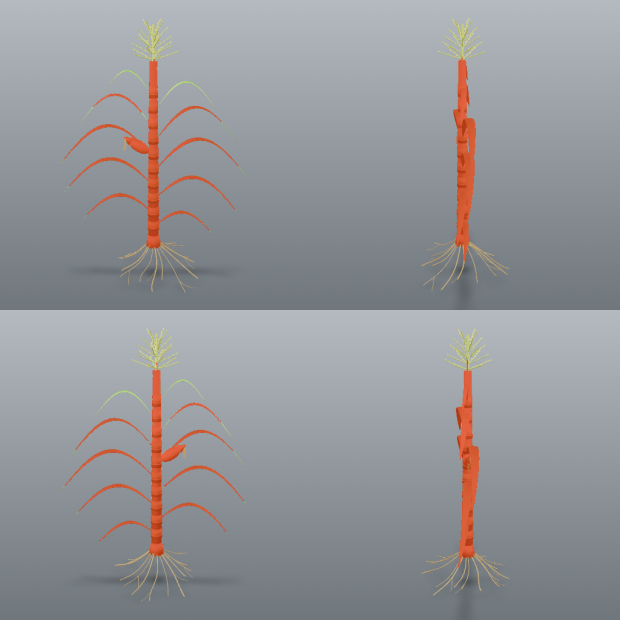 | 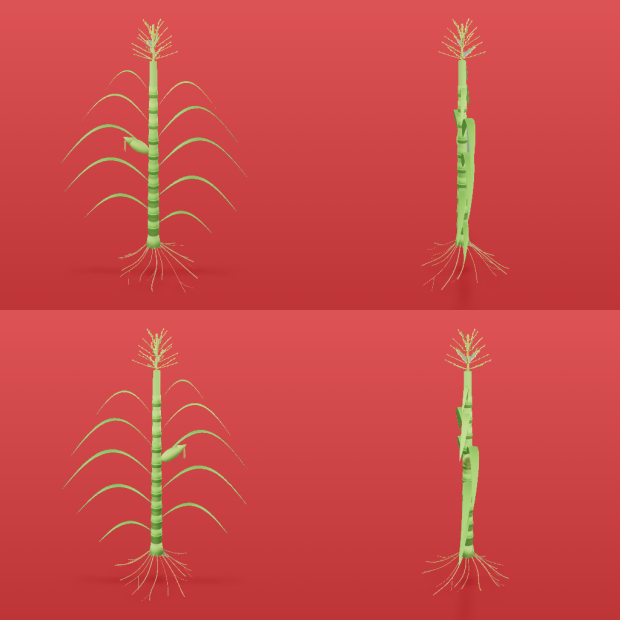 |
| Mask covers **3.1%** of the frame, 9 components. `area=32427` | Mask covers **96.1%** — it is the **background**. `area=1007829` |
The failure on the right is what this server exists to prevent. Without the picture, both
runs return seventeen traits with correct units and entirely believable magnitudes. The one
on the right is measuring the wall behind the plants.
`segment()` returns the overlay and diagnostics but **no traits**. `measure()` requires the
`session_id` that `segment()` mints. You cannot get a number without first being handed the
image it came from.
That is not a style preference. Measured on real images with PlantCV 4.11.3:
| failure | what you get without the overlay |
| --------------------------------- | ----------------------------------------------------------- |
| four-view render, whole-image ROI | 17 plausible traits describing four merged plants |
| plant clipped by the frame | size traits that are silently lower bounds |
| empty mask | 17 traits of zeros, with PlantCV reporting `in_bounds=True` |
All three produce correctly-united, entirely believable numbers.
## Install
```bash
pip install plantcv-mcp
```
Or from the repository, to track unreleased changes:
```bash
uv add git+https://github.com/musharna/plantcv-mcp
```
Or from a local checkout:
```bash
uv add /path/to/plantcv-mcp
```
Requires Python 3.11+. Installing pulls PlantCV and its scientific stack
(scikit-image, dask, scipy), so the first install is not fast.
## Configure your MCP client
The server speaks stdio. The console script installed by the package is
`plantcv-mcp`.
**Claude Code**
```bash
claude mcp add plantcv -- plantcv-mcp
```
**Claude Desktop** — add to `claude_desktop_config.json`:
```json
{
"mcpServers": {
"plantcv": {
"command": "plantcv-mcp"
}
}
}
```
If the executable is not on your `PATH` (common when it lives in a project
virtualenv), give the absolute path to it, or invoke it through uv:
```json
{
"mcpServers": {
"plantcv": {
"command": "uv",
"args": ["run", "--directory", "/path/to/plantcv-mcp", "plantcv-mcp"]
}
}
}
```
Verify it is wired up by calling `list_methods()`, which reports the channels,
the methods, and the pinned PlantCV version.
## Tools
| tool | returns |
| ----------------------------------------------------------------------- | ------------------------------------------------------- |
| `suggest_segmentation(image_path, channel, method)` | contact sheets, and what each `object_type` would yield |
| `segment(image_path, channel, method, ...)` | overlay + diagnostics + warnings — **no traits** |
| `measure(session_id, analyses, px_per_mm, ...)` | traits, or a raised error on a degenerate mask |
| `calibrate_scale_from_marker(image_path, x, y, w, h, marker_length_mm)` | `px_per_mm` from a marker of known real size |
| `measure_images(image_paths, channel, method, ...)` | one recipe across many images; traits only where valid |
| `list_methods()` | channels, methods, object types, pinned PlantCV version |
Typical loop: `suggest_segmentation` → `segment` → **look at the overlay** → `segment` again
with a different channel, method or polarity if it is wrong → `measure`.
### `segment` parameters
| parameter | default | what it does |
| ------------- | -------- | --------------------------------------------------------------- |
| `image_path` | required | image to read from the host filesystem |
| `channel` | required | one of `l a b h s v` — never guessed for you |
| `method` | required | one of `otsu triangle mean gaussian` |
| `object_type` | `"dark"` | which side of the threshold is the plant. **See below** |
| `fill_size` | `200` | drops components smaller than this; can erase a small specimen |
| `ksize` | `11` | neighbourhood size, `mean` and `gaussian` only |
| `offset` | `2` | constant subtracted from the local mean, `mean`/`gaussian` only |
The `segment()` response for the image at the top of this page — verbatim, apart from a
shortened `session_id` and an elided warning message:
```json
{
"session_id": "9d2384c8-…",
"channel": "a",
"method": "otsu",
"object_type": "dark",
"fill_size": 200,
"mask_fraction": 0.031,
"component_count": 9,
"major_object_count": 4,
"largest_area": 8628,
"overlay_scale": 1.0,
"overlay_png_bytes": 748233,
"warnings": [
{
"code": "multi_specimen",
"message": "4 comparably-sized objects detected (areas: [8628, 7981, 7106, 6748]). …"
}
]
}
```
The overlay arrives alongside this as a second content block, as an image.
## Getting the polarity right
`object_type` decides which side of the threshold is the plant, and it is the easiest way to
get a confidently wrong answer — that is the right-hand image at the top of this page.
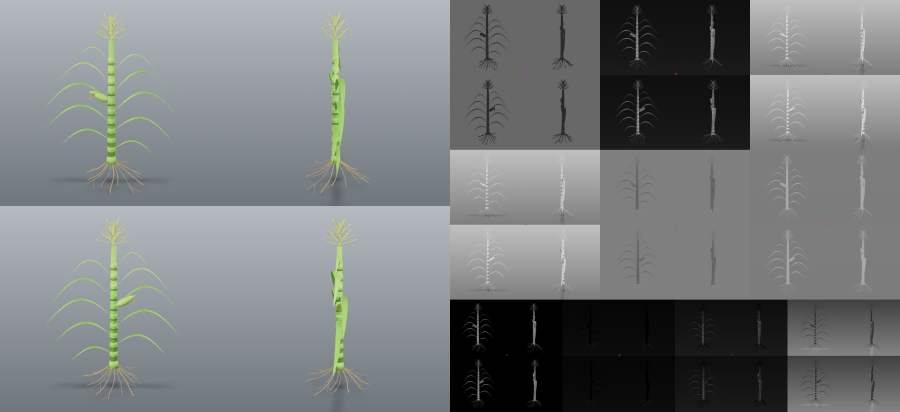
Two things guard against it. `suggest_segmentation` reports what **both** polarities yield on
your image before you commit, alongside a contact sheet of every colourspace:
And `segment` emits an `implausible_coverage` warning when the mask covers more than half the
frame. Neither refuses the measurement, because a macro shot of a single leaf legitimately
fills the frame — they make the choice visible rather than making it for you.
`fill_size` deletes any component smaller than itself, so a small specimen can vanish
entirely. When that happens `segment` reports `fill_erased_mask` and names the size to drop
below, rather than letting it look like a bad channel choice.
## What it measures
One `measure()` call returns seventeen traits, each with a unit.
| group | traits |
| ------------- | -------------------------------------------------------------------------------------------------------- |
| size | `area`, `convex_hull_area`, `perimeter`, `total_edge_length`, `width`, `height`, `longest_path` (pixels) |
| shape | `solidity`, `convex_hull_vertices`, `ellipse_eccentricity` (unitless) |
| ellipse fit | `ellipse_major_axis`, `ellipse_minor_axis` (pixels), `ellipse_angle` (degrees) |
| position | `center_of_mass`, `ellipse_center` (x, y) |
| PlantCV flags | `in_bounds`, `object_in_frame` |
The last two are PlantCV's own flags. They are passed through as **information, never as
validity signals** — on an all-zero mask PlantCV reports both as `True` while returning
seventeen zeros. They are bounds checks, not success checks.
Passing `analyses=["size", "color"]` adds hue, saturation and value statistics —
`hue_circular_mean`, `hue_circular_std`, `hue_median` (degrees), `saturation_mean`,
`saturation_median`, `value_mean`, `value_median` (percent). The three frequency histograms
that accompany them total 692 numbers, so they are withheld unless you ask for them with
`include_histograms=true`.
### Real-world units
**Traits are in pixels by default, and pixel sizes are not comparable between images shot at
different distances or zoom levels.** Pass `px_per_mm` to `measure()` and spatial traits come
back in `mm` Lo que la gente pregunta sobre plantcv-mcp
¿Qué es musharna/plantcv-mcp?
+
musharna/plantcv-mcp es mcp servers para el ecosistema de Claude AI. MCP server exposing PlantCV as a measurement instrument — plant traits plus the segmentation overlay they were measured from Tiene 0 estrellas en GitHub y se actualizó por última vez today.
¿Cómo se instala plantcv-mcp?
+
Puedes instalar plantcv-mcp clonando el repositorio (https://github.com/musharna/plantcv-mcp) o siguiendo las instrucciones del README en GitHub. ClaudeWave también te ofrece bloques de instalación rápida en esta misma página.
¿Es seguro usar musharna/plantcv-mcp?
+
musharna/plantcv-mcp aún no ha sido auditado por nuestro agente de seguridad. Revisa el repositorio original en GitHub antes de usarlo en producción.
¿Quién mantiene musharna/plantcv-mcp?
+
musharna/plantcv-mcp es mantenido por musharna. La última actividad registrada en GitHub es de today, con 0 issues abiertos.
¿Hay alternativas a plantcv-mcp?
+
Sí. En ClaudeWave puedes explorar mcp servers similares en /categories/mcp, ordenados por popularidad o actividad reciente.
Despliega plantcv-mcp en tu cloud
Lleva este repo a producción en minutos. Cada plataforma genera su propio entorno con variables de entorno editables.
¿Mantienes este repo? Añade un badge a tu README
Pega el badge en tu README de GitHub para mostrar que está auditado por ClaudeWave. Cada badge enlaza de vuelta a esta página y muestra el Trust Score actual.
[](https://claudewave.com/repo/musharna-plantcv-mcp)<a href="https://claudewave.com/repo/musharna-plantcv-mcp"><img src="https://claudewave.com/api/badge/musharna-plantcv-mcp" alt="Featured on ClaudeWave: musharna/plantcv-mcp" width="320" height="64" /></a>Más MCP Servers

Fair-code workflow automation platform with native AI capabilities. Combine visual building with custom code, self-host or cloud, 400+ integrations.

User-friendly AI Interface (Supports Ollama, OpenAI API, ...)

An open-source AI agent that brings the power of Gemini directly into your terminal.

The fastest path to AI-powered full stack observability, even for lean teams.

Real-time global intelligence dashboard. AI-powered news aggregation, geopolitical monitoring, and infrastructure tracking in a unified situational awareness interface

🕷️ An adaptive Web Scraping framework that handles everything from a single request to a full-scale crawl!