

Microsoft Graph MCP server for AI agents — 85 tools across Outlook mail & calendar, Teams, OneDrive, SharePoint, OneNote, Planner and Entra ID. Delegated OAuth, stdio or Streamable HTTP.
- ✓Open-source license (MIT)
- ✓Actively maintained (<30d)
- ✓Clear description
- ✓Topics declared
- ✓Documented (README)
claude mcp add ms-graph-mcp -- uvx ms-graph-mcp{
"mcpServers": {
"ms-graph-mcp": {
"command": "uvx",
"args": ["ms-graph-mcp"]
}
}
}Resumen de MCP Servers
# ms-graph-mcp
<!-- mcp-name: io.github.nitin27may/ms-graph-mcp -->
[](https://pypi.org/project/ms-graph-mcp/)
[](https://github.com/nitin27may/ms-graph-mcp/releases/latest)
[](https://github.com/nitin27may/ms-graph-mcp/actions/workflows/ci.yml)
[](https://pypi.org/project/ms-graph-mcp/)
[](https://github.com/nitin27may/ms-graph-mcp/pkgs/container/ms-graph-mcp)
[](https://github.com/nitin27may/ms-graph-mcp/blob/main/LICENSE)
[](https://modelcontextprotocol.io)
[Releases](https://github.com/nitin27may/ms-graph-mcp/releases) · [Changelog](CHANGELOG.md)
A [Model Context Protocol](https://modelcontextprotocol.io) server for **Microsoft Graph** — 85
tools across mail, calendar, meetings (including transcripts), Teams chat, files, SharePoint,
search, people, contacts, directory, tasks and OneNote, over **stdio** or **Streamable HTTP**.
**Signs you in with your own Microsoft account** — browser SSO, no token to paste, no client secret.
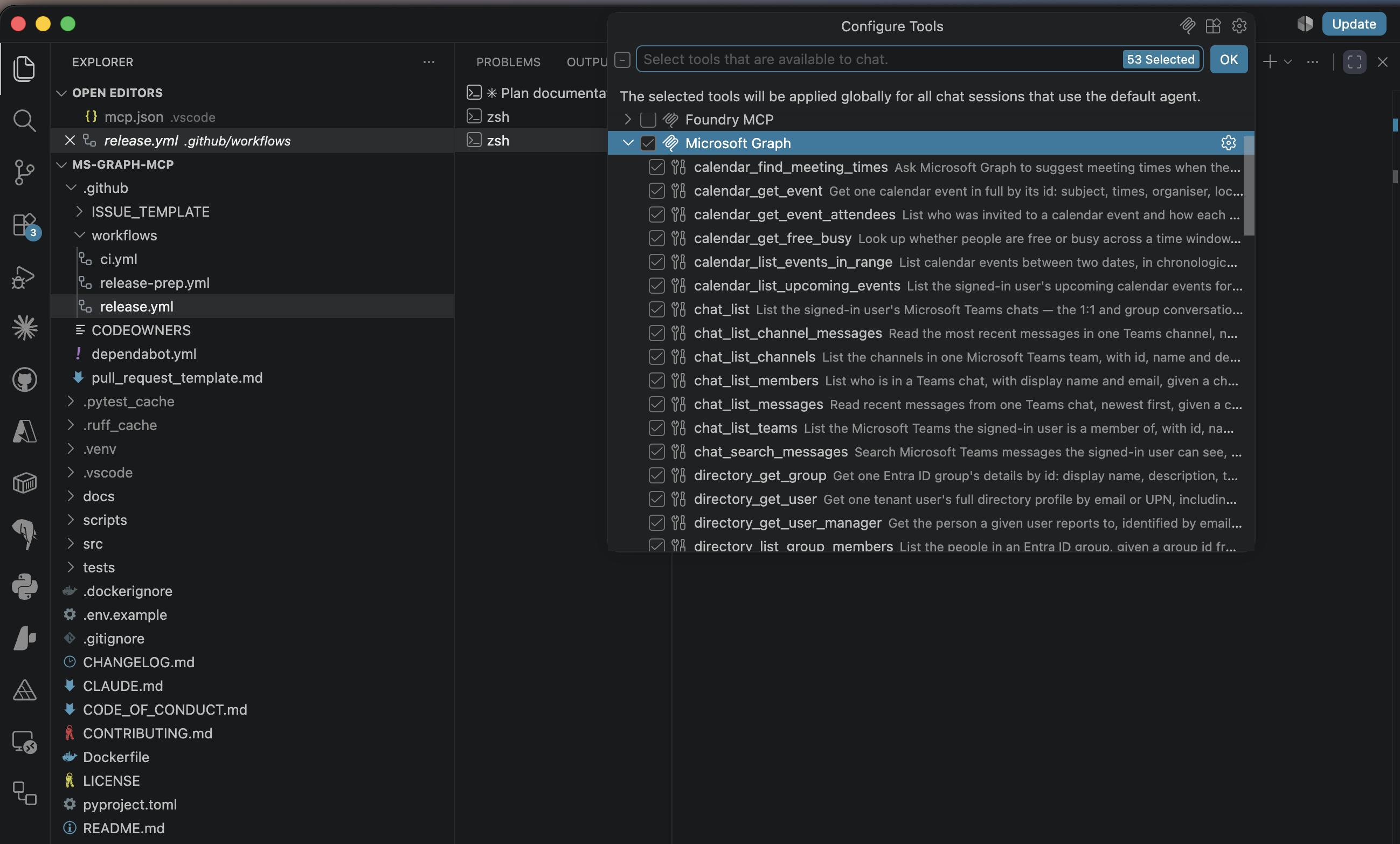
- **No `msgraph-sdk`, no `azure-identity`** — the Graph client is raw `httpx`, so the dependency tree
stays small and the wire behaviour is inspectable.
- **Read/write separation is enforced, not advisory** — write tools are hidden *and* refused unless
the caller explicitly opts in.
- **Auth-agnostic by default** — tools receive an already-acquired Graph token via the request
context. The server can also perform its own on-behalf-of exchange when you want it to act as a
proper OAuth resource server.
> **Status: early.** Extracted from a production agent platform where it has been running against a
> real tenant. The code is battle-tested; the packaging and public API surface are newer. Expect the
> config surface to move before 1.0.
## Install
Requires **Python 3.12+**. Two paths — pick the one that matches what you want to do.
### A. Use the package
Nothing to clone. [uv](https://docs.astral.sh/uv/) runs it straight from PyPI:
```bash
uvx --from ms-graph-mcp ms-graph-mcp # stdio, for an MCP client
uvx --from ms-graph-mcp ms-graph-mcp-http # Streamable HTTP
```
or install it into an environment:
```bash
pip install ms-graph-mcp
```
Release candidates are published too. pip skips them unless you ask:
```bash
pip install --pre ms-graph-mcp # newest, including candidates
pip install ms-graph-mcp==0.3.0rc1 # a specific one; no --pre needed for an exact pin
```
A container image is on GHCR for the HTTP transport — see
[docs/hosting.md](https://github.com/nitin27may/ms-graph-mcp/blob/main/docs/hosting.md#docker).
Also listed on the [official MCP registry](https://modelcontextprotocol.io/registry) as
`io.github.nitin27may/ms-graph-mcp`.
> **TestPyPI is not a distribution channel.** Every release is published there first, but that is a
> rehearsal of the publishing process: it can be wiped without notice and does not mirror PyPI, so
> installing from it needs `--extra-index-url https://pypi.org/simple/` just to resolve ordinary
> dependencies. Use PyPI, or `--pre`.
### B. Run from source
For hacking on it, forking it, or running an unreleased change:
```bash
git clone https://github.com/nitin27may/ms-graph-mcp
cd ms-graph-mcp
uv sync # creates .venv and installs everything
uv run ms-graph-mcp # check it starts
```
`uv sync` is the only setup step. See
[CONTRIBUTING.md](https://github.com/nitin27may/ms-graph-mcp/blob/main/CONTRIBUTING.md) before
opening a pull request — the tool allowlists and the tier separation have invariants that are
enforced rather than advisory.
To point an MCP client at your clone, you need its absolute path — clients do not inherit your
working directory and most do not expand `~`:
```bash
cd ms-graph-mcp && pwd
# /Users/you/workspace/ms-graph-mcp
```
Then use the source form of the config in
[Configure your MCP client](#running-from-source-instead) below.
## Set up the Entra app
You need an **Entra ID app registration** — about two minutes. **Do not create a client secret:**
this registers as a *public client*, which signs you in through your browser using PKCE. A secret on
a program running on your own machine would be readable by anyone with the config file, which is why
the flow is designed not to need one. Nothing goes into a config file except two ids, neither of
which is sensitive.
In the [Entra portal](https://entra.microsoft.com) → **App registrations** → **New registration**:
- **Name:** anything, e.g. `ms-graph-mcp`
- **Supported account types:** *Accounts in this organizational directory only*
- **Redirect URI:** select **Public client/native**, value `http://localhost`
Leave **Certificates & secrets** alone — you do not need anything from it.
Then, on the new app:
- **Authentication** → enable **Allow public client flows**
- **API permissions** → **Add a permission** → **Microsoft Graph** → **Delegated permissions**, and
add what you want the agent to reach. A sensible read-only starting set:
```
User.Read Mail.Read Calendars.Read Files.Read.All
People.Read Chat.Read Tasks.Read Notes.Read Contacts.Read
```
The complete copy-paste consent sets — and which permission each individual tool needs — are in
[docs/permissions.md](https://github.com/nitin27may/ms-graph-mcp/blob/main/docs/permissions.md).
Copy the **Application (client) ID** and **Directory (tenant) ID** from the Overview page. That is
everything you need.
## Configure your MCP client
Every MCP client that speaks stdio takes the same three things — a command, its arguments, and an
environment block:
```jsonc
{
"command": "uvx",
"args": ["--from", "ms-graph-mcp", "ms-graph-mcp"],
"env": {
"GRAPH_MCP_CLIENT_ID": "<application-client-id>",
"GRAPH_MCP_TENANT_ID": "<directory-tenant-id>"
}
}
```
Where that block goes, and what the surrounding key is called, differs:
| Client | Config file | Key |
|---|---|---|
| VS Code | `.vscode/mcp.json` (workspace), or **MCP: Open User Configuration** | `servers` |
| Claude Code | `claude mcp add …` — no file to edit | — |
| Claude Desktop | macOS `~/Library/Application Support/Claude/claude_desktop_config.json` · Windows `%APPDATA%\Claude\claude_desktop_config.json` | `mcpServers` |
| Cursor | `.cursor/mcp.json` (project) or `~/.cursor/mcp.json` (global) | `mcpServers` |
| Windsurf | `~/.codeium/windsurf/mcp_config.json` | `mcpServers` |
| MCP Inspector | command line, `-e` flags | — |
The first sign-in opens your browser for normal Microsoft 365 SSO — including MFA and conditional
access. The result is cached in `~/.ms-graph-mcp/token_cache.json`, owner-readable only, so it does
not prompt again.
### VS Code
```jsonc
{
"inputs": [
{ "id": "clientId", "type": "promptString", "description": "Entra application (client) ID" },
{ "id": "tenantId", "type": "promptString", "description": "Entra directory (tenant) ID" }
],
"servers": {
"ms-graph": {
"type": "stdio",
"command": "uvx",
"args": ["--from", "ms-graph-mcp", "ms-graph-mcp"],
"env": {
"GRAPH_MCP_CLIENT_ID": "${input:clientId}",
"GRAPH_MCP_TENANT_ID": "${input:tenantId}"
}
}
}
}
```
Reload the window. VS Code prompts once for the two ids and remembers them, so this file is safe to
commit. Open the Chat view, switch to **Agent** mode, and the tools appear under the tools picker —
that is the panel in the screenshot above. **Confirm with** `MCP: List Servers`, which shows status
and output if it does not connect.
### Claude Code
```bash
claude mcp add ms-graph \
--env GRAPH_MCP_CLIENT_ID=<application-client-id> \
--env GRAPH_MCP_TENANT_ID=<directory-tenant-id> \
-- uvx --from ms-graph-mcp ms-graph-mcp
```
**Confirm with** `/mcp` inside Claude Code — it lists the server and its tools.
### Claude Desktop
```jsonc
{
"mcpServers": {
"ms-graph": {
"command": "uvx",
"args": ["--from", "ms-graph-mcp", "ms-graph-mcp"],
"env": {
"GRAPH_MCP_CLIENT_ID": "<application-client-id>",
"GRAPH_MCP_TENANT_ID": "<directory-tenant-id>"
}
}
}
}
```
**Confirm by** quitting Claude Desktop fully — not just closing the window — reopening it, and
looking for the tools icon in the composer.
### Cursor and Windsurf
Both use the same `mcpServers` shape as Claude Desktop, in the file named in the table above.
### MCP Inspector
The quickest way to check the server independently of any client:
```bash
npx @modelcontextprotocol/inspector \
uvx --from ms-graph-mcp ms-graph-mcp \
-e GRAPH_MCP_CLIENT_ID=<application-client-id> \
-e GRAPH_MCP_TENANT_ID=<directory-tenant-id>
```
Needs Node 22.19+. It opens a browser UI where you can list tools and call them by hand — worth
doing before blaming your client. There is a scriptable `--cli` mode too; see
[docs/testing.md](https://github.com/nitin27may/ms-graph-mcp/blob/main/docs/testing.md).
> **Pass variables with `-e`, not from your shell.** Inspector does not give the server it spawns
> your environment, so `GRAPH_MCP_CLIENT_ID=… npx @modelcontextprotocol/inspector …` starts the
> server with *no* client id. The `-e` flags go **after** the server command.
### Running from source instead
Same blocks as above — swap the command and args for your clone's absolute path:
```jsonc
"command": "uv",
"args": ["run", "--directory", "/Users/you/workspace/ms-graph-mcp", "ms-graph-mcp"]
```
Two things catch people out here:Lo que la gente pregunta sobre ms-graph-mcp
¿Qué es nitin27may/ms-graph-mcp?
+
nitin27may/ms-graph-mcp es mcp servers para el ecosistema de Claude AI. Microsoft Graph MCP server for AI agents — 85 tools across Outlook mail & calendar, Teams, OneDrive, SharePoint, OneNote, Planner and Entra ID. Delegated OAuth, stdio or Streamable HTTP. Tiene 1 estrellas en GitHub y su última actualización registrada es del 2026-08-20.
¿Cómo se instala ms-graph-mcp?
+
Puedes instalar ms-graph-mcp clonando el repositorio (https://github.com/nitin27may/ms-graph-mcp) o siguiendo las instrucciones del README en GitHub. ClaudeWave también te ofrece bloques de instalación rápida en esta misma página.
¿Es seguro usar nitin27may/ms-graph-mcp?
+
Nuestro agente de seguridad ha analizado nitin27may/ms-graph-mcp y le ha asignado un Trust Score de 95/100 (tier: Verified). Revisa el desglose completo de comprobaciones superadas y flags en esta página.
¿Quién mantiene nitin27may/ms-graph-mcp?
+
nitin27may/ms-graph-mcp es mantenido por nitin27may. La última actividad registrada en GitHub es del 2026-08-20, con 3 issues abiertos.
¿Hay alternativas a ms-graph-mcp?
+
Sí. En ClaudeWave puedes explorar mcp servers similares en /categories/mcp, ordenados por popularidad o actividad reciente.
Despliega ms-graph-mcp en tu cloud
Lleva este repo a producción en minutos. Cada plataforma genera su propio entorno con variables de entorno editables.
¿Mantienes este repo? Añade un badge a tu README
Pega el badge en tu README de GitHub para mostrar que está auditado por ClaudeWave. Cada badge enlaza de vuelta a esta página y muestra el Trust Score actual.
[](https://claudewave.com/repo/nitin27may-ms-graph-mcp)<a href="https://claudewave.com/repo/nitin27may-ms-graph-mcp"><img src="https://claudewave.com/api/badge/nitin27may-ms-graph-mcp" alt="Featured on ClaudeWave: nitin27may/ms-graph-mcp" width="320" height="64" /></a>Más MCP Servers

Fair-code workflow automation platform with native AI capabilities. Combine visual building with custom code, self-host or cloud, 400+ integrations.

User-friendly AI Interface (Supports Ollama, OpenAI API, ...)

An open-source AI agent that brings the power of Gemini directly into your terminal.

Real-time global intelligence dashboard. AI-powered news aggregation, geopolitical monitoring, and infrastructure tracking in a unified situational awareness interface

The fastest path to AI-powered full stack observability, even for lean teams.

🕷️ An adaptive Web Scraping framework that handles everything from a single request to a full-scale crawl!