

An open-source AI coding agent that lives in your terminal.
- ✓Open-source license (Apache-2.0)
- ✓Actively maintained (<30d)
- ✓Healthy fork ratio
- ✓Clear description
- ✓Topics declared
- ✓Mature repo (>1y old)
- !Install pipes a remote script into a shell (curl | sh)
git clone https://github.com/QwenLM/qwen-code && cp qwen-code/*.md ~/.claude/agents/24 items en este repositorio
Use after a Codex or Claude Code feature has been implemented in Qwen Code to run the selected reference agent and Qwen Code under the same scenario, capture HTTP and terminal traces, compare request bodies, tool/function schemas, outputs, and iterate until the reproduced behavior is close enough.
Use when reproducing an existing Codex or Claude Code feature in Qwen Code or another agent CLI by choosing a reference agent, capturing HTTP request bodies, prompts, tool/function schemas, terminal output, and then implementing the matching behavior in the target repo.
Review and repair current local changes until they converge, or run Qwen Code Autofix issue and review workflows from GitHub Actions.
Classify a bounded batch of stale PR CI failures and choose the safest response.
Analyze indexed codebases via graph database (neug) and vector index (zvec). Covers call graphs, dependencies, dead code, hotspots, module coupling, architecture reports, semantic search, impact analysis, bug root cause from GitHub issues, class diagrams (UML), and PR review (risk scoring, conflict detection, auto-merge candidates, labeling). Also covers creating, inspecting, and repairing a CodeScope index. Use for: code structure, who calls what, why something changed, similar functions, module boundaries, bug tracing, class relationships, PR risk/conflicts, or any question benefiting from a code knowledge graph. Applies when a `.codegraph` index exists in the workspace, or when the user wants to create one.
Draft and submit a GitHub issue from a user idea or bug description, with bilingual body and correct labels.
Stabilize a flaky test with a minimal, assertion-preserving fix — never by weakening or deleting the check.
Audit the repository's docs/ content against the current codebase,
Guide for running end-to-end tests of the Qwen Code CLI, including headless mode, MCP server testing, and API traffic inspection. Use this skill whenever you need to verify CLI behavior with real model calls, reproduce user-reported bugs end-to-end, test MCP tool integrations, or inspect raw API request/response payloads. Trigger on mentions of E2E testing, headless testing, MCP tool testing, or reproducing issues.
Use for a periodic repo-wide sweep of qwen-code for accumulated excess surface — dead components and files, orphaned locale keys, exports nothing consumes, added-then-removed scaffolding — filing candidates on a tracking issue and landing only what a maintainer has said yes to. Repo-wide and evidence-first; every consumer is named before anything is deleted. Not for tidying a diff you just wrote (that is bundled `/simplify`) and not for defects (that is `/review`).
Prepare GitHub pull request title and body files from the current branch diff, especially for non-interactive CI/autofix flows that must follow the repository PR template without pushing or creating the PR.
Use when the scheduled repo-hygiene workflow runs from GitHub Actions (or an operator dry-run) to scan the repository for small, certain docs/test/code hygiene issues and fix them as one batched branch.
This skill should be used when the user asks to "用 tmux 做真实测试", "保存 tmux 日志", "像真实用户一样测试 Qwen", "生成可复查的 TUI 测试报告", "测试 slash command 交互", or requests a tmux-based real user E2E run with complete readable logs. It guides real TUI usage with step-by-step capture-pane snapshots rather than ANSI raw pipe logs.
Gatekeep and review GitHub issues and pull requests for Qwen Code maintainers. Use for GitHub Action issue triage, PR admission checks, product-direction review, KISS-focused PR review, and staged bilingual GitHub comments.
This skill should be used to run a sandboxed deep verification of a qwen-code PR — "/verify-pr <n>", "深度验证这个 PR", A/B load-bearing proof against the base build, mock-free harnesses with wire oracles, and targeted gates — producing tmp/pr<n>-verify-<ts>/report.md plus a machine-readable verdict. Designed for the token-free CI verify job; also usable locally.
Generate synonyms for words or phrases. Use this skill when the user needs alternative words with similar meanings, wants to expand vocabulary, or seeks varied expressions for writing.
Resumen de Subagents
<div align="center">
[](https://www.npmjs.com/package/@qwen-code/qwen-code)
[](./LICENSE)
[](https://nodejs.org/)
[](https://www.npmjs.com/package/@qwen-code/qwen-code)
<a href="https://trendshift.io/repositories/15287" target="_blank"><img src="https://trendshift.io/api/badge/repositories/15287" alt="QwenLM%2Fqwen-code | Trendshift" style="width: 250px; height: 55px;" width="250" height="55"/></a>
**The open-source AI coding agent for your terminal, editor, desktop, browser, and chat.**
<a href="https://qwenlm.github.io/qwen-code-docs/zh/users/overview">中文</a> |
<a href="https://qwenlm.github.io/qwen-code-docs/de/users/overview">Deutsch</a> |
<a href="https://qwenlm.github.io/qwen-code-docs/fr/users/overview">français</a> |
<a href="https://qwenlm.github.io/qwen-code-docs/ja/users/overview">日本語</a> |
<a href="https://qwenlm.github.io/qwen-code-docs/ru/users/overview">Русский</a> |
<a href="https://qwenlm.github.io/qwen-code-docs/pt-BR/users/overview">Português (Brasil)</a> |
<a href="https://qwenlm.github.io/qwen-code-docs/ko/users/overview">한국어</a>
</div>
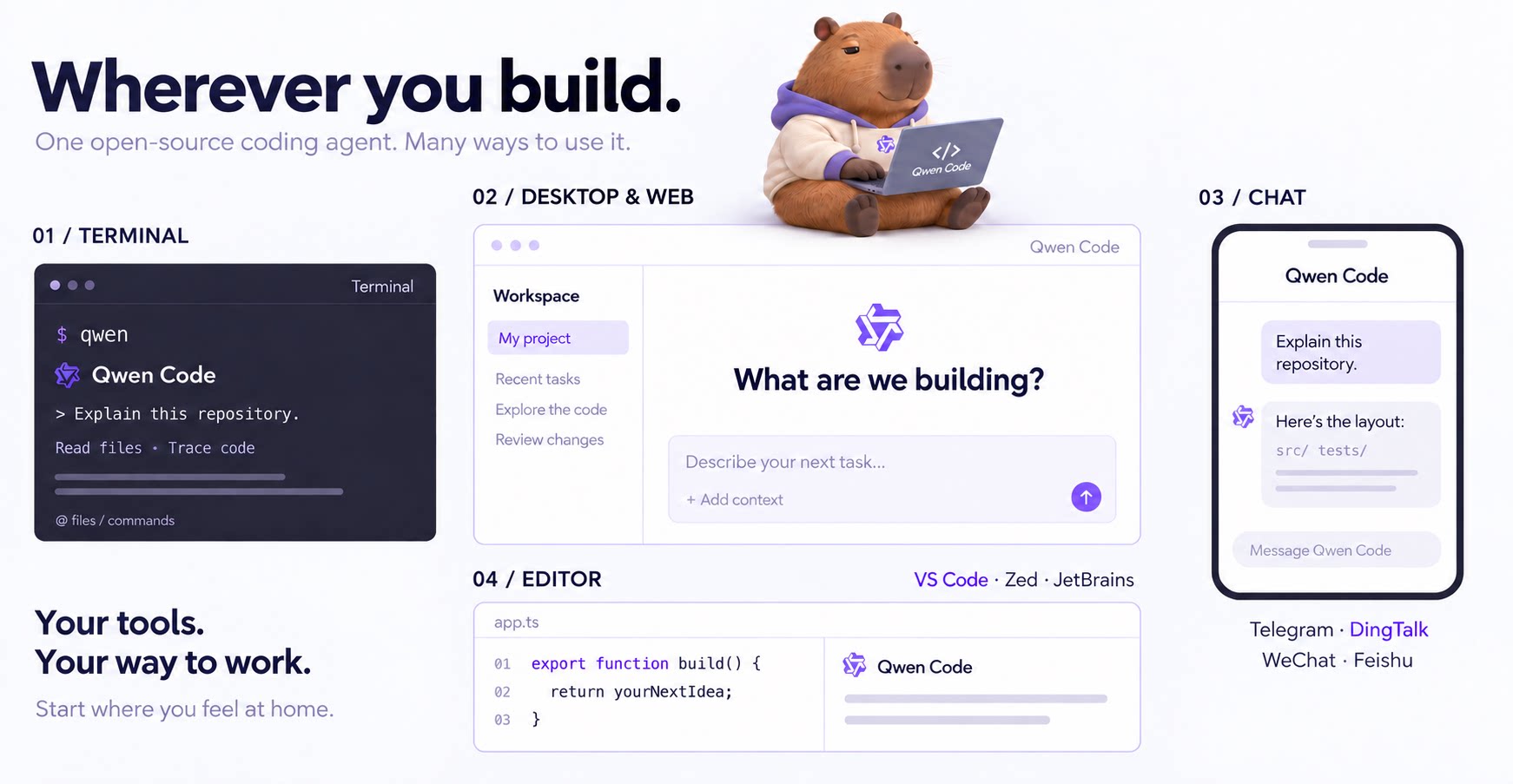
## Why Qwen Code?
- **Agentic out of the box** — Auto-Memory, Auto-Skills, SubAgents, Agent Teams, and MCP. Dynamic workflows, zero setup.
- **Open-source, inside and out** — The framework and the Qwen models are open-source. They evolve together. No vendor lock-in.
- **Multi-protocol** — Supports OpenAI, Anthropic, Gemini, and Qwen APIs. Any third-party provider or local model (Ollama / vLLM). Switch at runtime.
- **Beyond the terminal** — IDE plugins, Desktop app, Web UI, SDKs, and chat integrations (Telegram / DingTalk / WeChat / Feishu).
> [!TIP]
> Qwen Code is actively iterating on itself — using its own agent and models to file issues, submit PRs, review code, and run tests. Powered by the community, driven by AI.
## Installation
**Linux / macOS:**
```bash
curl -fsSL https://qwen-code-assets.oss-cn-hangzhou.aliyuncs.com/installation/install-qwen-standalone.sh | bash
```
**Windows:**
```powershell
irm https://qwen-code-assets.oss-cn-hangzhou.aliyuncs.com/installation/install-qwen-standalone.ps1 | iex
```
> Restart your terminal after installation to ensure environment variables take effect.
<details>
<summary>NPM / Homebrew</summary>
**NPM** (requires [Node.js 22+](https://nodejs.org/)):
```bash
npm install -g @qwen-code/qwen-code@latest
```
**Homebrew** (macOS / Linux):
```bash
brew install qwen-code
```
</details>
## Quick Start
Open a terminal in your project and start Qwen Code:
```bash
cd /path/to/your-project
qwen
```
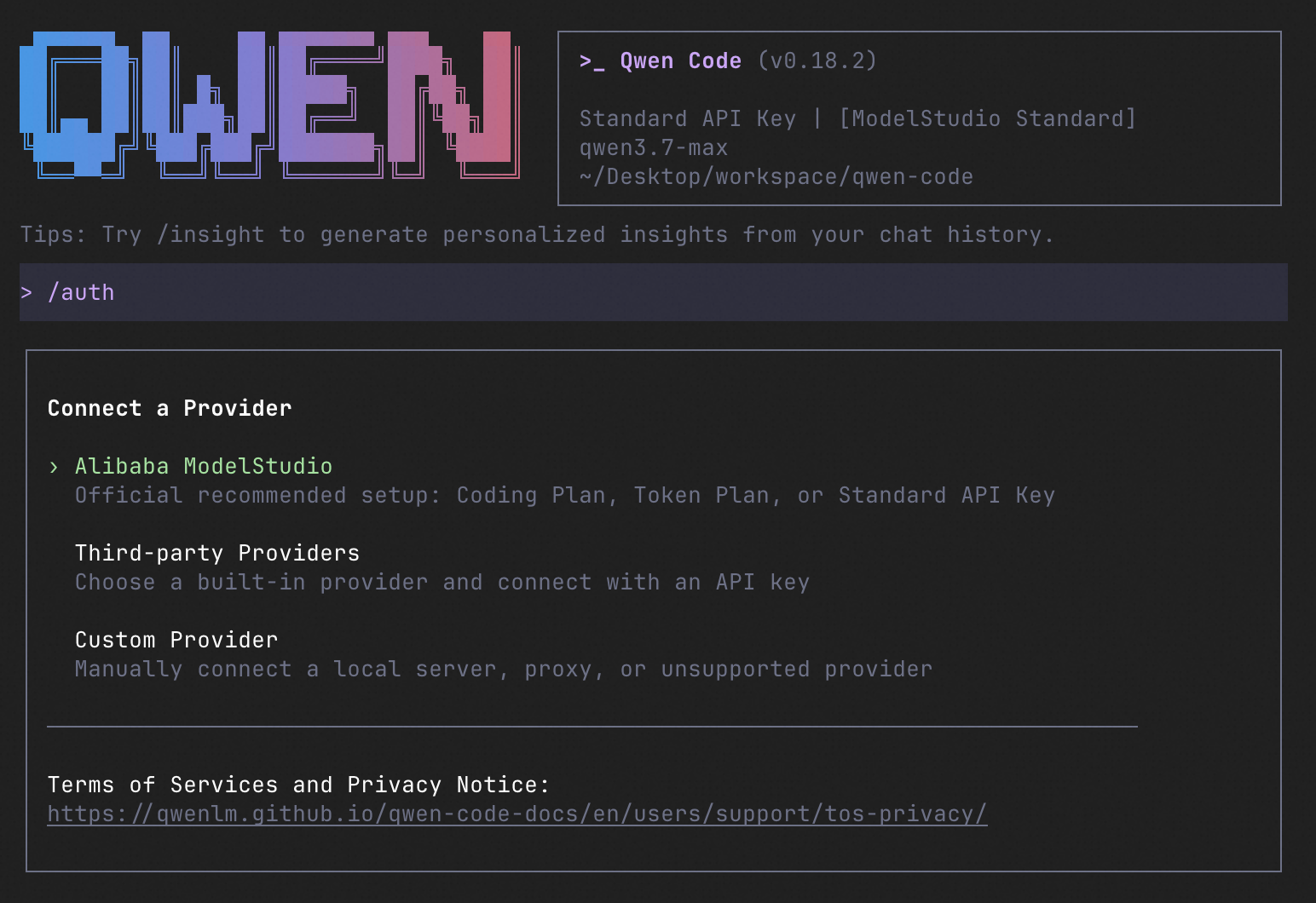
Inside the session, run `/auth` to configure your provider and API key. Then try:
```text
Explain this repository and show me where to start.
```
See the [Authentication Guide](https://qwenlm.github.io/qwen-code-docs/en/users/configuration/auth/) and [Settings Reference](https://qwenlm.github.io/qwen-code-docs/en/users/configuration/settings/) for detailed setup.
<details>
<summary>See the terminal interface</summary>
</details>
## How to Use Qwen Code
Choose the interface that fits your workflow:
| Interface | Get started |
| ------------ | --------------------------------------------------------------------------------------------------------------------------------------------------------------------------------------------------------------------------------------------------------------------------------------------------------------------------------------------------------------------------------------------------------- |
| **Terminal** | Run `qwen` in your project — see [Quick Start](#quick-start). |
| **Desktop** | [Download Qwen Code Desktop](https://github.com/QwenLM/qwen-code/releases/tag/desktop-latest) for macOS, Windows, and Linux. |
| **Web** | Run `qwen serve --open` to open the [Web UI](https://qwenlm.github.io/qwen-code-docs/en/users/qwen-serve/) in your browser. _(experimental)_ |
| **Editor** | Set up [VS Code](https://qwenlm.github.io/qwen-code-docs/en/users/integration-vscode/), [Zed](https://qwenlm.github.io/qwen-code-docs/en/users/integration-zed/), or [JetBrains](https://qwenlm.github.io/qwen-code-docs/en/users/integration-jetbrains/). |
| **Chat** | Connect [Telegram](https://qwenlm.github.io/qwen-code-docs/en/users/features/channels/telegram/), [DingTalk](https://qwenlm.github.io/qwen-code-docs/en/users/features/channels/dingtalk/), [WeChat](https://qwenlm.github.io/qwen-code-docs/en/users/features/channels/weixin/), or [Feishu](https://qwenlm.github.io/qwen-code-docs/en/users/features/channels/feishu/), then run `qwen channel start`. |
For automation and custom integrations:
- **Headless** — Run `qwen -p "..."` in scripts, CI/CD, or batch jobs.
- **SDKs** — Build with [TypeScript](./packages/sdk-typescript/README.md), [Python](./packages/sdk-python/README.md), or [Java](./packages/sdk-java/qwencode/README.md).
- **Daemon** — Run `qwen serve` to connect clients over HTTP + SSE (ACP). _(experimental)_ [Daemon guide](https://qwenlm.github.io/qwen-code-docs/en/users/qwen-serve/).
<details>
<summary>SDK example (Python)</summary>
```python
import asyncio
from qwen_code_sdk import is_sdk_result_message, query
async def main() -> None:
result = query(
"Summarize the repository layout.",
{
"cwd": "/path/to/project",
"path_to_qwen_executable": "qwen",
},
)
async for message in result:
if is_sdk_result_message(message):
print(message["result"])
asyncio.run(main())
```
</details>
## Capabilities
If you know Claude Code, you already know Qwen Code — and then some. We've put significant effort into [bringing Qwen Code to feature parity with Claude Code](https://github.com/wenshao/codeagents/blob/main/docs/comparison/qwen-code-improvement-report.md), improving both breadth and reliability across the board.
| Feature | Qwen Code | Claude Code |
| ------------------------------------------------------------------ | :-------: | :---------: |
| SubAgents, Agent Teams, Dynamic Workflows | ✓ | ✓ |
| Auto-Memory, Auto-Skills, Hooks | ✓ | ✓ |
| Built-in Skills (/review, /batch, /loop, /bugfix…) | ✓ | ✓ |
| MCP, Plan Mode, LSP Integration | ✓ | ✓ |
| Auto Mode, Sandbox, Git Worktrees | ✓ | ✓ |
| Computer Use (desktop automation) | ✓ | ✓ |
| IDE Plugins (VS Code / JetBrains / Zed) | ✓ | ✓ |
| SDK | ✓ | ✓ |
| Headless Mode, Session Management | ✓ | ✓ |
| Open-source — model and framework | ✓ | — |
| Multi-protocol (OpenAI / Anthropic / Gemini / Qwen + any provider) | ✓ | — |
| Agent Arena (multi-model head-to-head on same task) | ✓ | — |
| Daemon Mode — `qwen serve` (multi-client shared agent) | ✓ | — |
| IM Channels (Telegram / DingTalk / WeChat / Feishu) | ✓ | — |
## Qwen Code Evaluation
### Evaluation Configuration
| Configuration | Value |
| ----------------------- | --------------------------------------------------------------------------------------------------- |
| Dataset | `princeton-nlp/SWE-bench_Verified`, 500 cases |
| Runs | 3 trials per version, 1,500 jobs per version; 7 Qwen Code versions Lo que la gente pregunta sobre qwen-code
¿Qué es QwenLM/qwen-code?
+
QwenLM/qwen-code es subagents para el ecosistema de Claude AI. An open-source AI coding agent that lives in your terminal. Tiene 28k estrellas en GitHub y su última actualización registrada es del 2026-09-20.
¿Cómo se instala qwen-code?
+
Puedes instalar qwen-code clonando el repositorio (https://github.com/QwenLM/qwen-code) o siguiendo las instrucciones del README en GitHub. ClaudeWave también te ofrece bloques de instalación rápida en esta misma página.
¿Es seguro usar QwenLM/qwen-code?
+
Nuestro agente de seguridad ha analizado QwenLM/qwen-code y le ha asignado un Trust Score de 100/100 (tier: Verified). Revisa el desglose completo de comprobaciones superadas y flags en esta página.
¿Quién mantiene QwenLM/qwen-code?
+
QwenLM/qwen-code es mantenido por QwenLM. La última actividad registrada en GitHub es del 2026-09-20, con 1484 issues abiertos.
¿Hay alternativas a qwen-code?
+
Sí. En ClaudeWave puedes explorar subagents similares en /categories/agents, ordenados por popularidad o actividad reciente.
Despliega qwen-code en tu cloud
Lleva este repo a producción en minutos. Cada plataforma genera su propio entorno con variables de entorno editables.
¿Mantienes este repo? Añade un badge a tu README
Pega el badge en tu README de GitHub para mostrar que está auditado por ClaudeWave. Cada badge enlaza de vuelta a esta página y muestra el Trust Score actual.
[](https://claudewave.com/repo/qwenlm-qwen-code)<a href="https://claudewave.com/repo/qwenlm-qwen-code"><img src="https://claudewave.com/api/badge/qwenlm-qwen-code" alt="Featured on ClaudeWave: QwenLM/qwen-code" width="320" height="64" /></a>Más Subagents

The agent harness performance optimization system. Skills, instincts, memory, security, and research-first development for Claude Code, Codex, Opencode, Cursor and beyond.

The agent that grows with you

Java 面试 & 后端通用面试指南,覆盖计算机基础、数据库、分布式、高并发、系统设计与 AI 应用开发

Build Agentic workflows, RAG pipelines, with rich AI model and tool support on one collaborative workspace. Deploy on cloud, VPC, or self-hosted, so teams move from prototype to production without rebuilding the stack.

The agent engineering platform.

Makes your AI agent think like the laziest senior dev in the room. The best code is the code you never wrote.