

MCP server for RevenueDot: manage in-app subscriptions, entitlements, offerings and customers from Claude, ChatGPT, Cursor and other AI agents. Part of the open-source RevenueCat alternative.
- ✓Open-source license (MIT)
- ✓Actively maintained (<30d)
- ✓Clear description
- ✓Topics declared
- ✓Documented (README)
claude mcp add mcp -- npx -y @revenuedot/mcp{
"mcpServers": {
"mcp": {
"command": "npx",
"args": ["-y", "@revenuedot/mcp"],
"env": {
"REVENUEDOT_API_KEY": "<revenuedot_api_key>",
"REVENUEDOT_URL": "<revenuedot_url>",
"REVENUEDOT_MCP_TOKEN": "<revenuedot_mcp_token>"
}
}
}
}REVENUEDOT_API_KEYREVENUEDOT_URLREVENUEDOT_MCP_TOKENResumen de MCP Servers
<div align="center">
<picture>
<source media="(prefers-color-scheme: dark)" srcset="https://raw.githubusercontent.com/revenuedot/revenuedot/main/brand/kit/wordmark/revenuedot-lockup-white.svg">
<img alt="RevenueDot" src="https://raw.githubusercontent.com/revenuedot/revenuedot/main/brand/kit/wordmark/revenuedot-lockup-black.svg" height="44">
</picture>
# RevenueDot MCP server
**Connect Claude, ChatGPT, Cursor and other AI assistants to RevenueDot, the open-source RevenueCat alternative.** 38 tools to set up apps, products, entitlements and offerings, find customers, grant access and check webhooks, hosted at `mcp.revenuedot.app` or run locally.
[Main repository](https://github.com/revenuedot/revenuedot) · [Docs](https://revenuedot.app/docs/guides/connect-ai-assistants) · [Agent skills](https://github.com/revenuedot/agent-skills) · [Start free on RevenueDot Cloud](https://app.revenuedot.app/signup)
[](https://www.npmjs.com/package/@revenuedot/mcp)
[](LICENSE)
[](https://mcp.revenuedot.app/mcp)
Learn more: [RevenueCat MCP server, official and open source](https://revenuedot.app/revenuecat-mcp): config for Claude Code, Claude, Codex, Cursor, ChatGPT and Windsurf, the tool table, the approval model, and what RevenueCat's own MCP server offers.
</div>
[](https://revenuedot.app/videos/revenuedot-chatgpt-demo.mp4)
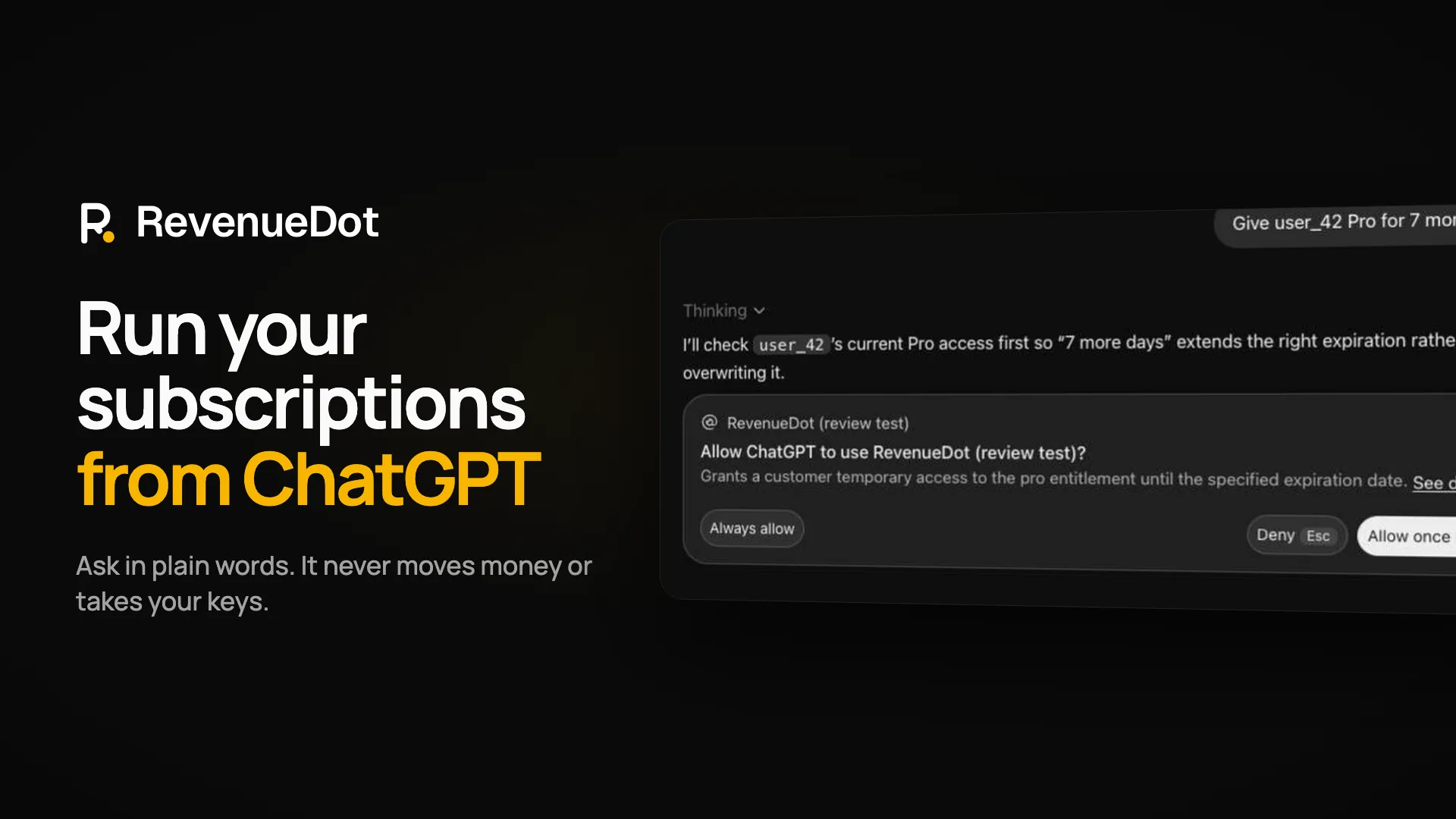
The server has 38 tools to create apps and read their SDK keys and store notification settings, set up products, entitlements, offerings and packages, find customers and read their history, grant, extend, cancel or refund, add and debug webhooks, check store credentials, read revenue metrics and follow an import from RevenueCat. It is also the server behind the RevenueDot ChatGPT plugin and Claude connector (install: [`revenuedot/agent-skills`](https://github.com/revenuedot/agent-skills)). Tool names match [RevenueCat's MCP tools](https://www.revenuecat.com/docs/tools/mcp/tools-reference) where the tool does the same thing, so prompts written for RevenueCat work here.
> Status (2026-09-30): the hosted server is live at `https://mcp.revenuedot.app/mcp`, in front of RevenueDot Cloud (`https://api.revenuedot.app`). The local server is published on npm as [`@revenuedot/mcp`](https://www.npmjs.com/package/@revenuedot/mcp), so `npx -y @revenuedot/mcp` runs the latest release.
## Connect
**Hosted (Streamable HTTP):** `https://mcp.revenuedot.app/mcp`. Your client signs you in with OAuth, or you send `Authorization: Bearer sk_...`. `https://mcp.revenuedot.app/claude/mcp` (the Claude connector) serves the same 38 tools. `https://mcp.revenuedot.app/chatgpt/mcp` (the ChatGPT plugin) serves 37: it leaves out `refund-subscription`, because OpenAI does not list plugins that move money.
**Free knowledge server, no sign-in:** `https://mcp.revenuedot.app/kit/mcp` serves six read-only tools (`search-monetization-knowledge`, `list-paywall-patterns`, `get-paywall-pattern`, `get-store-guideline`, `get-code-snippet`, `list-skills`) with sourced paywall patterns, App Store and Google Play rules and code snippets. It needs no account or key, never calls a RevenueDot project, and every result ends with a line saying RevenueDot maintains it. It is the free half of the RevenueDot App Monetization plugin in [`revenuedot/agent-skills`](https://github.com/revenuedot/agent-skills). The data lives in `src/kit/data/`.
**Local (stdio), for RevenueDot Cloud or your own server** (`REVENUEDOT_URL` defaults to `https://api.revenuedot.app`):
```bash
# Claude Code
claude mcp add revenuedot -e REVENUEDOT_API_KEY=sk_... -e REVENUEDOT_URL=https://your-server -- npx -y @revenuedot/mcp
```
```json
{
"mcpServers": {
"revenuedot": {
"command": "npx",
"args": ["-y", "@revenuedot/mcp"],
"env": { "REVENUEDOT_API_KEY": "sk_...", "REVENUEDOT_URL": "https://your-server" }
}
}
}
```
Create the secret key under **API keys** in the RevenueDot dashboard. Give it only the permissions you want the assistant to have: a key with read scopes only cannot change anything, and a tool call that needs more gets an error naming the missing permission.
**Self-hosted HTTP:** `npx -y @revenuedot/mcp --http --port 8788 --url https://your-server` serves `http://127.0.0.1:8788/mcp`. Put it behind your reverse proxy with `--host 0.0.0.0 --public-url https://mcp.your-domain`. OAuth works against your own server too: it is the authorization server.
## Auth
1. **Secret key (bearer).** `Authorization: Bearer sk_...` is passed to the RevenueDot REST API v2, which checks the key's project and scopes.
2. **OAuth 2.1.** The RevenueDot server is the authorization server (`/.well-known/oauth-authorization-server`, dynamic client registration, authorization code with PKCE S256). The consent screen uses your dashboard session: you pick one project and read-only or read-and-write access. The access token is a secret key limited to that project and those scopes. It is listed under API keys as `OAuth: <client name>` and you revoke it there. This server publishes `/.well-known/oauth-protected-resource` and answers `401` with `WWW-Authenticate` so clients find the sign-in on their own.
## Tools
Every tool takes an optional `project_id`. Leave it out when the key or connection has one project.
| Tool | What it does | API v2 call |
|---|---|---|
| `list-projects` | Projects this key or connection can use | `GET /v2/projects` |
| `list-apps` | Apps, one per store | `GET /apps` |
| `create-app` | Adds a Test Store, App Store (bundle id) or Google Play (package name) app; no credentials | `POST /apps` |
| `list-public-api-keys` | The app's public SDK key (`appl_`, `goog_`, `test_`), which ships inside the app | `GET /apps/{id}/public_api_keys` |
| `list-products` | Products, optionally for one app | `GET /products` |
| `create-product` | Adds a store product to an app | `POST /products` |
| `list-entitlements` | Entitlements with their products | `GET /entitlements` |
| `create-entitlement` | Adds an entitlement such as `pro` | `POST /entitlements` |
| `attach-products-to-entitlement` | Makes products unlock an entitlement | `POST /entitlements/{id}/actions/attach_products` |
| `list-offerings` | Offerings with packages and products | `GET /offerings` |
| `create-offering` | Adds an offering, optionally current | `POST /offerings` |
| `create-packages` | Adds a package to an offering | `POST /offerings/{id}/packages` |
| `attach-products-to-package` | Puts products in a package | `POST /packages/{id}/actions/attach_products` |
| `get-customer` | Customer, active entitlements, attributes, subscriptions, purchases | `GET /customers/{id}` and sub-resources |
| `grant-customer-entitlement` | Promotional access until a date (creates the customer if new) | `POST /customers/{id}/actions/grant_entitlement` |
| `revoke-customer-entitlement` | Ends granted access | `POST /customers/{id}/actions/revoke_granted_entitlement` |
| `list-webhook-integrations` | Webhooks | `GET /integrations/webhooks` |
| `create-webhook-integration` | Adds a webhook | `POST /integrations/webhooks` |
| `get-import-status` | Customers, subscriptions and pending Google tokens after `npx revenuedot import` | `GET /import/status` |
| `get-project-health` | Per app: do the store credentials work, do notifications arrive; are webhooks delivered | `GET /setup_health` |
| `get-metrics` | Overview cards, or one metric's daily history | `GET /metrics/overview`, `/metrics/history` |
| `list-customers` | Newest first, or search by app user id, email or transaction id | `GET /customers` |
| `list-transactions` | Purchases, renewals, trials and refunds | `GET /transactions` |
| `list-events` | The event log (the events webhooks send), by customer, type or environment | `GET /events` |
| `set-customer-attributes` | Sets or deletes attributes (destructive: it overwrites) | `POST /customers/{id}/attributes` |
| `delete-customer` | Deletes a customer's data (destructive) | `DELETE /customers/{id}` |
| `extend-subscription` | Free days, or until a date | `POST /subscriptions/{id}/actions/extend` |
| `cancel-subscription` | Cancels at period end (destructive) | `POST /subscriptions/{id}/actions/cancel` |
| `refund-subscription` | Refunds and ends access (destructive) | `POST /subscriptions/{id}/actions/refund` |
| `create-test-purchase` | Simulates a Test Store purchase lifecycle | `POST /test_purchases` |
| `archive-offering` | Hides an offering (destructive) | `POST /offerings/{id}/actions/archive` |
| `list-webhook-deliveries` | Delivery attempts, by status | `GET /webhooks/{id}/deliveries` |
| `retry-webhook-delivery` | Sends a delivery again | `POST /webhooks/{id}/deliveries/{id}/retry` |
| `send-test-webhook` | Sends a TEST event | `POST /integrations/webhooks/{id}/test` |
| `delete-webhook-integration` | Deletes a webhook (destructive) | `DELETE /integrations/webhooks/{id}` |
| `verify-store-credentials` | Calls Apple or Google with the saved key and reports whether it works | `POST /apps/{id}/actions/verify_credentials` |
| `get-app-store-settings` | Notification URL for App Store Connect or Pub/Sub, forward URL, last notification and forward; credentials only as configured or not | `GET /apps/{id}/store_settings` |
| `update-app` | Renames an app, sets or clears `notification_forward_url`, sets `track_new_purchases`; no credentials (destructive: it changes where store notifications go) | `POST /apps/{id}` |
No tool accepts a key, password or credential: store keys and webhook headers are entered in the dashboard. Creating a webhook returns its signing secret once.
### OAuth scopes
| Scope | Lets the assistant | Tools |
|---|---|---|
| `project:read` | Lo que la gente pregunta sobre mcp
¿Qué es revenuedot/mcp?
+
revenuedot/mcp es mcp servers para el ecosistema de Claude AI. MCP server for RevenueDot: manage in-app subscriptions, entitlements, offerings and customers from Claude, ChatGPT, Cursor and other AI agents. Part of the open-source RevenueCat alternative. Tiene 0 estrellas en GitHub y su última actualización registrada es del 2026-10-05.
¿Cómo se instala mcp?
+
Puedes instalar mcp clonando el repositorio (https://github.com/revenuedot/mcp) o siguiendo las instrucciones del README en GitHub. ClaudeWave también te ofrece bloques de instalación rápida en esta misma página.
¿Es seguro usar revenuedot/mcp?
+
Nuestro agente de seguridad ha analizado revenuedot/mcp y le ha asignado un Trust Score de 95/100 (tier: Verified). Revisa el desglose completo de comprobaciones superadas y flags en esta página.
¿Quién mantiene revenuedot/mcp?
+
revenuedot/mcp es mantenido por revenuedot. La última actividad registrada en GitHub es del 2026-10-05, con 0 issues abiertos.
¿Hay alternativas a mcp?
+
Sí. En ClaudeWave puedes explorar mcp servers similares en /categories/mcp, ordenados por popularidad o actividad reciente.
Despliega mcp en tu cloud
Lleva este repo a producción en minutos. Cada plataforma genera su propio entorno con variables de entorno editables.
¿Mantienes este repo? Añade un badge a tu README
Pega el badge en tu README de GitHub para mostrar que está auditado por ClaudeWave. Cada badge enlaza de vuelta a esta página y muestra el Trust Score actual.
[](https://claudewave.com/repo/revenuedot-mcp)<a href="https://claudewave.com/repo/revenuedot-mcp"><img src="https://claudewave.com/api/badge/revenuedot-mcp" alt="Featured on ClaudeWave: revenuedot/mcp" width="320" height="64" /></a>Más MCP Servers

Fair-code workflow automation platform with native AI capabilities. Combine visual building with custom code, self-host or cloud, 400+ integrations.

User-friendly AI Interface (Supports Ollama, OpenAI API, ...)

An open-source AI agent that brings the power of Gemini directly into your terminal.

Real-time global intelligence dashboard. AI-powered news aggregation, geopolitical monitoring, and infrastructure tracking in a unified situational awareness interface

🕷️ An adaptive Web Scraping framework that handles everything from a single request to a full-scale crawl! Don't be shy, join here: https://discord.gg/EMgGbDceNQ and follow here for daily tips and tricks: https://x.com/Scrapling_dev

The fastest path to AI-powered full stack observability, even for lean teams.