

Screen Browser skill and MCP server config: narrated tutorial videos of your web app, from inside your coding agent.
- ✓Open-source license (MIT)
- ✓Actively maintained (<30d)
- ✓Clear description
- ✓Documented (README)
git clone https://github.com/screenbrowser/skill{
"mcpServers": {
"skill": {
"command": "node",
"args": ["/path/to/skill/dist/index.js"]
}
}
}Resumen de MCP Servers
# Screen Browser skill
Narrated demo and tutorial videos of your web app, from a guide or your coding agent.
Ask the agent that knows your codebase for a tutorial video of a feature. It writes the walkthrough
in the words your buttons and fields use, [Screen Browser](https://screenbrowser.com) records a real
browser following it against your deployed app, narrates it, adds the on-screen effects, and the
agent hands you the MP4 with a GIF, subtitles and chapters. When the app changes, edit a line and
ask again.
[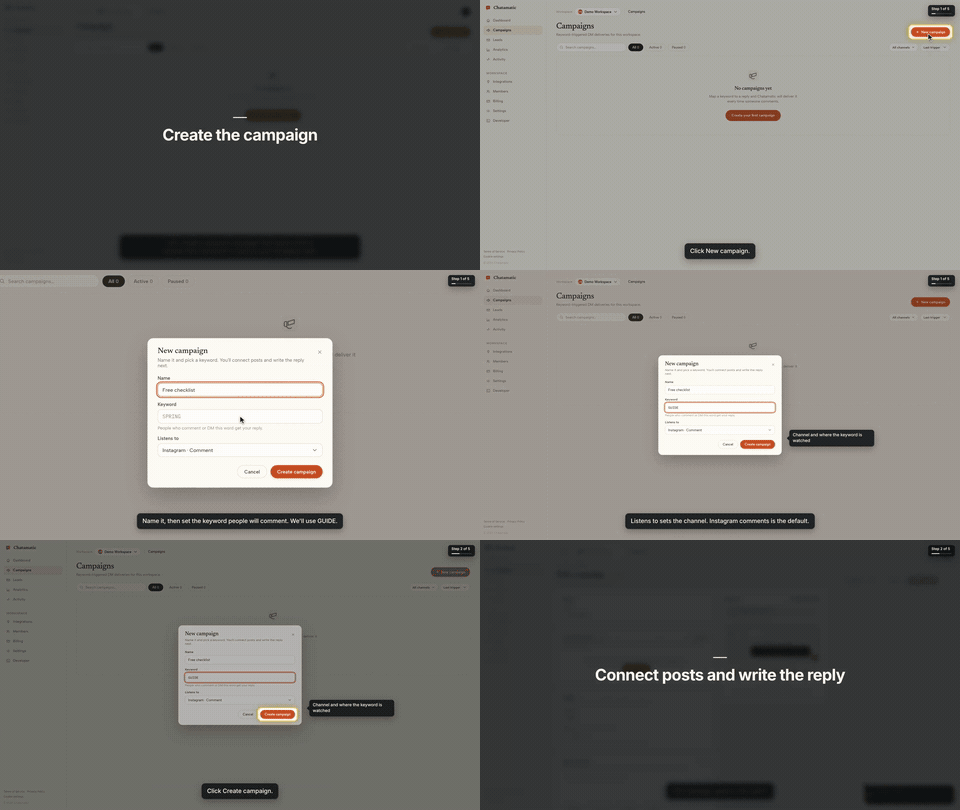](https://screenbrowser.com/guides/claude-code-demo-video/)
That is the first chapter of a 66-second video made from the request *"make a tutorial video of
creating a campaign"*. The whole session, from that sentence to the finished video with the exact
prompt and every screen along the way, is in the
[Claude Code guide](https://screenbrowser.com/guides/claude-code-demo-video/).
This repository gives your agent two things:
- **The `screenbrowser` skill** — how to read your codebase and write the two guides Screen Browser
needs (the login flow and the walkthrough), which effect fits which moment, how to check a guide
for free before recording, and how to review the video before handing it over.
- **The MCP server configuration** — the tools the agent calls: create the project, upload guides,
check them, start the run, poll it, fetch the video. The server itself is part of your Screen
Browser account at `https://mcp.screenbrowser.com`.
Claude Code, Codex, Cursor or any MCP client can use it. Sign-in happens in the browser; there is
no key to paste.
## Install (Claude Code)
Add this repository as a plugin marketplace and install the plugin:
```bash
claude plugin marketplace add screenbrowser/skill
claude plugin install screenbrowser@screenbrowser
```
The first time the agent reaches for a Screen Browser tool, Claude Code opens your browser: sign in
to Screen Browser, approve the connection, and you are done. Nothing to copy. (If it does not
prompt, run `/mcp` and pick **screenbrowser → Authenticate**.)
Without the plugin system, register the server yourself and copy the skill:
```bash
claude mcp add --transport http screenbrowser https://mcp.screenbrowser.com
cp -r skills/screenbrowser ~/.claude/skills/
```
### With an API key instead
If your agent cannot open a browser to sign in, create a key under **Settings → API keys** in
Screen Browser and pass it as a bearer token:
```bash
claude mcp add --transport http screenbrowser https://mcp.screenbrowser.com \
--header "Authorization: Bearer <your API key>"
```
Any MCP client works the same way: Streamable HTTP at `https://mcp.screenbrowser.com`, OAuth 2.1 with
dynamic client registration for interactive sign-in, or `Authorization: Bearer <key>`.
### Other agents
The skill is a plain `SKILL.md` in the open Agent Skills format, and the server is standard MCP over
HTTP, so the same two pieces work outside Claude Code.
**Cursor, VS Code, GitHub Copilot and other Agent Plugins clients** — this repository is also an
[Agent Plugins](https://agent-plugins.org/) package (`plugin.json`, `mcp.json`, `skills/`), so
install it as a plugin from the repository URL and sign in when the client offers. Cursor without
the plugin: add the server to `.cursor/mcp.json` (or the global one in Cursor settings), click
**Sign in** next to it, and copy the skill into `.cursor/skills/`:
```json
{
"mcpServers": {
"screenbrowser": { "url": "https://mcp.screenbrowser.com" }
}
}
```
```bash
mkdir -p .cursor/skills && cp -r skills/screenbrowser .cursor/skills/
```
**OpenAI Codex CLI** — add the server to `~/.codex/config.toml`, sign in once, and copy the skill
into Codex's skills folder:
```toml
[mcp_servers.screenbrowser]
url = "https://mcp.screenbrowser.com"
```
```bash
codex mcp login screenbrowser
mkdir -p ~/.codex/skills && cp -r skills/screenbrowser ~/.codex/skills/
```
**Anything else (Gemini CLI, Windsurf, a custom agent)** — register an HTTP MCP server with the URL
the way that tool documents it; a client that supports OAuth will sign you in, one that does not
takes the API key as an `Authorization: Bearer` header. Give the agent `skills/screenbrowser/SKILL.md`
as instructions (paste it, or point the tool's rules file at it). The MCP server itself also carries
the guide syntax as a resource and a `write-tutorial-guide` prompt, so a client with MCP prompts can
work without the skill file at all.
## Use
Videos can be recorded on the desktop or as a phone or tablet (`device: iphone`, `android`, `ipad`,
…), in a phone frame on a vertical 9:16 or widescreen 16:9 canvas or as the bare screen; one run is
one device.
Open your app's repository in Claude Code and ask:
> Make a tutorial video of creating a campaign.
The agent will check credits, create the project (it will ask you for the deployed URL, a demo
user, and the legal attestation), write the guides from your routes and templates, validate them,
show them to you, start the run, and give you the video link a few minutes later.
The MCP server also ships a `write-tutorial-guide` prompt that walks any client through the same
flow, and two resources: `screenbrowser://guide-syntax` and `screenbrowser://example-guides`.
## What your app needs
- A **demo user** that signs in with email and password: no OAuth, no 2FA, no captcha. Seed it with
realistic data.
- The deployed URL to record (staging is fine) and every host the app talks to (API subdomain,
auth provider, CDN).
- Confirmation that you are allowed to record the app (yours, a client's with permission, or an
internal tool).
## What it sends, and where
Everything the plugin does goes to one place: the Screen Browser MCP server at
`https://mcp.screenbrowser.com`, over HTTPS, signed in with your Screen Browser account. The
skill itself is instructions for the agent; it runs nothing on your machine and fetches nothing.
What the agent sends to Screen Browser when you ask for a video:
- the project's settings: your app's URL, the hosts it talks to, the sign-in check, narration
language and voice;
- the guides it writes from your code: plain sentences naming buttons and fields as they appear on
screen. Read them before they are saved; the agent shows them to you;
- the demo user's credentials, as project variables. Screen Browser stores them encrypted, uses
them only to sign in during a recording, and never returns them through any tool or shows them
to any model;
- run commands: start, poll, cancel, and, only if you agree, a failure report with the recorder's
screenshot and logs of a run that failed on Screen Browser's side.
It never sends your source code. The agent reads your repository locally to learn the labels; only
the guide text leaves the machine. Nothing is sent to any other service. What Screen Browser keeps,
and for how long, is in the [privacy policy](https://screenbrowser.com/legal/privacy/).
## What it costs
Plans start at $49 a month, sized in minutes of finished video. Checking a guide before recording
is free, and a run that fails is not charged. Videos are capped at five minutes; there is no free
plan. Current prices are on the [pricing page](https://screenbrowser.com/pricing/).
## Layout
```
plugin.json Agent Plugins manifest (Cursor, VS Code, Copilot, …)
mcp.json Agent Plugins MCP config (the URL; sign-in is OAuth)
.claude-plugin/plugin.json Claude Code plugin manifest
.claude-plugin/marketplace.json lets this repo act as its own Claude Code marketplace
.mcp.json Claude Code MCP server config
skills/screenbrowser/SKILL.md the skill
skills/screenbrowser/references/ guide syntax reference, worked example
examples/chatamatic/ a real auth guide + main guide pair
```
## What a guide looks like
Plain language, one step per line, naming things as they appear on screen. Screen Browser turns it
into the script — the narration, the highlights, the pacing — and resolves each step against the
live page:
```
Go to https://app.acme.test/campaigns
"Let's create a spring promotion."
Click "New campaign"
Type "Spring promo" into the Name field
Click "Save"
Confirm text "Campaign created" is visible
```
Ids and `name=` attributes are allowed when a step needs precision; class names generated by a build
tool are refused. The full reference, including the optional effect directives, is in
[`skills/screenbrowser/references/guide-syntax.md`](skills/screenbrowser/references/guide-syntax.md).
## Documentation index for AI agents
The skill carries everything an agent needs to write a guide and run a recording. For anything else —
prerequisites, costs, limitations, the API — https://screenbrowser.com/llms.txt is a Markdown index
of the public documentation, and https://screenbrowser.com/docs/agents/ is the reference for this
integration.
## Support
Issues and ideas about the skill are welcome in this repository. Anything about your account or a
particular recording: use the contact form at https://screenbrowser.com/contact/.
## License
MIT. Screen Browser itself is a hosted service; this repository contains only the agent-facing
skill, configuration and examples.
Lo que la gente pregunta sobre skill
¿Qué es screenbrowser/skill?
+
screenbrowser/skill es mcp servers para el ecosistema de Claude AI. Screen Browser skill and MCP server config: narrated tutorial videos of your web app, from inside your coding agent. Tiene 3 estrellas en GitHub y su última actualización registrada es del 2026-09-26.
¿Cómo se instala skill?
+
Puedes instalar skill clonando el repositorio (https://github.com/screenbrowser/skill) o siguiendo las instrucciones del README en GitHub. ClaudeWave también te ofrece bloques de instalación rápida en esta misma página.
¿Es seguro usar screenbrowser/skill?
+
Nuestro agente de seguridad ha analizado screenbrowser/skill y le ha asignado un Trust Score de 87/100 (tier: Trusted). Revisa el desglose completo de comprobaciones superadas y flags en esta página.
¿Quién mantiene screenbrowser/skill?
+
screenbrowser/skill es mantenido por screenbrowser. La última actividad registrada en GitHub es del 2026-09-26, con 0 issues abiertos.
¿Hay alternativas a skill?
+
Sí. En ClaudeWave puedes explorar mcp servers similares en /categories/mcp, ordenados por popularidad o actividad reciente.
Despliega skill en tu cloud
Lleva este repo a producción en minutos. Cada plataforma genera su propio entorno con variables de entorno editables.
¿Mantienes este repo? Añade un badge a tu README
Pega el badge en tu README de GitHub para mostrar que está auditado por ClaudeWave. Cada badge enlaza de vuelta a esta página y muestra el Trust Score actual.
[](https://claudewave.com/repo/screenbrowser-skill)<a href="https://claudewave.com/repo/screenbrowser-skill"><img src="https://claudewave.com/api/badge/screenbrowser-skill" alt="Featured on ClaudeWave: screenbrowser/skill" width="320" height="64" /></a>Más MCP Servers

Fair-code workflow automation platform with native AI capabilities. Combine visual building with custom code, self-host or cloud, 400+ integrations.

User-friendly AI Interface (Supports Ollama, OpenAI API, ...)

An open-source AI agent that brings the power of Gemini directly into your terminal.

Real-time global intelligence dashboard. AI-powered news aggregation, geopolitical monitoring, and infrastructure tracking in a unified situational awareness interface

🕷️ An adaptive Web Scraping framework that handles everything from a single request to a full-scale crawl! Don't be shy, join here: https://discord.gg/EMgGbDceNQ and follow here for daily tips and tricks: https://x.com/Scrapling_dev

The fastest path to AI-powered full stack observability, even for lean teams.