

Sugra MCP: connector between LLM agents and world data. 1,500+ endpoints aggregating 160+ primary sources across 36 data domains: markets, macroeconomics, company fundamentals, government, news, climate, maritime, and entity screening. Works with Anthropic Claude, OpenAI GPT, Google Gemini, xAI, and any MCP-enabled client.
- ✓Open-source license (MIT)
- ✓Actively maintained (<30d)
- ✓Clear description
- ✓Topics declared
- ✓Documented (README)
claude mcp add sugra-api-mcp -- python -m sugra-api-mcp{
"mcpServers": {
"sugra-api-mcp": {
"command": "python",
"args": ["-m", "sugra-api-mcp"],
"env": {
"SUGRA_API_KEY": "<sugra_api_key>"
}
}
}
}SUGRA_API_KEYResumen de MCP Servers
# sugra-api-mcp
<!-- mcp-name: ai.sugra/api-mcp -->
<p align="center">
<img src="https://app.sugra.ai/images/brand/sugra-app-icon.svg" alt="sugra.ai" width="112" height="112" />
</p>
<p align="center">
<a href="https://pypi.org/project/sugra-api-mcp/"><img src="https://img.shields.io/pypi/v/sugra-api-mcp?label=PyPI&color=F5A623" alt="PyPI"></a>
<a href="https://pypi.org/project/sugra-api-mcp/"><img src="https://img.shields.io/pypi/pyversions/sugra-api-mcp?label=Python" alt="Python versions"></a>
<a href="https://github.com/Sugra-Systems/sugra-api-mcp/blob/main/LICENSE"><img src="https://img.shields.io/github/license/Sugra-Systems/sugra-api-mcp?label=License" alt="License"></a>
<a href="https://smithery.ai/servers/sugra-systems/sugra-api"><img src="https://smithery.ai/badge/sugra-systems/sugra-api" alt="Smithery"></a>
</p>
<p align="center">
<a href="https://chatgpt.com/plugins/plugin_asdk_app_6a33ce728e488191a82df247ab605e91"><img src="https://img.shields.io/badge/OpenAI_Plugins_Directory-Install_plugin-F5A623?style=for-the-badge" alt="Install Sugra API from the OpenAI Plugins Directory"></a>
</p>
<p align="center">
<sub>Published in the official OpenAI Plugins Directory. Available for ChatGPT and Codex.</sub>
</p>
**Give any AI agent access to 1,500+ data endpoints across markets, economics, companies, government, news, climate, maritime and entity screening - through one MCP server.**
Works with ChatGPT, Claude, Gemini, xAI, Cursor, VS Code and any MCP client.
Official [Model Context Protocol](https://modelcontextprotocol.io) server for the [Sugra API](https://sugra.ai): one connector, a bundled endpoint catalog, and structured tool results with source attribution on every answer.
## See it in action
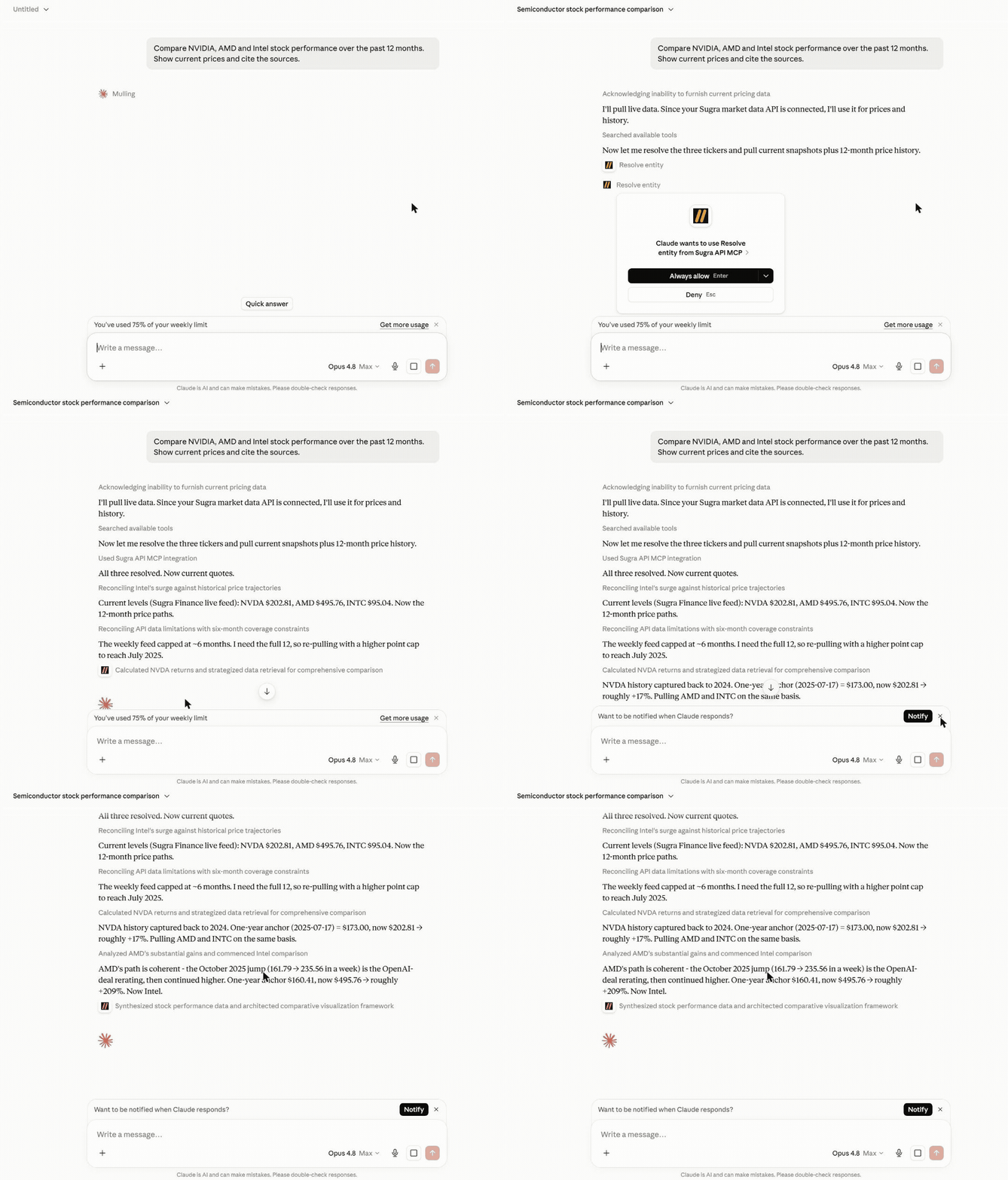
An agent answering a real question end to end - resolving entities, pulling live snapshots and history, and citing the source and freshness on every number:
More examples:
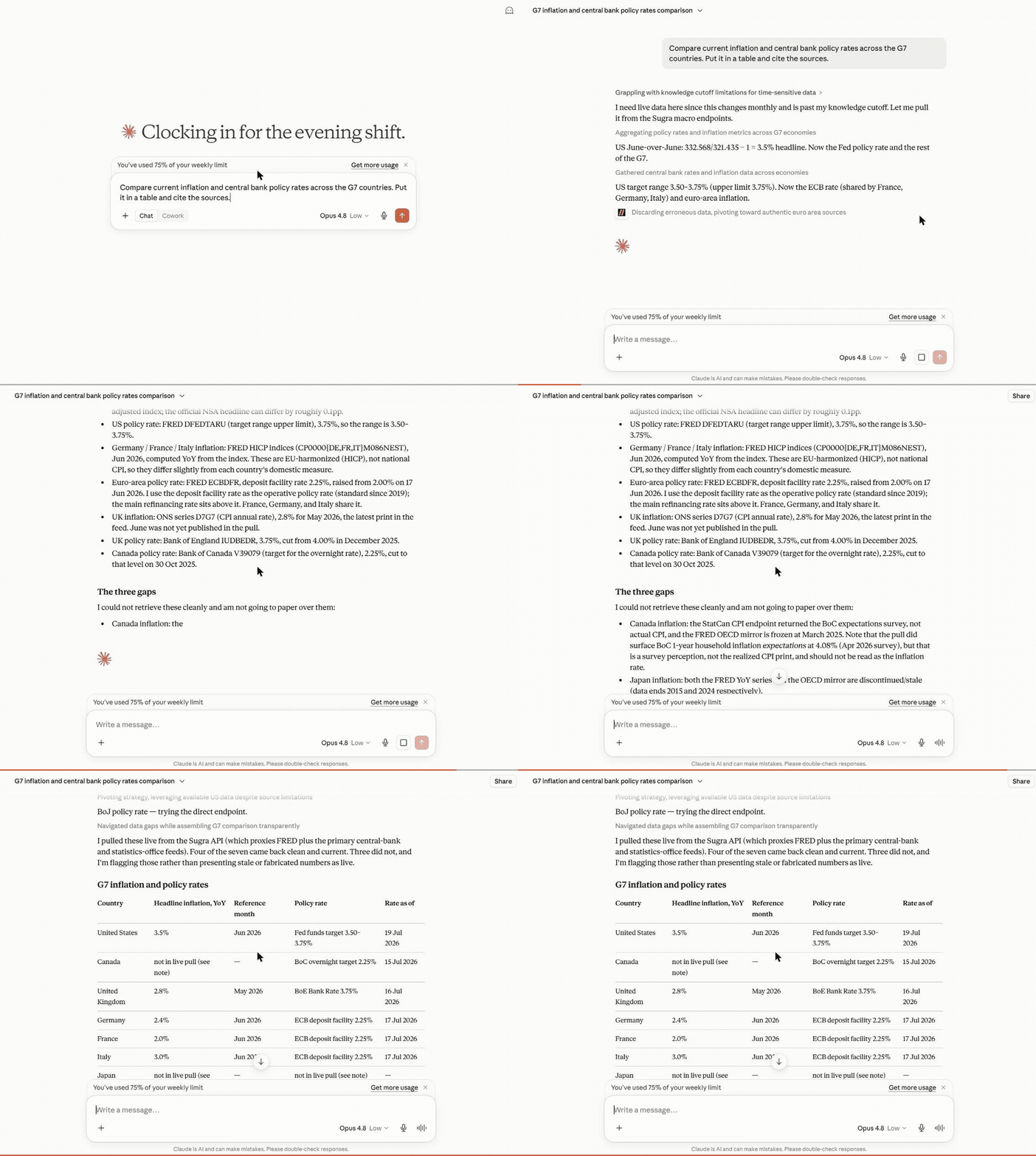
**Macro research** - one prompt builds a full G7 inflation and policy-rate table, each cell dated and sourced, with the unavailable ones flagged rather than faked:
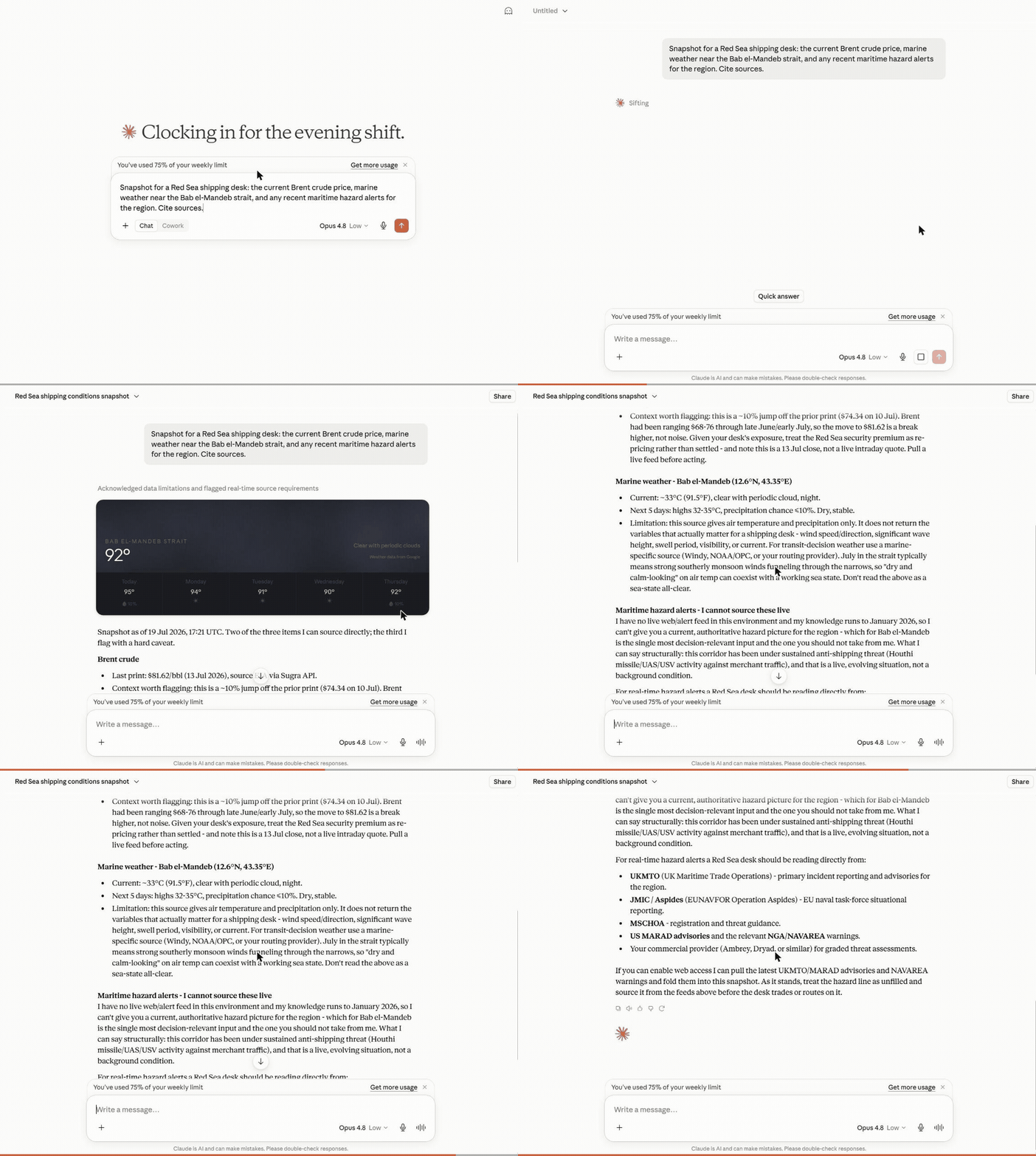
**Cross-domain snapshot** - Brent crude, marine weather and regional risk pulled together for a shipping desk, each with its source and timestamp:
## What a session looks like
Hosted MCP transcript (the three composed tools shown here run on the hosted endpoint). Captured example - wording and figures vary by run and as new BLS data is published:
```text
User: Where does US inflation stand, and how has it trended over the past year?
resolve_entity("US inflation")
-> macro indicator cpi_us (U.S. Bureau of Labor Statistics)
get_snapshot("cpi_us")
-> latest reading with freshness, provenance and quota cost
get_timeseries("cpi_us", metric="macro_series", range="1y")
-> 12 monthly points with an explicit downsampling flag
Agent: US CPI printed 2.9% year over year in the latest release, down from
3.5% twelve months earlier - a steady decline since spring.
Source: U.S. Bureau of Labor Statistics via the Sugra API.
```
Every tool result carries structured metadata - source attribution, freshness, and rate-limit cost - so agents can cite sources and budget requests instead of guessing.
## How it works
```mermaid
flowchart LR
A["AI agent<br/>(ChatGPT, Claude, Gemini, xAI, IDEs)"] --> B["Sugra MCP<br/>hosted: 11 tools / local: 8 tools"]
B --> C["Sugra API<br/>1,500+ endpoints, 36 data domains"]
C --> D["160+ primary sources<br/>markets, economics, government,<br/>news, climate, maritime"]
```
Behind the gateway sits the Sugra API: 160+ primary sources - sovereign statistics agencies, central banks, intergovernmental bodies and more - feeding 1,500+ endpoints across 36 data domains. The server ships a bundled catalog of the full endpoint surface, so discovery (search, describe, toolsets) runs locally without network calls; only actual data requests hit the API.
## What agents build with it
Five official skills ship as MCP resources (`sugra://skills/...`) and as `SKILL.md` files in `sugra_api_mcp/skills/`: explore the catalog, envelope and attribution, auth and rate limits, hosted vs gateway, and a cross-domain briefing pattern. Install them as a plugin from this repository (next section), or `resources/read` the matching URI after connect.
## Agent skills
These skills teach the catalog loop. They do not add MCP tools. Connect the Sugra MCP server separately (hosted or local).
### Claude Code
```
/plugin marketplace add Sugra-Systems/sugra-api-mcp
/plugin install sugra-api@sugra-api-mcp
```
Skills appear as `/sugra-api:explore-catalog`, `/sugra-api:envelope-attribution`, `/sugra-api:auth-limits`, `/sugra-api:hosted-vs-gateway`, and `/sugra-api:cross-domain-briefing`.
### Grok
```bash
grok plugin marketplace add Sugra-Systems/sugra-api-mcp
grok plugin install sugra-api --trust
```
### Codex
Ask `$skill-installer` to pull from this repo, or run:
```bash
python ~/.codex/skills/.system/skill-installer/scripts/install-skill-from-github.py \
--repo Sugra-Systems/sugra-api-mcp \
--path sugra_api_mcp/skills/explore-catalog \
--path sugra_api_mcp/skills/envelope-attribution \
--path sugra_api_mcp/skills/auth-limits \
--path sugra_api_mcp/skills/hosted-vs-gateway \
--path sugra_api_mcp/skills/cross-domain-briefing
```
Codex also loads a copied folder from `$HOME/.agents/skills/<slug>/` (current) or `~/.codex/skills/<slug>/`.
### Cursor
Copy each skill folder into `.cursor/skills/` (this project) or `~/.cursor/skills/` (every project). Team marketplace install is org-admin and is not covered here.
### ChatGPT
ChatGPT does not load SKILL.md from disk. Use the hosted MCP connector at `https://mcp.sugra.ai/mcp` (permanent alias `https://app.sugra.ai/mcp`).
Six workflow prompts ship with the server and turn these into one-click flows in clients that surface MCP prompts:
- **Market and macro research** - "Compare inflation and central bank policy rates across the G7." (`macro_briefing`)
- **Equity snapshots with sources** - "Where does NVIDIA stand today - price, profile, and market backdrop?" (`market_snapshot`)
- **Sanctions and compliance screening** - "Screen this supplier and resolve its LEI identity." (`sanctions_screening`)
- **Sector comparison** - "Energy versus technology: valuations and flows side by side." (`sector_compare`)
- **Climate, maritime and trade intelligence** - "Red Sea shipping this week: chokepoint transits, crude price, and weather on the route." (`earth_conditions` plus the transport and commodities catalog)
- **Source discovery** - "What does the catalog offer for fixed income, and from which institutions?" (`source_overview`)
Every answer carries source attribution and freshness metadata, so agents cite instead of guessing.
## Hosted MCP (recommended)
No install. Point your client at the hosted Streamable HTTP endpoint:
```
https://app.sugra.ai/mcp
```
- 11 tools: the eight gateway tools plus three composed agent tools (`resolve_entity`, `get_snapshot`, `get_timeseries`)
- OAuth sign-in through the claude.ai and ChatGPT connector UIs, or `Authorization: Bearer sugra_xxx_...` with an API key
- In claude.ai: Settings -> Connectors -> Add custom connector
- In ChatGPT: Settings -> Connectors -> Add MCP server
## Local package
Runs on your machine over stdio (or self-hosted HTTP) with an API key:
```bash
pip install sugra-api-mcp
```
- Eight gateway tools
- stdio for desktop clients and IDEs, Streamable HTTP for self-hosting
- Authenticates with `SUGRA_API_KEY`
Get a free API key at [app.sugra.ai/settings/billing](https://app.sugra.ai/settings/billing) (Free tier: 50 req/day).
## Quick start
```bash
pip install sugra-api-mcp
export SUGRA_API_KEY=sugra_xxx_... # free key: app.sugra.ai/settings/billing
sugra-api-mcp call quotes_symbol_price --params '{"symbol":"AAPL"}'
```
The same call through an agent: connect the server to your client (next section) and ask "What is AAPL trading at? Use Sugra." The agent finds `quotes_symbol_price` in the catalog and calls it with the symbol.
## Connect your client
Supported clients:
- **Anthropic Claude**: Claude Desktop, Claude Code (CLI), claude.ai (web)
- **OpenAI GPT**: ChatGPT (via MCP connector)
- **Google Gemini**: Gemini CLI, Gemini Code Assist (VS Code + JetBrains)
- **xAI**: Remote MCP Tools in xAI SDK and Responses API
- **IDEs**: VS Code (native), Cursor, Zed, Cline, Continue.dev, Windsurf
- **Custom agents**: anything built on the Python or TypeScript MCP SDK
### Claude Desktop (stdio)
Add to `claude_desktop_config.json`:
- macOS: `~/Library/Application Support/Claude/claude_desktop_config.json`
- Windows: `%APPDATA%\Claude\claude_desktop_config.json`
- Linux: Claude Desktop has no Linux build. On Linux, `pip install sugra-api-mcp` and use Claude Code (CLI), an IDE client, or the hosted HTTP endpoint below.
```json
{
"mcpServers": {
"sugra": {
"command": "sugra-api-mcp",
"env": {
"SUGRA_API_KEY": "sugra_xxx_yourkey..."
}
}
}
}
```
Restart Claude Desktop. Sugra tools appear in the tools menu.
### Claude Code (Anthropic CLI)
```bash
claude mcp add sugra -- sugra-api-mcp
# then set the env var that sugra-api-mcp reads
export SUGRA_API_KEY=sugra_xxx_...
```
Or edit `~/.claude/config.json` manually with the same shape as Claude Desktop above.
To install the official skills as a plugin (separate from the MCP server)Lo que la gente pregunta sobre sugra-api-mcp
¿Qué es Sugra-Systems/sugra-api-mcp?
+
Sugra-Systems/sugra-api-mcp es mcp servers para el ecosistema de Claude AI. Sugra MCP: connector between LLM agents and world data. 1,500+ endpoints aggregating 160+ primary sources across 36 data domains: markets, macroeconomics, company fundamentals, government, news, climate, maritime, and entity screening. Works with Anthropic Claude, OpenAI GPT, Google Gemini, xAI, and any MCP-enabled client. Tiene 2 estrellas en GitHub y su última actualización registrada es del 2026-09-12.
¿Cómo se instala sugra-api-mcp?
+
Puedes instalar sugra-api-mcp clonando el repositorio (https://github.com/Sugra-Systems/sugra-api-mcp) o siguiendo las instrucciones del README en GitHub. ClaudeWave también te ofrece bloques de instalación rápida en esta misma página.
¿Es seguro usar Sugra-Systems/sugra-api-mcp?
+
Nuestro agente de seguridad ha analizado Sugra-Systems/sugra-api-mcp y le ha asignado un Trust Score de 95/100 (tier: Verified). Revisa el desglose completo de comprobaciones superadas y flags en esta página.
¿Quién mantiene Sugra-Systems/sugra-api-mcp?
+
Sugra-Systems/sugra-api-mcp es mantenido por Sugra-Systems. La última actividad registrada en GitHub es del 2026-09-12, con 5 issues abiertos.
¿Hay alternativas a sugra-api-mcp?
+
Sí. En ClaudeWave puedes explorar mcp servers similares en /categories/mcp, ordenados por popularidad o actividad reciente.
Despliega sugra-api-mcp en tu cloud
Lleva este repo a producción en minutos. Cada plataforma genera su propio entorno con variables de entorno editables.
¿Mantienes este repo? Añade un badge a tu README
Pega el badge en tu README de GitHub para mostrar que está auditado por ClaudeWave. Cada badge enlaza de vuelta a esta página y muestra el Trust Score actual.
[](https://claudewave.com/repo/sugra-systems-sugra-api-mcp)<a href="https://claudewave.com/repo/sugra-systems-sugra-api-mcp"><img src="https://claudewave.com/api/badge/sugra-systems-sugra-api-mcp" alt="Featured on ClaudeWave: Sugra-Systems/sugra-api-mcp" width="320" height="64" /></a>Más MCP Servers

Fair-code workflow automation platform with native AI capabilities. Combine visual building with custom code, self-host or cloud, 400+ integrations.

User-friendly AI Interface (Supports Ollama, OpenAI API, ...)

An open-source AI agent that brings the power of Gemini directly into your terminal.

Real-time global intelligence dashboard. AI-powered news aggregation, geopolitical monitoring, and infrastructure tracking in a unified situational awareness interface

🕷️ An adaptive Web Scraping framework that handles everything from a single request to a full-scale crawl!

The fastest path to AI-powered full stack observability, even for lean teams.