

Playwright end-to-end testing MCP server — run, debug and inspect E2E tests from any AI agent: failure analysis, live DOM inspection, selector validation, visual diffs, flaky-test diagnosis.
- ✓Open-source license (MIT)
- ✓Actively maintained (<30d)
- ✓Clear description
- ✓Topics declared
- ✓Documented (README)
claude mcp add e2e -- npx -y playwright-e2e-mcp{
"mcpServers": {
"e2e": {
"command": "npx",
"args": ["-y", "playwright-e2e-mcp"]
}
}
}Resumen de MCP Servers
# playwright-e2e-mcp [](https://github.com/trajectiq-ai/E2E/actions/workflows/ci.yml) [](https://github.com/trajectiq-ai/E2E/releases) [](https://registry.modelcontextprotocol.io/) An [MCP](https://modelcontextprotocol.io) server that lets AI agents **run, debug, and inspect Playwright end-to-end tests** — with structured results, actionable failure diagnostics, and live DOM inspection. ``` run-test ──▶ get-failure ──▶ inspect-page ──▶ validate-selector ──▶ fix ──▶ re-run ▲ │ └──────────────────────── list-tests ◀────────────────────────────────┘ ``` Instead of handing an agent raw Playwright output, this server turns every run into machinable results: pass/fail stats, per-failure messages with `file:line`, a failure kind (assertion, timeout, browser crash, syntax error, dead dev server, full disk…), and a concrete "how to fix" hint. When a test fails because a selector no longer matches, the agent can open the **live page** in a headless browser, see the real DOM with unique CSS selectors, and validate the replacement selector before re-running. ## Demo **Live endpoint** — a real `initialize` + `tools/list` round-trip against `https://playwright-e2e-mcp.vercel.app/api/mcp`: 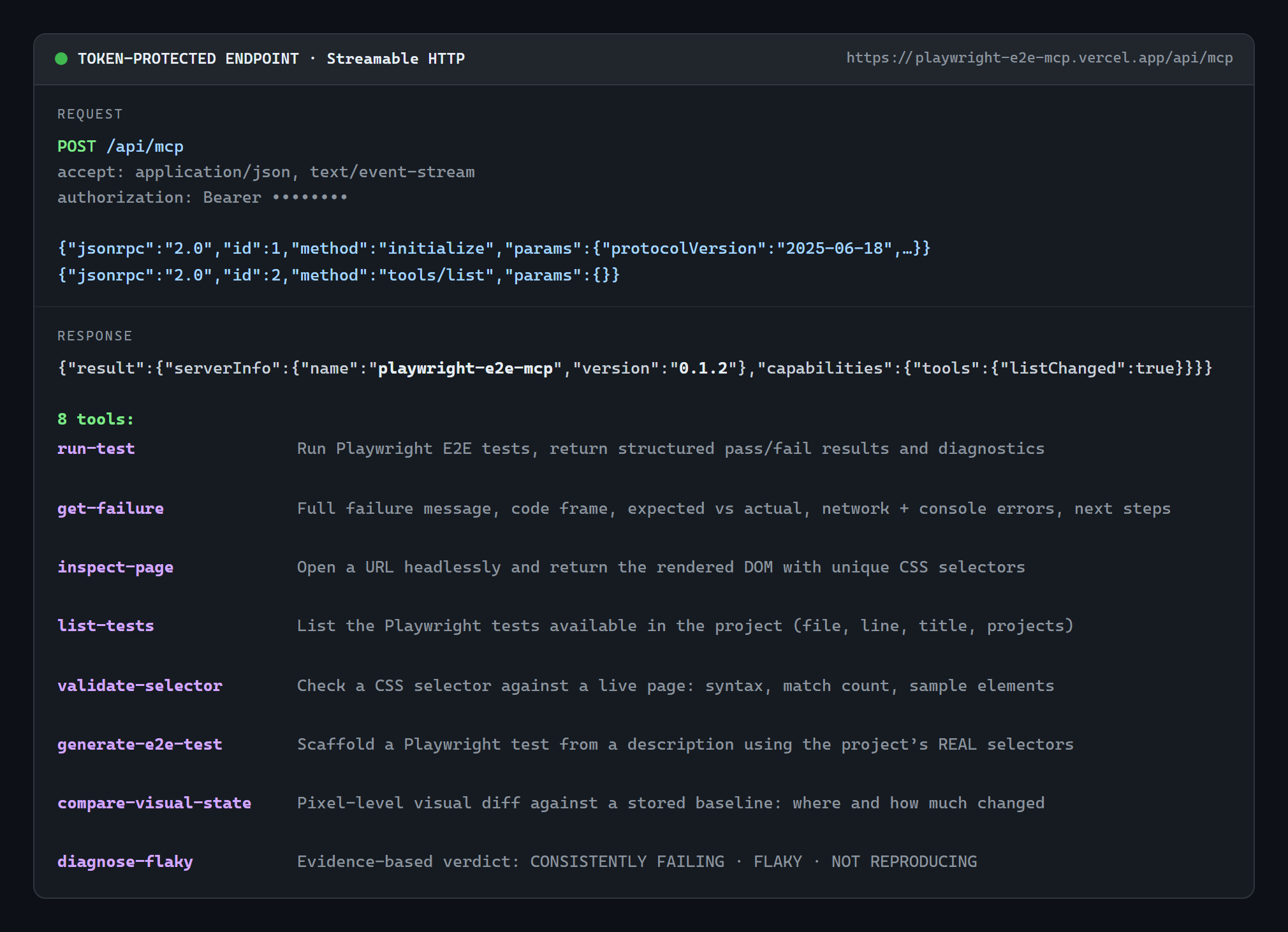 **A real test run** — `run-test` served over stdio by `npx -y playwright-e2e-mcp` against the bundled `examples/sample-test.spec.ts` (actual output, unedited): 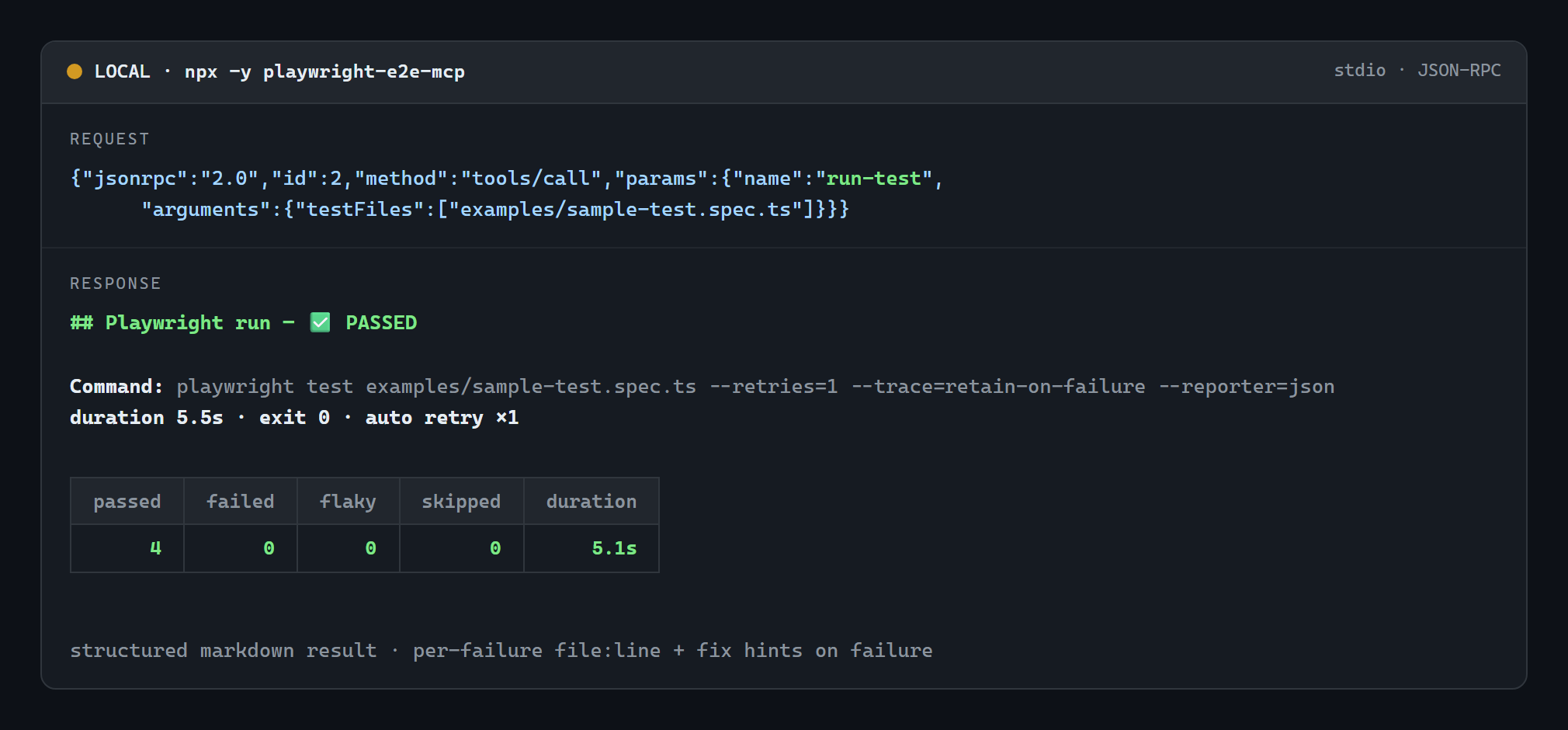 Images are generated from real captured output with `node scripts/gen-demo-images.mjs`. ## Install Works with Claude Desktop, Claude Code, Cursor, Windsurf, Codex, Gemini CLI, Freebuff and every other MCP client — pick whichever route fits: | Route | How | | --- | --- | | **npm (canonical, fastest)** | `npx -y playwright-e2e-mcp` | | **MCP Registry** (registry-aware clients discover it automatically) | `io.github.trajectiq-ai/E2E` — [listing](https://registry.modelcontextprotocol.io/) | | **Any client, no npm account needed** | `npx -y github:trajectiq-ai/E2E` | | **Claude Desktop, zero Node setup** | double-click the [`.mcpb` extension](https://github.com/trajectiq-ai/E2E/releases) | | **Remote-only clients (ChatGPT connectors)** | `https://playwright-e2e-mcp.vercel.app/api/mcp` | Details and per-client config: [Installation](#installation) · [MCP client configuration](#mcp-client-configuration). --- ## Tools | Tool | Purpose | | --- | --- | | `run-test` | Run Playwright tests and return stats, failures, diagnostics and hints | | `get-failure` | Deep analysis of one failure: stack, expected/actual, **DOM snapshot at failure (from the Playwright trace)**, next steps | | `inspect-page` | Open a URL headlessly and return the rendered DOM: selectors, visibility, boxes, text, console output, HTML | | `list-tests` | List available tests (`file`, `line`, full title, projects) with filtering | | `validate-selector` | Check a CSS selector against a live page: validity, match count, sample matches | | `generate-e2e-test` | Scaffold a Playwright test from a description using the project's **real** selectors, discovered from recent file changes | | `compare-visual-state` | Visual regression: screenshot before/after a change and report *what* moved and how colors shifted | | `diagnose-flaky` | Run a failing test 2–10 times **with retries disabled** and return an evidence verdict: `CONSISTENTLY FAILING`, `FLAKY` or `NOT REPRODUCING` | ### `run-test` | Argument | Type | Description | | --- | --- | --- | | `projectRoot` | string | Project directory (default: server working directory) | | `testFiles` | string[] | Files/directories relative to the root; `file:line` supported. Omit to run everything | | `grep` | string | Only run tests whose title matches this regex | | `browser` | `chromium` \| `firefox` \| `webkit` | Playwright project to run (matched against config project names) | | `headed` | boolean | Visible browser window | | `timeoutMs` | number | Hard wall-clock limit for the run (default `120000`); the whole process tree is killed past it and **partial results are returned** | | `testTimeoutMs` | number | Per-test timeout passed to Playwright | | `workers` / `retries` | number | Passed through to Playwright | | `config` | string | `playwright.config` path **or 1-based index** when the project has several | | `retryOnFailure` | boolean | Auto-retry failures **once** before reporting them (default `true`; ignored when `retries` is set) | | `lastFailed` | boolean | Only re-run tests that failed in the previous run (Playwright `--last-failed`) — the fast fix → re-run loop | | `args` | string[] | Extra CLI flags (shell metacharacters are rejected) | Flakiness handling: by default the server injects `--retries=1` (unless the config already sets `retries`), so a test that passes on the retry is reported as **flaky**, not failed. Traces are captured automatically (`--trace=retain-on-failure`) so `get-failure` can show the DOM at the moment of failure. Example result: ```markdown ## Playwright run — ❌ FAILED **Command:** `playwright test --config playwright.config.ts tests/checkout.spec.ts --reporter=json` **duration 4.2s · exit 1 · config `playwright.config.ts`** | passed | failed | flaky | skipped | duration | | ---: | ---: | ---: | ---: | ---: | | 0 | 1 | 0 | 0 | 1.1s | ### ❌ 1 failing test(s) ### 1 of 1. checkout.spec.ts › pays with card **File:** `checkout.spec.ts:5` | **failed · server-unreachable** ### ⚠️ SERVER_NOT_RUNNING Your app (dev server) does not appear to be reachable. Start it in another terminal (e.g. npm run dev / npm start), keep it running, then retry — or configure `webServer` in playwright.config.* so Playwright starts it automatically. ``` ### `get-failure` | Argument | Type | Description | | --- | --- | --- | | `index` | number | 1-based failure index from the last run (default `1`) | | `projectRoot` | string | Only used when re-reading the stored report | Returns the message/code frame, expected vs actual, stack, failure kind with a diagnosis, the test's console output, **the DOM snapshot from the Playwright trace (plus the failed action, its selector, and the action log leading up to it)**, **the network requests that failed** (4xx/5xx, dead endpoints, no-response — with method, URL, status and resource type), **the console errors/warnings the page logged before the failure**, and numbered next steps (re-run this single test by `file:line`, headed/debug mode, `validate-selector` when the message mentions a locator, …). ### `inspect-page` | Argument | Type | Description | | --- | --- | --- | | `url` | string | Full http(s) URL to open (required) | | `projectRoot` | string | Project whose Playwright launches the browser | | `selector` | string | Inspect matches of this CSS selector instead of the whole DOM | | `waitFor` | string | Wait for a selector (CSS or `text=…`) before inspecting | | `waitUntil` | `load` \| `domcontentloaded` \| `networkidle` | Navigation wait condition | | `includeHtml` | boolean | Include the rendered HTML (capped) | | `maxHtmlChars` | number | HTML cap, default `20000` | | `timeoutMs` | number | Overall limit, default `45000` | Returns each element's **unique CSS selector**, tag, visibility, bounding box, text and attributes, plus captured console messages (errors first). ### `list-tests` | Argument | Type | Description | | --- | --- | --- | | `projectRoot` | string | Project directory | | `config` | string | Config path or 1-based index | | `testDir` | string | Restrict scanning to a directory (must stay inside the project) | | `filter` | string | Case-insensitive substring filter on `file › title` | | `limit` | number | Max tests returned, default `500` | Uses `playwright test --list` when Playwright works, and **falls back to a source scan** (keeping the reason) when the install or a spec file is broken. ### `validate-selector` | Argument | Type | Description | | --- | --- | --- | | `url` | string | Live page to test against (required) | | `selector` | string | CSS selector to validate (required) | | `projectRoot` | string | Project whose Playwright launches the browser | | `timeoutMs` | number | Overall limit, default `45000` | Verdicts: `✅ VALID — N matches` (with a sample of matches), `✅ VALID — 0 matches` (with debugging advice), `❌ INVALID` (parse error + fix), or a warning when the input uses a Playwright-only engine (`text=`, `xpath=`, `>>`, `:has-text()`), which is not plain CSS. ### `generate-e2e-test` | Argument | Type | Description | | --- | --- | --- | | `description` | string | What the test should cover (required) | | `pageUrl` | string | Page the test starts on (default: `baseURL` / `webServer.url` from config) | | `testDir` / `file` | string | Where to write the spec (default: detected `testDir` + `generated/<slug>.spec.ts`) | | `write` | boolean | Write the file to disk (default `true`) | | `overwrite` | boolean | Replace an existing file at the target path | | `liveInspect` | boolean | Cross-check selectors against the live page (default on when a URL is known) | | `projectRoot` / `config` | string | As with the other tools | Reads the agent's recent changes (`git status`, falling back to `git diff HEAD~1`, then recent mtimes), extracts the locators those files actually declare (`data-testid`, `getByRole`, `aria-label`, `placeholder`, `id`, `name`, element text), ranks verified-live selectors first, writes a spec built from them, and reports each selector with its source `file:line`. ### `compare-visual-state` | Argum
Lo que la gente pregunta sobre E2E
¿Qué es trajectiq-ai/E2E?
+
trajectiq-ai/E2E es mcp servers para el ecosistema de Claude AI. Playwright end-to-end testing MCP server — run, debug and inspect E2E tests from any AI agent: failure analysis, live DOM inspection, selector validation, visual diffs, flaky-test diagnosis. Tiene 0 estrellas en GitHub y su última actualización registrada es del 2026-10-06.
¿Cómo se instala E2E?
+
Puedes instalar E2E clonando el repositorio (https://github.com/trajectiq-ai/E2E) o siguiendo las instrucciones del README en GitHub. ClaudeWave también te ofrece bloques de instalación rápida en esta misma página.
¿Es seguro usar trajectiq-ai/E2E?
+
Nuestro agente de seguridad ha analizado trajectiq-ai/E2E y le ha asignado un Trust Score de 95/100 (tier: Verified). Revisa el desglose completo de comprobaciones superadas y flags en esta página.
¿Quién mantiene trajectiq-ai/E2E?
+
trajectiq-ai/E2E es mantenido por trajectiq-ai. La última actividad registrada en GitHub es del 2026-10-06, con 0 issues abiertos.
¿Hay alternativas a E2E?
+
Sí. En ClaudeWave puedes explorar mcp servers similares en /categories/mcp, ordenados por popularidad o actividad reciente.
Despliega E2E en tu cloud
Lleva este repo a producción en minutos. Cada plataforma genera su propio entorno con variables de entorno editables.
¿Mantienes este repo? Añade un badge a tu README
Pega el badge en tu README de GitHub para mostrar que está auditado por ClaudeWave. Cada badge enlaza de vuelta a esta página y muestra el Trust Score actual.
[](https://claudewave.com/repo/trajectiq-ai-e2e)<a href="https://claudewave.com/repo/trajectiq-ai-e2e"><img src="https://claudewave.com/api/badge/trajectiq-ai-e2e" alt="Featured on ClaudeWave: trajectiq-ai/E2E" width="320" height="64" /></a>Más MCP Servers

Fair-code workflow automation platform with native AI capabilities. Combine visual building with custom code, self-host or cloud, 400+ integrations.

User-friendly AI Interface (Supports Ollama, OpenAI API, ...)

An open-source AI agent that brings the power of Gemini directly into your terminal.

Real-time global intelligence dashboard. AI-powered news aggregation, geopolitical monitoring, and infrastructure tracking in a unified situational awareness interface

🕷️ An adaptive Web Scraping framework that handles everything from a single request to a full-scale crawl! Don't be shy, join here: https://discord.gg/EMgGbDceNQ and follow here for daily tips and tricks: https://x.com/Scrapling_dev

The fastest path to AI-powered full stack observability, even for lean teams.