

Jikida — the security toolkit for modern and AI-built web apps: pentest, code & repo scanning, a managed WAF, and an MCP server for AI editors.
- ✓Open-source license (Apache-2.0)
- ✓Actively maintained (<30d)
- ✓Clear description
- ✓Documented (README)
claude mcp add jikida -- npx -y @jikida/init{
"mcpServers": {
"jikida": {
"command": "npx",
"args": ["-y", "@jikida/init"]
}
}
}Resumen de MCP Servers
<p align="center">
<img src="https://raw.githubusercontent.com/unesLam/jikida/main/.github/guardian.png" alt="Jikida guardian" width="220">
</p>
<h1 align="center">Jikida.io</h1>
<p align="center"><b>The hosted AI pentester for people who ship — not just security engineers.</b><br>
Pentest your live app, scan your repo, protect it with a WAF, and watch its uptime. One account. No Docker, no LLM key, free tier.</p>
<p align="center">
<a href="https://jikida.io"><img src="https://img.shields.io/badge/site-jikida.io-E01F26" alt="site"></a>
<a href="https://mcp.jikida.io"><img src="https://img.shields.io/badge/MCP-20_AI_tools-A855F7" alt="mcp"></a>
<a href="#sdks--every-language"><img src="https://img.shields.io/badge/SDKs-10_languages-0A0A0A" alt="sdks"></a>
<a href="https://www.npmjs.com/package/@jikida/scan"><img src="https://img.shields.io/npm/v/@jikida/scan?label=%40jikida%2Fscan&color=cb3837" alt="npm scan"></a>
<a href="https://packagist.org/packages/jikida/sdk-php"><img src="https://img.shields.io/packagist/v/jikida/sdk-php?label=jikida%2Fsdk-php&color=777bb4" alt="packagist"></a>
<a href="LICENSE"><img src="https://img.shields.io/badge/license-Apache_2.0-3b82f6" alt="license"></a>
</p>
<p align="center">
<b><a href="#why-jikida-beats-the-other-security-tools">Why it beats Nuclei / Strix / Shannon ↓</a></b> ·
<a href="#quick-install-30-seconds">Install</a> ·
<a href="#mcp-server-for-ai-ides">MCP</a> ·
<a href="#sdks--every-language">SDKs</a> ·
<a href="https://jikida.io/compare">Compare</a>
</p>
**Install it, scan it, or plug it into your AI editor:**
```bash
npx @jikida/init # add the SDK + protection to your app in 30 seconds
npx @jikida/scan # pentest any site or repo from your terminal
npx -y @jikida/mcp # security tools inside Claude Code, Cursor, Windsurf
```
<pre><code><span style="color:#E01F26"> ██ ██ ██ ██ ██ █████ ████
██ ██ ██ ██ ██ ██ ██ ██ ██
██ ██ ████ ██ ██ ██ ██████
██ ██ ██ ██ ██ ██ ██ ██ ██ ██
███ ██ ██ ██ ██ █████ ██ ██</span>
pentest · repo scan · uptime · alerts https://jikida.io
→ scanning example.com …
✓ 41 checks · grade B (88/100)
CRITICAL Exposed .env file /.env CWE-538
CRITICAL Stripe secret key in JS /app.js:1204 CWE-312
HIGH Missing Content-Security-Policy CWE-693
MEDIUM Cookie without Secure flag session CWE-614
Every finding has a fix. Full report: https://app.jikida.io
</code></pre>
## Pentest & scan for developers, AI IDEs & vibe coders
Pentest and scan websites, web apps, code and GitHub for vulnerabilities and exposed keys. Secure vibe-coded apps, monitor uptime, SSL and domains, and rate-limit APIs. One platform.
**Website & app pentest** · **Code & repo scan** · **Deep pentest** · **MCP for AI IDEs** · **Agentic & vibe-coded security** · **SDKs**
---
**Jikida.io** is a developer-first security platform. The core is **pentest and scanning**: it pentests your live website and app, scans your code and connected GitHub/GitLab/Bitbucket repos for exposed secrets and vulnerable dependencies, runs a deeper authenticated pentest, and plugs into your **AI IDE** (Claude Code, Cursor, Windsurf) over **MCP** so it guides agentic and vibe-coded work to write secure code and catches mistakes before they ship. Uptime, SSL & domain monitoring, a managed WAF, and a compliance generator come bundled as complementary extras — installed in **one line** for Node, PHP/Laravel, Python, Go, Ruby, Java, .NET, Rust, Bun, or Deno.
**Your security layer. Shipped in 30 seconds.** One line — `npx @jikida/init` — and every SDK fails open, so if Jikida.io is ever down your app keeps serving.
---
## Why Jikida beats the other security tools
The strongest open-source security tools are **deep but narrow** — pentest-only, self-hosted, bring-your-own-LLM-key. Jikida does the deep work **and** hosts it, runs with no key of your own, and adds a WAF, uptime and repo scan the pentest-only tools skip. ✅ full · ⚠️ partial · ❌ none.
| | Jikida | Nuclei | Strix | Shannon | Snyk | Cloudflare |
| :--- | :---: | :---: | :---: | :---: | :---: | :---: |
| Live-app pentest with real exploit | ✅ | ⚠️ match | ✅ | ✅ | ❌ | ❌ |
| SAST + DAST (code **and** live app) | ✅ | ⚠️ DAST | ✅ | ✅ | ⚠️ SAST | ❌ |
| Repo secret + CVE (OSV) scan | ✅ | ❌ | ⚠️ | ⚠️ | ✅ | ❌ |
| Managed WAF (blocks live attacks) | ✅ | ❌ | ❌ | ❌ | ❌ | ✅ |
| Uptime + SSL / domain monitoring | ✅ | ❌ | ❌ | ❌ | ❌ | ⚠️ |
| **Hosted — no Docker, no self-host** | ✅ | ⚠️ cloud | ❌ | ❌ | ✅ | ✅ |
| **Runs with no LLM key of yours** | ✅ | ✅ | ❌ BYOK | ❌ BYOK | ✅ | ✅ |
| Install: CLI + Docker + `npx` | ✅ all | ⚠️ CLI | ⚠️ Docker | ⚠️ npx | ⚠️ CLI | ⚠️ DNS |
| MCP tools in your AI editor | ✅ | ❌ | ❌ | ⚠️ | ❌ | ❌ |
| Free tier, no card | ✅ | ✅ | ✅ | ✅ | ✅ | ✅ |
The one axis the AI pentesters still go deeper on is raw exploitation — exactly what our [source-to-exploit deep pentest](https://jikida.io/compare) is closing. Everywhere else, the builder who shipped with Cursor last week wins with Jikida: nothing to self-host, no key to buy, the whole stack in one account. Full breakdowns: [nuclei](https://jikida.io/compare/nuclei-alternative) · [strix](https://jikida.io/compare/strix-alternative) · [shannon](https://jikida.io/compare/shannon-alternative) · [snyk](https://jikida.io/compare/snyk-alternative) · [cloudflare](https://jikida.io/compare/cloudflare-alternative).
---
### Get started — pick your entry point
Every command below sits in its own copy box. Lines that start with `!` are notes, not commands — do not copy those.
**Scan a URL or repo** — no account needed.
```bash
npx @jikida/scan https://your-app.com
```
! Scan a local repo for committed secrets:
```bash
npx @jikida/scan ./
```
**Add the WAF + SDK** — auto-detects your framework.
```bash
npx @jikida/init
```
**Install a language SDK** — Node shown; PHP, Python, Go and the rest are in the [SDK table](#sdks--every-language).
```bash
npm install @jikida/sdk-node
```
**MCP server** for Claude Code, Cursor and Windsurf — add this to `~/.claude/mcp.json`:
```json
{ "mcpServers": { "jikida": { "command": "npx", "args": ["-y", "@jikida/mcp"] } } }
```
**Agent skills** — copy the [`skills/`](./skills) folder into your assistant's skills folder (`.claude/skills/`, Cursor rules, and the like). Three skills: **security**, **clean-code**, **UX design** — see [the table below](#anthropic-agent-skills--ship-secure-non-sloppy-apps).
Full details for each are below.
### Where things live
| Folder | What it holds |
| --- | --- |
| [`sdks/`](./sdks) | Ten language SDKs — Node, PHP, Python, Go, Ruby, Java, .NET, Rust, Bun, Deno. |
| [`tools/`](./tools) | The `scan` CLI, the `init` onboarding CLI, and the `mcp` server. |
| [`skills/`](./skills) | The Jikida agent skill for Claude Code, Cursor and Windsurf. |
| [`waf-rules/`](./waf-rules) | Versioned WAF rule packs (OWASP Top 10, API abuse, bot scanners, vibe-coder). |
Get a token at [app.jikida.io/developer](https://app.jikida.io/developer). Set it as `JIKIDA_TOKEN`.
---
## See it in action
One dashboard for a site's whole security posture — protection status, uptime, pentest grade, email security (SPF/DKIM/DMARC) and compliance — with instant alerts to your phone, Slack, Telegram, Discord, email or a webhook.
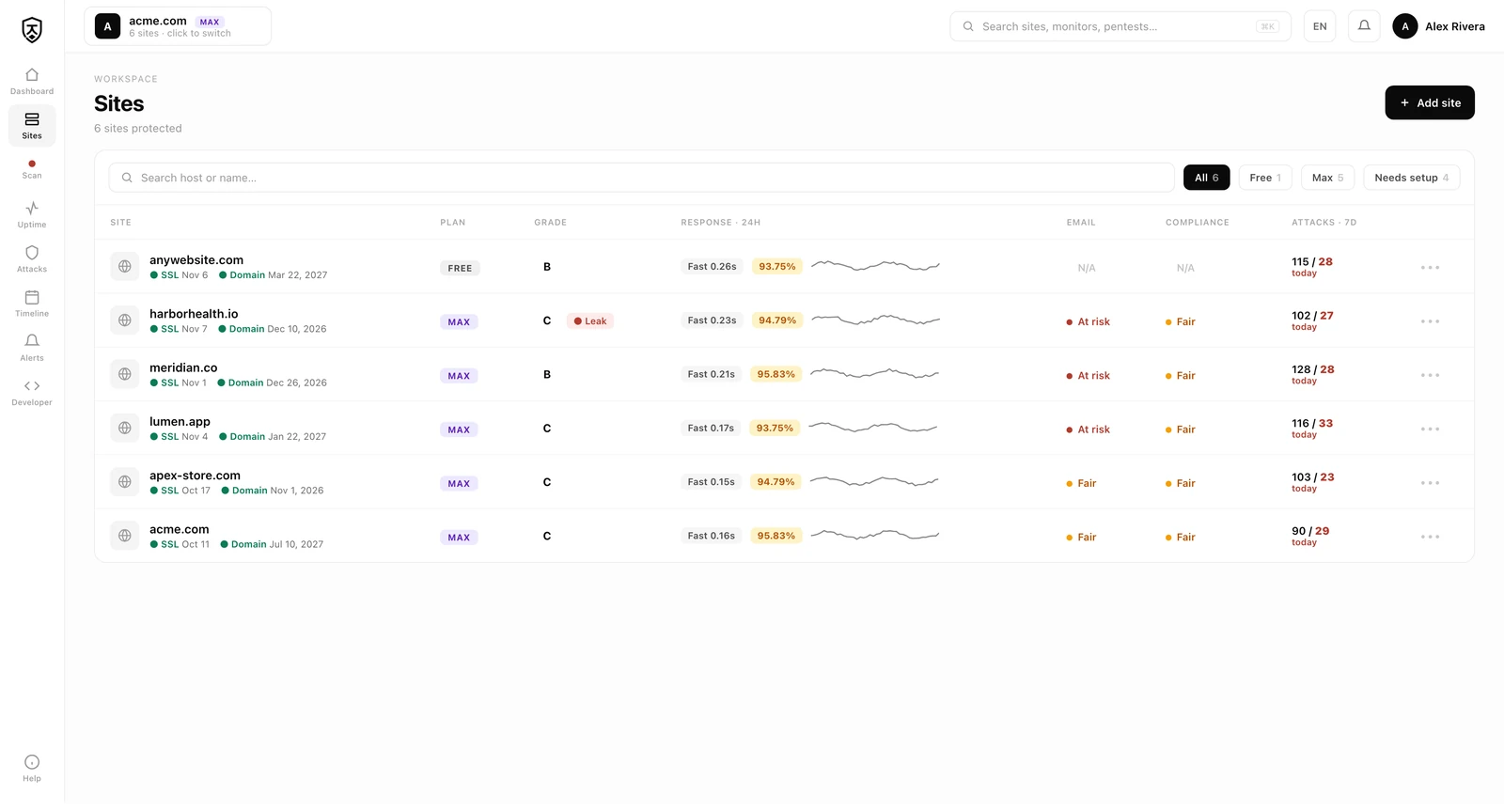
- **Uptime & performance** — response-time trend, uptime %, P95 and an incident timeline for every page and API you watch.
- **API rate-limits & rules** — your SDK auto-detects endpoints from real traffic; approve per-endpoint rate caps and WAF rules, or dismiss the ones you don't need.
---
## Table of contents
- [Why Jikida beats the other security tools](#why-jikida-beats-the-other-security-tools)
- [Why Jikida.io](#why-jikida)
- [How access works](#how-access-works--free-then-account-gated-then-plan-gated)
- [What's inside](#whats-inside)
- [Quick install](#quick-install-30-seconds)
- [Security for your stack](#security-for-your-stack)
- [SDKs — every language](#sdks--every-language)
- [MCP server for AI IDEs](#mcp-server-for-ai-ides)
- [Free tools](#free-tools)
- [Skill for Claude Code](#skill-for-claude-code-cli)
- [Standards & mappings](#standards--mappings)
- [Threats Jikida.io stops](#threats-jikida-stops)
- [Contributing](#contributing)
---
## Why Jikida.io
Most small teams ship without a Web Application Firewall in front of their app. They know they should. They put it on the backlog. Then the free trial ends, or a user reports a slow page, and the WAF ticket rots another quarter.
Jikida.io removes three specific frictions:
1. **Install** — one line, one language, five minutes.
2. **Downside risk** — every SDK is fail-open. If Jikida.io is down, your app keeps serving. You lose protection, not availability.
3. **Cost** — there's a real free tier that protects a hobby project. Plans and current pricing live at [jikida.io](https://jikida.io).
## How access works — free, then account-gated, then plan-gated
Everything in this repo is open source, and a lot of Jikida.io is usable before you ever sign up. The model is three tiers of friction, on purpose:
- **Free, no account.** The SDKs, the WAF rule packs, the CLI scanner and four MCP tools (`scan_domain`, `check_headers`, `guard_code`, `check_s3_bucket`) run with no login at all — rate-limited by IP. You can protect an app or scan a URL in one command and never create an account. This is the open-source, try-it-now surface.
- **Account-gated (still free).** Sign up — no card — and the hosted layer turns on: uptime monitoring, one live-site pentest, one repo scan, a basic managed WAF, mobile push, a public status pageLo que la gente pregunta sobre jikida
¿Qué es unesLam/jikida?
+
unesLam/jikida es mcp servers para el ecosistema de Claude AI. Jikida — the security toolkit for modern and AI-built web apps: pentest, code & repo scanning, a managed WAF, and an MCP server for AI editors. Tiene 1 estrellas en GitHub y su última actualización registrada es del 2026-09-11.
¿Cómo se instala jikida?
+
Puedes instalar jikida clonando el repositorio (https://github.com/unesLam/jikida) o siguiendo las instrucciones del README en GitHub. ClaudeWave también te ofrece bloques de instalación rápida en esta misma página.
¿Es seguro usar unesLam/jikida?
+
Nuestro agente de seguridad ha analizado unesLam/jikida y le ha asignado un Trust Score de 87/100 (tier: Trusted). Revisa el desglose completo de comprobaciones superadas y flags en esta página.
¿Quién mantiene unesLam/jikida?
+
unesLam/jikida es mantenido por unesLam. La última actividad registrada en GitHub es del 2026-09-11, con 0 issues abiertos.
¿Hay alternativas a jikida?
+
Sí. En ClaudeWave puedes explorar mcp servers similares en /categories/mcp, ordenados por popularidad o actividad reciente.
Despliega jikida en tu cloud
Lleva este repo a producción en minutos. Cada plataforma genera su propio entorno con variables de entorno editables.
¿Mantienes este repo? Añade un badge a tu README
Pega el badge en tu README de GitHub para mostrar que está auditado por ClaudeWave. Cada badge enlaza de vuelta a esta página y muestra el Trust Score actual.
[](https://claudewave.com/repo/uneslam-jikida)<a href="https://claudewave.com/repo/uneslam-jikida"><img src="https://claudewave.com/api/badge/uneslam-jikida" alt="Featured on ClaudeWave: unesLam/jikida" width="320" height="64" /></a>Más MCP Servers

Fair-code workflow automation platform with native AI capabilities. Combine visual building with custom code, self-host or cloud, 400+ integrations.

User-friendly AI Interface (Supports Ollama, OpenAI API, ...)

An open-source AI agent that brings the power of Gemini directly into your terminal.

Real-time global intelligence dashboard. AI-powered news aggregation, geopolitical monitoring, and infrastructure tracking in a unified situational awareness interface

🕷️ An adaptive Web Scraping framework that handles everything from a single request to a full-scale crawl! Don't be shy, join here: https://discord.gg/EMgGbDceNQ and follow here for daily tips and tricks: https://x.com/Scrapling_dev

The fastest path to AI-powered full stack observability, even for lean teams.