

Durable MCP Tasks on infrastructure you already own — local, SSH, and Slurm.
- ✓Open-source license (MIT)
- ✓Actively maintained (<30d)
- ✓Clear description
- ✓Topics declared
- ✓Documented (README)
claude mcp add awaitless -- uvx awaitless{
"mcpServers": {
"awaitless": {
"command": "uvx",
"args": ["awaitless"]
}
}
}Resumen de MCP Servers
# Awaitless
<!-- mcp-name: io.github.xpluspro/awaitless -->
[](https://github.com/xpluspro/Awaitless/actions/workflows/ci.yml)
[](https://pypi.org/project/awaitless-runner/)
[](https://pypi.org/project/awaitless-runner/)
**Adaptive durable execution for coding agents.**
Run commands through one execution layer. Quick work returns inline; longer or
queued work becomes durable across local, SSH, and Slurm. Your workload stays
on infrastructure you already own.
> **Agents submit work. Awaitless owns execution.**
Awaitless is the adaptive durable execution layer between coding agents and the
compute they use. It gives agents one stable job contract while reusing your local
machine, SSH hosts, and Slurm clusters underneath.
[简体中文](README.zh-CN.md) · [Documentation](docs/README.md) ·
[Benchmarks](metric/README.md) · [PyPI](https://pypi.org/project/awaitless-runner/)
## One job lifecycle across your existing compute
```text
Coding agent → submit work → Awaitless owns the job lifecycle → Local / SSH / Slurm
```
| Durable jobs | Named scarce-resource queues | Completion and recovery |
|---|---|---|
| Stable IDs, state, cancellation, bounded logs, and Artifacts survive client disconnects. | Durable FIFO admission prevents too many jobs from entering a named resource at once. | Exit codes and results remain available by Job ID or replayable completion cursor. |
Awaitless owns the **job lifecycle**, not the hardware. It does not discover
resources, understand GPU topology, allocate multiple resources, or replace a
cluster scheduler. Operators name queues and set fixed concurrency; Slurm
continues to handle requests such as `--gpus 2 --mem 64G` and all physical
cluster scheduling.
## Your coding agent should write code, not babysit jobs
An agent can write its own `run → sleep → check` loop. The harder problem is
making job identity, disconnect recovery, queue admission, cancellation, and
result delivery reliable across long workloads and changing sessions. Without
that execution layer, the agent repeatedly pulls the same growing log back into
its context:
```bash
ssh gpu 'run_benchmark > job.log 2>&1 &'
ssh gpu 'tail -n 200 job.log' # again...
ssh gpu 'tail -n 200 job.log' # and again...
```
Awaitless turns that lifecycle into one adaptive execution call and one result
boundary:
```bash
awaitless run --json --host gpu --artifact results.json -- ./run_benchmark
# quick: {"state":"succeeded","delivery":"inline","exit_code":0,...}
# longer: {"job_id":"job_019F...","state":"running","delivery":"detached",...}
awaitless wait job_019F... --json
# {"state":"succeeded","exit_code":0,"parsed_results":{...}}
```
Detached JSON also includes `job_state`, `wait_state`, `delivery_state`, and a
ready-to-copy `next_command`. A client-side wait timeout is not a workload
failure: use `awaitless wait --last --json` for the most recently detached Job,
or use the returned command with its stable Job ID. To inspect benchmark lines
without reading a large tail, use `awaitless logs <job-id> --grep 'PASS|FAIL|median|CV'`.
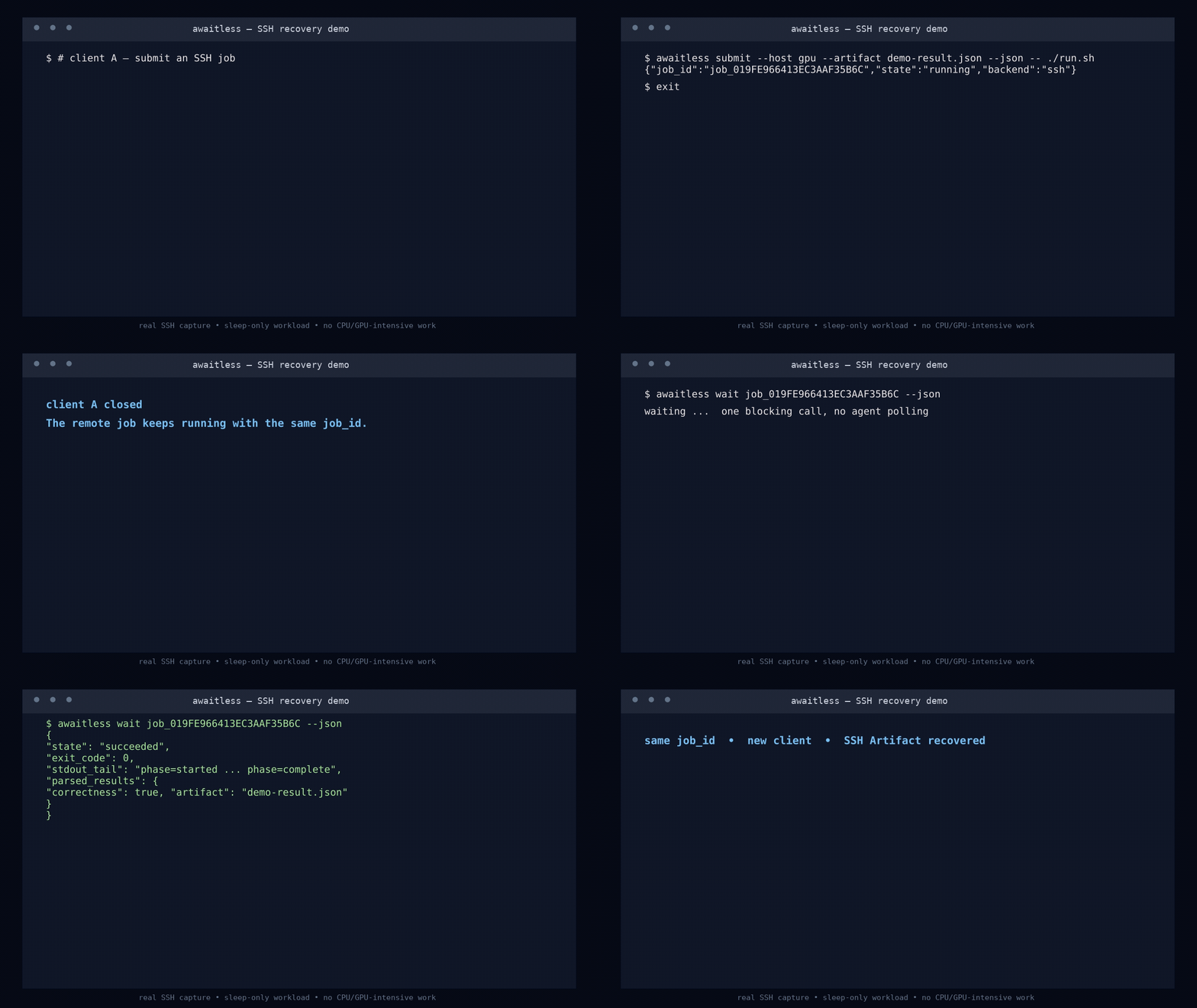
Every `run` is durable before launch. Finishing within the inline window looks
like an ordinary command result; crossing it only detaches the waiter. Interrupt
the waiter, close the MCP client, or start a fresh agent session: the Job keeps
running and its stable ID recovers the result.
## Queue work before a named resource is free
Create a durable FIFO queue once, then submit every command immediately:
```bash
awaitless queue create gpu0 --concurrency 1
awaitless submit --queue gpu0 -- python train_a.py
awaitless submit --queue gpu0 -- python train_b.py
awaitless submit --queue gpu0 -- python train_c.py
```
The first command runs and the others report `queued`. Each starts automatically
when capacity becomes available. This is durable admission control for a named
scarce resource: fixed concurrency and FIFO ordering, with no priority or
preemption. Awaitless never kills running work to make room for a later job.
Operators can also bind adaptive runs to a queue globally or per host:
```toml
[hosts.gpu]
hostname = "gpu.example.com"
queue = "gpu0"
```
The Agent can then call `run` without choosing a queue or probing the GPU first.
This queue does not discover resources, understand GPU topology, dynamically
allocate devices, issue leases, or combine requests such as two GPUs plus 64 GB
of memory. Use Slurm or another scheduler for those responsibilities; Awaitless
provides the Agent-facing job lifecycle around that scheduler.
## Consume whichever job finishes next
v0.7 adds `completions ... --drain --json` for consuming a small parallel set
in one call without client-side cursor bookkeeping. Long jobs can emit
structured heartbeat updates with `wait --progress-interval 30s`. Use
`--capture-log PATH` for command-owned logs and `--resource gpu=0` or
`--device 0` for explicit exclusive admission; terminal results freeze bounded
logs, diagnostics, timing, environment, and a SHA-256 identified snapshot.
Submit independent work up front, keep every Job ID, then wait at one durable
completion boundary:
```bash
awaitless completions job_A job_B job_C --json
# {"completions":[...],"next_cursor":"cmp_...","active_job_ids":[...]}
awaitless completions job_A job_B job_C --after cmp_... --json
```
The first call returns already-finished work immediately or blocks until at
least one selected Job completes. Process the batch before advancing to
`next_cursor`; reusing an older cursor safely replays the same completion IDs.
If the client disappears, a new session can continue from the saved cursor.
Awaitless makes continuation results durably available—it does not run the
agent's next reasoning step or require a resident notification service.
The v0.8 evidence suite replaces historical call-count demos with four
questions: does an Agent choose the protocol correctly, does a Job survive
faults without duplicate launch, does Awaitless keep execution-management state
out of the reasoning loop, and does adaptive `run` preserve low friction for
short commands? See the [v0.8 evidence plan](metric/README.md#v08-evidence-suite).
## v0.8 evidence status
Release evidence is model- and commit-specific. The checked-in suite does not
carry numbers from earlier versions or from a different model. Run the v0.8
benchmarks, inspect every raw record, then publish a dated report with model,
config hash, git commit, skipped workloads, and all failures in the denominator.
The reviewed [v0.8 evidence report](metric/results/v0.8-report.md) includes the
complete raw records and analysis summaries rather than a selected score.
## Try the recovery story in 30 seconds
Linux, Python 3.10+, and Bash are required. Run the built-in demo without a
persistent install:
```bash
uvx --from awaitless-runner awaitless demo --json
```
The demo submits two local jobs, terminates their first completion waiter, then
uses new clients to consume both bounded results and JSON Artifacts by cursor.
For regular CLI use:
```bash
uv tool install awaitless-runner
awaitless doctor --json
```
`pip install awaitless-runner` works too.
## Give it to your coding agent
Add one stdio MCP server to your client's configuration (adapt the outer key to
your client):
```json
{
"mcpServers": {
"awaitless": {
"command": "uvx",
"args": ["awaitless-runner"]
}
}
}
```
The preferred `run` tool returns quick commands inline and automatically gives
longer or queued work a durable handle. Tasks-aware clients can still use
`run_job`, while low-level clients retain `submit_job` and `wait_for_job`.
Retrying an expensive submission with the same
`client_request_id` cannot launch a duplicate job. For parallel work, every
client can use `wait_for_completions` regardless of MCP Tasks support.
The normative identity, lifecycle, continuation, completion, Artifact, and
compatibility contract is [Awaitless Agent Job Protocol](JOB_PROTOCOL.md).
### Codex plugin
This repository is also a Codex plugin. Its manifest bundles the Awaitless agent
skill with the stdio MCP server, which Codex launches through `uvx`. Install the
repository from a local Codex marketplace, then start a new Codex task so the
skill and MCP tools are loaded together.
The plugin requires `uvx` on `PATH`; the first MCP launch downloads
`awaitless-runner` from PyPI if it is not already cached.
For direct CLI use, the whole loop is:
```bash
awaitless run --json --name tests -- python -m pytest -q
# If delivery is detached, save the returned job_id, then:
awaitless wait <job-id> --json
# Or recover the most recent detached job:
awaitless wait --last --json
```
## One interface, three places to run
| Backend | What Awaitless adds |
|---|---|
| **Local** | Durable process-group tracking, cancellation, bounded logs, and transactional named queues. |
| **SSH** | The same job contract plus queues coordinated on the target host, with no remote daemon. |
| **Slurm** | Real `sbatch` scheduling plus durable Slurm IDs, queue/accounting state, exit codes, logs, cancellation, and Artifacts. |
Use `--backend`, `--host`, or configuration defaults to switch targets without
changing how the agent submits and collects work.
## Why not just use a shell or tmux?
| Tool | Best at | What the agent still has to build |
|---|---|---|
| Blocking shell call | Quick inspection and interactive work | Lifecycle management once an engineering command runs longer than expected. |
| Shell polling / `nohup` | Keeping a basic command alive | IDs, status, exit-code recovery, bounded logs, cancellation, deduplication, and result parsing. |
| `tmux` | Humans detaching fLo que la gente pregunta sobre Awaitless
¿Qué es xpluspro/Awaitless?
+
xpluspro/Awaitless es mcp servers para el ecosistema de Claude AI. Durable MCP Tasks on infrastructure you already own — local, SSH, and Slurm. Tiene 1 estrellas en GitHub y su última actualización registrada es del 2026-08-20.
¿Cómo se instala Awaitless?
+
Puedes instalar Awaitless clonando el repositorio (https://github.com/xpluspro/Awaitless) o siguiendo las instrucciones del README en GitHub. ClaudeWave también te ofrece bloques de instalación rápida en esta misma página.
¿Es seguro usar xpluspro/Awaitless?
+
Nuestro agente de seguridad ha analizado xpluspro/Awaitless y le ha asignado un Trust Score de 95/100 (tier: Verified). Revisa el desglose completo de comprobaciones superadas y flags en esta página.
¿Quién mantiene xpluspro/Awaitless?
+
xpluspro/Awaitless es mantenido por xpluspro. La última actividad registrada en GitHub es del 2026-08-20, con 0 issues abiertos.
¿Hay alternativas a Awaitless?
+
Sí. En ClaudeWave puedes explorar mcp servers similares en /categories/mcp, ordenados por popularidad o actividad reciente.
Despliega Awaitless en tu cloud
Lleva este repo a producción en minutos. Cada plataforma genera su propio entorno con variables de entorno editables.
¿Mantienes este repo? Añade un badge a tu README
Pega el badge en tu README de GitHub para mostrar que está auditado por ClaudeWave. Cada badge enlaza de vuelta a esta página y muestra el Trust Score actual.
[](https://claudewave.com/repo/xpluspro-awaitless)<a href="https://claudewave.com/repo/xpluspro-awaitless"><img src="https://claudewave.com/api/badge/xpluspro-awaitless" alt="Featured on ClaudeWave: xpluspro/Awaitless" width="320" height="64" /></a>Más MCP Servers

Fair-code workflow automation platform with native AI capabilities. Combine visual building with custom code, self-host or cloud, 400+ integrations.

User-friendly AI Interface (Supports Ollama, OpenAI API, ...)

An open-source AI agent that brings the power of Gemini directly into your terminal.

Real-time global intelligence dashboard. AI-powered news aggregation, geopolitical monitoring, and infrastructure tracking in a unified situational awareness interface

The fastest path to AI-powered full stack observability, even for lean teams.

🕷️ An adaptive Web Scraping framework that handles everything from a single request to a full-scale crawl!