

a local-first, multi-provider tool that captures LLM API spend and exposes it to coding agents via the Model Context Protocol
claude mcp add llm-usage-mcp -- uvx llm-usage-mcp{
"mcpServers": {
"llm-usage-mcp": {
"command": "uvx",
"args": ["llm-usage-mcp"],
"env": {
"ANTHROPIC_API_KEY": "<anthropic_api_key>",
"OPENAI_API_KEY": "<openai_api_key>",
"DEEPSEEK_API_KEY": "<deepseek_api_key>",
"DASHSCOPE_API_KEY": "<dashscope_api_key>",
"ANTHROPIC_BASE_URL": "<anthropic_base_url>"
}
}
}
}ANTHROPIC_API_KEYOPENAI_API_KEYDEEPSEEK_API_KEYDASHSCOPE_API_KEYANTHROPIC_BASE_URLResumen de MCP Servers
<!-- mcp-name: io.github.zhaoyue722/llm-usage-mcp -->
<p align="center">
<img src="https://raw.githubusercontent.com/zhaoyue722/llm-usage-mcp/main/docs/assets/watch-pom.png" alt="llm-usage-mcp" width="140">
</p>
<h1 align="center">llm-usage-mcp</h1>
<p align="center"><em>LLM Usage & Cost Tracker — your local-first spend watchdog</em></p>
<p align="center">
<a href="https://github.com/zhaoyue722/llm-usage-mcp/actions/workflows/ci.yml"><img src="https://github.com/zhaoyue722/llm-usage-mcp/actions/workflows/ci.yml/badge.svg" alt="CI"></a>
<a href="https://github.com/zhaoyue722/llm-usage-mcp/blob/main/LICENSE"><img src="https://img.shields.io/badge/License-MIT-blue.svg" alt="License: MIT"></a>
<a href="https://www.python.org/downloads/"><img src="https://img.shields.io/badge/python-3.13%2B-blue.svg" alt="Python 3.13+"></a>
<a href="https://glama.ai/mcp/servers/zhaoyue722/llm-usage-mcp"><img src="https://glama.ai/mcp/servers/zhaoyue722/llm-usage-mcp/badges/score.svg" alt="Glama score"></a>
</p>
<p align="center">English | <a href="https://github.com/zhaoyue722/llm-usage-mcp/blob/main/README.zh.md">中文</a></p>
Stop treating your LLM API bills like a scary horror movie you only look at through your fingers at the end of the month. Know what your LLM calls actually cost — across every provider, in one place, on your own machine. Ask your coding agent (MCP) or type a command (CLI).
It's a cost **meter**, not a router: it tells you what you spent and which provider fits a workload — it never changes your calls. Pairs happily alongside a router or a model-leaderboard tool.
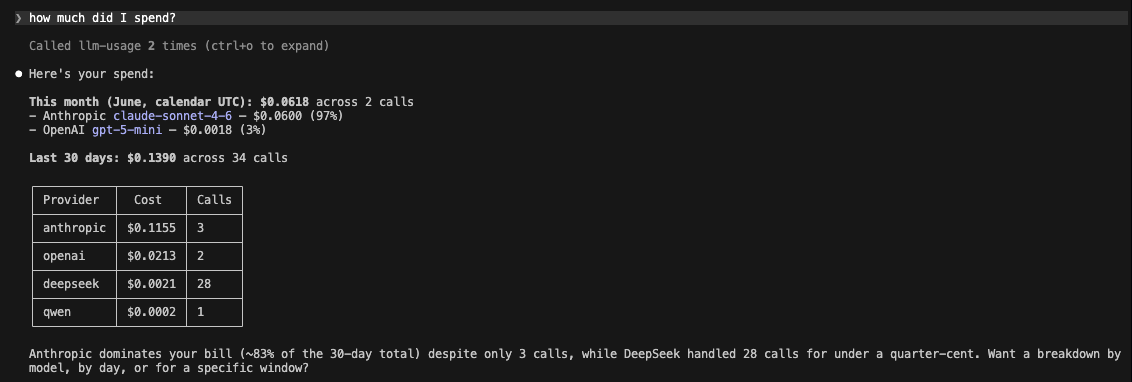
Or straight from the terminal — your week's spend, broken down by provider, and a cross-provider cost comparison before you commit to a model:

## Why you'd want this
You're calling LLMs from a handful of providers — Claude, GPT, plus Chinese models like Qwen and DeepSeek. Each one bills in its own dashboard, in its own currency, with its own rules for what a "cached token" costs. So the simplest possible question — *how much am I spending, and on what?* — turns into four browser logins, looking up exchange rates for RMB to USD, and trying to decipher what a "cached context token discount" actually means in midnight math. Most people just cross their fingers and let the bill be a surprise at the end of the month.
`llm-usage-mcp` captures every call you make into one local store, costs it correctly per provider at the moment it happens, and hands the answer back **two ways**:
- **Ask your coding agent.** It's an MCP server, so Claude Code, Cursor, or any MCP client can answer *"how much did I spend on Claude this week?"* or *"which provider is cheapest for a 10k-in / 2k-out call?"* in plain English.
- **Or type a command.** It's also a CLI — `llm-usage spend`, `llm-usage compare`, `llm-usage recommend` — for when you'd rather not round-trip through an agent.
And it stays out of your way:
- **Local-first.** No SaaS, no signup, no telemetry. Just a SQLite file at `~/.llm-usage/usage.db`. Privacy is a feature, not a setting.
- **Multi-provider, Chinese models included.** Anthropic, OpenAI, DeepSeek, Qwen — streaming and non-streaming for all four. DeepSeek and Qwen run the same capture path as Anthropic and OpenAI, not a bolted-on afterthought. More providers (Gemini, Bedrock, Moonshot, …) are [on the way](#supported-providers).
## Quickstart
Two minutes from `git clone` to your first captured call. This part is about **capture** — getting calls recorded. [Reading the data back](#querying-your-spend) comes next.
### 1. Install
Install from PyPI with [uv](https://docs.astral.sh/uv/) (or `pipx`) — this puts the three console scripts on your `PATH`:
```bash
uv tool install llm-usage-mcp # or: pipx install llm-usage-mcp
```
Prefer to hack on it? Clone and sync from source instead:
```bash
git clone https://github.com/zhaoyue722/llm-usage-mcp.git
cd llm-usage-mcp
uv sync
```
Either way you get three console scripts:
- `llm-usage` — the multi-command CLI. See [From the command line (CLI)](#from-the-command-line-cli) below.
- `llm-usage-mcp` — the stdio MCP server.
- `llm-usage-proxy` — a back-compat alias; identical to `llm-usage proxy`.
> The Quickstart below uses `uv run …` (the from-source workflow). If you installed from PyPI, the scripts are already on your `PATH` — drop the `uv run` prefix, and register the MCP server with `claude mcp add llm-usage -- llm-usage-mcp`.
### 2. Set at least one API key
You only need a key for the provider(s) you actually use; the proxy starts regardless and per-route requests return `503 configuration_error` for any provider whose key is missing.
```bash
export ANTHROPIC_API_KEY=sk-ant-...
# and/or:
export OPENAI_API_KEY=sk-...
export DEEPSEEK_API_KEY=sk-...
export DASHSCOPE_API_KEY=sk-... # Qwen
```
Full env-var reference: [`docs/configuration.md`](https://github.com/zhaoyue722/llm-usage-mcp/blob/main/docs/configuration.md) (or copy [`.env.example`](https://github.com/zhaoyue722/llm-usage-mcp/blob/main/.env.example) to `.env` and fill in).
### 3. Run the capture proxy
```bash
uv run llm-usage-proxy
```
It binds **loopback-only** (`127.0.0.1:5525`) — never reachable from the network. The proxy holds your API keys server-side; clients never need them.
### 4. Point your coding agent at the proxy
The proxy exposes one route per provider. Set the matching `*_BASE_URL` env var on the client side:
| Provider | Client env var | Value |
|---|---|---|
| Anthropic | `ANTHROPIC_BASE_URL` | `http://127.0.0.1:5525` |
| OpenAI | `OPENAI_BASE_URL` | `http://127.0.0.1:5525/openai/v1` |
| DeepSeek | `DEEPSEEK_BASE_URL` (or any OpenAI-SDK base-url override) | `http://127.0.0.1:5525/deepseek/v1` |
| Qwen | DashScope OpenAI-compatible base | `http://127.0.0.1:5525/qwen/v1` |
Example — launch Claude Code with calls routed through the proxy:
```bash
ANTHROPIC_BASE_URL=http://127.0.0.1:5525 claude
```
### 5. Confirm it's capturing
Make a call through your agent (or any client pointed at the proxy), then check it landed:
```bash
uv run llm-usage spend
```
Every call lands in `~/.llm-usage/usage.db` with tokens, cost, latency, and a `request_id` for idempotency — and shows up in that headline. That's the whole loop: capture on one side, answers on the other.
## Querying your spend
Once calls are being captured, you read them back two ways. Same data, same numbers — pick whichever fits the moment.
### Ask your coding agent (MCP)
Register the MCP server with Claude Code:
```bash
claude mcp add llm-usage -- uv --directory $(pwd) run llm-usage-mcp
```
Then just ask, in plain English, inside that session:
> How much did I spend on Anthropic today? Which provider is cheapest for a 10k-input / 2k-output call?
Claude picks the right tool and reads the numbers back. Seven tools are exposed over stdio; full param/return shapes are in [`docs/spec.md`](https://github.com/zhaoyue722/llm-usage-mcp/blob/main/docs/spec.md).
| Tool | Purpose |
|---|---|
| `query_spend` | Totals + per-group rollups over a time window (group by provider / model / project / tag / day). |
| `usage_summary` | Headline summary for `today` / `week` / `month` / `year` — totals, top-N providers + models, largest call. |
| `compare_providers` | Given a hypothetical workload (tokens in / out), rank every priced model by cost. |
| `recommend_provider` | Pick the cheapest priced model that fits a stated budget. |
| `get_pricing` | Inspect the vendored pricing snapshot. |
| `list_providers` | List providers + their models + OpenAI-compatibility flag. |
| `record_usage` | Manual write path — log a call when the capture proxy isn't in the picture. |
`query_spend` and `usage_summary` default to `include_failed=false` so partial-stream rows don't pollute totals; opt-in via the param.
### From the command line (CLI)
The same questions, as a CLI — eight subcommands under one `llm-usage` console, for when typing is faster than asking your agent.
> The examples below assume `llm-usage` is on your `PATH` — either `source .venv/bin/activate` or `uv tool install .`. Otherwise, prefix each command with `uv run` (e.g. `uv run llm-usage spend`).
```text
$ llm-usage
Local-first LLM spend capture + query, exposed over MCP.
Commands
proxy Run the local LLM capture proxy on 127.0.0.1.
compare Project the cost of a hypothetical workload across every priced model.
models Browse the local pricing catalog.
recommend Recommend the cheapest priced model for a workload + budget.
spend Show recorded spend over a calendar period.
status Snapshot of the local install: DB, proxy, providers, pricing.
providers List configured providers with key state, wire-format, model count.
about Show version, author, license, and the project homepage.
```
| Command | The question it answers |
|---|---|
| [`compare`](#compare) | Given a workload, who's cheapest? |
| [`models`](#models) | What do they actually charge per million tokens? |
| [`recommend`](#recommend) | I've got $0.04 left — which model won't bankrupt me? |
| [`spend`](#spend) | How much did I just spend? |
| [`status`](#status) | Is everything actually working? |
| [`providers`](#providers) | What's configured locally? |
| [`about`](#about) | What is this, and where do I report a bug? |
| `proxy` | Run the capture proxy (same as `llm-usage-proxy`). |
Conventions that hold across every command:
- `--json` emits the same Pydantic shape the matching MCP tool returns. Pipe straight into `jq`.
- `--color {auto,always,never}` honors `NO_COLOR` and TTY detection. The palette is a warm, low-contrast dark theme — easy on the eyes at 11pm.
- FLo que la gente pregunta sobre llm-usage-mcp
¿Qué es zhaoyue722/llm-usage-mcp?
+
zhaoyue722/llm-usage-mcp es mcp servers para el ecosistema de Claude AI. a local-first, multi-provider tool that captures LLM API spend and exposes it to coding agents via the Model Context Protocol Tiene 3 estrellas en GitHub y se actualizó por última vez today.
¿Cómo se instala llm-usage-mcp?
+
Puedes instalar llm-usage-mcp clonando el repositorio (https://github.com/zhaoyue722/llm-usage-mcp) o siguiendo las instrucciones del README en GitHub. ClaudeWave también te ofrece bloques de instalación rápida en esta misma página.
¿Es seguro usar zhaoyue722/llm-usage-mcp?
+
zhaoyue722/llm-usage-mcp aún no ha sido auditado por nuestro agente de seguridad. Revisa el repositorio original en GitHub antes de usarlo en producción.
¿Quién mantiene zhaoyue722/llm-usage-mcp?
+
zhaoyue722/llm-usage-mcp es mantenido por zhaoyue722. La última actividad registrada en GitHub es de today, con 0 issues abiertos.
¿Hay alternativas a llm-usage-mcp?
+
Sí. En ClaudeWave puedes explorar mcp servers similares en /categories/mcp, ordenados por popularidad o actividad reciente.
Despliega llm-usage-mcp en tu cloud
Lleva este repo a producción en minutos. Cada plataforma genera su propio entorno con variables de entorno editables.
¿Mantienes este repo? Añade un badge a tu README
Pega el badge en tu README de GitHub para mostrar que está auditado por ClaudeWave. Cada badge enlaza de vuelta a esta página y muestra el Trust Score actual.
[](https://claudewave.com/repo/zhaoyue722-llm-usage-mcp)<a href="https://claudewave.com/repo/zhaoyue722-llm-usage-mcp"><img src="https://claudewave.com/api/badge/zhaoyue722-llm-usage-mcp" alt="Featured on ClaudeWave: zhaoyue722/llm-usage-mcp" width="320" height="64" /></a>Más MCP Servers

Fair-code workflow automation platform with native AI capabilities. Combine visual building with custom code, self-host or cloud, 400+ integrations.

User-friendly AI Interface (Supports Ollama, OpenAI API, ...)

An open-source AI agent that brings the power of Gemini directly into your terminal.

The fastest path to AI-powered full stack observability, even for lean teams.

Real-time global intelligence dashboard. AI-powered news aggregation, geopolitical monitoring, and infrastructure tracking in a unified situational awareness interface

🕷️ An adaptive Web Scraping framework that handles everything from a single request to a full-scale crawl!