

LLMxRay — Local LLM Observatory. Full observability interface for Ollama: chat, streaming, reasoning, RAG, introspection, metrics.
- ✓Open-source license (Apache-2.0)
- ✓Actively maintained (<30d)
- ✓Clear description
- ✓Documented (README)
git clone https://github.com/LogneBudo/llmxrayTools overview
<p align="center"> <img src="https://raw.githubusercontent.com/LogneBudo/llmxray/master/public/favicon.svg" alt="LLMxRay" width="80" /> </p> <h1 align="center">LLMxRay</h1> <p align="center"><strong>See what your local AI is actually doing.</strong></p> <p align="center"> One command, one browser tab. Token-by-token streaming, cache diagnostics, model comparison, benchmarks and cost tracking<br/> for the models running on your own machine through Ollama. No cloud. No API keys. No cost. </p> <p align="center"> <a href="https://www.npmjs.com/package/llmxray"><img src="https://img.shields.io/npm/v/llmxray?color=cb3837&logo=npm&logoColor=white" alt="npm" /></a> <a href="https://hub.docker.com/r/djovaneli/llmxray"><img src="https://img.shields.io/docker/pulls/djovaneli/llmxray?color=2496ED&logo=docker&logoColor=white" alt="Docker" /></a> <img src="https://img.shields.io/badge/license-Apache%202.0-blue" alt="License" /> <img src="https://img.shields.io/badge/ollama-0.40.x-000?logo=ollama&logoColor=white" alt="Ollama" /> </p> <p align="center"> 🌐 <strong>English</strong> • <a href="README.fr.md">Français</a> • <a href="README.zh-CN.md">中文</a> • <a href="README.ar.md">العربية</a> • <a href="README.sr.md">Srpski</a> </p> <p align="center"> <a href="#quick-start">Quick Start</a> • <a href="#what-llmxray-shows-you">What it shows you</a> • <a href="#who-is-this-for">Who is this for</a> • <a href="#install">Install</a> • <a href="#ollama-compatibility">Ollama compatibility</a> • <a href="CHANGELOG.md">Changelog</a> </p> <p align="center"> <img src="https://raw.githubusercontent.com/LogneBudo/llmxray/master/docs/public/screenshots/demo.gif" alt="LLMxRay demo: a chat turn streaming token by token, then the session metrics" width="800" /> </p> --- ## Quick Start You need [Ollama](https://ollama.com/download) running with at least one model pulled (`ollama pull llama3.2`). Then: ```bash npx llmxray ``` Or with Docker: ```bash docker run -p 5174:5174 djovaneli/llmxray ``` Open **http://localhost:5174**. Pick a model, send a message, and watch what happens. That's it. --- ## What LLMxRay shows you You run a local model. You chat with it. LLMxRay answers the questions that come next: how fast was each token, what did the prompt cost, did the cache help, which setting was actually better, and what are your *other* tools sending to the same model. Every page below is one of those answers. ### Prompt X-ray: the prompt itself, drawn to scale Each turn your tool sent, as a bar. Colour is what each part of the prompt was: system prompt, tool schemas, earlier turns, the new message. Brightness is what happened to it: dim was already in the model's memory and cost nothing, bright had to be read again, striped was cut by the daemon and never seen. Stack the turns of a conversation and you watch the cache grow, see the turn where a timestamp in the system prompt emptied it, and the turn where the prompt outgrew the context and Ollama silently dropped the start, system prompt included, and answered anyway. Click a part and the request opens at that place in the text. ### Shared box: why Ollama is slow right now, and which tool did it One line per tool, sorted by what it cost the others, in seconds: the one that sends `keep_alive: 0` and unloads the model after every run, the one that asks for a 128K context on 4K prompts and drops the daemon to one request at a time, the one that waited 22 seconds behind them. Each with the setting to change. A tool that cost nothing is listed too, so you can see what good looks like. ### GPU map: what is in video memory, and what else would fit One bar the width of your card: each loaded model as a block split into its weights and what its context costs on top, then the free space. Under it, every pulled model with one of three verdicts: fits now, fits only if what is loaded unloads first, larger than the card. ### Tool calls: can this model drive an agent? Thirteen request shapes agents send all day, scored on what the daemon returned: the right tool, the right arguments, the right number of calls, no call when none is needed. Each cell is one sentence: "the path argument is missing", "wrote the call into the answer text", "called search_web when no tool was needed". Click it for what the model returned. ### Chat, token by token Every token is drawn as it arrives, coloured by confidence. You see where the model hesitated and where it was sure. Markdown, multi-turn, file and image attachments, slash commands, and a thinking budget for reasoning models (off, model's choice, or low / medium / high / max). 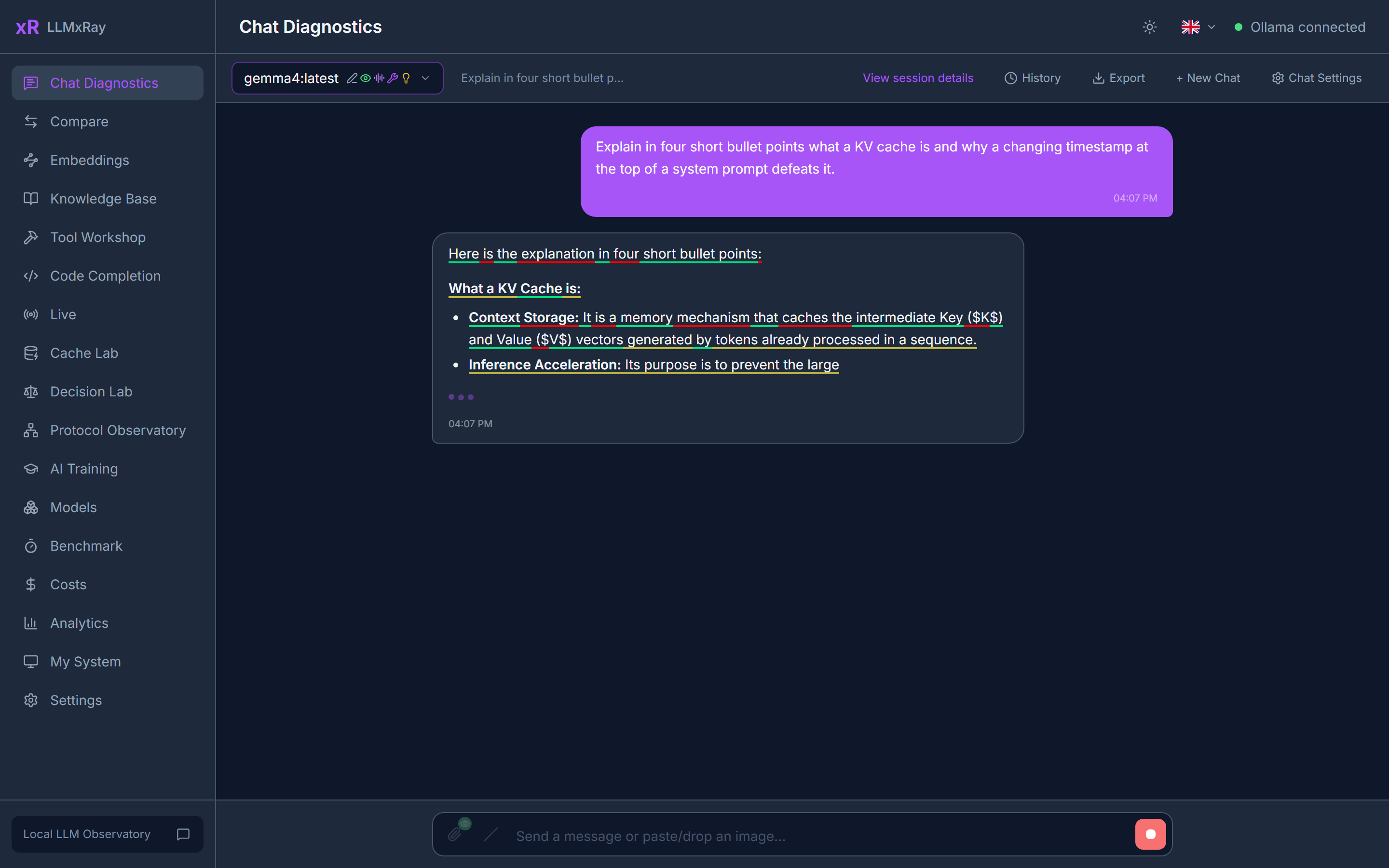 Each response is also checked as it lands. A badge appears only when something is wrong: repetition, a refusal, gibberish, an empty answer, or a reply cut off at the token limit. ### Session deep dive Open any turn to see it as a timeline: time to first token, inter-token gaps, the reasoning block if there was one, tool calls, and the exact prompt that was sent. 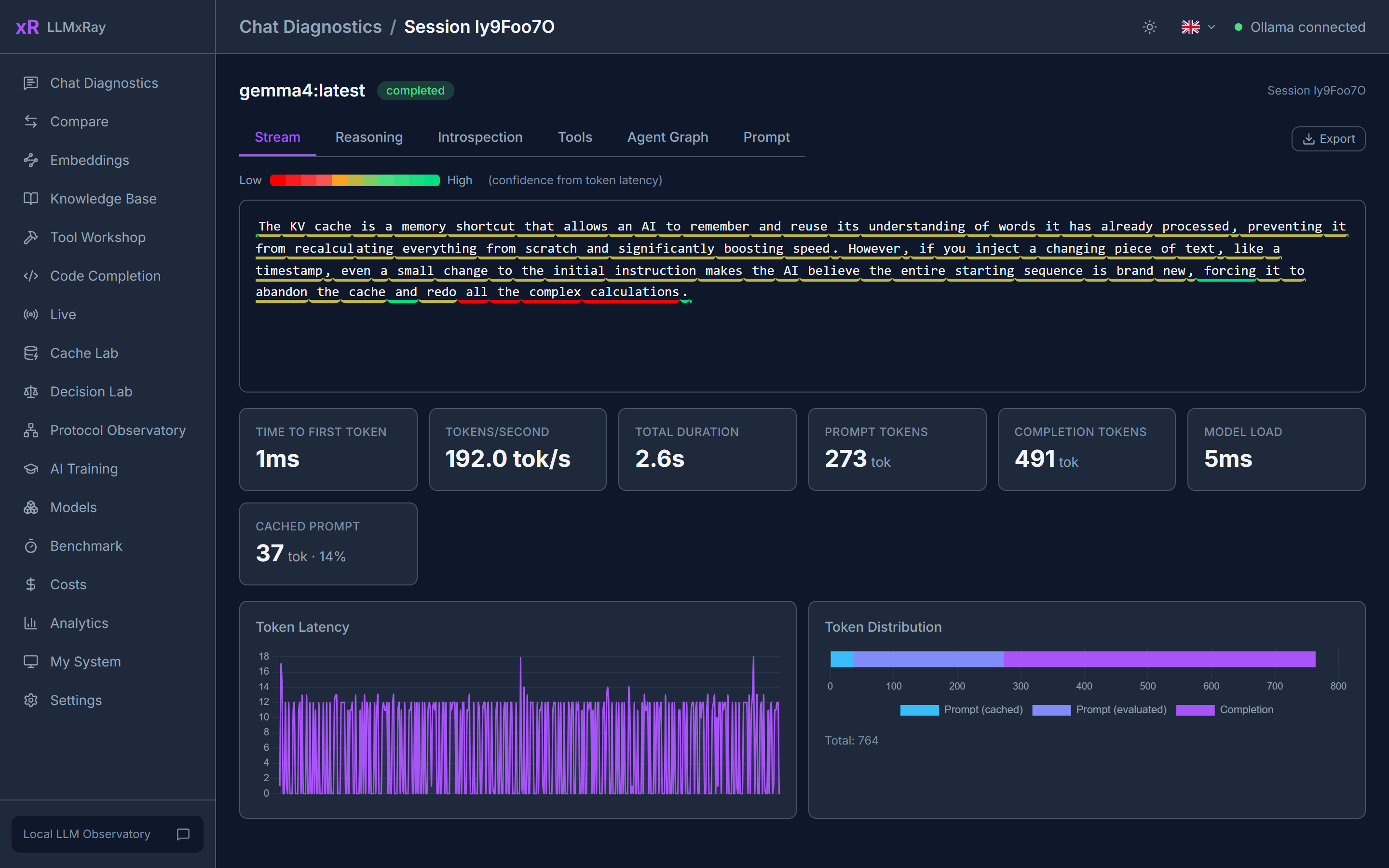 ### Live: what your other tools send LLMxRay opens a second port, **11435**, that behaves exactly like Ollama and forwards everything to it. Point VS Code Copilot, Open WebUI, Continue, n8n or your own script at `http://localhost:11435` and every turn they send appears here: client, model, prompt size, how much came from the cache, prefill and generation speed, tool calls. ``` VS Code Copilot ─┐ Open WebUI ──────┤ ┌─ Live page: every turn, Continue / n8n ──┼─► http://localhost:11435 ─► Ollama ┤ cache hits, prefill speed, your scripts ────┘ (LLMxRay) └─ where the cache broke ``` 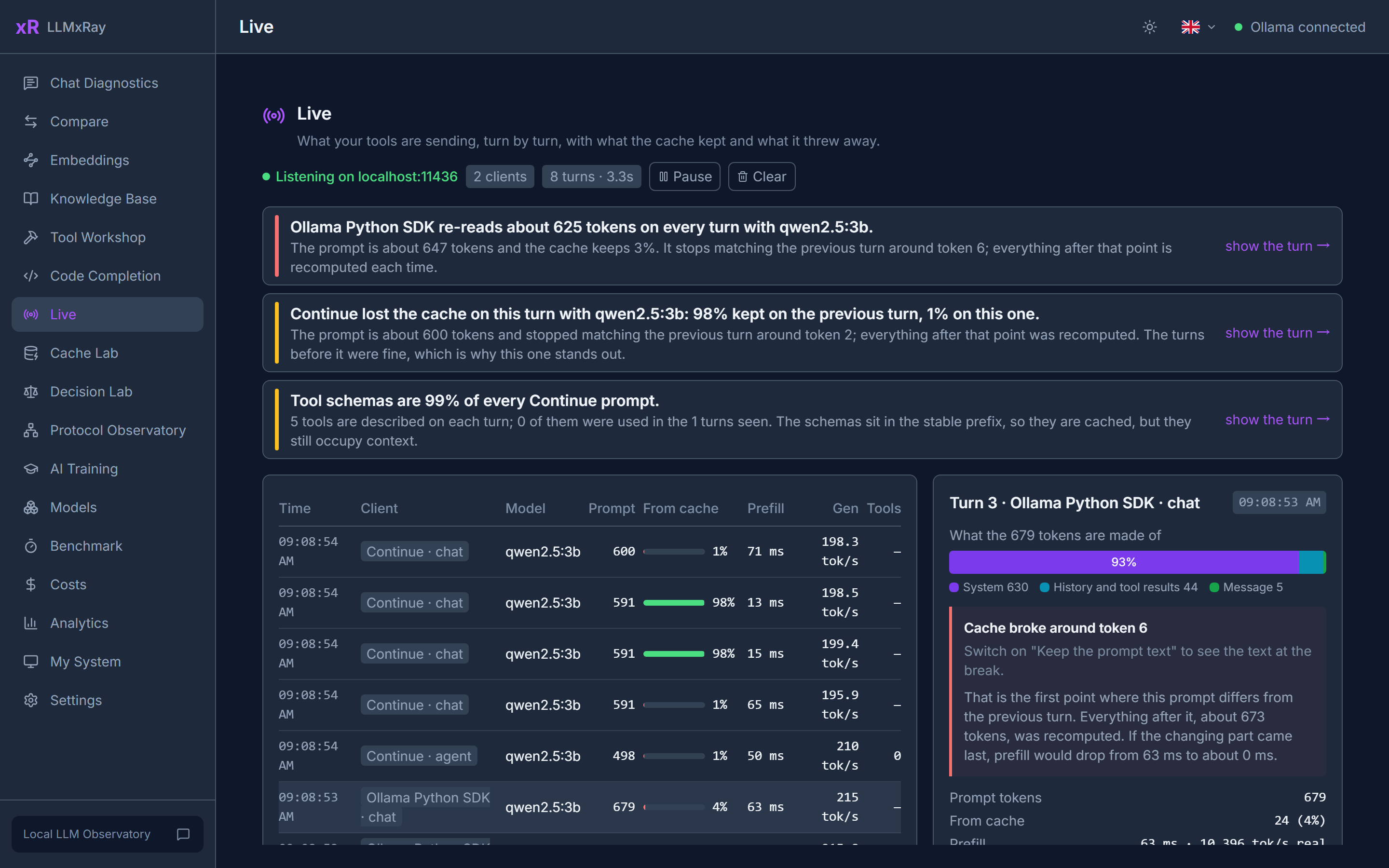 Select a turn to see what the prompt is made of and the exact point where it stopped matching the previous one, which is where the cache broke. Findings are plain sentences, each linked to the turn that proves it: a client re-reading its whole prompt every turn, a prompt the daemon silently cut to fit the context (Ollama keeps the first few tokens and the end, drops the rest, and says nothing), a model running partly on CPU, tool schemas taking 40% of every prompt. Only counts and timings are kept, in memory. Prompt text is an opt-in that writes to a local file. Nothing leaves your machine. Both ports answer only this machine by default, because the Live log holds whatever your tools sent. Start with `npx llmxray --host 0.0.0.0` to let other machines on your network reach them, for a Live page on a second screen or a shared GPU box. ### Cache Lab A local model reuses its prompt cache only while the prompt matches from the very first token. One timestamp near the top forfeits everything below it. Cache Lab finds the values that change between turns, shows where reuse dies, and then **measures** against your own daemon what moving them to the end saves. 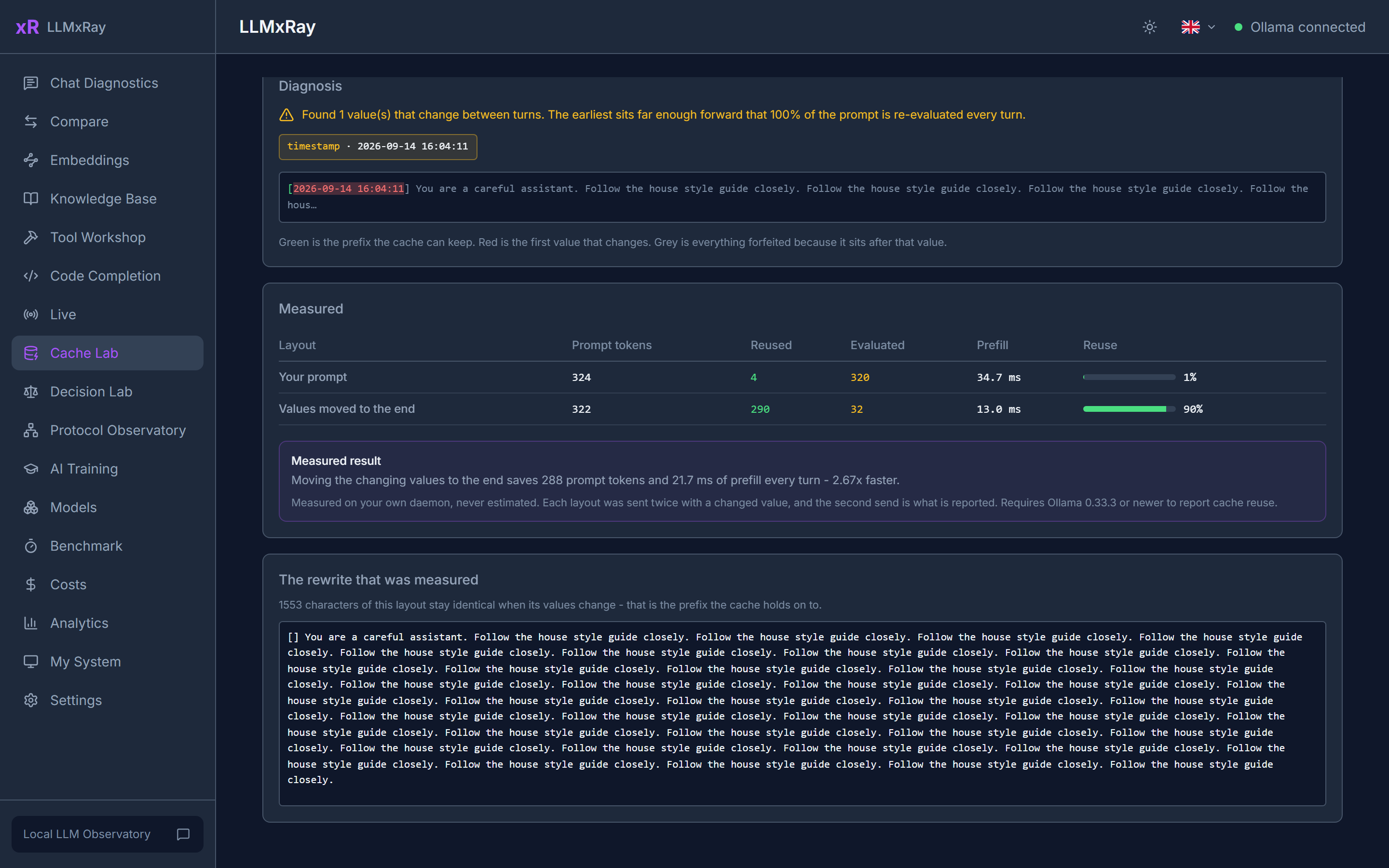 Measured on a real 324-token prompt: 4 tokens reused and 64.6 ms of prefill with the timestamp at the front, 290 reused and 18.6 ms with it at the back. **3.5x faster, same words.** ### Compare The same prompt against up to four slots, each with its own model, temperature and system prompt, streaming side by side. One-click presets: Temperature Sweep, Deterministic Pair, Language Compare. A word-level diff shows exactly what changed between two answers. 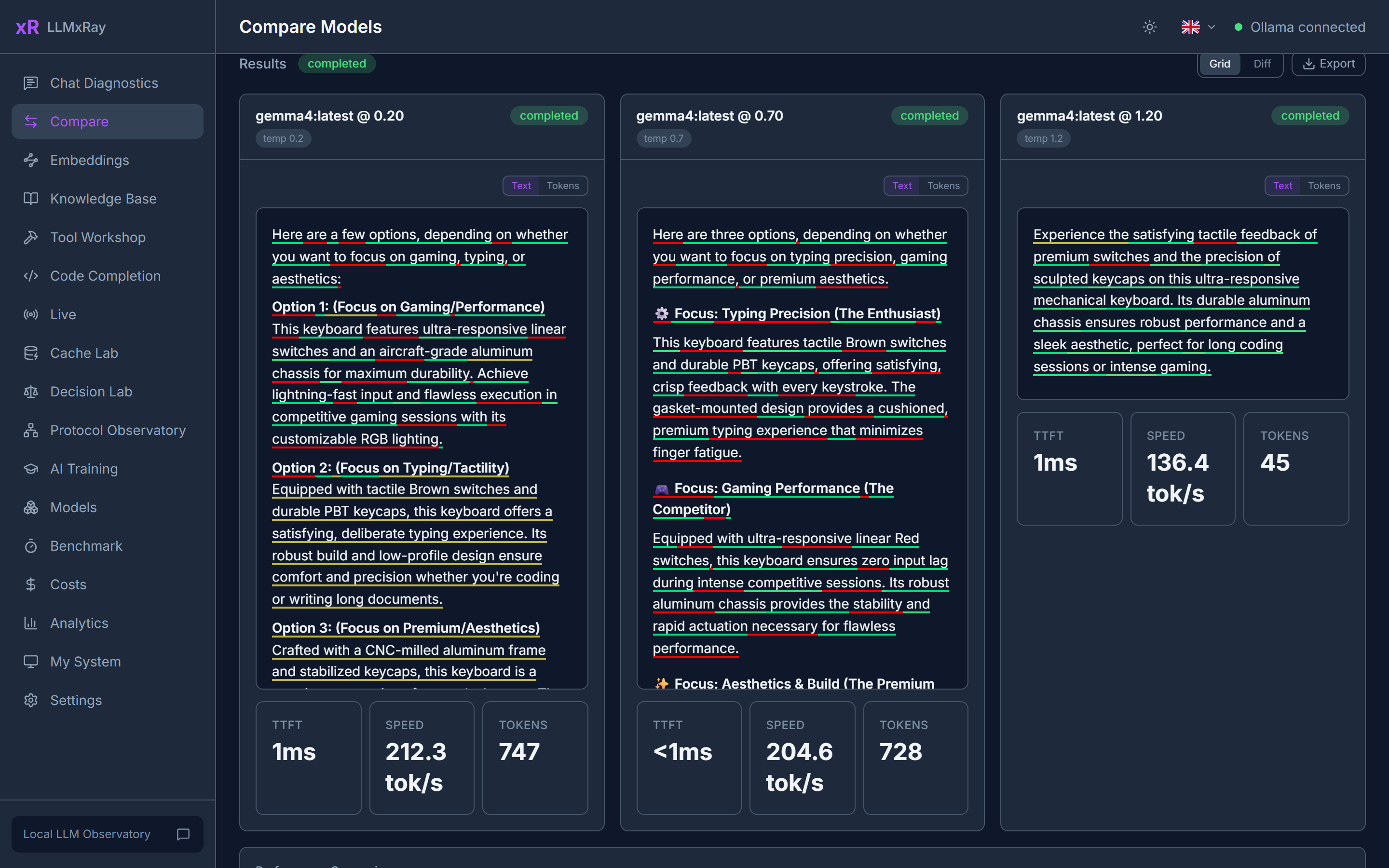 ### Surgical Benchmark Score models on curated question suites (MMLU-Pro, ARC-Challenge, HellaSwag, GSM8K, TruthfulQA) using the model's **real token logprobs**, not whether the answer happened to look right. Confidence versus accuracy per category, so you see where a model is confidently wrong. Import your own suites as JSON. 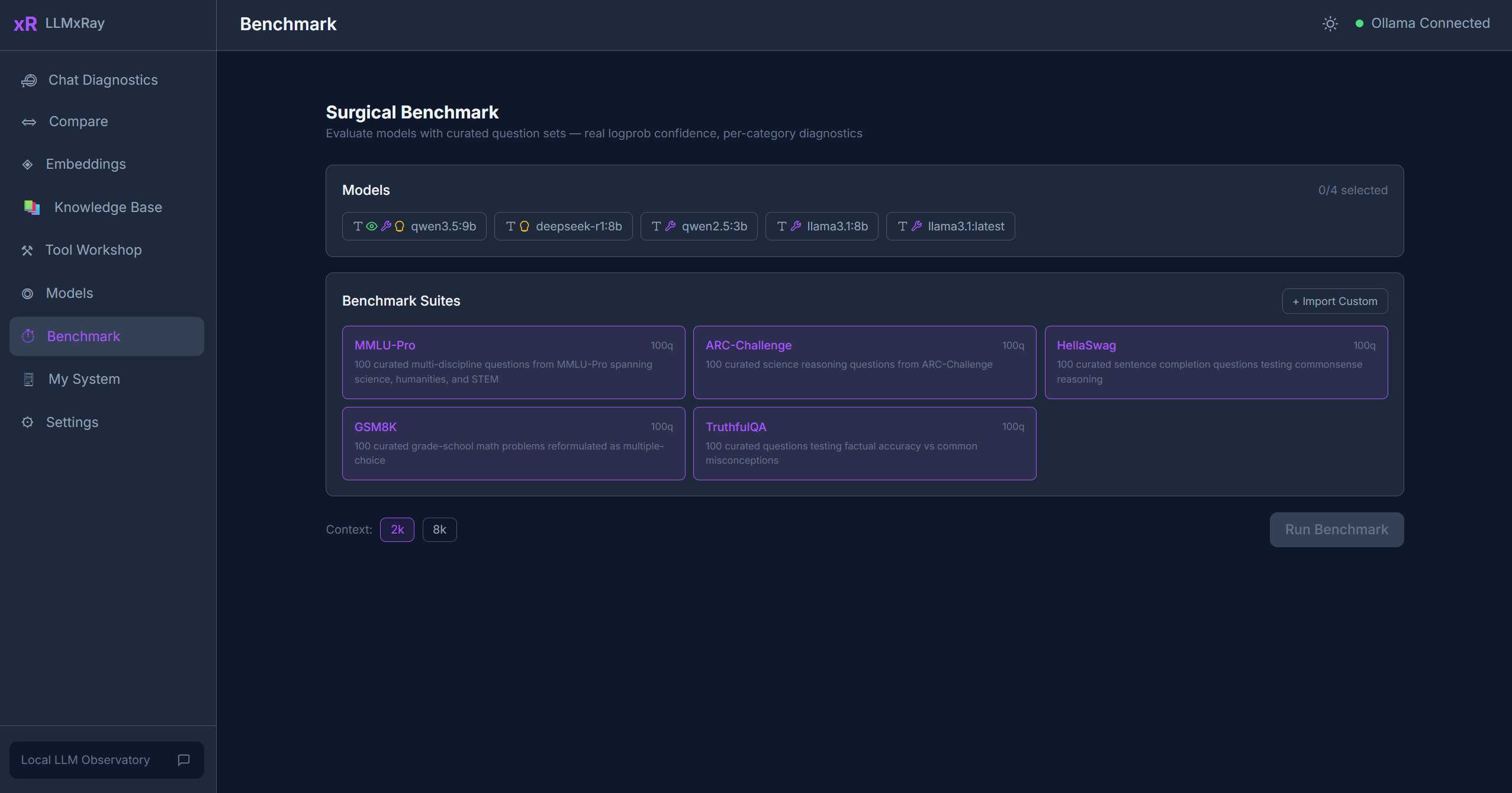 ### Decision Lab Decision models (nimble, tev1, clef) answer typed questions with probabilities instead of prose. Give the lab a situation and ask for a choice among candidates, a yes/no probability, or a score on a scale. Every answer comes back as the model's own distribution, drawn as bars. 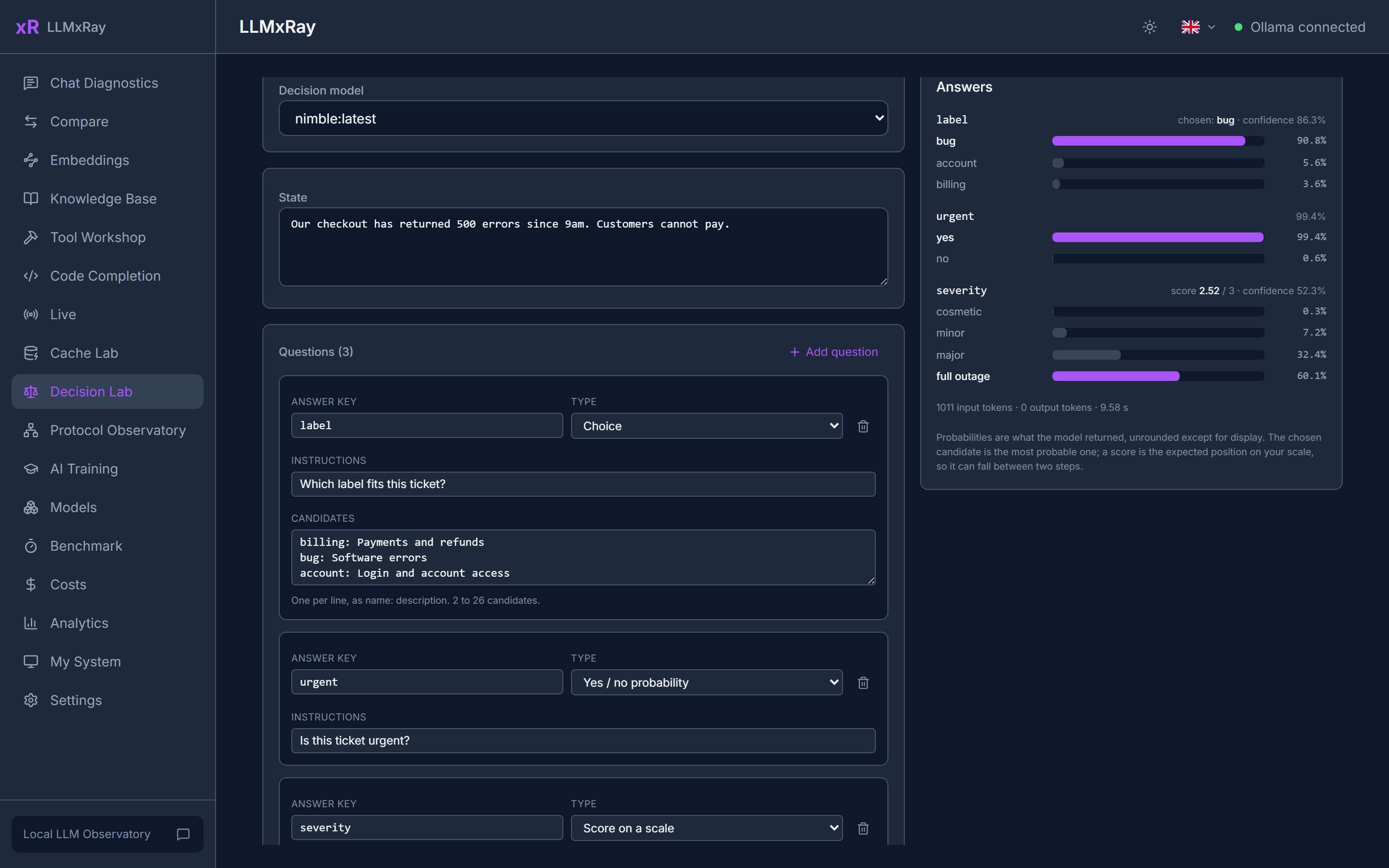 ### Protocol Observatory The same prompt through Ollama's three serving protocols in parallel: native `/api/chat`, OpenAI-compatible `/v1/chat/completions`, and Anthropic-compatible `/v1/messages`. Side-by-side streaming, per-protocol metrics, and an envelope diff that shows how each one frames finish reasons, token counts and errors. 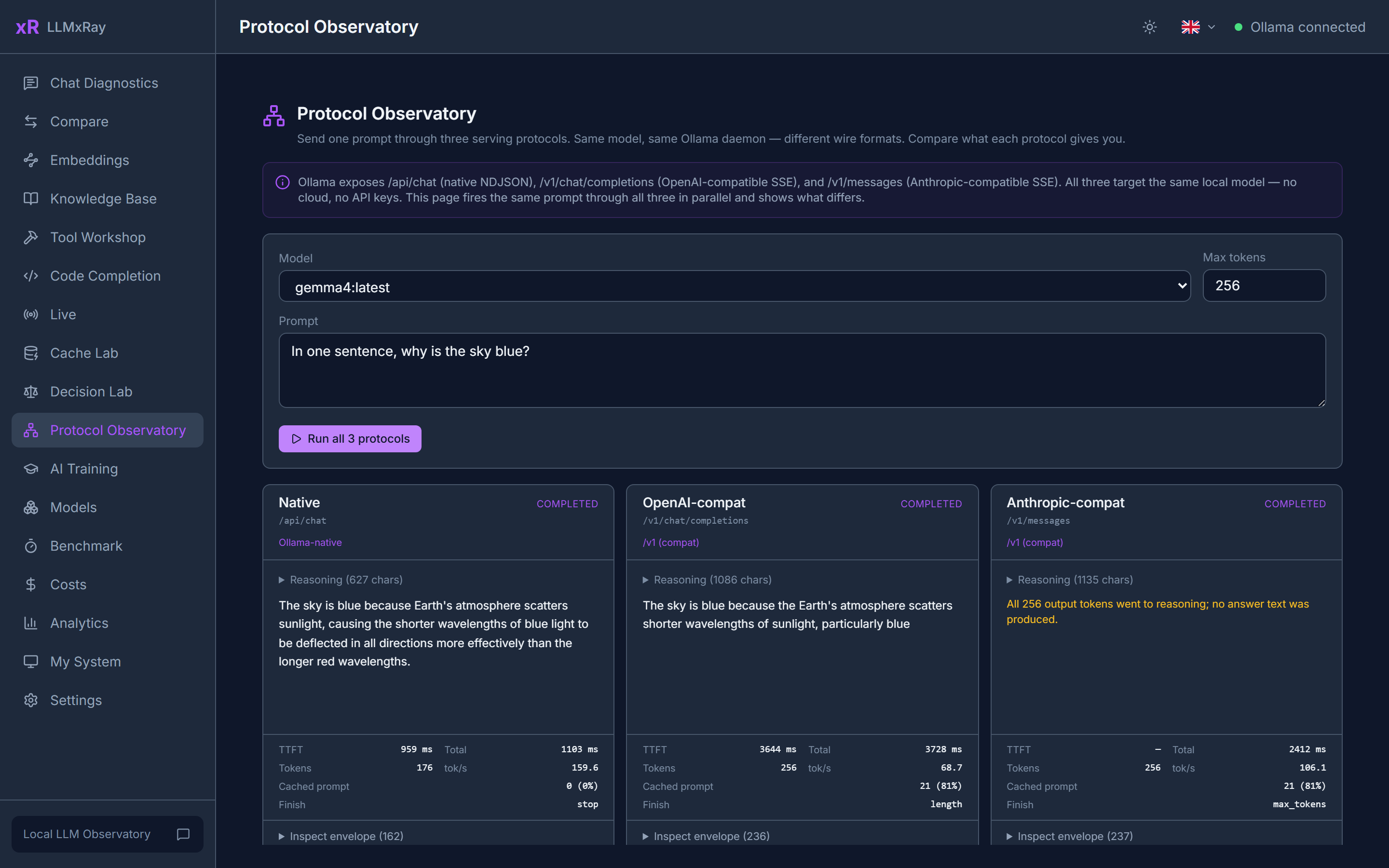 ### Knowledge Base and Embeddings Drop in PDF, DOCX, Markdown or CSV files. They are chunked, embedded and searchable, so you see what retrieval actually returns before a model ever sees it. The Embeddings page lets you compare any two texts by cosine similarity, visualise the vectors, and see what Matryoshka truncation costs. <table> <tr> <td width="50%">  or following the README instructions on GitHub. ClaudeWave also provides quick install blocks on this page.
Is LogneBudo/llmxray safe to use?
+
Our security agent has analyzed LogneBudo/llmxray and assigned a Trust Score of 87/100 (tier: Trusted). See the full breakdown of passed checks and flags on this page.
Who maintains LogneBudo/llmxray?
+
LogneBudo/llmxray is maintained by LogneBudo. The last recorded GitHub activity is dated 2026-10-16, with 0 open issues.
Are there alternatives to llmxray?
+
Yes. On ClaudeWave you can browse similar tools at /categories/tools, sorted by popularity or recent activity.
Deploy llmxray to your cloud
Ship this repo to production in minutes. Each platform spins up its own environment with editable env vars.
Maintain this repo? Add a badge to your README
Drop the badge into your GitHub README to show it's tracked on ClaudeWave. Each badge links back to this page and reflects the live Trust Score.
[](https://claudewave.com/repo/lognebudo-llmxray)<a href="https://claudewave.com/repo/lognebudo-llmxray"><img src="https://claudewave.com/api/badge/lognebudo-llmxray" alt="Featured on ClaudeWave: LogneBudo/llmxray" width="320" height="64" /></a>More Tools

A single CLAUDE.md file to improve Claude Code behavior, derived from Andrej Karpathy's observations on LLM coding pitfalls.

An AI skill that provides design intelligence for building professional UI/UX across multiple platforms.

🪨 why use many token when few token do trick. Viral skill + proxy for coding agents that cuts 65% of tokens by talking like a caveman.

The fastest, litest AI Gateway. Rust core with Python SDK. Call 100+ LLM APIs in OpenAI (or native) format with cost tracking, guardrails, load balancing, and logging [Bedrock, Azure, OpenAI, Anthropic, OpenAI, VertexAI, vLLM, Nvidia NIM]

Use Claude Code, Codex, VSCode, Pi, and OpenCode (and 6 other harnesses) for free (1.3B+ free tokens) from your terminal, app, IDE, or phone, and now from the browser with native browser sessions (multi-harness + multi-model) like OpenClaw (voice supported + ToS friendly)

Wrap Antigravity, ChatGPT Codex, Claude Code, Grok Build, Muse Code, Devin as an OpenAI/Gemini/Claude/Codex compatible API service, allowing you to enjoy the free Gemini Series, GPT Series, Grok Series, Claude model through API