

Manage multiple AI terminal agents like Claude Code, Codex, OpenCode, and Amp.
Claude Squad is a Go-based terminal application that runs as the `cs` binary and lets developers manage multiple AI coding agents simultaneously from a single interface. It spins up isolated sessions for Claude Code, OpenAI Codex, Google Gemini, Aider, and other CLI agents, giving each one its own git worktree so branches never conflict. The tool connects to Claude specifically through the `claude` CLI (Claude Code), which is its default program. A built-in TUI provides keyboard-driven session management, including creating, pausing, resuming, and deleting agent sessions, plus a diff preview tab that lets developers review changes before committing or pushing to GitHub via the `gh` CLI. A standout feature is the `--autoyes` flag, which enables auto-accept mode so agents complete tasks entirely in the background without waiting for user confirmation. Named profiles stored in `~/.claude-squad/config.json` allow quick switching between different agents at session creation. The tool targets developers who want to parallelize AI-assisted coding work across multiple tasks.
- ✓Open-source license (AGPL-3.0)
- ✓Actively maintained (<30d)
- ✓Healthy fork ratio
- ✓Clear description
- ✓Topics declared
- ✓Mature repo (>1y old)
git clone https://github.com/smtg-ai/claude-squadTools overview
# Claude Squad [](https://github.com/smtg-ai/claude-squad/actions/workflows/build.yml) [](https://github.com/smtg-ai/claude-squad/releases/latest)
[Claude Squad](https://smtg-ai.github.io/claude-squad/) is a terminal app that manages multiple [Claude Code](https://github.com/anthropics/claude-code), [Codex](https://github.com/openai/codex), [Gemini](https://github.com/google-gemini/gemini-cli) (and other local agents including [Aider](https://github.com/Aider-AI/aider)) in separate workspaces, allowing you to work on multiple tasks simultaneously.

### Highlights
- Complete tasks in the background (including yolo / auto-accept mode!)
- Manage instances and tasks in one terminal window
- Review changes before applying them, checkout changes before pushing them
- Each task gets its own isolated git workspace, so no conflicts
<br />
https://github.com/user-attachments/assets/aef18253-e58f-4525-9032-f5a3d66c975a
<br />
### Installation
Both Homebrew and manual installation will install Claude Squad as `cs` on your system.
#### Homebrew
```bash
brew install claude-squad
ln -s "$(brew --prefix)/bin/claude-squad" "$(brew --prefix)/bin/cs"
```
#### Manual
Claude Squad can also be installed by running the following command:
```bash
curl -fsSL https://raw.githubusercontent.com/smtg-ai/claude-squad/main/install.sh | bash
```
This puts the `cs` binary in `~/.local/bin`.
To use a custom name for the binary:
```bash
curl -fsSL https://raw.githubusercontent.com/smtg-ai/claude-squad/main/install.sh | bash -s -- --name <your-binary-name>
```
### Prerequisites
- [tmux](https://github.com/tmux/tmux/wiki/Installing)
- [gh](https://cli.github.com/)
### Usage
```
Usage:
cs [flags]
cs [command]
Available Commands:
completion Generate the autocompletion script for the specified shell
debug Print debug information like config paths
help Help about any command
reset Reset all stored instances
version Print the version number of claude-squad
Flags:
-y, --autoyes [experimental] If enabled, all instances will automatically accept prompts for claude code & aider
-h, --help help for claude-squad
-p, --program string Program to run in new instances (e.g. 'aider --model ollama_chat/gemma3:1b')
```
Run the application with:
```bash
cs
```
NOTE: The default program is `claude` and we recommend using the latest version.
<br />
<b>Using Claude Squad with other AI assistants:</b>
- For [Codex](https://github.com/openai/codex): Set your API key with `export OPENAI_API_KEY=<your_key>`
- Launch with specific assistants:
- Codex: `cs -p "codex"`
- Aider: `cs -p "aider ..."`
- Gemini: `cs -p "gemini"`
- Make this the default, by modifying the config file (locate with `cs debug`)
<br />
#### Menu
The menu at the bottom of the screen shows available commands:
##### Instance/Session Management
- `n` - Create a new session
- `N` - Create a new session with a prompt
- `D` - Kill (delete) the selected session
- `↑/j`, `↓/k` - Navigate between sessions
##### Actions
- `↵/o` - Attach to the selected session to reprompt
- `ctrl-q` - Detach from session
- `s` - Commit and push branch to github
- `c` - Checkout. Commits changes and pauses the session
- `r` - Resume a paused session
- `?` - Show help menu
##### Navigation
- `tab` - Switch between preview tab and diff tab
- `q` - Quit the application
- `shift-↓/↑` - scroll in diff view
### Configuration
Claude Squad stores its configuration in `~/.claude-squad/config.json`. You can find the exact path by running `cs debug`.
#### Profiles
Profiles let you define multiple named program configurations and switch between them when creating a new session. When more than one profile is defined, the session creation overlay shows a profile picker that you can navigate with `←`/`→`.
To configure profiles, add a `profiles` array to your config file and set `default_program` to the name of the profile to select by default:
```json
{
"default_program": "claude",
"profiles": [
{ "name": "claude", "program": "claude" },
{ "name": "codex", "program": "codex" },
{ "name": "aider", "program": "aider --model ollama_chat/gemma3:1b" }
]
}
```
Each profile has two fields:
| Field | Description |
|-----------|----------------------------------------------------------|
| `name` | Display name shown in the profile picker |
| `program` | Shell command used to launch the agent for that profile |
If no profiles are defined, Claude Squad uses `default_program` directly as the launch command (the default is `claude`).
### FAQs
#### Failed to start new session
If you get an error like `failed to start new session: timed out waiting for tmux session`, update the
underlying program (ex. `claude`) to the latest version.
### How It Works
1. **tmux** to create isolated terminal sessions for each agent
2. **git worktrees** to isolate codebases so each session works on its own branch
3. A simple TUI interface for easy navigation and management
### License
[AGPL-3.0](LICENSE.md)
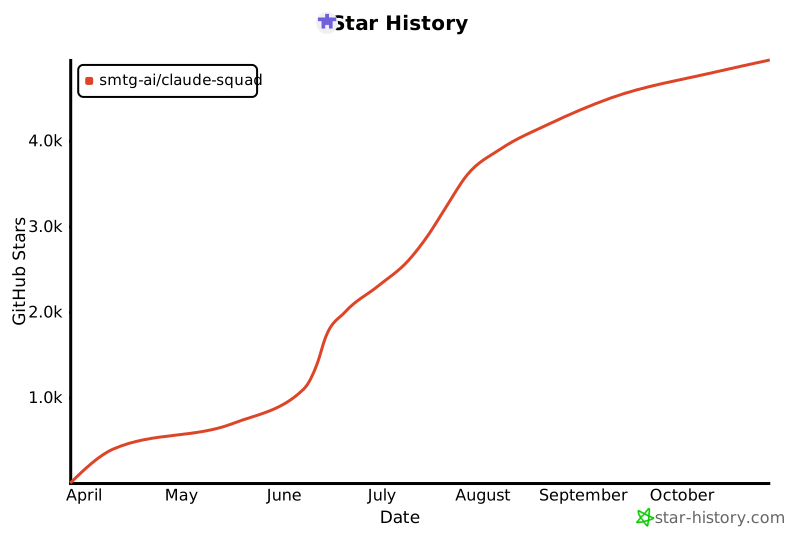
### Star History
[](https://www.star-history.com/#smtg-ai/claude-squad&Date)
What people ask about claude-squad
What is smtg-ai/claude-squad?
+
smtg-ai/claude-squad is tools for the Claude AI ecosystem. Manage multiple AI terminal agents like Claude Code, Codex, OpenCode, and Amp. It has 8.2k GitHub stars and was last updated 1mo ago.
How do I install claude-squad?
+
You can install claude-squad by cloning the repository (https://github.com/smtg-ai/claude-squad) or following the README instructions on GitHub. ClaudeWave also provides quick install blocks on this page.
Is smtg-ai/claude-squad safe to use?
+
Our security agent has analyzed smtg-ai/claude-squad and assigned a Trust Score of 100/100 (tier: Verified). See the full breakdown of passed checks and flags on this page.
Who maintains smtg-ai/claude-squad?
+
smtg-ai/claude-squad is maintained by smtg-ai. The last recorded GitHub activity is from 1mo ago, with 54 open issues.
Are there alternatives to claude-squad?
+
Yes. On ClaudeWave you can browse similar tools at /categories/tools, sorted by popularity or recent activity.
Deploy claude-squad to your cloud
Ship this repo to production in minutes. Each platform spins up its own environment with editable env vars.
Maintain this repo? Add a badge to your README
Drop the badge into your GitHub README to show it's tracked on ClaudeWave. Each badge links back to this page and reflects the live Trust Score.
[](https://claudewave.com/repo/smtg-ai-claude-squad)<a href="https://claudewave.com/repo/smtg-ai-claude-squad"><img src="https://claudewave.com/api/badge/smtg-ai-claude-squad" alt="Featured on ClaudeWave: smtg-ai/claude-squad" width="320" height="64" /></a>More Tools

A single CLAUDE.md file to improve Claude Code behavior, derived from Andrej Karpathy's observations on LLM coding pitfalls.

An AI SKILL that provide design intelligence for building professional UI/UX multiple platforms

🪨 why use many token when few token do trick — Claude Code skill that cuts 65% of tokens by talking like caveman

CLI proxy that reduces LLM token consumption by 60-90% on common dev commands. Single Rust binary, zero dependencies

The fastest, litest AI Gateway. Rust core with Python SDK. Call 100+ LLM APIs in OpenAI (or native) format with cost tracking, guardrails, load balancing, and logging [Bedrock, Azure, OpenAI, Anthropic, OpenAI, VertexAI, vLLM, Nvidia NIM]

AI agent skill that researches any topic across Reddit, X, YouTube, HN, Polymarket, and the web - then synthesizes a grounded summary