

lobehub
🤯 LobeHub is your Chief Agent Operator, organizing your agents into 7×24 operations by hiring, scheduling, and reporting on your entire AI team.
- 83.4k estrellas
- 16k forks
- 1158 issues abiertos
- Lenguaje: TypeScript
- Licencia: NOASSERTION
- actualizado
Instalación
git clone https://github.com/lobehub/lobehub && cp lobehub/*.md ~/.claude/agents/- Clone the repository and copy the agent .md definitions into ~/.claude/agents (or .claude/agents inside a project).
- Start a new Claude Code session to load the agents.
- Delegate work to them with the Task/Agent tool or by name.
Nota editorial
LobeHub is a multi-agent orchestration platform built in TypeScript that lets users define, schedule, and coordinate teams of AI agents running continuously without manual oversight. It supports Claude alongside other models including GPT, Gemini, and DeepSeek, connecting through direct API integration and MCP (Model Context Protocol) for tool access. Core features include agent hiring and scheduling to automate 7x24 task execution, a knowledge base for giving agents persistent and contextual memory, skill assignment so individual agents carry specific capabilities, and collaboration networks that allow agents to hand off work between one another rather than requiring users to switch between isolated conversations. The platform can be self-hosted via Docker or deployed to Vercel, Zeabur, Sealos, or Alibaba Cloud. Developers and teams managing repetitive or parallel AI workflows benefit most, particularly those who need agents to operate asynchronously and report results without the user staying online throughout execution.
24 items en este repositorio
Add documentation for a new AI provider — usage docs, env vars, Docker config, image resources.
Add server-side environment variables that control default values for user settings.
Agent runtime lifecycle hooks. Use for before/after tool or step hooks, tool mocks, human intervention, sub-agent calls, context compression, evals, callAgent, or lifecycle events.
Build or extend LobeHub Agent Signal pipelines. Use for signal sources, signal/action types, policies, middleware, workflow handoff, dedupe, scope behavior, or observability.
Agent tracing CLI for execution snapshots. Use for agent-tracing, traces, snapshots, LLM call inspection, context engine data, agent step analysis, execution debugging, or pulling remote/production traces ("拉线上 tracing") by operation id. Also the first stop for debugging agent tool calls — wrong or missing tool_calls, unexpected tool arguments or results, which tools were available at a step, or why a tool ran where it did.
Agent Work registry (works / work_versions): how agent outputs — github/linear entities, files, documents, tasks — get registered, deduped, and rendered as cards, and how to extend it with a new skill provider, a new shell CLI scanner, or a new Work type.
Build LobeHub builtin tool packages. Use when adding agent-callable tools, manifests, executors, runtimes, inspectors, renders, placeholders, streaming, interventions, portals, or tool registries.
Build multi-platform chat bots with the chat SDK. Use for Slack, Teams, Google Chat, Discord, GitHub, Linear bots, webhooks, mentions, slash commands, cards, modals, or streaming responses.
Audit and safely clean Git worktrees and stale local branches. Use when asked to list worktrees, identify completed or merged branches, remove worktrees whose remote branches are gone, prune stale worktree registrations, or clean local branches without losing uncommitted work.
Decompose a heavy domain feature into mountable capability atoms. Use when a Viewer/Page/index.tsx owns fetch, filters, mutations, modals, and host integrations together; a visual split still leaves store calls and actions on the page; a portal, embed, share, mobile, or micro-app needs a subset of the same domain; or a new capability is landing as another `readOnly`/`mode`/`variant` flag. Triggers on `compose-atoms`, sink state, 状态下沉, 重业务拆分, 拆成原子, 原子组件, 组装, god component, fat viewer, module graph, slot composition, host seam.
LobeHub data-fetching pipeline guide. Use for service layer, Zustand store, SWR, lambdaClient, useClientDataSWR, useFetchXxx hooks, or migrating useEffect fetches.
Use for database rollout strategy, Drizzle migrations, online index creation, data backfills, migration regeneration, sequence conflicts after rebase, idempotent SQL review, or migration renames.
Frontend diagnosis extension for the acceptance skill. Use for intermittent rendering, ordering, stale-state, navigation, virtual-list, React/Zustand, optimistic-update, refresh-dependent, or browser-only failures where the first broken boundary may be DOM, component input, derived state, client cache, network data, or a pure transformation. Before any browser, Electron, or live-app interaction, this skill must load and follow the acceptance skill and the repository's `.agents/acceptance/` project layer; it adds only boundary tracing, minimal fixture replay, and regression attribution.
LobeHub debug package and log namespace guide. Use when adding debug() logging, choosing lobe-* namespaces, troubleshooting DEBUG output, localStorage.debug, or log format specifiers.
Multi-dimensional code review. Use when the user asks to review, evaluate, or audit a PR, diff, branch, or pasted change — including informal review asks like "look at this change for problems" — via light mode: one independent reviewer against the dimension quick checklists. Not for explain-only questions about what a change does or why. Deep mode runs only on explicit invocation (/deep-review), and normally at most once per logical requirement.
Produce an interactive single-file HTML design prototype using the REAL LobeHub design system (@lobehub/ui + antd + antd-style tokens) with production-style React — no build step, opens directly in a browser. Use when asked for a design prototype / interactive mockup / 交互原型 / 出个原型 / 设计稿 HTML for a page or flow, or to explore a redesign before committing to implementation.
Electron desktop development guide — IPC handlers, controllers, preload scripts, window/menu management.
Write website changelog pages under docs/changelog/*.mdx. Use for EN/ZH product update posts, changelog posts, update-log copy, or docs changelog edits; not GitHub Release notes.
Resumen de Subagents
[![][image-banner]][vercel-link]
LobeHub
LobeHub organizes your agents into 7×24 operation.
It hires, schedules, reports on your entire AI team.
You stay in charge — without staying online.
English · 简体中文 · [Official Site][official-site] · [Changelog][changelog] · [Documents][docs] · [Blog][blog] · [Feedback][github-issues-link]
[![][github-release-shield]][github-release-link] [![][docker-release-shield]][docker-release-link] [![][vercel-shield]][vercel-link] [![][discord-shield]][discord-link] [![][codecov-shield]][codecov-link] [![][github-action-test-shield]][github-action-test-link] [![][github-action-release-shield]][github-action-release-link] [![][github-releasedate-shield]][github-releasedate-link] [![][github-contributors-shield]][github-contributors-link] [![][github-forks-shield]][github-forks-link] [![][github-stars-shield]][github-stars-link] [![][github-issues-shield]][github-issues-link] [![][github-license-shield]][github-license-link]
Share LobeHub Repository
[![][share-x-shield]][share-x-link] [![][share-telegram-shield]][share-telegram-link] [![][share-whatsapp-shield]][share-whatsapp-link] [![][share-reddit-shield]][share-reddit-link] [![][share-weibo-shield]][share-weibo-link] [![][share-mastodon-shield]][share-mastodon-link] [![][share-linkedin-shield]][share-linkedin-link]
Your Chief Agent Operator

Table of contents
TOC
https://github.com/user-attachments/assets/0a33365f-b786-48b5-9ed6-f8af7927bccb
👋🏻 Getting Started & Join Our Community
We are a group of e/acc design-engineers, hoping to provide modern design components and tools for AIGC. By adopting the Bootstrapping approach, we aim to provide developers and users with a more open, transparent, and user-friendly product ecosystem.
Whether for users or professional developers, LobeHub will be your AI Agent playground. Please be aware that LobeHub is currently under active development, and feedback is welcome for any [issues][issues-link] encountered.
 | We are live on Product Hunt! We are thrilled to bring LobeHub to the world. If you believe in a future where humans and agents co-evolve, please support our journey. |
|---|---|
| [![][discord-shield-badge]][discord-link] | Join our Discord community! This is where you can connect with developers and other enthusiastic users of LobeHub. |
[!IMPORTANT]
Star Us, You will receive all release notifications from GitHub without any delay ~ ⭐️
[![][image-star]][github-stars-link]
Star History
✨ Features
Today’s agents are one-off, task-driven tools. They lack context, live in isolation, and require manual hand-offs between different windows and models. While some maintain memory, it is often global, shallow, and impersonal. In this mode, users are forced to toggle between fragmented conversations, making it difficult to form structured productivity.
LobeHub changes everything.
LobeHub is a work-and-lifestyle space to find, build, and collaborate with agent teammates that grow with you. In LobeHub, we treat Agents as the unit of work, providing an infrastructure where humans and agents co-evolve.
Operator: Agents as the Unit of Work
Hires, schedules, and reports on your entire AI team.
More productivity. Fewer tools: Bring all your agents under one roof.
IM Gateway: Agents where you already chat.
Create: Agents as the Unit of Work
Building a personalized AI team starts with the Agent Builder. You can describe what you need once, and the agent setup starts right away, applying auto-configurations so you can use it instantly.
Unified Intelligence: Seamlessly access any model and any modality—all under your control.
10,000+ Skills: Connect your agents to the skills you use every day with a library of over 10,000 tools and MCP-compatible plugins.
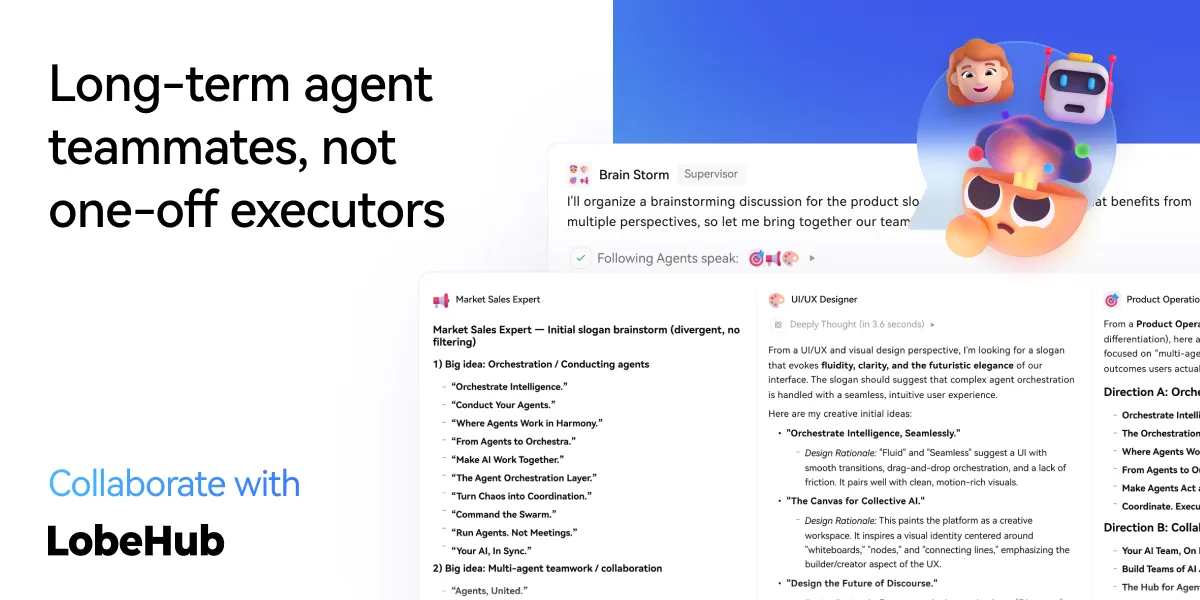
Collaborate: Scale New Forms of Collaboration Networks
LobeHub introduces Agent Groups, allowing you to work with agents like real teammates. The system assembles the right agents for the task, enabling parallel collaboration and iterative improvement.
Pages: Write and refine content with multiple agents in one place with a shared context.
Schedule: Schedule runs and let agents do the work at the right time, even while you are away.
Project: Organize work by project to keep everything structured and easy to track.
Workspace: A shared space for teams to collaborate with agents, ensuring clear ownership and visibility across the organization.
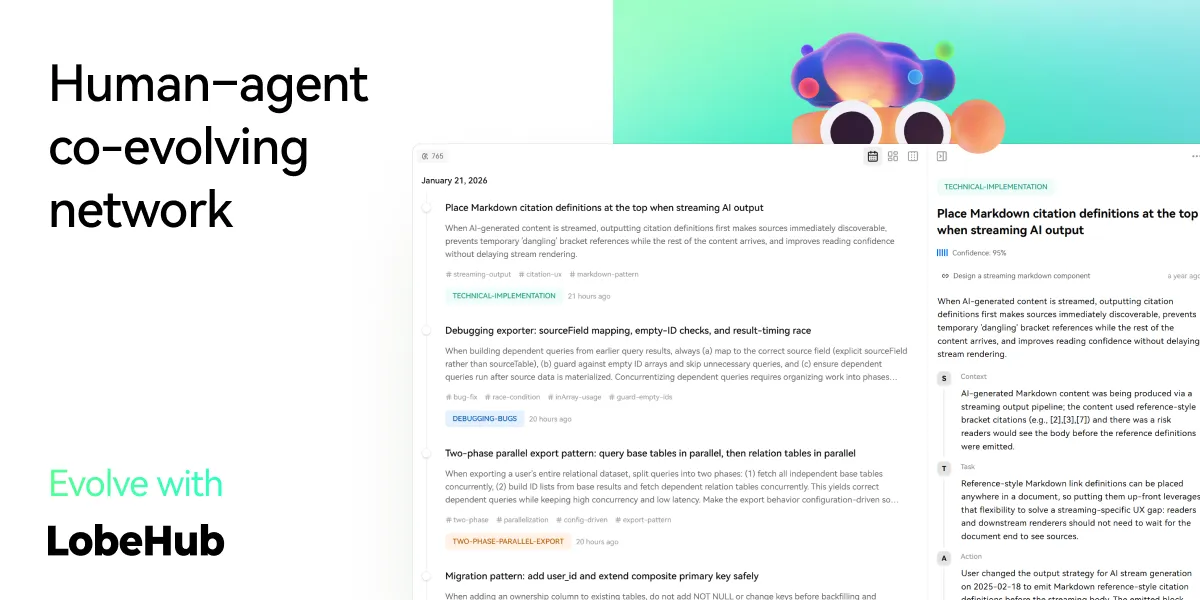
Evolve: Co-evolution of Humans and Agents
The best AI is one that understands you deeply. LobeHub features Personal Memory that builds a clear understanding of your needs.
Continual Learning: Your agents learn from how you work, adapting their behavior to act at the right moment.
White-Box Memory: We believe in transparency. Your agents use structured, editable memory, giving you full control over what they remember.
✨ more features will be added when LobeHub evolve.
🛳 Self Hosting
LobeHub provides Self-Hosted Version with Vercel, Alibaba Cloud, and [Docker Image][docker-release-link]. This allows you to deploy your own chatbot within a few minutes without any prior knowledge.
[!TIP]
Learn more about [📘 Build your own LobeHub][docs-self-hosting] by checking it out.
A Deploying with Vercel, Zeabur , Sealos or Alibaba Cloud
"If you want to deploy this service yourself on Vercel, Zeabur or Alibaba Cloud, you can follow these steps:
Prepare your OpenAI API Key.
Lo que la gente pregunta sobre lobehub
¿Qué es lobehub/lobehub?
lobehub/lobehub es subagents para el ecosistema de Claude AI. 🤯 LobeHub is your Chief Agent Operator, organizing your agents into 7×24 operations by hiring, scheduling, and reporting on your entire AI team. Tiene 83.4k estrellas en GitHub y su última actualización registrada es del 2026-10-23.
¿Cómo se instala lobehub?
Puedes instalar lobehub clonando el repositorio (https://github.com/lobehub/lobehub) o siguiendo las instrucciones del README en GitHub. ClaudeWave también te ofrece bloques de instalación rápida en esta misma página.
¿Es seguro usar lobehub/lobehub?
Nuestro agente de seguridad ha analizado lobehub/lobehub y le ha asignado un Trust Score de 95/100 (tier: Verified). Revisa el desglose completo de comprobaciones superadas y flags en esta página.
¿Quién mantiene lobehub/lobehub?
lobehub/lobehub es mantenido por lobehub. La última actividad registrada en GitHub es del 2026-10-23, con 1158 issues abiertos.
¿Hay alternativas a lobehub?
Sí. En ClaudeWave puedes explorar subagents similares en /categories/agents, ordenados por popularidad o actividad reciente.
¿Mantienes este repo? Muestra su Trust Score en tu README
La insignia muestra el Trust Score y el veredicto actuales de este repositorio y enlaza a esta página. Sigue los datos del catálogo: nadie puede comprar ni editar la puntuación que enseña.
[](https://claudewave.com/en/repo/lobehub-lobehub)<a href="https://claudewave.com/en/repo/lobehub-lobehub"><img src="https://claudewave.com/api/badge/lobehub-lobehub" alt="ClaudeWave Trust Score for lobehub/lobehub" width="320" height="64"></a>