

A cross-platform Markdown AI note-taking software.
NoteGen is an open-source, cross-platform Markdown note-taking application built with Tauri and Next.js that organizes its workspace into three areas: a Recording space for capturing fragmented thoughts, screenshots, links, and clips; a Markdown editor with tables, diagrams, and math support for refining those fragments into structured notes; and an AI Dialogue panel for chatting with notes and a built-in knowledge base. The knowledge base uses RAG with vector indexing and hybrid retrieval, letting users query their own content directly. AI integration is handled through a configurable stack that supports MCP, custom models, memory, and agent workflows, meaning Claude or other LLMs can be wired in via the API layer to assist with rewriting, translating, and organizing content. Notes are stored locally as plain Markdown files and can sync across GitHub, Gitee, GitLab, Gitea, S3, and WebDAV. The app runs on Windows, macOS, Linux, Android, and iOS. Writers, researchers, and knowledge workers who accumulate scattered inputs before shaping them into finished documents are the primary audience.
- ✓Open-source license (GPL-3.0)
- ✓Actively maintained (<30d)
- ✓Healthy fork ratio
- ✓Clear description
- ✓Topics declared
- ✓Mature repo (>1y old)
git clone https://github.com/codexu/note-gen && cp note-gen/*.md ~/.claude/agents/Subagents overview
<div align="center">
<h1>NoteGen</h1>
<p><strong>Capture first, organize later.</strong></p>
<p>
<a href="https://notegen.top/en/">Documentation</a>
·
<a href="https://notegen.top/en/download">Download</a>
·
<a href="https://notegen.top/business">Business</a>
·
<a href="https://notegen.top/donate">Donate</a>
·
<a href="https://github.com/codexu/note-gen/discussions">Discussions</a>
</p>
<p>
<a href="https://github.com/codexu/note-gen/actions/workflows/release.yml"><img alt="Release workflow" src="https://img.shields.io/github/actions/workflow/status/codexu/note-gen/release.yml?branch=release&label=release&style=flat-square&logo=githubactions&logoColor=white"></a>
<a href="https://github.com/codexu/note-gen/blob/dev/LICENSE"><img alt="License" src="https://img.shields.io/github/license/codexu/note-gen?style=flat-square&color=0f766e"></a>
<img alt="Pricing: free" src="https://img.shields.io/badge/pricing-free-155eef?style=flat-square">
</p>
<p>
<img alt="Tauri 2" src="https://img.shields.io/badge/Tauri-2-ffc131?style=flat-square&logo=tauri&logoColor=111111">
<img alt="Next.js 15" src="https://img.shields.io/badge/Next.js-15-000000?style=flat-square&logo=nextdotjs&logoColor=white">
<img alt="React 19" src="https://img.shields.io/badge/React-19-61dafb?style=flat-square&logo=react&logoColor=111111">
<img alt="Tailwind CSS 4" src="https://img.shields.io/badge/Tailwind_CSS-4-06b6d4?style=flat-square&logo=tailwindcss&logoColor=white">
</p>
<p>
<a href="https://trendshift.io/repositories/12784" target="_blank"><img src="https://trendshift.io/api/badge/repositories/12784" alt="codexu%2Fnote-gen | Trendshift" style="width: 250px; height: 55px;" width="250" height="55"/></a>
<a href="https://hellogithub.com/repository/0163cb946dca44cc8905dbe34c2c987b" target="_blank"><img src="https://abroad.hellogithub.com/v1/widgets/recommend.svg?rid=0163cb946dca44cc8905dbe34c2c987b&claim_uid=YJ39kIMBz1TGAvc" alt="Featured|HelloGitHub" style="width: 250px; height: 54px;" width="250" height="54" /></a>
<a href="https://www.producthunt.com/products/notegen-2?embed=true&utm_source=badge-featured&utm_medium=badge&utm_source=badge-notegen-2" target="_blank"><img src="https://api.producthunt.com/widgets/embed-image/v1/featured.svg?post_id=956348&theme=light&t=1749194675492" alt="NoteGen - A cross-platform Markdown note-taking application | Product Hunt" style="width: 250px; height: 54px;" width="250" height="54" /></a>
</p>
</div>
## Get Started
> Capture first, organize later.
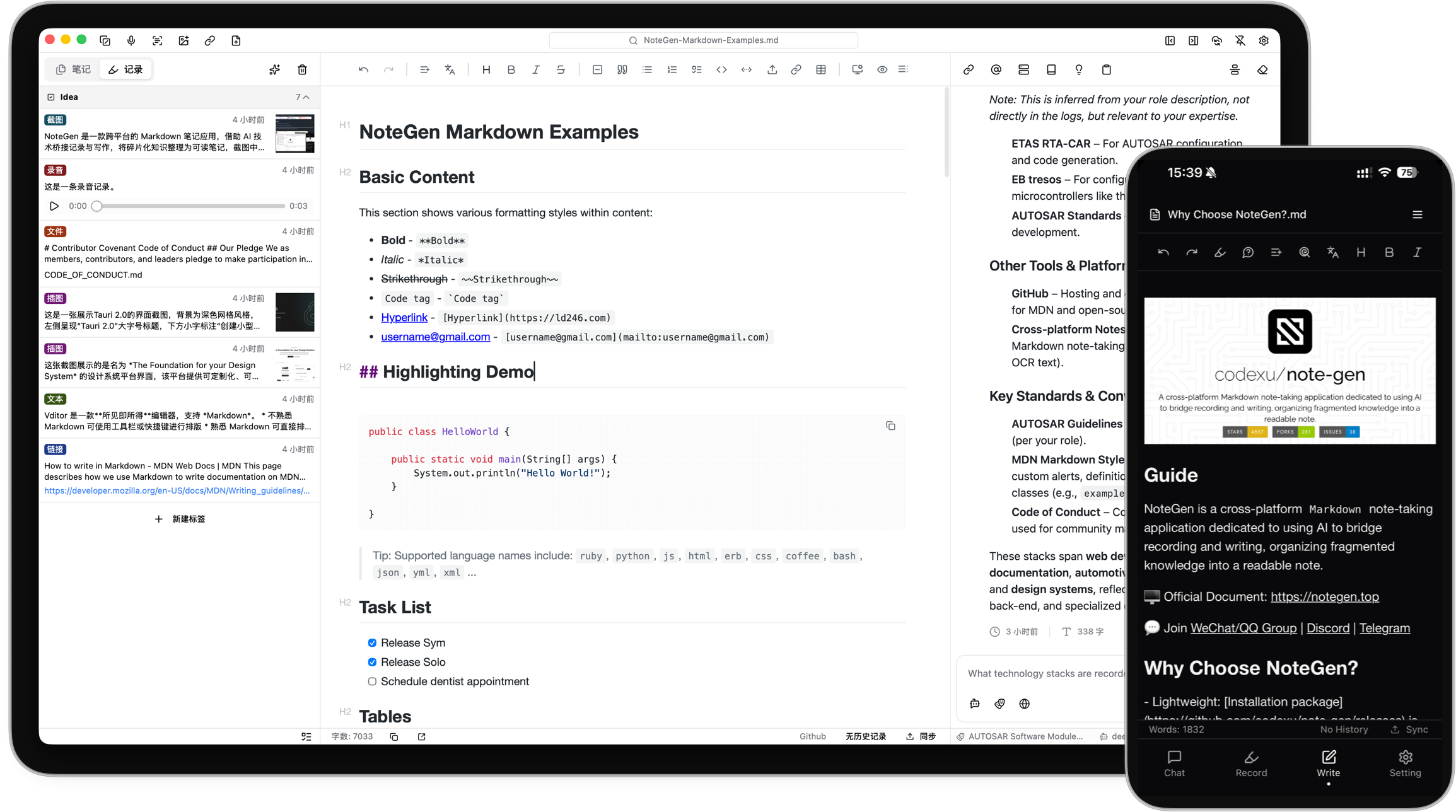
NoteGen is an open-source, cross-platform note app that helps you capture rough information first and turn it into structured writing later.
It works like a capture inbox, Markdown editor, and AI assistant in one app. Save scattered thoughts, voice recordings, screenshots, images, links, files, and todos in one place. When you are ready, let AI organize those raw records into clear notes, summaries, reports, articles, or reusable knowledge.
## What Can NoteGen Do?
NoteGen is built around a simple idea: do not force yourself to write a perfect note at the moment an idea appears.
- 🧩 Capture anything quickly: text, voice, screenshots, images, links, files, and todos.
- 🧠 Turn messy records into organized notes: select records, choose a template, and generate structured Markdown.
- ✍️ Keep writing after AI helps: edit the result in a Markdown editor with tables, diagrams, math, outline, search, and export tools.
- 💬 Ask questions about your own material: chat with notes, records, and knowledge base content instead of starting from a blank prompt.
- 🖼️ Make images useful: save screenshots and images, run OCR or AI recognition, add descriptions, and reuse them in notes.
- 🔄 Work across devices: keep notes local as Markdown files and sync them through GitHub, Gitee, GitLab, Gitea, S3, or WebDAV.
## Use NoteGen For
- Meeting notes and class notes: capture fragments during the session, then turn them into a readable summary.
- Reading and research: collect links, screenshots, documents, and quotes, then ask AI to organize the material.
- Weekly reports and work logs: generate reports from recent records by tag, time range, or template.
- Personal knowledge management: keep long-term notes as Markdown files and chat with your own knowledge base.
## Typical Workflow
1. **Record first**: save a thought, meeting snippet, screenshot, webpage, document, or task without deciding where it belongs.
2. **Organize later**: filter records by tag, time, or type, then ask AI to turn selected records into a note, weekly report, draft, or summary.
3. **Write with control**: polish the generated Markdown, keep useful references and images, and export or sync when needed.
4. **Reuse your knowledge**: search, chat, translate, rewrite, or let the Agent help continue working with your notes.
## Powerful When You Need It
NoteGen keeps the everyday experience focused on recording and writing, while still offering advanced tools for heavier workflows:
- Local-first Markdown storage and workspace-based file management.
- AI chat, inline completion, translation, rewriting, summaries, prompts, memories, and Agent mode.
- Knowledge base search with vector indexing and hybrid retrieval.
- Configurable AI providers and models for chat, embeddings, OCR/VLM, audio, and more.
- MCP support for connecting external AI tools.
- Cross-platform desktop and mobile apps built with Tauri.
## Download
|  |  |  |  |  |
| --- | --- | --- | --- | --- |
| ✅ beta | ✅ beta | ✅ beta | 🛠️ alpha | 🛠️ alpha |
| [Download](https://notegen.top/en/download) | [Download](https://notegen.top/en/download) | [Download](https://notegen.top/en/download) | [Download](https://notegen.top/en/download) | [TestFlight](https://testflight.apple.com/join/8KjFRTCq) |
Desktop and Android packages are distributed through the official download page, with GitHub Releases kept as a fallback mirror.
## Contribute
- [Read contribution guide](https://notegen.top/en/docs/contributing)
- [Update plans](https://github.com/codexu/note-gen/issues/46)
- [Submit bugs or improvement suggestions](https://github.com/codexu/note-gen/issues)
- [Discussions](https://github.com/codexu/note-gen/discussions)
## Contributors
<a href="https://github.com/codexu/note-gen/graphs/contributors">
<img src="https://contrib.rocks/image?repo=codexu/note-gen" />
</a>
## Thanks
Special thanks to our technology partners who make NoteGen better:
**[SiliconFlow](https://cloud.siliconflow.cn/i/O2ciJeZw)** - Providing free AI model services, powering NoteGen's intelligent features with high-quality AI capabilities.
<a href="https://cloud.siliconflow.cn/i/O2ciJeZw" target="_blank">
<img width="240" src="https://s2.loli.net/2025/09/10/KWPOA5XhIGmYTV9.png" />
</a>
We also thank other partners for their service support
<div>
<a href="https://www.qiniu.com/products/ai-token-api?utm_source=NoteGen" target="_blank">
<img src="https://s2.loli.net/2025/06/11/OKJq542lTs7U9xg.png" />
</a>
<a href="https://share.302.ai/jfFrIP" target="_blank">
<img src="https://s2.loli.net/2025/07/01/dPlkU1tejnDyV4S.png" />
</a>
<a href="https://www.shengsuanyun.com/?from=CH_KAFLGC9O" target="_blank">
<img src="https://s2.loli.net/2025/09/15/CcVRbTUBtf7ZvNl.png" />
</a>
<a href="https://ai.gitee.com/" target="_blank">
<img src="https://s2.loli.net/2025/09/15/wmnBWfyACMz9pVc.png" />
</a>
<a href="https://www.netlify.com" target="_blank">
<img src="https://s2.loli.net/2025/09/16/yJ64xIlrhdABt9o.png" />
</a>
<a href="https://skywork.ai/p/bY47ky" target="_blank">
<img src="https://s2.loli.net/2025/09/16/mTzMCQ8tZLfJNk5.png" />
</a>
</div>
What people ask about note-gen
What is codexu/note-gen?
+
codexu/note-gen is subagents for the Claude AI ecosystem. A cross-platform Markdown AI note-taking software. It has 12.3k GitHub stars and was last updated today.
How do I install note-gen?
+
You can install note-gen by cloning the repository (https://github.com/codexu/note-gen) or following the README instructions on GitHub. ClaudeWave also provides quick install blocks on this page.
Is codexu/note-gen safe to use?
+
Our security agent has analyzed codexu/note-gen and assigned a Trust Score of 100/100 (tier: Verified). See the full breakdown of passed checks and flags on this page.
Who maintains codexu/note-gen?
+
codexu/note-gen is maintained by codexu. The last recorded GitHub activity is from today, with 116 open issues.
Are there alternatives to note-gen?
+
Yes. On ClaudeWave you can browse similar subagents at /categories/agents, sorted by popularity or recent activity.
Deploy note-gen to your cloud
Ship this repo to production in minutes. Each platform spins up its own environment with editable env vars.
Maintain this repo? Add a badge to your README
Drop the badge into your GitHub README to show it's tracked on ClaudeWave. Each badge links back to this page and reflects the live Trust Score.
[](https://claudewave.com/repo/codexu-note-gen)<a href="https://claudewave.com/repo/codexu-note-gen"><img src="https://claudewave.com/api/badge/codexu-note-gen" alt="Featured on ClaudeWave: codexu/note-gen" width="320" height="64" /></a>More Subagents

The agent harness performance optimization system. Skills, instincts, memory, security, and research-first development for Claude Code, Codex, Opencode, Cursor and beyond.

The agent that grows with you

Java 面试 & 后端通用面试指南,覆盖计算机基础、数据库、分布式、高并发、系统设计与 AI 应用开发

Build Agentic workflows, RAG pipelines, with rich AI model and tool support on one collaborative workspace. Deploy on cloud, VPC, or self-hosted, so teams move from prototype to production without rebuilding the stack.

The agent engineering platform.

Turn any codebase, with its docs, SQL schemas, configs, and PDFs, into a queryable knowledge graph. A /graphify skill for Claude Code, Cursor, Codex, and Gemini CLI: local deterministic AST parsing, every edge explained, no vector store.