

🚀 Beautiful highly customizable statusline for Claude Code CLI with powerline support, themes, and more.
ccstatusline is a TypeScript npm package that adds a configurable status line to the Claude Code CLI terminal interface, surfacing real-time session data directly in the terminal prompt area. It integrates with Claude Code through its hook and status line system, displaying widgets for active model name, token usage, context window size, git branch, staged and unstaged file counts, GitLab and GitHub pull request or merge request status, session compaction count, voice input state, and pay-as-you-go overage limits. The package ships with a terminal user interface for configuring widget layout, Powerline segment styling, and theme selection without manual config file editing. A persistent git cache stored under ~/.cache/ccstatusline reduces subprocess overhead by checking .git/HEAD and .git/index modification times. Developers working daily in the Claude Code CLI who want at-a-glance visibility into token consumption, usage bucket resets, and repository state without switching contexts are the primary audience.
- ✓Open-source license (MIT)
- ✓Actively maintained (<30d)
- ✓Clear description
- ✓Topics declared
- ✓Documented (README)
git clone https://github.com/sirmalloc/ccstatuslineResumen de Awesome Lists
<div align="center">
<pre>
_ _ _ _
___ ___ ___| |_ __ _| |_ _ _ ___| (_)_ __ ___
/ __/ __/ __| __/ _` | __| | | / __| | | '_ \ / _ \
| (_| (__\__ \ || (_| | |_| |_| \__ \ | | | | | __/
\___\___|___/\__\__,_|\__|\__,_|___/_|_|_| |_|\___|
</pre>
# ccstatusline
**🎨 A highly customizable status line formatter for Claude Code CLI**
*Display model info, git branch, token usage, and other metrics in your terminal*
[](https://www.npmjs.com/package/ccstatusline)
[](https://www.npmjs.com/package/ccstatusline)
[](https://github.com/sirmalloc/ccstatusline/blob/main/LICENSE)
[](https://nodejs.org)
[](https://packagephobia.com/result?p=ccstatusline)
[](https://github.com/sirmalloc/ccstatusline/graphs/commit-activity)
[](https://github.com/hesreallyhim/awesome-claude-code)
[](https://claudelog.com/)
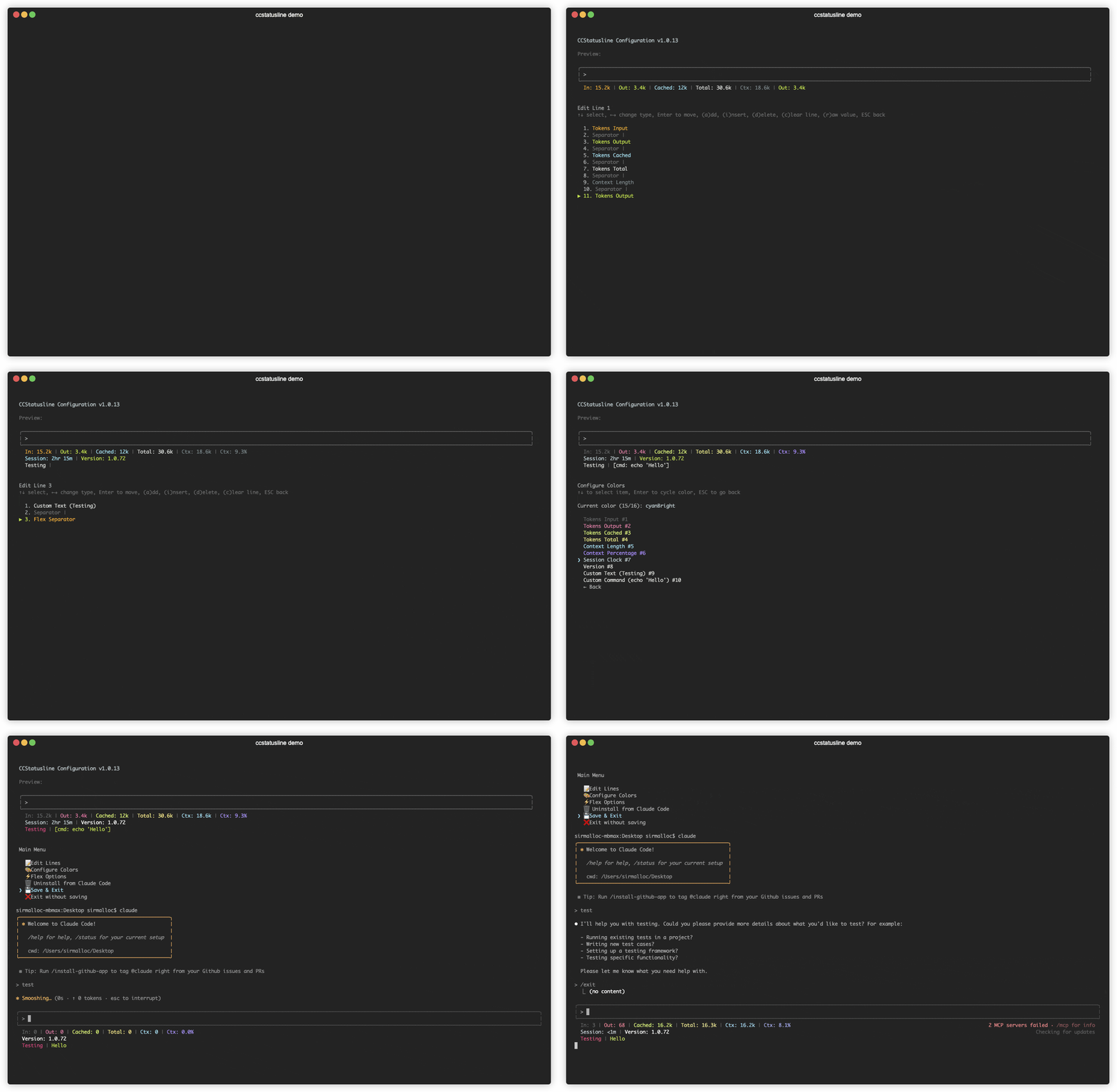
</div>
<br />
## 📚 Table of Contents
- [Recent Updates](#-recent-updates)
- [Features](#-features)
- [Localizations](#-localizations)
- [Quick Start](#-quick-start)
- [Windows Support](docs/WINDOWS.md)
- [Usage](docs/USAGE.md)
- [Development](docs/DEVELOPMENT.md)
- [Contributing](#-contributing)
- [License](#-license)
- [Related Projects](#-related-projects)
<br />
## 🆕 Recent Updates
### v2.2.27 - Portable configuration import and export
- **📦 Config import/export** - Export the current TUI configuration to JSON, validate and preview imports, then replace all settings or merge only supplied fields while preserving local installation metadata and leaving the result unsaved for review.
### v2.2.25 - v2.2.26 - Fable usage, migrated usage API support, compaction accuracy, and rendering reliability
- **🪄 Weekly Fable usage** - Added a `Weekly Fable Usage` widget with percentage, progress-bar, remaining-mode, and time-cursor controls.
- **📊 Reshaped usage API support** - Session and all-model weekly usage can fall back to the newer `limits[]` response, while Sonnet, Opus, and Fable weekly widgets read authoritative `weekly_scoped` entries so migrated accounts do not show stale or frozen values.
- **🧠 Correct post-compaction context** - Context length and percentage widgets reset immediately from `compact_boundary.postTokens` after `/compact`, then switch to the first new turn instead of retaining the pre-compaction size.
- **🧹 Reliable hidden-widget separators** - Manual separators now look past widgets that render empty, preserve the intended visible boundary, and inherit colors from the actual preceding visible widget.
- **⚡ Non-blocking Git PR/CI refreshes** - Git PR and CI widgets render from a versioned disk cache while stale data refreshes in the background, preventing slow `gh` calls from blocking the status line.
### v2.2.22 - v2.2.24 - Powerline flex mode, cache/CI/sandbox visibility, layout controls, composable metrics, and safer config

- **⏳ Prompt cache timer** - Added a `Cache Timer` widget with live `HOT` state, TTL countdown, configurable 5-minute/1-hour windows, and customizable state glyphs.
- **✅ GitHub CI status** - Added a `Git CI Status` widget that summarizes failing, pending, and successful checks for the current branch's pull request.
- **🔒 Sandbox status** - Added a `Sandbox Status` widget with glyph, text, and Nerd Font formats that follows Claude Code's layered sandbox setting on each refresh.
- **↔️ One-sided default padding** - Default widget padding can now apply to both sides, the left only, or the right only in standard and Powerline layouts.
- **⚡ Powerline flex mode** - Flex separators now work in Powerline mode, letting Powerline status lines right-align content or absorb available width.
- **🌗 Per-widget dim styling** - The color editor can dim an entire widget or only parenthesized text, with reset and clear-all actions covering dim state.
- **🧯 Safer settings recovery** - Invalid `settings.json` files are left untouched, defaults render in memory, and the status line shows an invalid-config warning.
- **🧭 Selective Powerline alignment** - Press `x` in the line editor to let a widget and the rest of its line keep their natural widths while earlier Powerline columns stay auto-aligned.
- **📏 Git widget width limits** - `Git Branch` and `Git Root Dir` can cap their visible width with ellipsis-safe truncation while preserving hyperlink targets.
- **🔣 Current directory glyphs** - `Current Working Dir` can prepend an optional custom glyph, including in raw-value mode.
- **🧠 Configurable context fallback** - `CCSTATUSLINE_CONTEXT_SIZE_FALLBACK` overrides the default 200k last-resort context window when Claude Code and the model name do not report one.
- **🧩 Composable compaction metrics** - `Compaction Counter` can render count, auto, manual, unknown, or reclaimed-token values independently for custom layouts.
- **🏷️ CLI version flag** - `ccstatusline --version` now prints the installed package version and exits.
- **🛡️ Guarded invalid-config saves** - The TUI warns when it loaded defaults for an invalid settings file and requires confirmation before replacing that file.
- **🔄 Usage display and cache fixes** - Used/remaining direction now works in every percentage mode, account switches invalidate cached usage, and fetch locks no longer cause repeated requests or stale timeout output.
- **⏱️ Calmer reset timer startup** - Reset timers show labeled loading placeholders instead of transient rate-limit errors while Claude Code's embedded usage-window data is still arriving.
- **🔇 Quieter install detection** - Best-effort npm and Bun probes no longer leak expected package-manager errors into the TUI.
### v2.2.21 - Cache widgets, compaction details, extra usage currency, and package fixes
- **🔣 Custom widget glyphs** - Git and JJ symbol widgets can override or suppress their built-in glyphs from the TUI.
- **🔁 Compaction counter details** - `Compaction Counter` now counts explicit `compact_boundary` markers and can optionally show trigger splits plus tokens reclaimed.
- **💸 Extra usage improvements** - Added `Extra Usage Used` and formats extra usage amounts with the billing currency reported by the usage API.
- **📏 Custom command width context** - `Custom Command` widgets receive `terminal_width` in stdin JSON when ccstatusline can detect the terminal width.
- **🧠 Prompt cache widgets** - Added `Cache Hit Rate`, `Cache Read`, and `Cache Write` widgets with turn/session scopes and hide-when-empty behavior.
- **🔢 Token rounding fix** - Token counts from `999950` through `999999` now render as `1.0M` instead of `1000.0k`.
### v2.2.20 - Gradients, token accuracy, usage reliability, and Git PR/MR fixes
- **🌈 Gradient colors** - Added per-widget and whole-line foreground gradients with named presets, custom hex stops, TUI picker support, and Powerline-aware rendering. Press `g` on the Edit Colors screen for widget gradients, or press `g` for Override FG Color in Global Overrides for a line-wide gradient.
- **🎯 More accurate token counts** - `Tokens Input` and `Tokens Output` now prefer cumulative transcript metrics before falling back to context-window totals.
- **💸 Extra usage no-limit fix** - Extra usage widgets no longer get stuck on `[Timeout]` for accounts with overage enabled but no monthly limit configured.
- **🔁 Compaction glitch filtering** - `Compaction Counter` ignores transient below-1% context readings so incomplete status frames do not create false compaction counts.
- **🔀 SSH alias Git PR/MR detection** - Git PR/MR detection resolves SSH host aliases while preserving canonical GitHub and GitLab hosts for CLI selection and fallback repo links.
- **🧪 Usage test cache isolation** - Usage-fetch test probes now isolate `HOME`, `USERPROFILE`, `CLAUDE_CONFIG_DIR`, and proxy variables so local tests cannot touch the real ccstatusline cache.
- **📦 Dependency refresh** - Refreshed React/React DOM and Bun lockfile development-tooling resolutions for the release.
### v2.2.14 - v2.2.19 - Version pinning, npm provenance, usage overage widgets, and Git lock avoidance
- **📌 Version pinning support** - Added support for pinned global installs so Claude Code can keep running a specific ccstatusline version.
- **🔐 npm provenance attestations** - Published packages now use trusted publishing provenance so users can verify where releases were built while avoiding long-lived npm publish tokens.
- **🔄 Moving from auto-update installs** - If you currently use an auto-updating install, use the TUI uninstall option first, then reinstall to go through the version pinning flow. Your ccstatusline settings are preserved when uninstalling.
- **💸 Extra usage widgets** - Added Extra Usage Utilization and Extra Usage Remaining widgets for monthly pay-as-you-go overage limits, with null rate-limit buckets handled as zero usage.
- **🔒 Git lock avoidance** - Git helpers now pass `--no-optional-locks` so background status checks avoid creating `index.lock` races.
- **🧱 Older Git compatibility** - Git widgets avoid newer command forms so repository status works on older Git installations.
- **⚡ Persistent Git cache** - Git command output is cached under `~/.cache/ccstatusline/git-cache` with configurablLo que la gente pregunta sobre ccstatusline
¿Qué es sirmalloc/ccstatusline?
+
sirmalloc/ccstatusline es awesome lists para el ecosistema de Claude AI. 🚀 Beautiful highly customizable statusline for Claude Code CLI with powerline support, themes, and more. Tiene 12k estrellas en GitHub y se actualizó por última vez today.
¿Cómo se instala ccstatusline?
+
Puedes instalar ccstatusline clonando el repositorio (https://github.com/sirmalloc/ccstatusline) o siguiendo las instrucciones del README en GitHub. ClaudeWave también te ofrece bloques de instalación rápida en esta misma página.
¿Es seguro usar sirmalloc/ccstatusline?
+
Nuestro agente de seguridad ha analizado sirmalloc/ccstatusline y le ha asignado un Trust Score de 100/100 (tier: Verified). Revisa el desglose completo de comprobaciones superadas y flags en esta página.
¿Quién mantiene sirmalloc/ccstatusline?
+
sirmalloc/ccstatusline es mantenido por sirmalloc. La última actividad registrada en GitHub es de today, con 91 issues abiertos.
¿Hay alternativas a ccstatusline?
+
Sí. En ClaudeWave puedes explorar awesome lists similares en /categories/awesome, ordenados por popularidad o actividad reciente.
Despliega ccstatusline en tu cloud
Lleva este repo a producción en minutos. Cada plataforma genera su propio entorno con variables de entorno editables.
¿Mantienes este repo? Añade un badge a tu README
Pega el badge en tu README de GitHub para mostrar que está auditado por ClaudeWave. Cada badge enlaza de vuelta a esta página y muestra el Trust Score actual.
[](https://claudewave.com/repo/sirmalloc-ccstatusline)<a href="https://claudewave.com/repo/sirmalloc-ccstatusline"><img src="https://claudewave.com/api/badge/sirmalloc-ccstatusline" alt="Featured on ClaudeWave: sirmalloc/ccstatusline" width="320" height="64" /></a>Más Awesome Lists

A collection of MCP servers.

A curated list of awesome Claude Skills, resources, and tools for customizing Claude AI workflows

A hand-picked collection of the finest of resources for the most awesome of agents, Claude Code, the undisputed champion of coding companions, from the unstoppable team at Anthropic PBC. A delectable showcase of top tier skills, ambidextrous agents, scintillating status lines, top notch developer tooling, and also we have plugins

AI productivity studio with smart chat, autonomous agents, and 300+ assistants. Unified access to frontier LLMs

AAS Core is the local, agent-first control plane for complete catalog discovery, agent-owned selection, stack validation, and planning, backed by 1,987+ agentic skills. Includes CLI, local MCP, catalog, plugins, and Workbench.

Your ultimate Go microservices framework for the cloud-native era.