

Open-source, self-hosted CMS platform on AWS serverless (Lambda, DynamoDB, S3). TypeScript framework with multi-tenancy, lifecycle hooks, GraphQL API, and AI-assisted development via MCP server. Built for developers at large organizations.
Webiny is a self-hosted, open-source content platform that runs entirely within a user's own AWS account on Lambda, DynamoDB, S3, and CloudFront, with infrastructure provisioned via Pulumi in a single deploy command. It includes a headless CMS with a GraphQL API, field-level permissions, versioning, and localization; a drag-and-drop Website Builder with a Next.js SDK; a File Manager with CDN delivery; multi-step Publishing Workflows; and native multi-tenancy that isolates data, users, and permissions across thousands of tenants from one deployment. The repository ships a built-in MCP server alongside a set of AI skills that give agents like Claude Code deep context about Webiny's extension points, lifecycle hooks, and coding patterns, allowing them to scaffold content models, custom GraphQL queries, admin UI extensions, and tenant configurations that conform to the framework's actual conventions. The framework is built in TypeScript with dependency injection and GraphQL schema extensions, making it programmable rather than merely configurable through a UI. Developers and engineering teams at large organizations building multi-tenant SaaS platforms or enterprise content infrastructure are the primary intended users.
- ✓License: NOASSERTION
- ✓Actively maintained (<30d)
- ✓Healthy fork ratio
- ✓Clear description
- ✓Topics declared
- ✓Mature repo (>1y old)
claude mcp add webiny-js -- npx -y create-webiny-project{
"mcpServers": {
"webiny-js": {
"command": "npx",
"args": ["-y", "create-webiny-project"]
}
}
}MCP Servers overview
<p align="center">
<img src="./docs/static/webiny-logo.svg" width="350">
</p>
<p align="center">
AI-programmable CMS for enterprises hosting on AWS
</p>
<p align="center">
<a href="https://github.com/webiny/webiny-js/actions"><img src="https://img.shields.io/github/actions/workflow/status/webiny/webiny-js/push.yml" alt="Build Status"></a>
<a href="https://www.npmjs.com/package/@webiny/cli"><img src="https://img.shields.io/npm/dt/@webiny/cli.svg" alt="Total Downloads"></a>
<a href="https://github.com/webiny/webiny-js/releases"><img src="https://img.shields.io/github/v/release/webiny/webiny-js" alt="Latest Release"></a>
<a href="https://github.com/webiny/webiny-js/blob/master/LICENSE"><img src="https://img.shields.io/badge/license-MIT-green.svg" alt="License"></a>
</p>
# About Webiny
Open-source content platform. Self-hosted on AWS serverless. Built as a TypeScript framework you extend with code, not a closed product you configure through a UI.
Runs on Lambda, DynamoDB, S3, and CloudFront inside your own AWS account. Scales automatically. No servers to manage. Infrastructure provisioned via IaC (Pulumi) in a single `deploy` command.
Used in production by teams managing hundreds of millions of content records, petabytes of assets, and thousands of editors — including Amazon, Emirates, Fortune 500 companies, government agencies, and SaaS platforms that white-label Webiny inside their own products.
[Documentation](https://www.webiny.com/docs) · [Learn Webiny Course](https://www.webiny.com/learn) · [Community Slack](https://www.webiny.com/slack)
---
## What's Inside
.png%3Foriginal&w=3840&q=75>)
**Headless CMS** — Custom content models, GraphQL API, field-level permissions, localization, versioning. Models can be defined through the admin UI or in code via the framework.

**Website Builder** — Visual drag-and-drop page editor with a Next.js SDK. Render pages through your own frontend (Vercel, CloudFront, wherever). Create custom page elements with React components.
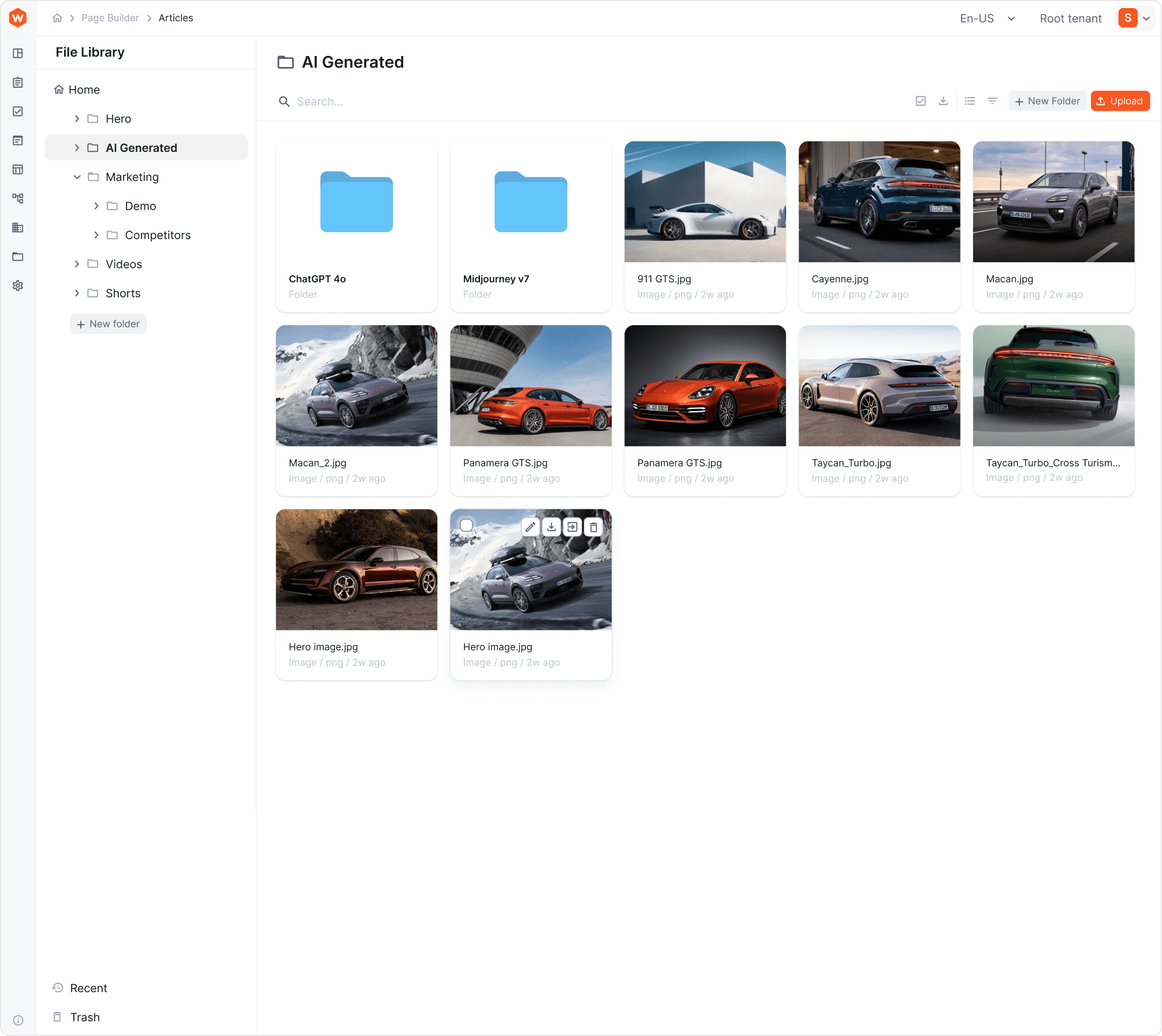
**File Manager** — Digital asset management with CDN delivery, folder structure, tagging, search. Integrated into CMS and Website Builder.
**Publishing Workflows** — Multi-step content approval with draft states, reviewer assignments, scheduled publishing, and audit trails.
**Multi-Tenancy** — Native tenant isolation (data, users, assets, permissions) from a single deployment. One instance can host thousands of tenants. Tenants are created and managed programmatically via GraphQL API. Supports hierarchical tenant structures (Root → Brand → Market, Root → Client → Site, etc.).
**Webiny Framework** — TypeScript framework with lifecycle hooks, dependency injection, GraphQL schema extensions, admin UI extension points, and infrastructure extensions. This is the core — it's what makes Webiny programmable rather than just configurable.
---
## Architecture
```
┌─────────────────────────────────────────────────────┐
│ Your AWS Account │
│ │
│ ┌──────────┐ ┌──────────┐ ┌─────┐ ┌──────────┐ │
│ │ Lambda │ │ DynamoDB │ │ S3 │ │CloudFront│ │
│ │ (API + │ │ (Content │ │(Assets)│ │ (CDN) │ │
│ │ business │ │ storage) │ │ │ │ │ │
│ │ logic) │ │ │ │ │ │ │ │
│ └──────────┘ └──────────┘ └─────┘ └──────────┘ │
│ │
│ Optional: OpenSearch (full-text search at scale) │
│ Optional: VPC deployment, multi-AZ, custom config │
│ │
│ All provisioned automatically via Pulumi IaC │
└─────────────────────────────────────────────────────┘
```
**Stack:** TypeScript, React, GraphQL, Node.js, Pulumi, AWS serverless services.
**What you control:** Everything. The IaC templates are open-source. Modify Lambda memory, add CloudWatch alarms, change VPC configuration, add custom AWS resources — it's your infrastructure.
**What you don't manage:** Servers. Patching. Scaling. Capacity planning. That's the point of serverless.
---
## Quick Start
**Prerequisites:** Node.js 22+, Yarn, AWS account with programmatic access.
```bash
npx create-webiny-project my-project
cd my-project
yarn webiny deploy
```
First deploy takes 5–15 minutes (AWS provisioning). After that, you get an admin panel URL. Create your first admin account, and you're in.
**Local development:**
```bash
yarn webiny watch admin # React dev server on localhost:3001
yarn webiny watch api # Local Lambda execution environment
```
**New team member onboarding:**
```bash
git clone <your-repo>
yarn
# Ready to develop
```
---
## AI-Assisted Development
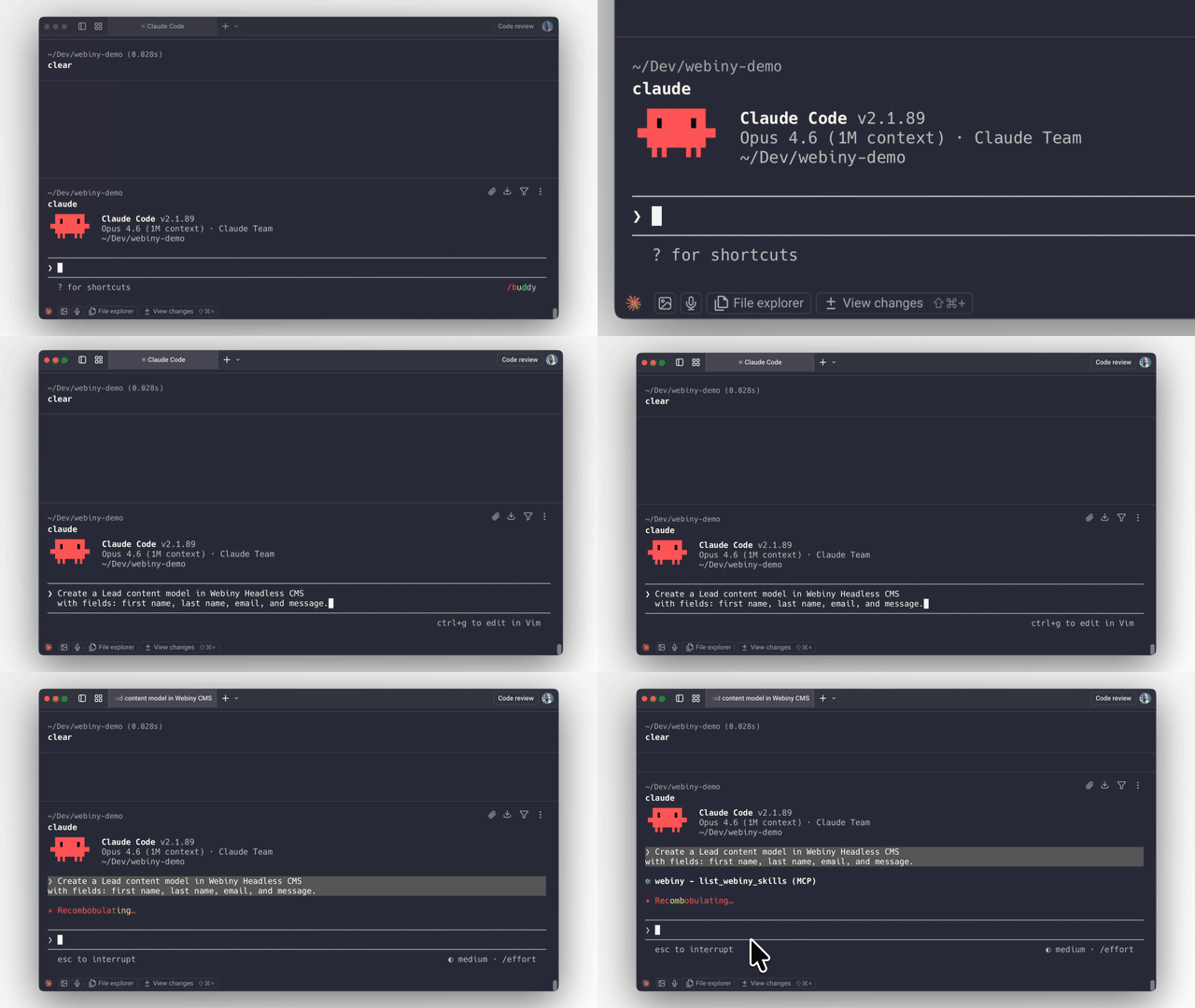
Webiny ships with an **MCP server** and **AI skills** that give AI coding agents (Claude Code, Cursor, Kiro, etc.) deep context about the platform's architecture, extension points, and patterns.
This means you can ask an AI agent to:
- Create content models with specific field types and validation
- Build lifecycle hooks that trigger on content events
- Extend the GraphQL API with custom queries and business logic
- Scaffold admin UI extensions with React components
- Wire integrations with external systems via lifecycle events
- Set up multi-tenant configurations programmatically
The AI produces code that follows Webiny's actual patterns because the MCP server gives it real knowledge of the framework — not generic guesses.
**Why this works better on Webiny than most platforms:** The framework is strongly typed with explicit extension points. AI-generated code either fits the type system or it doesn't compile. There's no ambiguous plugin API where the AI has to guess. Types enforce correctness.
**Getting started with the MCP server:**
```bash
# The MCP server runs locally inside your Webiny project
# Connect it to your AI coding tool of choice
# See docs for tool-specific setup instructions
```
→ [AI-Assisted Development Guide](https://www.webiny.com/docs/build-with-ai/ai-assisted-development)
---
## Extending Webiny
All customization happens in the `extensions/` folder and is registered in `webiny.config.tsx`. Four extension types:
**API Extensions** — Custom GraphQL schemas, resolvers, lifecycle hooks, business logic.
```typescript
// extensions/NotifyOnPublish.ts — Example: send Slack notification when content is published
class NotifyOnPublish implements CmsLifecycleHook.Interface {
constructor(private slackService: SlackService.Interface) {}
async afterPublish(params: AfterPublishParams): Promise<void> {
await this.slackService.notify(`Content published: ${params.entry.title}`);
}
}
```
**Admin Extensions** — Custom UI components, white-label branding, new views, tenant-specific themes. Standard React — use any patterns and libraries you already know.
**Infrastructure Extensions** — Modify AWS resources via Pulumi. Add Lambda functions, S3 buckets, CloudWatch alarms, or change existing resource configuration.
**CLI Extensions** — Custom commands for deployment workflows, data migrations, code generators.
→ [Extensions Guide](https://www.webiny.com/docs/core-concepts/extensions)
---
## When to Use Webiny
- You need a self-hosted CMS and don't want to run servers
- You need multi-tenancy as a first-class primitive, not a workaround
- You want to extend the CMS with real code (TypeScript), not just configuration
- You need to embed a CMS inside your own product (white-label)
- Data ownership and compliance requirements rule out SaaS CMS
- You want AI agents to be able to build on your content platform effectively
- You're on AWS (or planning to be)
## When Not to Use Webiny
**Be honest with yourself about these:**
- **Simple sites or blogs.** Webiny is built for complex projects. If you need a blog with 10 pages, use something simpler.
- **Not on AWS.** Webiny only runs on AWS. No GCP, no Azure, no on-prem. If that's a dealbreaker, it's a dealbreaker.
- **No TypeScript/React skills on the team.** The entire extension model is TypeScript and React. If your team works in a different stack and doesn't want to adopt these, Webiny won't be a good fit.
- **You want a no-code, plug-and-play SaaS CMS.** Webiny is a platform for developers to build on. If you want zero development involvement, this isn't it.
---
## Licensing
**Community Edition** — MIT license. Free forever. Includes Headless CMS, Website Builder, File Manager.
**Business Edition** — Commercial license starting at $79/mo. Adds RBAC, multi-tenancy, publishing workflows.
**Enterprise Edition** — Custom pricing. Adds SSO, audit logs, team management, priority support, managed hosting option.
All plans: unlimited content entries, pages, assets, API calls, roles, and workflows. No per-seat pricing traps. No API metering.
→ [Pricing Details](https://www.webiny.com/pricing)
---
## Project Structure
```
my-webiny-project/
extensions/ # Your custom code lives here
public/ # Admin app static assets
webiny.config.tsx # Project configuration (React components, type-safe)
package.json
tsconfig.json
```
Single `package.json`. Single `tsconfig.json`. Configuration in `webiny.config.tsx` uses React components for type safety and IDE auto-completion.
---
## Key Commands
```bash
npx create-webiny-project <name> # Create new project
yarnWhat people ask about webiny-js
What is webiny/webiny-js?
+
webiny/webiny-js is mcp servers for the Claude AI ecosystem. Open-source, self-hosted CMS platform on AWS serverless (Lambda, DynamoDB, S3). TypeScript framework with multi-tenancy, lifecycle hooks, GraphQL API, and AI-assisted development via MCP server. Built for developers at large organizations. It has 8k GitHub stars and was last updated today.
How do I install webiny-js?
+
You can install webiny-js by cloning the repository (https://github.com/webiny/webiny-js) or following the README instructions on GitHub. ClaudeWave also provides quick install blocks on this page.
Is webiny/webiny-js safe to use?
+
Our security agent has analyzed webiny/webiny-js and assigned a Trust Score of 100/100 (tier: Verified). See the full breakdown of passed checks and flags on this page.
Who maintains webiny/webiny-js?
+
webiny/webiny-js is maintained by webiny. The last recorded GitHub activity is from today, with 348 open issues.
Are there alternatives to webiny-js?
+
Yes. On ClaudeWave you can browse similar mcp servers at /categories/mcp, sorted by popularity or recent activity.
Deploy webiny-js to your cloud
Ship this repo to production in minutes. Each platform spins up its own environment with editable env vars.
Maintain this repo? Add a badge to your README
Drop the badge into your GitHub README to show it's tracked on ClaudeWave. Each badge links back to this page and reflects the live Trust Score.
[](https://claudewave.com/repo/webiny-webiny-js)<a href="https://claudewave.com/repo/webiny-webiny-js"><img src="https://claudewave.com/api/badge/webiny-webiny-js" alt="Featured on ClaudeWave: webiny/webiny-js" width="320" height="64" /></a>More MCP Servers

Fair-code workflow automation platform with native AI capabilities. Combine visual building with custom code, self-host or cloud, 400+ integrations.

User-friendly AI Interface (Supports Ollama, OpenAI API, ...)

An open-source AI agent that brings the power of Gemini directly into your terminal.

The fastest path to AI-powered full stack observability, even for lean teams.

Real-time global intelligence dashboard. AI-powered news aggregation, geopolitical monitoring, and infrastructure tracking in a unified situational awareness interface

🕷️ An adaptive Web Scraping framework that handles everything from a single request to a full-scale crawl!