

MCP 资源精选, MCP指南,Claude MCP,MCP Servers, MCP Clients
Awesome-MCP-ZH is a curated, Chinese-language resource collection covering the Model Context Protocol (MCP), the open communication standard Anthropic introduced in November 2024 that lets AI models interact with external tools and data sources. The repository catalogs MCP clients including Claude Desktop, Claude Code, Cherry Studio, Cursor, and several others, alongside a categorized directory of MCP servers spanning browser automation, Git and GitHub integration, database interaction, cloud platforms (AWS, Cloudflare, Azure, Kubernetes), search, file systems, knowledge and RAG tools, geolocation, and communications services like Slack and email. It also includes Chinese-language explainer articles, a developer guide for building MCP servers, and links to Microsoft's beginner MCP curriculum. A notable practical recommendation for users in mainland China is the Cherry Studio client paired with Alibaba's Qwen model, which requires no VPN and no paid subscription. The collection primarily benefits Chinese-speaking developers and non-technical users who want to extend Claude or other large language models with real-world tool access through the MCP protocol.
- ✓Open-source license (MIT)
- ✓Actively maintained (<30d)
- ✓Healthy fork ratio
- ✓Clear description
- ✓Topics declared
- ✓Trusted owner (yzfly)
claude mcp add awesome-mcp-zh -- python -m free-web-search-ultimate{
"mcpServers": {
"awesome-mcp-zh": {
"command": "python",
"args": ["-m", "free-web-search-ultimate"]
}
}
}MCP Servers overview
# Awesome-MCP-ZH

欢迎来到 `Awesome-MCP-ZH`,一个专为中文用户打造的 MCP(模型上下文协议)资源合集!
这里有 MCP 的基础介绍、玩法、客户端、服务器和社区资源,帮你快速上手这个 AI 界的“万能插头”。
[](README.md)
- 作者:云中江树 (微信公众号:云中江树,微信:1796060717)
- 如果国内的朋友想免费快速的体验MCP能力,推荐 Cherry Studio(客户端) + 阿里 Qwen (大模型)的组合,优势是免费、操作简单、LLM无需魔法、无需充值。
- LLM 选型我的使用体感是: Claude4.5 > GPT-5 > Gemini-2.5 > Qwen3-Max > DeepSeek
分析文章:
- [ 10分钟搞定高德地图MCP!我用AI解决了约会地点选择难题 ](https://mp.weixin.qq.com/s/SUifLfJIBX_JNIZesTm8CA)
- [ 因为Manus爆火的 Claude MCP,90%人的认知可能都是错的](https://mp.weixin.qq.com/s/mT43PSiyO9ZsXKCbiVsWzQ)
- [ 刚官宣支持MCP,就发布自家Agent协议(A2A),扒一扒Google暗藏的小心思](https://mp.weixin.qq.com/s/Zoq2bgPfJIERAzPiN1l0QA)
- [阿里云拥抱 MCP 这步棋,太多人都没有真正看懂](https://mp.weixin.qq.com/s/GrEWFqpmvp1LfURAT1XzZw)
- [ 详解 MCP 传输机制 ](https://mp.weixin.qq.com/s/gmgo_glOzbvdFwePP1yQ9g)
---
## 目录
- [MCP 是什么?](#mcp-是什么)
- [MCP 能干什么?](#mcp-能干什么)
- [MCP 客户端](#mcp-客户端)
- [MCP 服务器精选列表](#mcp-服务器精选列表)
- [🌐 浏览器自动化与网页交互](#浏览器自动化与网页交互)
- [💻 开发与代码执行](#开发与代码执行)
- [🖥️ 命令行与 Shell 交互](#命令行与-shell-交互)
- [🔄 版本控制 (Git / GitHub / GitLab)](#版本控制-git--github--gitlab)
- [🗄️ 数据库交互](#数据库交互)
- [☁️ 云平台与服务集成 (AWS, Cloudflare, Azure, K8s, etc.)](#云平台与服务集成-aws-cloudflare-azure-k8s-etc)
- [🔍 搜索](#搜索)
- [💬 通讯与协作 (Slack, Email, Calendar, Social, etc.)](#通讯与协作-slack-email-calendar-social-etc)
- [💰 金融与加密货币](#金融与加密货币)
- [📁 文件系统与存储](#文件系统与存储)
- [📊 数据分析、处理与可视化](#数据分析处理与可视化)
- [🛠️ 效率工具与集成 (Office, Project Management, Notes, etc.)](#效率工具与集成-office-project-management-notes-etc)
- [multimedia 多媒体与内容创作](#multimedia-多媒体与内容创作)
- [📕 社交媒体与内容创作 (小红书/RedNote)](#社交媒体与内容创作-小红书rednote)
- [🛒 电商商家经营 (E-Commerce)](#电商商家经营-e-commerce)
- [🧠 知识、记忆与 RAG](#知识记忆与-rag)
- [🔒 安全与分析](#安全与分析)
- [🌍 地理位置与出行](#地理位置与出行)
- [🏃 体育与游戏](#体育与游戏)
- [🏛️ 艺术与文化](#艺术与文化)
- [🛠️ 其他实用工具与集成](#其他实用工具与集成)
- [更多 MCP Server 资源](#更多-mcp-server-资源)
- [MCP 更多玩法](#mcp-更多玩法)
- [MCP 资源](#mcp-资源)
- [MCP Server 开发](#mcp-server-开发)
- [Star History](#star-history)
- [贡献指南](#贡献指南)
- [许可证](#许可证)
---
## MCP 是什么?
MCP 全称 **模型上下文协议(Model Context Protocol)**,由 Anthropic 在 2024 年 11 月推出,是个开源通信标准。简单说,它给 AI 装了个“超级网线”,让 AI 能跟外部工具、数据、系统无缝对接。
- **比喻**:AI 是个聪明但宅家的书呆子,MCP 就是它的“外卖员”,能帮它拿数据、干活儿。
- **目标**:让 AI 不只聊天,还能真动手,比如查数据库、发邮件、写代码。
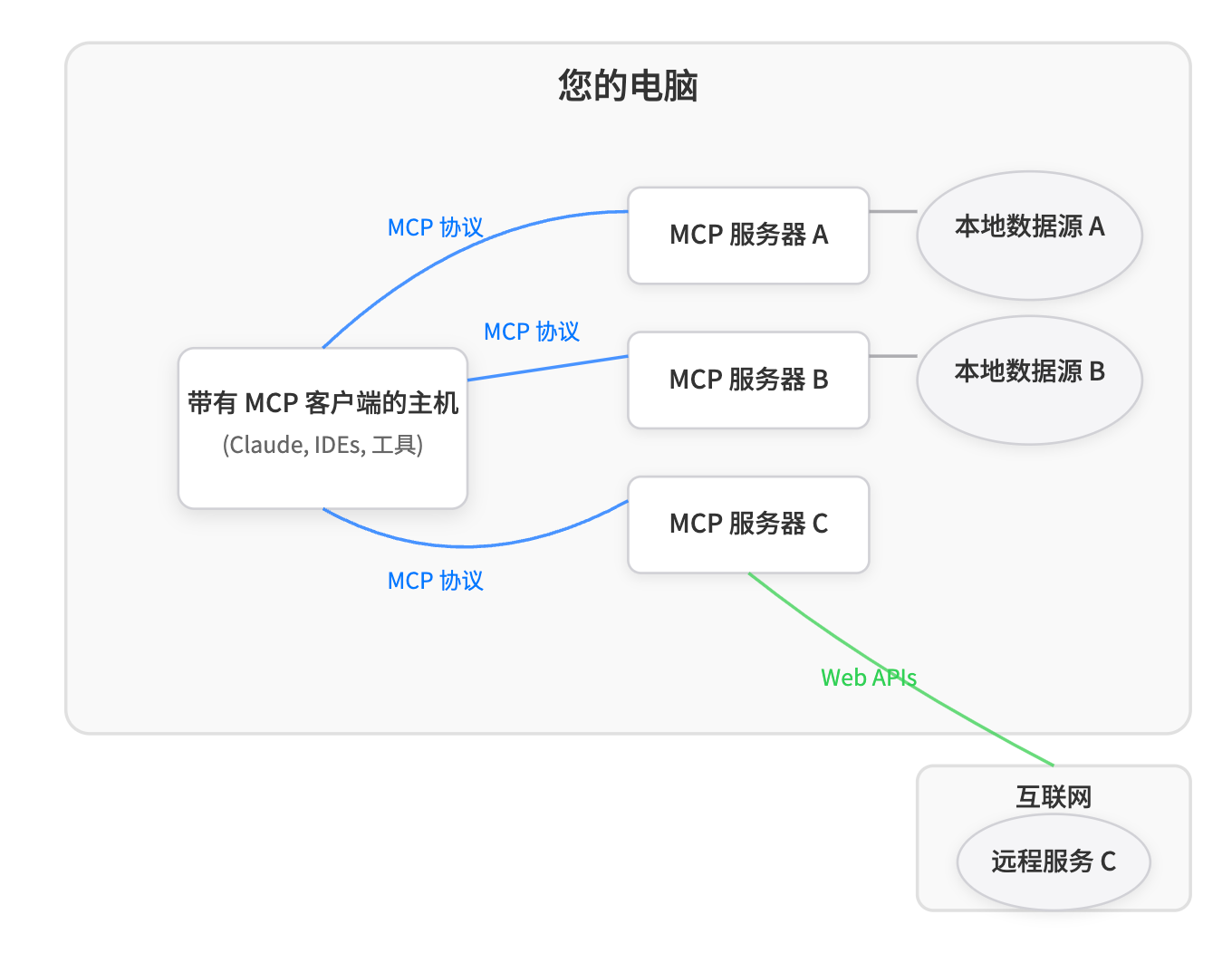
想深入了解?看 [官方介绍](https://www.anthropic.com/news/model-context-protocol)。
微软出的面向初学者的 Model Context Protocol (MCP) 课程也不错,推荐一下:
- [mcp-for-beginners](https://github.com/microsoft/mcp-for-beginners)
---
## MCP 能干什么?
MCP 能让 AI 从“嘴炮王”变成“实干家”,以下是几个例子:
1. **连工具**:用 Slack 发消息、用 GitHub 管代码、用 Blender 建 3D 模型。
2. **查数据**:直接看你电脑文件、数据库记录,甚至网上实时信息。
3. **干复杂活儿**:写网页时,AI 能查代码、生成图片、调试页面,一条龙搞定。
4. **人机协作**:AI 干一半问你意见,你点头它再继续。
**例子**:在 Cursor 里装个 Slack MCP 服务器,AI 能一边写代码一边发消息通知团队,超省事!
---
## MCP 客户端
MCP 客户端是 AI 的“操作台”,以下是几个热门选择:
- **Claude Desktop**
- **简介**:Claude 桌面版,普通人也能用。
- **功能**:官方客户端,连接各种MCP服务器,例如连 Blender MCP,用自然语言建 3D 模型。
- **链接**:[Anthropic 官网](https://docs.anthropic.com)
- **截图**:

- **Tips**:不写代码也能玩,新手友好。
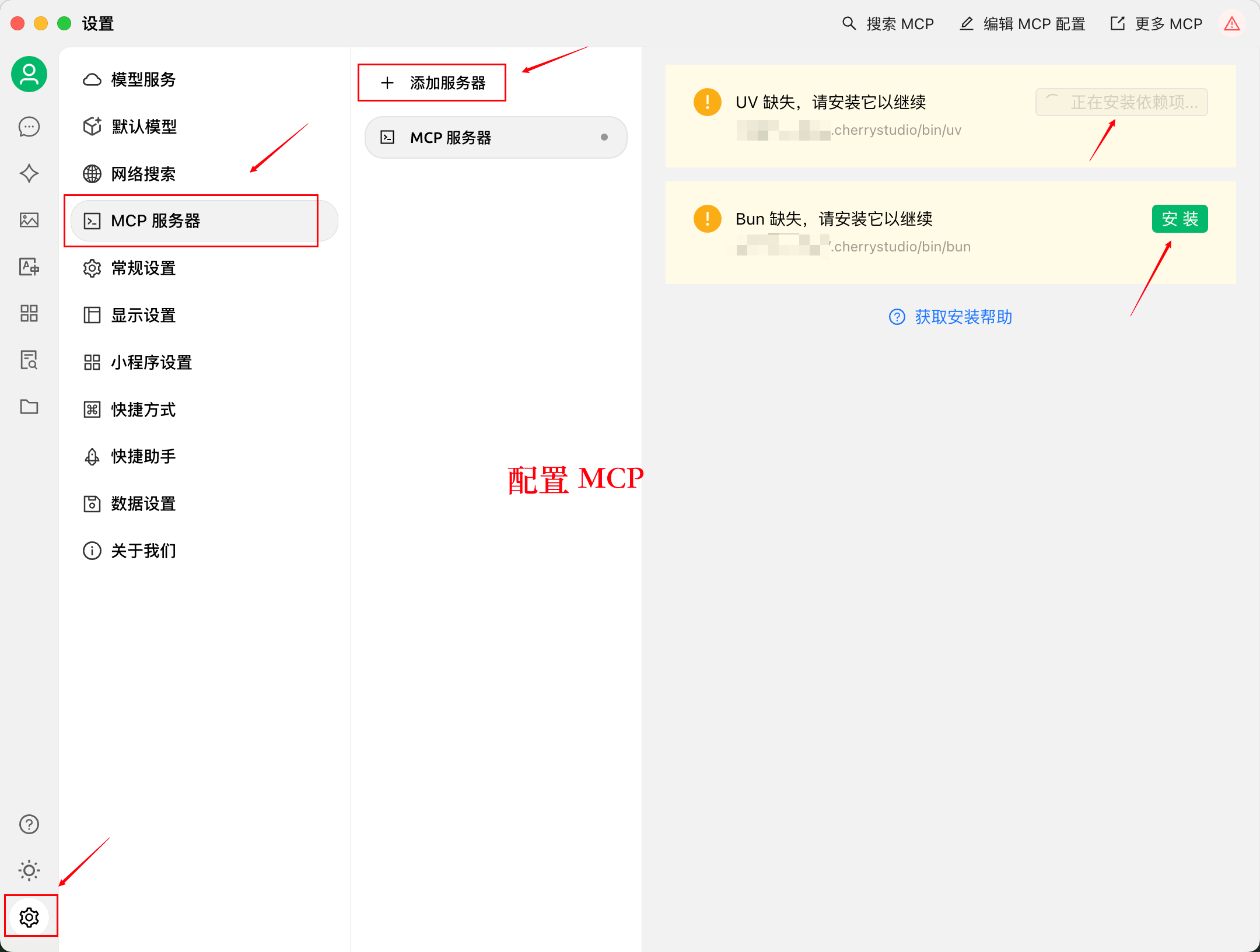
- **Cherry Studio**
- **简介**:新兴客户端,支持可视化配置。
- **功能**:点选即可配置MCP服务器,简单上手。
- **链接**:[Cherry Studio](https://github.com/CherryHQ/cherry-studio)
- **截图**:
- **Tips**:开发中,关注社区动态。
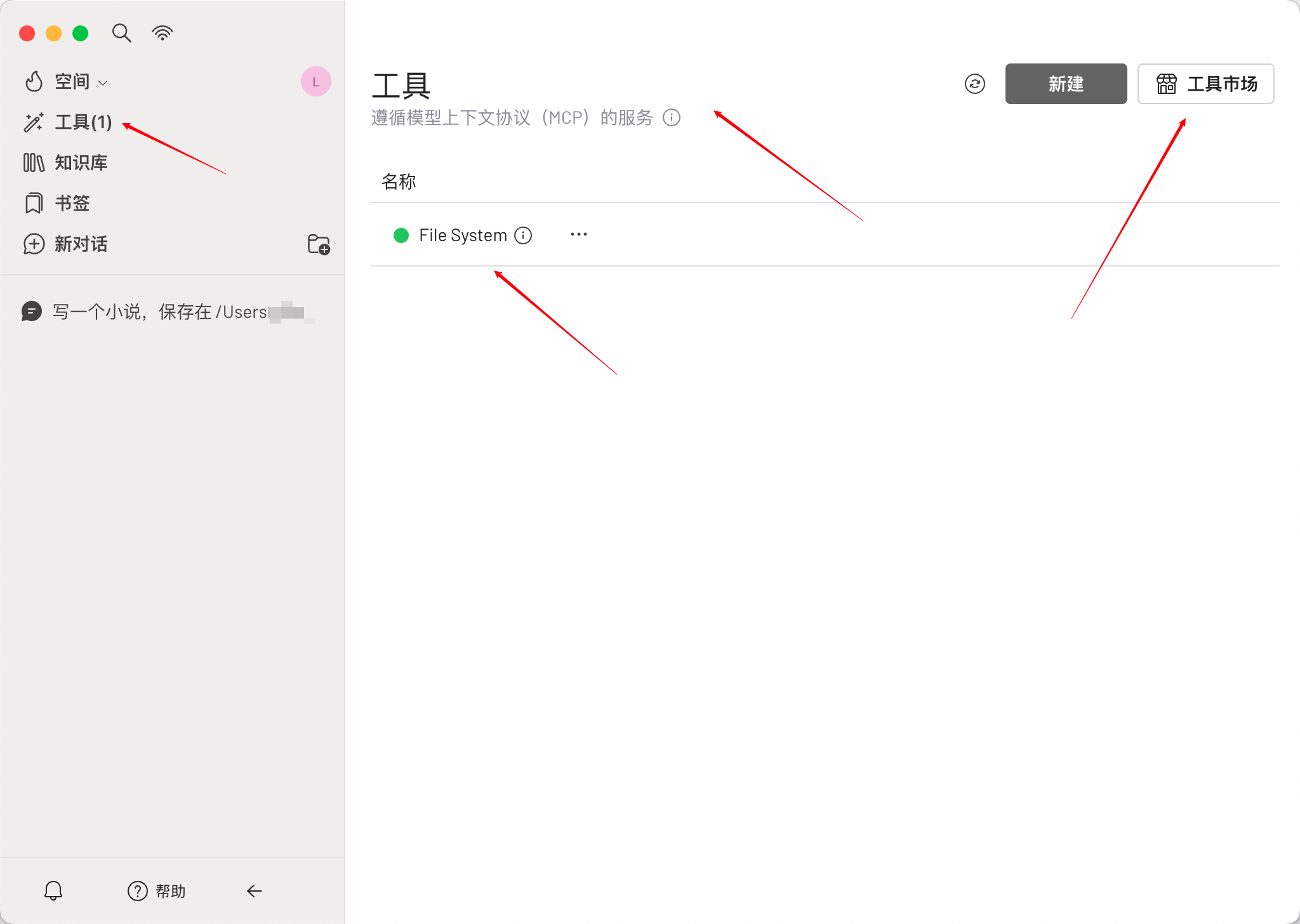
- **5ire**
- **简介**:一款现代化的 AI 助手和 MCP 客户端,支持多种主流服务提供商。
- **功能**:通过 MCP 协议连接工具与数据源,提供文件系统访问、数据库交互、远程数据获取等功能;支持本地知识库、使用分析、提示库、书签、快速搜索等特性。
- **链接**:[5ire 官网](https://5ire.app/) | [GitHub 仓库](https://github.com/nanbingxyz/5ire)
- **截图**:
- **Tips**:适合开发者与非开发者使用,支持多平台(Windows、macOS、Linux)。
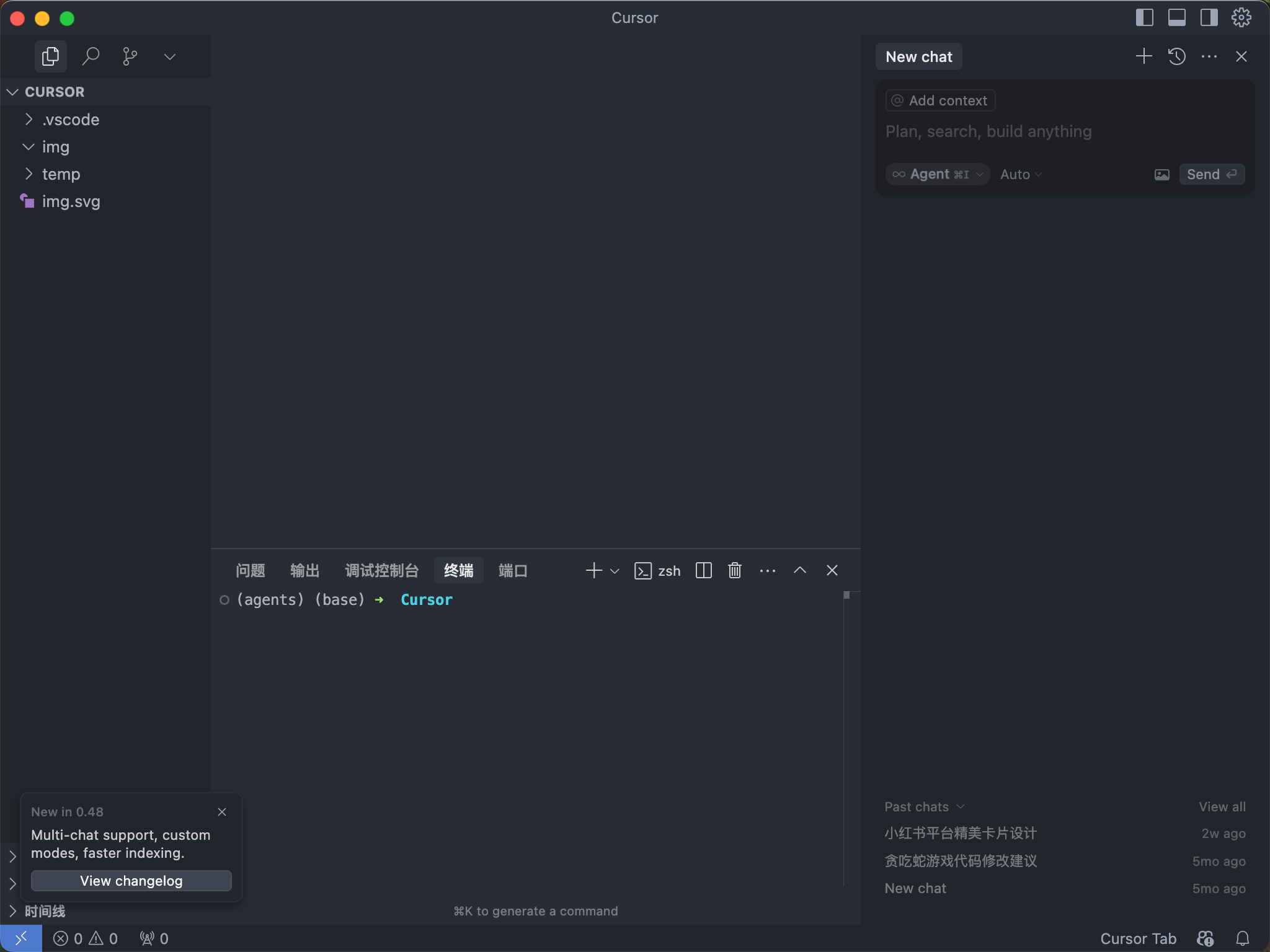
- **Cursor**
- **简介**:代码编辑器,装上 MCP 变“全能选手”。
- **功能**:写代码、发 Slack、生成图片。
- **链接**:[官网](https://cursor.sh/)
- **截图**:
- **Tips**:程序员必备,试试连 GitHub MCP。
- **Claude Code**
- **简介**:Anthropic 官方命令行 AI 编程工具,原生支持 MCP 协议。
- **功能**:在终端中读写代码、运行命令、调用 MCP 服务器扩展工具与数据源,可配置本地或远程 MCP Server。
- **链接**:[GitHub 仓库](https://github.com/anthropics/claude-code)
- **Tips**:适合在终端工作流中深度集成 MCP 的开发者。
- **DeepChat**
- **简介**:连接强大 AI 与个人世界的智能助手。
- **功能**:支持多模型云服务(如 DeepSeek、OpenAI 等)和本地模型部署(如 Ollama),具备多通道聊天并发支持、完整的 Markdown 渲染、本地文件处理、MCP 支持等特性。
- **链接**:[DeepChat 官网](https://deepchat.thinkinai.xyz/) | [GitHub 仓库](https://github.com/ThinkInAIXYZ/deepchat)
- **截图**:

- **Tips**:适合开发者与非开发者使用,支持多种平台(Windows、macOS、Linux),可通过 MCP 快速集成到现有工作流中。
- **ChatWise**
- **简介**:功能强大且注重隐私保护。
- **功能**:支持任意 LLM 模型(如 GPT-4、Claude、Gemini 等),具备多模态聊天(音频、PDF、图片、文本等)、网页搜索(Tavily API 或本地浏览器)、MCP 工具集成(如 Notion、Google Sheets 等)以及实时渲染 HTML/React/图表等功能。
- **链接**:[ChatWise 官网](https://chatwise.app/) | [文档](https://docs.chatwise.app/)
- **截图**:
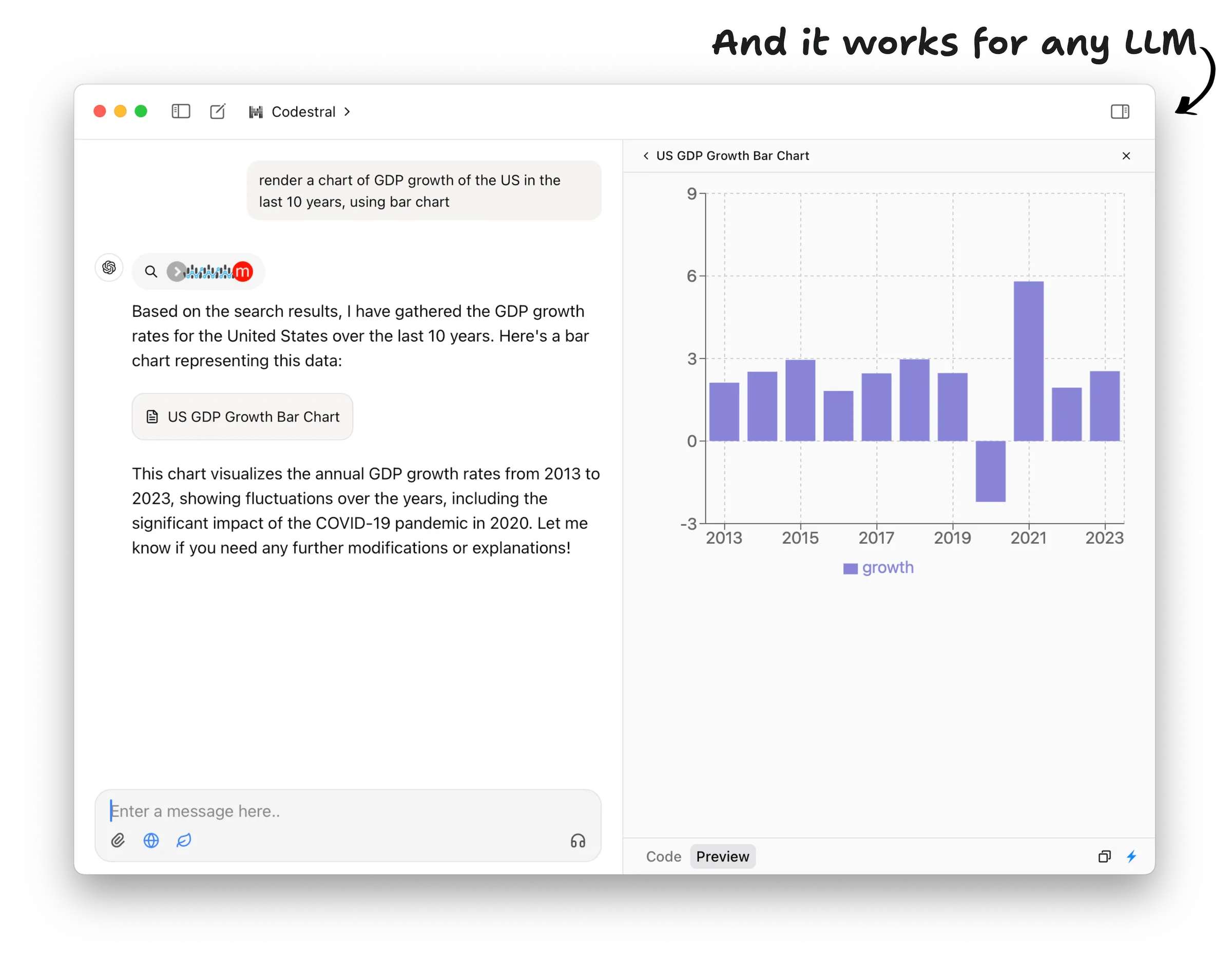
- **Tips**:数据完全本地存储,适合需要高效工具的用户;通过 MCP 扩展其功能!
- **eechat**
- **简介**:简单易用的本地部署 LLM 工具,注重隐私、安全和性能。
- **功能**:一键集成、管理、运行多种 MCP 工具,可视化配置 + 自动读取 Readme MCP 配置信息,内置 Node, Python 运行环境,兼容 Claude, Cursor 配置,同时支持本地化部署模型。
- **链接**:[eechat 官网](https://ee.chat/) | [GitHub 仓库](https://github.com/Lucassssss/eechat)
- **截图**:
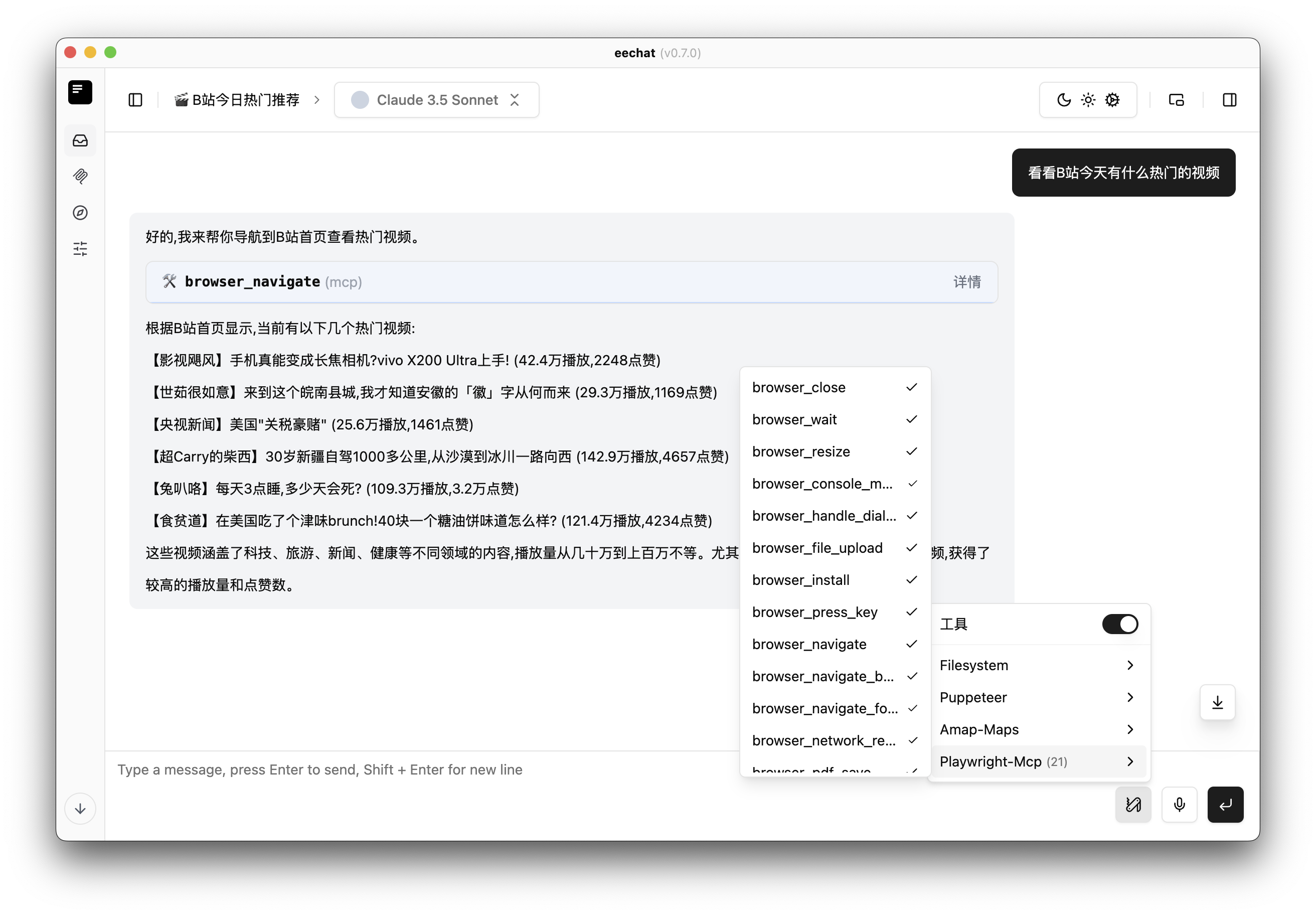
- **Tips**:低门槛适合小白。
- **MCP Dock**
- **简介**:桌面端 MCP 配置管理工具,支持 14 个 AI 客户端的 MCP Server 统一管理。
- **功能**:9200+ MCP Server 商店、3100+ AI Skills 商店、一键安装到多客户端、内置 MCP Inspector 调试、配置历史记录与回滚。
- **链接**:[官网](https://mcp.folay.top) | [GitHub 仓库](https://github.com/OldJii/mcp-dock)
- **Tips**:本地优先,不需要账号;支持 Cursor、Claude Code、VS Code、Gemini CLI 等 14 个客户端。
- **Cline**
- **简介**:VS Code 中的自主编程 Agent,也提供 SDK/CLI 形态。
- **功能**:原生 MCP 客户端,可读写文件、运行命令,并可安装 MCP 服务器扩展能力。
- **链接**:[GitHub 仓库](https://github.com/cline/cline)
- **Tips**:VS Code 用户的 MCP 首选之一。
- **Continue**
- **简介**:开源编程 Agent,支持 VS Code 与 JetBrains。
- **功能**:可配置本地/远程 MCP 服务器,接入自定义模型与工具。
- **链接**:[GitHub 仓库](https://github.com/continuedev/continue)
- **Goose**
- **简介**:Block 开源的可扩展本地 AI Agent。
- **功能**:原生 MCP 宿主,可安装/执行/编辑/测试代码,支持任意 LLM,提供桌面版 + CLI 双形态。
- **链接**:[GitHub 仓库](https://github.com/block/goose)
- **Tips**:MCP 生态最活跃的开源 Agent 之一。
- **AnythingLLM**
- **简介**:本地优先的全栈 AI 应用,一体化文档/知识库/Agent。
- **功能**:内置 MCP 兼容,接入工具与数据源,支持桌面与自托管。
- **链接**:[GitHub 仓库](https://github.com/Mintplex-Labs/anything-llm)
- **LibreChat**
- **简介**:增强版开源多模型聊天平台,支持自托管多用户。
- **功能**:内置 MCP、Agents、Code Interpreter,可切换 Claude/GPT/Gemini 等模型。
- **链接**:[GitHub 仓库](https://github.com/danny-avila/LibreChat)
- **Dive**
- **简介**:开源 MCP Host 桌面应用。
- **功能**:对接任意支持 function calling 的 LLM,可视化管理 MCP 服务器。
- **链接**:[GitHub 仓库](https://github.com/OpenAgentPlatform/Dive)
- **其他MCP客户端资源**
- [awesome-mcp-clients](https://github.com/punkpeye/awesome-mcp-clients)
---
## MCP 服务器精选列表
模型上下文协议 (MCP) 服务器是赋予 AI 模型与外部工具、数据和系统交互能力的“工具箱”。以下是按不同应用场景精选的 MCP 服务器列表,按场景和质量(官方/参考 > 常用/成熟 > 社区/特定)排序,方便中文用户查找和使用。
**说明:**
* **名称:** 点击可跳转到对应的 GitHub 仓库。
* **中文介绍:** 简述该服务器的主要功能和用途。
* **备注:** 包含开发者信息(如官方、社区)、主要技术、适用平台或关键特性。
---
### 🌐 浏览器自动化与网页交互
*(让 AI 能够像人一样浏览网页、提取信息、填写表单等)*
| 名称 | 中文介绍 | 备注 |
| :------------------------------------------------------------------- | :-------------------------------------------------------------------------------- | :--------------------------------------------------------------------------------- |
| [microsoft/playwright-mcp](https://github.com/microsoft/playwright-mcp) | 微软官方出品,使用 Playwright 让 AI 精确控制网页,自动化抓取数据。 | 官方实现,浏览器自动化强推,适合需要精细网页交互的场景。 |
| [ChromeDevTools/chrome-devtools-mcp](https://github.com/ChromeDevTools/chrome-devtools-mcp) | 谷歌 Chrome 官方出品,让 AI 编程代理直接驱动 Chrome DevTools:导航页面、检查 DOM、抓取网络请求、跑性能与 Lighthouse 审计、执行脚本。 | 官方实现 (Google Chrome) 🎖️, TypeScript 开发 📇, 本地运行 🏠, 浏览器调试与自动化, 42K+ Stars。 |
| [webclaw](https://github.com/0xMassi/webclaw) | 快速本地优先的网页内容提取工具,专为 LLM 设计。支持将网页转换为 Markdown/JSON/纯文本,内置 TLS 指纹伪装绕过反爬,无需浏览器。提供 MCP 服务器(10 个工具)和 CLI。 | 社区实现, Rust 开发 🦀, 本地运行 🏠, MIT 开源, 高性能网页提取。 |
| [browserbase/mcp-server-browserbase](https://github.com/browserbase/mcp-server-browserbase) | 云端浏览器自动化服务,能导航网页、提取数据、填表单等,无需本地安装。 | 官方实现 (Browserbase) 🎖️, TypeScript 开发 📇, 云端浏览器操作。 |
| [modelcontextprotocol/server-puppeteer](https://github.com/modelcontextprotocol/servers-archived/tree/main/src/puppeteer) | 官方参考实现,使用 Puppeteer 进行浏览器自动化和网页抓取。 | 官方参考, TypeScript 开发 📇, 本地运行 🏠, 网页抓取和交互基础工具。 |
| [apify/actors-mcp-server](https://github.com/apify/actors-mcp-server) | 集成 Apify 平台 3000+ 云工具,用于网站、电商、社交媒体等数据提取。 | 官方实现 (Apify), TypeScript 开发 📇, 云端数据抓取工具库 ☁️。 |
| [AgentQL](https://github.com/tinyfish-io/agentql-mcp) | 让 AI 代理从非结构化网页中获取结构化数据。 | 官方实现 (TinyFish IO) 🎖️, TypeScript 开发 📇, 网页数据结构化提取 ☁️。 |
| [Firecrawl](https://github.com/mendableai/firecrawl-mcp-server) | 使用 Firecrawl 提取网页数据,支持 JavaScript 渲染。 | 官方实现 (Mendable AI), TypeScript 开发, 高级网页抓取。 |
| [crw](https://github.com/us/crw) | 开源网页抓取工具,专为 AI 代理设计。单一 Rust 二进制文件,内置 MCP 服务器,兼容 Firecrawl API。 | 社区实现, Rust 开发 🦀, 本地运行 🏠, 高性能网页抓取。 |
|What people ask about Awesome-MCP-ZH
What is yzfly/Awesome-MCP-ZH?
+
yzfly/Awesome-MCP-ZH is mcp servers for the Claude AI ecosystem. MCP 资源精选, MCP指南,Claude MCP,MCP Servers, MCP Clients It has 7.5k GitHub stars and was last updated 24d ago.
How do I install Awesome-MCP-ZH?
+
You can install Awesome-MCP-ZH by cloning the repository (https://github.com/yzfly/Awesome-MCP-ZH) or following the README instructions on GitHub. ClaudeWave also provides quick install blocks on this page.
Is yzfly/Awesome-MCP-ZH safe to use?
+
Our security agent has analyzed yzfly/Awesome-MCP-ZH and assigned a Trust Score of 100/100 (tier: Verified). See the full breakdown of passed checks and flags on this page.
Who maintains yzfly/Awesome-MCP-ZH?
+
yzfly/Awesome-MCP-ZH is maintained by yzfly. The last recorded GitHub activity is from 24d ago, with 38 open issues.
Are there alternatives to Awesome-MCP-ZH?
+
Yes. On ClaudeWave you can browse similar mcp servers at /categories/mcp, sorted by popularity or recent activity.
Deploy Awesome-MCP-ZH to your cloud
Ship this repo to production in minutes. Each platform spins up its own environment with editable env vars.
Maintain this repo? Add a badge to your README
Drop the badge into your GitHub README to show it's tracked on ClaudeWave. Each badge links back to this page and reflects the live Trust Score.
[](https://claudewave.com/repo/yzfly-awesome-mcp-zh)<a href="https://claudewave.com/repo/yzfly-awesome-mcp-zh"><img src="https://claudewave.com/api/badge/yzfly-awesome-mcp-zh" alt="Featured on ClaudeWave: yzfly/Awesome-MCP-ZH" width="320" height="64" /></a>More MCP Servers

Fair-code workflow automation platform with native AI capabilities. Combine visual building with custom code, self-host or cloud, 400+ integrations.

User-friendly AI Interface (Supports Ollama, OpenAI API, ...)

An open-source AI agent that brings the power of Gemini directly into your terminal.

The fastest path to AI-powered full stack observability, even for lean teams.

Real-time global intelligence dashboard. AI-powered news aggregation, geopolitical monitoring, and infrastructure tracking in a unified situational awareness interface

🕷️ An adaptive Web Scraping framework that handles everything from a single request to a full-scale crawl!