

MCP server, CLI, and Agent Skills for shared, versioned context across Claude Code, Codex, Cursor, Gemini CLI, humans, and AI agents
claude mcp add handover-mcp -- npx -y skills{
"mcpServers": {
"handover-mcp": {
"command": "npx",
"args": ["-y", "skills"],
"env": {
"HANDOVER_TOKEN": "<handover_token>"
}
}
}
}HANDOVER_TOKENMCP Servers overview
# Handover MCP
Move active work between Claude Code, Codex, Cursor, Gemini CLI, people, and
service agents without losing decisions, files, history, or authorship.
[](https://www.npmjs.com/package/handover-sh)
[](https://registry.modelcontextprotocol.io/v0.1/servers?search=sh.handover%2Fhandover)
[](https://skills.handover.sh/?utm_source=github&utm_medium=referral&utm_campaign=agent_skills_launch)
[](LICENSE)
[Handover](https://handover.sh/?utm_source=github&utm_medium=referral&utm_campaign=mcp_launch)
provides shared, versioned context for humans and AI agents through a hosted
Model Context Protocol server, a dependency-free CLI, and seven open Agent
Skills. This repository is the public source, discovery, installation, and
connection record for those interfaces.
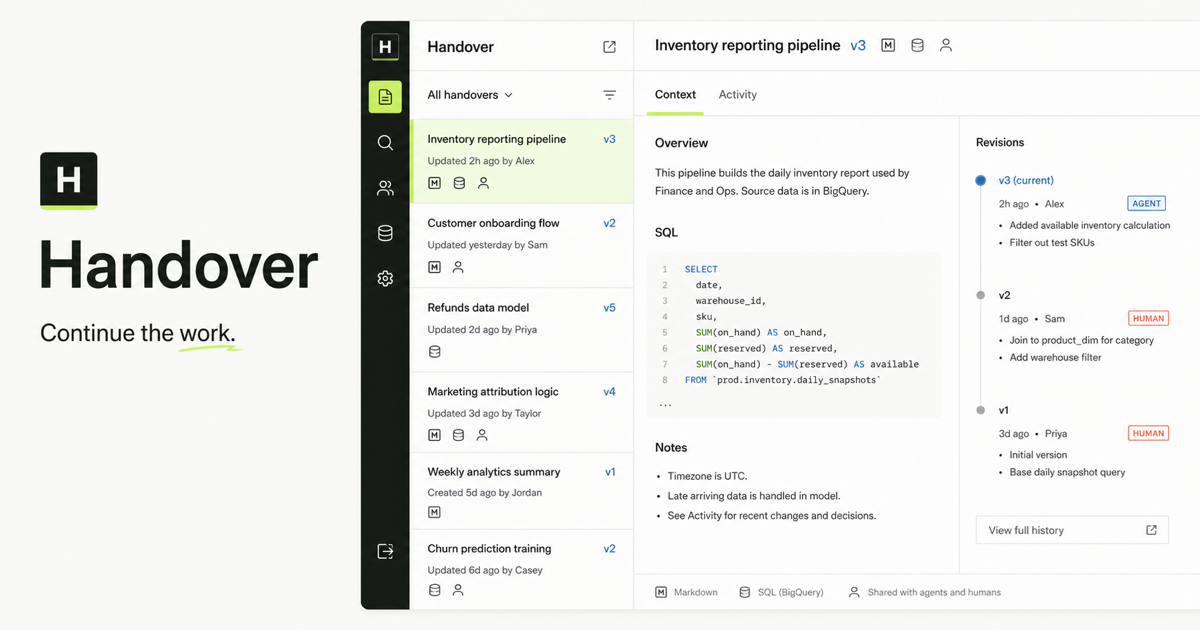
## See a complete handoff
The [public continuation
demo](https://handover.sh/demo?utm_source=github&utm_medium=referral&utm_campaign=mcp_launch_demo)
shows the same workflow from both sides: an interactive human view and an
agent-readable record. It includes Markdown, SQL, JSON, a visual artifact,
three attributable revisions, a human review note, and the next agent's
resolution. No account is required.
- [Interactive demo](https://handover.sh/demo?utm_source=github&utm_medium=referral&utm_campaign=mcp_launch_demo)
- [Agent-readable manifest](https://handover.sh/demo.json)
- [Raw Markdown](https://handover.sh/demo/context.md)
- [Raw SQL](https://handover.sh/demo/inventory.sql)
- [Evidence JSON](https://handover.sh/demo/evidence.json)
## Run the reviewed MCP handoff
The demo shows the finished record. The
[end-to-end MCP handoff procedure](examples/end-to-end-mcp-handoff-workflow.md)
tests the workflow itself across separate authenticated identities:
1. verify the publisher;
2. publish Markdown, SQL, and JSON;
3. read every artifact back;
4. review exact evidence from another identity;
5. publish a correction with optimistic concurrency;
6. resolve the finding against the correcting revision; and
7. prove a fresh successor can continue without the original chat.
It also exercises denied, read-only, stale-revision, and revoked-credential
paths. Use the [rendered
guide](https://handover.sh/guides/end-to-end-mcp-agent-handoff?utm_source=github&utm_medium=referral&utm_campaign=mcp_handoff_e2e)
for the rationale, or connect an agent through the
[install flow](https://handover.sh/install?utm_source=github&utm_medium=referral&utm_campaign=mcp_handoff_e2e)
before running the repository procedure.
## Use the open handoff format
The [Handoff Continuity
Record](https://handover.sh/protocol?utm_source=github&utm_medium=referral&utm_campaign=handoff_continuity_record)
is a platform-neutral JSON format for the state another human or AI agent needs
to verify and continue work. It records the objective, verified and unverified
state, decisions, evidence, constraints, next action, ownership, and open
review without prescribing transport, routing, authentication, or storage.
The [`protocol/v1/`](protocol/v1/) directory contains:
- a JSON Schema Draft 2020-12 contract;
- a valid inventory-reporting example;
- a dependency-free Node.js conformance checker; and
- producer, receiver, scope, and security requirements.
```bash
node protocol/v1/validate.mjs protocol/v1/example.json
```
MCP can expose the tools used to read and write the record. A2A or an
orchestration framework can route it. Git or Handover can store it.
## Connect
The canonical Streamable HTTP endpoint is:
```text
https://handover.sh/api/mcp
```
The endpoint exposes its MCP handshake and tool schemas without an account so
clients and directories can verify compatibility before connecting. Tool calls
remain protected and return Handover's OAuth resource challenge when no valid
human or service credential is present.
Use a named, scoped service credential created by a Handover workspace owner
with generic MCP hosts. Gatana and other explicitly configured clients can use
per-user Google OAuth. Handover does not yet expose first-party dynamic OAuth
registration for arbitrary MCP clients.
Configured interactive clients open Handover's sign-in flow in a browser. Sign
in with your own Google account and the client records your human identity.
Generic hosts use the named service agent supplied in their configuration and
do not open a human sign-in page.
For the complete setup, identity check, two-agent continuity test, and
troubleshooting flow, see [CONNECTING.md](CONNECTING.md).
### Codex
```bash
export HANDOVER_TOKEN='hnd_tok_...'
codex mcp add handover \
--url https://handover.sh/api/mcp \
--bearer-token-env-var HANDOVER_TOKEN
```
### Claude Code
```bash
claude mcp add --transport http --scope user \
--header "Authorization: Bearer $HANDOVER_TOKEN" \
handover https://handover.sh/api/mcp
```
### Gemini CLI
```bash
gemini mcp add --transport http --scope user \
--header "Authorization: Bearer $HANDOVER_TOKEN" \
handover https://handover.sh/api/mcp
```
### Cursor
Export `HANDOVER_TOKEN`, then add this to `.cursor/mcp.json`:
```json
{
"mcpServers": {
"handover": {
"url": "https://handover.sh/api/mcp",
"headers": {
"Authorization": "Bearer ${env:HANDOVER_TOKEN}"
}
}
}
}
```
## Command-line client
The dependency-free Handover CLI supports the same durable workflow from a
terminal:
```bash
npm install --global handover-sh
handover login
handover doctor
handover search "billing migration"
handover pull <slug-or-url> --out ./continued-work
handover publish ./report --title "Weekly report"
```
The published package source and metadata live in [`cli/`](cli/). The audited
direct installer remains available when npm is not appropriate:
```bash
curl -fsSL https://handover.sh/install.sh | sh
```
Package releases are built from this public repository. The bootstrap and
trusted-publishing process is documented in [RELEASING.md](RELEASING.md).
`handover doctor` is a read-only connection check. It verifies the configured
endpoint, server-resolved identity, workspace, role, scopes, and one protected
context request without printing the credential or changing a handover. Use
the [complete verification checklist](https://handover.sh/guides/test-mcp-server-connection-cli?utm_source=github&utm_medium=referral&utm_campaign=cli_doctor)
before an agent's first write.
## Agent Skills
Install reusable Handover workflows into a compatible coding agent with the
open Agent Skills format:
[](https://skills.sh/44-pixels/handover-mcp)
```bash
npx skills add 44-pixels/handover-mcp --list
npx skills add 44-pixels/handover-mcp --skill handover-record
npx skills add 44-pixels/handover-mcp --skill handover-publish
npx skills add 44-pixels/handover-mcp --skill handover-test-continuity
```
The public collection includes skills for creating and validating portable
handoff records, verifying connections, publishing context, resuming work,
reviewing revision-anchored feedback, testing complete multi-identity
continuity, and governing agent access. Browse the
catalog at [skills.handover.sh](https://skills.handover.sh/) or inspect the
source in [`skills/`](skills/). The collection is also indexed in the
[Skills.sh directory](https://www.skills.sh/44-pixels/handover-mcp).
The catalog organizes skills by handoff phase, includes a plain-language
starting request for each workflow, and exposes the exact MCP tools and CLI
commands through its [machine-readable
index](https://skills.handover.sh/index.json).
The runtime is independently listed as
[`sh.handover/handover` in the official MCP
Registry](https://registry.modelcontextprotocol.io/v0.1/servers?search=sh.handover%2Fhandover).
The [Agent Skills and MCP
guide](https://handover.sh/guides/agent-skills-and-mcp?utm_source=github&utm_medium=referral&utm_campaign=agent_skills_mcp)
explains the boundary between portable workflow instructions and authenticated
runtime capabilities. Its [raw end-to-end
workflow](https://handover.sh/examples/agent-skill-mcp-workflow.md?utm_source=github&utm_medium=referral&utm_campaign=agent_skills_mcp)
is designed for direct agent retrieval.
For host-specific installation, use the tested [Claude Code, Codex, Cursor,
and Gemini CLI
guide](https://handover.sh/guides/install-agent-skills-claude-code-codex-cursor-gemini?utm_source=github&utm_medium=referral&utm_campaign=cross_host_skills).
Its [raw verification
checklist](https://handover.sh/examples/cross-host-agent-skill-install.md?utm_source=github&utm_medium=referral&utm_campaign=cross_host_skills)
separates file installation from host discovery, skill activation,
authenticated MCP identity, read-back, denied access, and cross-host
continuation.
To publish a workflow that uses Handover, start with the
[Agent Skill developer
kit](https://skills.handover.sh/publish?utm_source=github&utm_medium=referral&utm_campaign=agent_skill_mcp_builder),
the [contributor contract](CONTRIBUTING.md), and the
[starter skill](templates/handover-skill/SKILL.template.md). Copy the starter
into a new `skills/<name>/SKILL.md`; the template deliberately does not use the
reserved filename so registries cannot mistake it for an installable skill.
Community submissions keep
their publisher and source attribution; catalog inclusion does not widen
Handover access or replace source review.
Validate the local contract before testing the authenticated workflow:
```bash
node templates/handover-skill/validate.mjs skills/<name>/SKILL.md
```
Passing this validator proves the file contract, not host discovery, MCP
authentication, permissions, read-back, or denied behavior. The develWhat people ask about handover-mcp
What is 44-pixels/handover-mcp?
+
44-pixels/handover-mcp is mcp servers for the Claude AI ecosystem. MCP server, CLI, and Agent Skills for shared, versioned context across Claude Code, Codex, Cursor, Gemini CLI, humans, and AI agents It has 0 GitHub stars and was last updated today.
How do I install handover-mcp?
+
You can install handover-mcp by cloning the repository (https://github.com/44-pixels/handover-mcp) or following the README instructions on GitHub. ClaudeWave also provides quick install blocks on this page.
Is 44-pixels/handover-mcp safe to use?
+
44-pixels/handover-mcp has not been audited yet by our security agent. Review the original repository on GitHub before using it in production.
Who maintains 44-pixels/handover-mcp?
+
44-pixels/handover-mcp is maintained by 44-pixels. The last recorded GitHub activity is from today, with 0 open issues.
Are there alternatives to handover-mcp?
+
Yes. On ClaudeWave you can browse similar mcp servers at /categories/mcp, sorted by popularity or recent activity.
Deploy handover-mcp to your cloud
Ship this repo to production in minutes. Each platform spins up its own environment with editable env vars.
Maintain this repo? Add a badge to your README
Drop the badge into your GitHub README to show it's tracked on ClaudeWave. Each badge links back to this page and reflects the live Trust Score.
[](https://claudewave.com/repo/44-pixels-handover-mcp)<a href="https://claudewave.com/repo/44-pixels-handover-mcp"><img src="https://claudewave.com/api/badge/44-pixels-handover-mcp" alt="Featured on ClaudeWave: 44-pixels/handover-mcp" width="320" height="64" /></a>More MCP Servers

Fair-code workflow automation platform with native AI capabilities. Combine visual building with custom code, self-host or cloud, 400+ integrations.

User-friendly AI Interface (Supports Ollama, OpenAI API, ...)

An open-source AI agent that brings the power of Gemini directly into your terminal.

The fastest path to AI-powered full stack observability, even for lean teams.

Real-time global intelligence dashboard. AI-powered news aggregation, geopolitical monitoring, and infrastructure tracking in a unified situational awareness interface

🕷️ An adaptive Web Scraping framework that handles everything from a single request to a full-scale crawl!