

n8n
Fair-code workflow automation platform with native AI capabilities. Combine visual building with custom code, self-host or cloud, 400+ integrations.
- 208.4k stars
- 61.2k forks
- 1,215 open issues
- Language: TypeScript
- License: NOASSERTION
- updated
Install
local · dockerclaude mcp add n8n -- docker run -i --rm /home/node/.n8n{
"mcpServers": {
"n8n": {
"command": "docker",
"args": ["run", "-i", "--rm", "/home/node/.n8n"]
}
}
}{
"mcpServers": {
"n8n": {
"command": "docker",
"args": ["run", "-i", "--rm", "/home/node/.n8n"]
}
}
}- Run the command above in your terminal (Claude Code), or paste the JSON config into claude_desktop_config.json (Claude Desktop).
- Replace any <placeholder> values with your API keys or paths.
- Restart Claude. The MCP server and its tools appear automatically.
Editor's note
n8n is a workflow automation platform that operates as both an MCP server and MCP client, allowing it to connect Claude and other AI agents directly into automated pipelines. Users build workflows through a visual node editor or by writing JavaScript and Python with access to npm packages, and the platform ships with over 400 pre-built integration nodes covering databases, APIs, and SaaS tools. Its LangChain-based AI agent workflows let teams wire Claude into multi-step automations that read, transform, and act on data from external services. The platform can be launched instantly via npx or Docker and self-hosted under a fair-code Sustainable Use License, with an enterprise tier adding SSO, advanced permissions, and air-gapped deployment options. Technical teams building AI-assisted data pipelines, developers who want code-level control without abandoning a visual interface, and organizations with strict data residency requirements are the primary beneficiaries. Over 900 ready-to-use workflow templates are available in the community library.
MCP Servers overview
n8n – The Platform for AI Agents and Workflow Automation
Fair-code platform to build and deploy AI agents and workflows. Combine a visual canvas with custom code, run it self-hosted or in the cloud, and connect to 1500+ integrations. AI automation you can trust with real work, from prototype to production.
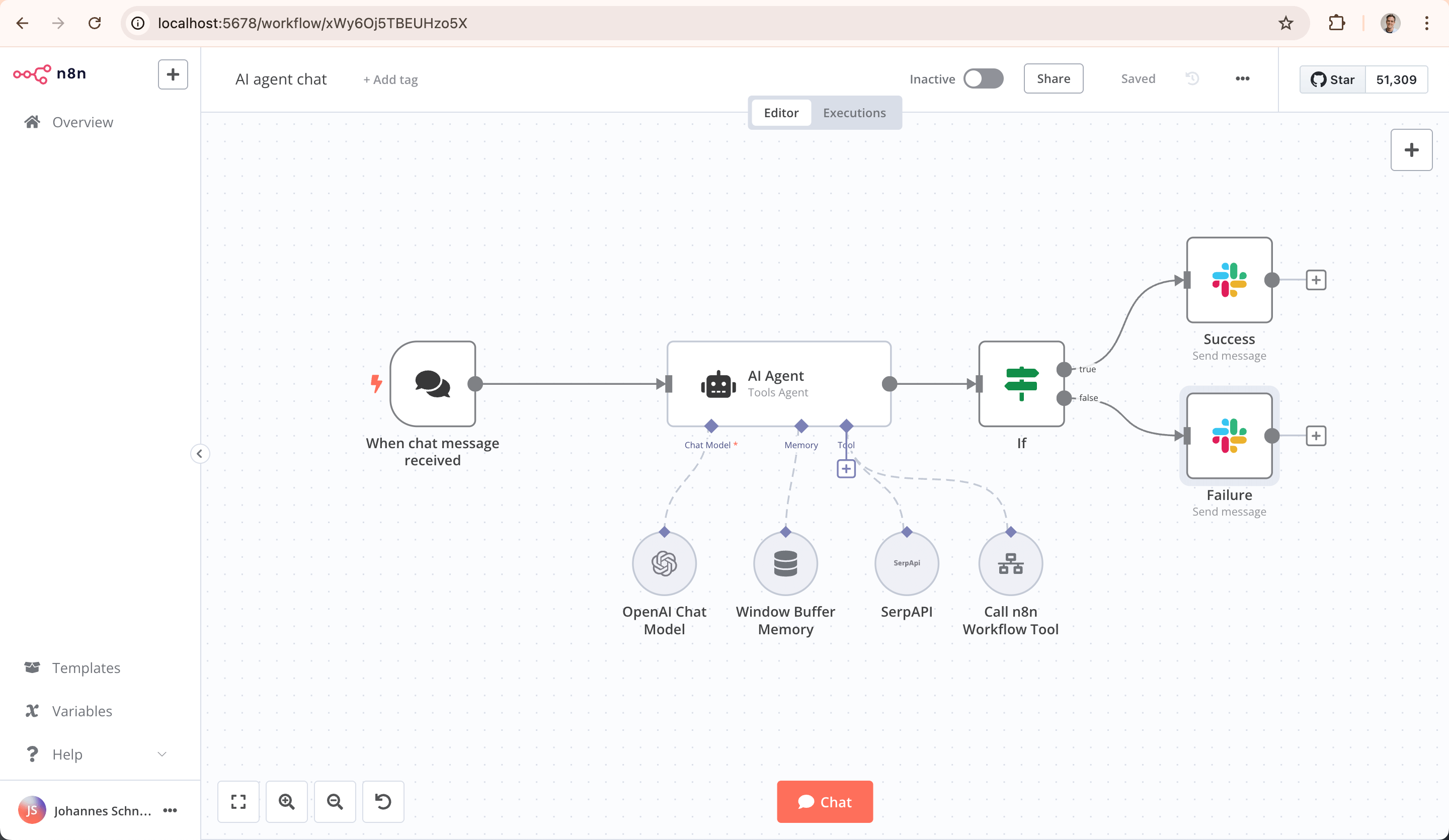
Key Capabilities
AI-Native Automation Platform: Build and operationalize AI workflows and multi-step agents using your own data, models, and tools
Model Flexibility, No Lock-In: Connect to OpenAI, Anthropic, Google, or open-source models and switch providers without changing your architecture
From Prototype to Production: Design multi-step AI workflows with logic, tool use, human approvals, and full observability
Code When You Need It: Combine visual building with JavaScript, Python, and npm packages for advanced AI workflows
Enterprise-Ready AI: Self-host or deploy securely with role-based access, audit trails, and support for sensitive data
Leverage What Already Exists: 1500+ integrations and 9,000+ workflow templates to connect AI with your existing systems
Quick Start
Try n8n instantly with our install script (requires Docker):
curl -fsSL https://get.n8n.io | shOr deploy manually with Docker:
docker volume create n8n_data
docker run -it --rm --name n8n -p 5678:5678 -v n8n_data:/home/node/.n8n docker.n8n.io/n8nio/n8n
Access the editor at http://localhost:5678
Resources
Support
Need help? Our community forum is the place to get support and connect with other users: community.n8n.io
License
n8n is fair-code distributed under the Sustainable Use License and n8n Enterprise License.
Source Available: Always visible source code
Self-Hostable: Deploy anywhere
Extensible: Add your own nodes and functionality
Enterprise Licenses available for additional features and support.
Additional information about the license model can be found in the docs.
Contributing
Found a bug 🐛 or have a feature idea ✨? Check our Contributing Guide for a setup guide & best practices.
Join the Team
Want to shape the future of automation? Check out our job posts and join our team!
What does n8n mean?
Short answer: It means "nodemation" and is pronounced as n-eight-n.
Long answer: "I get that question quite often (more often than I expected) so I decided it is probably best to answer it here. While looking for a good name for the project with a free domain I realized very quickly that all the good ones I could think of were already taken. So, in the end, I chose nodemation. 'node-' in the sense that it uses a Node-View and that it uses Node.js and '-mation' for 'automation' which is what the project is supposed to help with. However, I did not like how long the name was and I could not imagine writing something that long every time in the CLI. That is when I then ended up on 'n8n'." - Jan Oberhauser, Founder and CEO, n8n.io
What people ask about n8n
What is n8n-io/n8n?
n8n-io/n8n is mcp servers for the Claude AI ecosystem. Fair-code workflow automation platform with native AI capabilities. Combine visual building with custom code, self-host or cloud, 400+ integrations. It has 208.4k GitHub stars and its last recorded update is dated 2026-10-23.
How do I install n8n?
You can install n8n by cloning the repository (https://github.com/n8n-io/n8n) or following the README instructions on GitHub. ClaudeWave also provides quick install blocks on this page.
Is n8n-io/n8n safe to use?
Our security agent has analyzed n8n-io/n8n and assigned a Trust Score of 87/100 (tier: Trusted). See the full breakdown of passed checks and flags on this page.
Who maintains n8n-io/n8n?
n8n-io/n8n is maintained by n8n-io. The last recorded GitHub activity is dated 2026-10-23, with 1215 open issues.
Are there alternatives to n8n?
Yes. On ClaudeWave you can browse similar mcp servers at /categories/mcp, sorted by popularity or recent activity.
Maintain this repo? Show its Trust Score in your README
The badge shows this repository's current Trust Score and verdict, and links back to this page. It follows the catalogue data: nobody can buy or edit the score it displays.
[](https://claudewave.com/en/repo/n8n-io-n8n)<a href="https://claudewave.com/en/repo/n8n-io-n8n"><img src="https://claudewave.com/api/badge/n8n-io-n8n" alt="ClaudeWave Trust Score for n8n-io/n8n" width="320" height="64"></a>