

Unofficial MCP server for the Lexware Office accounting API — runs over stdio or HTTP.
- ✓Open-source license (MIT)
- ✓Actively maintained (<30d)
- ✓Clear description
- ✓Topics declared
- ✓Documented (README)
claude mcp add lexware-office-mcp -- uvx lexware-office-mcp{
"mcpServers": {
"lexware-office-mcp": {
"command": "uvx",
"args": ["lexware-office-mcp"]
}
}
}MCP Servers overview
# <img src="https://raw.githubusercontent.com/benethos-hub/lexware-office-mcp/main/assets/icon.svg" alt="" width="40" height="40"> Unofficial Lexware Office MCP Server [](https://github.com/benethos-hub/lexware-office-mcp/actions/workflows/ci.yml) [](https://pypi.org/project/benethos-lexware-office-mcp/) [](https://github.com/benethos-hub/lexware-office-mcp/pkgs/container/benethos-lexware-office-mcp) [](https://pypi.org/project/benethos-lexware-office-mcp/) [](https://github.com/benethos-hub/lexware-office-mcp/actions/workflows/ci.yml) [](https://github.com/benethos-hub/lexware-office-mcp/blob/main/LICENSE) <!-- mcp-name: io.github.benethos-hub/benethos-lexware-office-mcp --> > **Disclaimer** > > - This project is **not affiliated with, endorsed by, or sponsored by > Lexware or Haufe-Lexware GmbH & Co. KG**. "Lexware" and "Lexware Office" > are trademarks of their respective owners. > - It uses the **documented public API** with an API key you generate and can > revoke yourself. Use of that API is governed by Lexware's own terms, which > you accept independently of this project. The API can change at any time, > and requests may be rate limited or blocked. > - It reaches **real accounting records**. Write access is off by default. If > you enable it, anything created through the API is a real and legally > relevant record — a finalized document cannot be withdrawn through the API. > - Data may be incomplete or out of date. **Nothing here is tax, accounting > or legal advice.** Do not rely on it for filings, audits, or your > bookkeeping obligations. > - Provided "as is", without warranty. Intended for personal and professional > use at your own risk. See [LICENSE](https://github.com/benethos-hub/lexware-office-mcp/blob/main/LICENSE). > - For **commercial use**, review Lexware's API terms and your own retention > and documentation duties. **Contents** - [Why this exists](#why-this-exists) - [Safety first](#safety-first) - [How it works](#how-it-works) - [Tools](#tools) - [Requirements](#requirements) - [Getting an API key](#getting-an-api-key) - [Installation](#installation) - [As a Claude Desktop extension](#as-a-claude-desktop-extension) - [With uvx, for any MCP client](#with-uvx-for-any-mcp-client) - [Configuring it in a browser](#configuring-it-in-a-browser) - [Switching individual tools off](#switching-individual-tools-off) - [Configuration](#configuration) - [Where a value comes from, and which one wins](#where-a-value-comes-from-and-which-one-wins) - [Naming the files](#naming-the-files) - [The settings](#the-settings) - [Transport](#transport) - [In a container](#in-a-container) - [With Compose](#with-compose) - [As single containers](#as-single-containers) - [Turn the interface off when you are done](#turn-the-interface-off-when-you-are-done) - [Logs](#logs) - [Example prompts](#example-prompts) - [Rate limits](#rate-limits) - [Development](#development) - [License](#license) - [Trademarks and affiliation](#trademarks-and-affiliation) An [MCP](https://modelcontextprotocol.io) server that connects an MCP client such as Claude Desktop to a [Lexware Office](https://www.lexware.de/) account through the official [public REST API](https://developers.lexware.io/docs/). Ask about invoices, contacts, articles and vouchers in plain language, and let the client fetch them for you. > **Status: 0.5.1.** > The server handles contacts, vouchers and documents: find them, read them, > create them, change them, see what is still unpaid, download a PDF and > upload a receipt and book it. `get_profile` answers which account is > connected. Every tool in the table below is built, and each was exercised > against a live account. It speaks stdio to a client that starts it, as a > Claude Desktop extension or from PyPI, and streamable HTTP behind a bearer > token where something else has to reach it - as a published container > image, with Compose files for running it and for building it from a > checkout. See [SPECS.md](https://github.com/benethos-hub/lexware-office-mcp/blob/main/SPECS.md) > for the full technical specification and the roadmap. ## Why this exists Lexware Office holds the day-to-day accounting of a small business. Most questions about it are read questions — what is still unpaid, what did this customer order, which receipt belongs to that expense — and those are exactly the questions an assistant answers well once it can see the data. This server makes that possible without exporting anything, using an API key the account owner generates and can revoke. ## Safety first The server points at a real accounting system, so the defaults are cautious. **Run it read-only unless you have a reason not to.** This server can change real accounting records - create a contact, record a voucher, issue an invoice, attach a receipt - and it is the assistant that decides when to call such a tool, not you. `--tools read-only` gives it everything it needs to answer questions about the books, which is what most people want it for: search, read, and download. Nothing in that set writes. Turn a write tool on when you have a job for it, and know what it leaves behind. This API cannot delete a bookkeeping voucher at all, so a wrong one is corrected in the web app rather than withdrawn here, and a finalized invoice is a real document with a number that has been used. If you are not sure which tools you need, read-only is the honest starting point - the permissions page adds one later in a click, and a client that honours `notifications/tools/list_changed`, as Claude Desktop does, picks it up without a restart. - **Nothing is enabled until you say so.** A fresh installation has no policy file, and a server without one offers no tools at all. What this server may do is a decision somebody made, never a default that happened. - **One flag per tool**, in a JSON file you write with `--tools`, tick through `setup`, or edit by hand. Not a level, not a group: `create_contact` on and `upload_file` off is an ordinary thing to want, and there is no combination the file cannot express. - **What a tool costs you is visible while you decide.** Every enabled tool is sent to the assistant on every request, and the permissions page puts that number on each row. - The file is checked twice, once when the tool list is built and again when a call arrives, so a stale tool list on the client cannot slip past it. - The API key is never logged, never returned in a tool result, and redacted from error messages. **It belongs in the `.env` and nowhere else** — not in your client's configuration file, which another program owns and rewrites, and which is the one people screenshot when they ask for help. Nor does any path from your machine reach the assistant. ## How it works 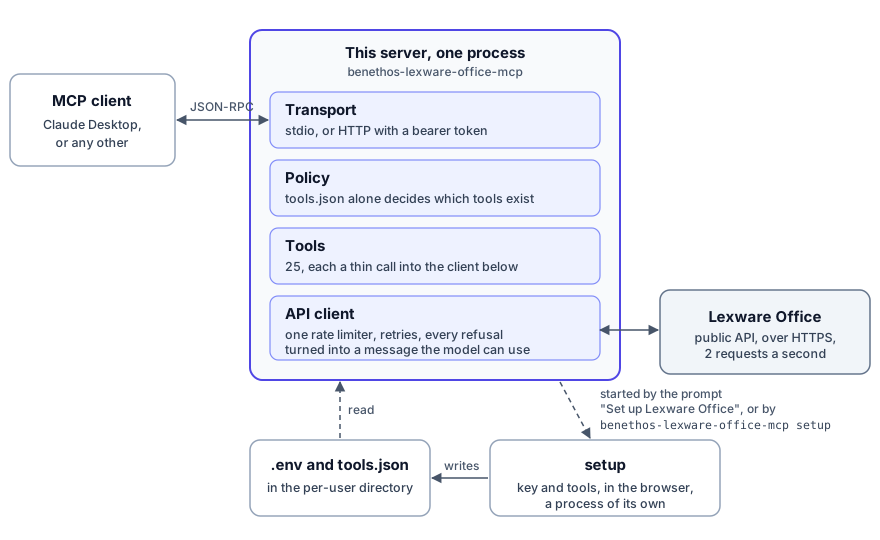 The client starts the server, or reaches it over HTTP, and speaks MCP with it. What a model can do is settled before anything reaches Lexware: a tool the policy file does not name does not exist for the client, and every call that is left goes through one API client with one rate limiter. The key and the permissions live in two files that `setup` writes, a process of its own that the client's prompt **Set up Lexware Office** starts, and so does `benethos-lexware-office-mcp setup` in a terminal. ## Tools Every tool below is built and was exercised against a live account. None of them is enabled until the policy file names it. Read tools: | Tool | What it does | |---|---| | `get_profile` | Company profile and connection check | | `search_contacts` | Find customers and vendors by name, email, number or role | | `get_contact` | One contact with addresses, roles and version | | `search_articles` | List articles, filtered by number, barcode or kind. The API offers no search by title | | `get_article` | One article with its price block and version | | `search_vouchers` | The central query — filter the voucher list by type, status, contact, document number, date range and what is still open | | `get_sales_document` | Read an invoice, quotation, credit note, order confirmation, delivery note, dunning or down payment invoice in full | | `get_voucher` | Read a bookkeeping voucher, by id or by its document number | | `get_payments` | Payment status and open amount of a voucher | | `get_recurring_templates` | Templates that issue invoices on a schedule, one or a page of them | | `get_master_data` | Countries, payment conditions, posting categories and print layouts, with a search to narrow them | | `download_document` | Save the rendered PDF or XML of a sales document | | `download_file` | Save a stored file, such as an uploaded receipt | | `read_download` | Put a downloaded file into the answer, for clients that cannot follow a resource link | | `get_deeplink` | Build a permalink to a sales document, contact or voucher in the web app, without an API call | Write tools. These change
What people ask about lexware-office-mcp
What is benethos-hub/lexware-office-mcp?
+
benethos-hub/lexware-office-mcp is mcp servers for the Claude AI ecosystem. Unofficial MCP server for the Lexware Office accounting API — runs over stdio or HTTP. It has 2 GitHub stars and its last recorded update is dated 2026-10-10.
How do I install lexware-office-mcp?
+
You can install lexware-office-mcp by cloning the repository (https://github.com/benethos-hub/lexware-office-mcp) or following the README instructions on GitHub. ClaudeWave also provides quick install blocks on this page.
Is benethos-hub/lexware-office-mcp safe to use?
+
Our security agent has analyzed benethos-hub/lexware-office-mcp and assigned a Trust Score of 95/100 (tier: Verified). See the full breakdown of passed checks and flags on this page.
Who maintains benethos-hub/lexware-office-mcp?
+
benethos-hub/lexware-office-mcp is maintained by benethos-hub. The last recorded GitHub activity is dated 2026-10-10, with 0 open issues.
Are there alternatives to lexware-office-mcp?
+
Yes. On ClaudeWave you can browse similar mcp servers at /categories/mcp, sorted by popularity or recent activity.
Deploy lexware-office-mcp to your cloud
Ship this repo to production in minutes. Each platform spins up its own environment with editable env vars.
Maintain this repo? Add a badge to your README
Drop the badge into your GitHub README to show it's tracked on ClaudeWave. Each badge links back to this page and reflects the live Trust Score.
[](https://claudewave.com/repo/benethos-hub-lexware-office-mcp)<a href="https://claudewave.com/repo/benethos-hub-lexware-office-mcp"><img src="https://claudewave.com/api/badge/benethos-hub-lexware-office-mcp" alt="Featured on ClaudeWave: benethos-hub/lexware-office-mcp" width="320" height="64" /></a>More MCP Servers

Fair-code workflow automation platform with native AI capabilities. Combine visual building with custom code, self-host or cloud, 400+ integrations.

User-friendly AI Interface (Supports Ollama, OpenAI API, ...)

An open-source AI agent that brings the power of Gemini directly into your terminal.

Real-time global intelligence dashboard. AI-powered news aggregation, geopolitical monitoring, and infrastructure tracking in a unified situational awareness interface

🕷️ An adaptive Web Scraping framework that handles everything from a single request to a full-scale crawl! Don't be shy, join here: https://discord.gg/EMgGbDceNQ and follow here for daily tips and tricks: https://x.com/Scrapling_dev

The fastest path to AI-powered full stack observability, even for lean teams.