

cherry-studio
AI productivity studio with smart chat, autonomous agents, and 300+ assistants. Unified access to frontier LLMs
- 52.9k stars
- 5.1k forks
- 2,106 open issues
- Language: TypeScript
- License: AGPL-3.0
- updated
Install
git clone https://github.com/CherryHQ/cherry-studio && cp cherry-studio/*.md ~/.claude/agents/- Clone the repository and copy the agent .md definitions into ~/.claude/agents (or .claude/agents inside a project).
- Start a new Claude Code session to load the agents.
- Delegate work to them with the Task/Agent tool or by name.
Editor's note
Cherry Studio is a cross-platform desktop application for Windows, Mac, and Linux that provides a unified interface for interacting with multiple LLM providers, including direct API access to Anthropic's Claude models alongside OpenAI, Gemini, Perplexity, and local models running through Ollama or LM Studio. The application ships with over 300 pre-configured AI assistants and allows users to build custom ones, run simultaneous conversations across different models for side-by-side comparison, and process a range of file types including PDFs, Office documents, and images. It integrates MCP (Model Context Protocol) server support, enabling Claude and other models to connect to external tools and data sources. Additional built-in utilities include AI-powered translation, Mermaid chart visualization, a topic management system, WebDAV backup, and global search. The project targets general productivity users, researchers, and developers who want a single desktop client to manage conversations, documents, and agent workflows across frontier and local models without switching between separate interfaces.
24 items in this repository
从当前安装包查询 Cherry Studio 产品信息并排查运行问题。当用户询问功能、路由、快捷键、Provider、语言、Agent、频道、定时任务、Code CLI、当前版本,或报告运行错误、连接失败、配置异常并需要诊断时触发。
Develop, fix, and profile Cherry Studio in a tracked Electron instance. Use for everyday implementation, UI and interaction work, bug fixing, runtime debugging, DevTools inspection, lag or jank investigation, CPU and memory monitoring, leak checks, and startup-performance analysis; reuse a verified workspace instance across instructions and launch or replace one only when required.
当用户明确要求搜索、安装、查看、卸载或创建 Skill,或内置 Skill / 工具出现能力缺口、无法完成当前任务时触发。通过 `mcp__skills__search_skills` 搜索并用 `mcp__skills__install_skill` 安装;已安装 Skill 的查看和删除通过产品清单导航到 Skills UI;没有合适结果时调用内置 `skill-creator` 创建并验证自定义 Skill,再继续原任务。普通任务仍先尝试内置能力。
Use when Cherry Studio 用户希望报告、提交或整理 BUG、UI/UX 问题或功能建议,但未明确要求创建 GitHub Issue。
Cherry Studio first-party tool and bundled-shell routing for general agents. For straightforward local work in shell-capable sessions, run JS/TS with `bun <file>` and one-off JS tools with `bun x`; run Python with `uv run [--with <pkg>] python` and one-off Python CLIs with `uvx`; search with `rg`. Load this guide before changing project dependencies, deciding whether a tool should be ephemeral or reusable, reading or converting local Office/PDF files, coordinating or delegating across Agent Sessions, or using Cherry-owned web/browser, knowledge, persistent memory, schedules/notifications, IM channels, image generation, artifact reporting, managed CLI, skill, or MCP-server-registration capabilities—even if the user names no tool. Consult it before shell/file workarounds; live tool schemas are authoritative.
Analyze a codebase and recommend Claude Code automations (hooks, subagents, skills, plugins, MCP servers). Use when user asks for automation recommendations, wants to optimize their Claude Code setup, mentions improving Claude Code workflows, asks how to first set up Claude Code for a project, or wants to know what Claude Code features they should use.
Runs Antigravity CLI headlessly for repository analysis and coding tasks. Use when the user asks to delegate work to Antigravity CLI or compare its result with another coding agent.
Runs Claude Code non-interactively for code analysis and implementation tasks. Use when the user asks to delegate repository work to Claude Code or compare its result with another coding agent.
Runs Codex CLI non-interactively for code analysis and implementation tasks. Use when the user asks to delegate repository work to Codex or obtain a second coding-agent result.
Runs DeepSeek Harness headlessly for bounded repository tasks. Use when the user asks to delegate analysis or implementation to DeepSeek Harness.
Runs Gemini CLI headlessly for repository analysis and coding tasks. Use when the user asks to delegate work to Gemini CLI or compare its result with another coding agent.
Runs GitHub Copilot CLI programmatically for repository analysis and coding tasks. Use when the user asks to delegate work to Copilot CLI or obtain a Copilot coding-agent result.
Runs Hermes Agent in one-shot mode for bounded local tasks. Use when the user explicitly asks to delegate work to Hermes and accepts its automatic tool approval behavior.
Runs Kimi Code in non-interactive prompt mode and parses its event stream. Use when the user asks to delegate a bounded repository task to Kimi Code.
Runs a local OpenClaw agent non-interactively and returns its structured response. Use when the user asks to delegate a bounded task to the OpenClaw main agent.
Runs OpenCode non-interactively for repository analysis and coding tasks. Use when the user asks to delegate work to OpenCode or compare OpenCode with another coding agent.
Runs Pi non-interactively and parses its JSON event stream for repository tasks. Use when the user asks to delegate a bounded analysis or implementation task to Pi.
Runs the Code Mate Qoder CN CLI non-interactively with structured output. Use when the user asks to delegate a bounded coding task to Qoder.
Runs Qwen Code headlessly for repository analysis and coding tasks. Use when the user asks to delegate work to Qwen Code or obtain a Qwen-based coding-agent result.
Create a new skill in the current repository. Use when the user wants to create/add a new skill, or mentions creating a skill from scratch. This skill follows the workflow defined in .agents/skills/README.md and helps scaffold, validate, and sync new skills.
将成功解决的用户问题收录到 FAQ 知识库。问题解决后自动判断是否收录。也可以在用户说"收录到 FAQ"、"记录这个问题"、"add to FAQ"时手动触发。
Helps users discover and install agent skills when they ask questions like "how do I do X", "find a skill for X", "is there a skill that can...", or express interest in extending capabilities. This skill should be used when the user is looking for functionality that might exist as an installable skill.
Use when user wants to create a GitHub issue for the current repository. Must read and follow the repository's issue template format.
Create or update GitHub pull requests using the repository-required workflow and template compliance. Use when asked to create/open/update a PR so the assistant reads `.github/pull_request_template.md`, fills every template section, preserves markdown structure exactly, and marks missing data as N/A or None instead of skipping sections.
Subagents overview
English | Official Site | Documentation | Development | Feedback
[![][deepwiki-shield]][deepwiki-link] [![][twitter-shield]][twitter-link] [![][discord-shield]][discord-link] [![][telegram-shield]][telegram-link]
[![][github-release-shield]][github-release-link] [![][github-nightly-shield]][github-nightly-link] [![][github-contributors-shield]][github-contributors-link] [![][license-shield]][license-link] [![][commercial-shield]][commercial-link] [![][sponsor-shield]][sponsor-link]
🍒 Cherry Studio
Cherry Studio is an AI workstation for Windows, macOS, and Linux. Chat with multiple models, work with agents, build knowledge bases, create images, and automate everyday tasks in one place.
Download Desktop · Getting Started
📱 Cherry Studio Mobile is now available for iOS and Android! Download · GitHub repository.
👏 Join Telegram Group|Discord | QQ Group(575014769)
❤️ Like Cherry Studio? Give it a star 🌟 or Sponsor to support the development!
🌠 Screenshots
Agents — work with files, tools, and multi-step tasks.

Conversations — explore ideas with your models and assistants.

Model providers — configure services, API keys, and models in one place.

Knowledge bases — organize sources for retrieval and agent workflows.

Image creation — turn prompts into images and refine your work.

🌟 Key Features
Agents & Automation
🤖 Create agents with their own instructions, workspaces, models, and tool permissions.
🛠️ Work with files, run commands, and use browser and computer automation tools.
🔌 Extend capabilities with Skills and MCP (Model Context Protocol) servers.
⏰ Run scheduled tasks and connect agents to messaging platforms through Channels.
Models & Conversations
☁️ Connect OpenAI, Anthropic, Gemini, and other cloud providers, or add custom compatible services.
💻 Use local models through Ollama and LM Studio.
💬 Customize assistants and compare responses from multiple models in one conversation.
📝 Read and share rich responses with Markdown, code highlighting, formulas, Mermaid charts, and conversation exports.
Knowledge & Documents
📚 Build local knowledge bases from files, folders, and web pages, then use them in conversations and agents.
📄 Process PDF, Office documents, images, and text, with OCR and document processing options.
✍️ Organize ideas in Markdown notes and manage attachments and generated files in the file library.
Creative & Everyday Tools
🎨 Generate and edit images with supported image models.
🔤 Translate text and documents, and use quick translation from other apps.
🔍 Search the web, read pages, and find content across your conversations and knowledge bases.
🧩 Open web-based tools through Mini Apps, or use the API Gateway to connect other applications to your configured models.
Voice & Workspace
🎙️ Dictate messages and listen to responses with speech recognition and text-to-speech options, including local models.
🪟 Work across tabs and detached windows, with window pinning, Quick Assistant, and text selection tools.
🌈 Customize your workspace with light and dark themes, layouts, and custom CSS.
💾 Keep conversation history and knowledge bases on your device, with local and WebDAV backup options.
Model and tool availability depends on your provider, operating system, and configuration. Some features require API credentials, downloaded models, additional dependencies, or system permissions. See the user documentation for setup.
📝 Roadmap
Follow upcoming work on our project board and GitHub Issues. See Releases for features and fixes already shipped.
Share ideas and discuss priorities in GitHub Discussions.
🌈 Theme
Theme Gallery: https://cherrycss.com
Aero Theme: https://github.com/hakadao/CherryStudio-Aero
PaperMaterial Theme: https://github.com/rainoffallingstar/CherryStudio-PaperMaterial
Claude dynamic-style: https://github.com/bjl101501/CherryStudio-Claudestyle-dynamic
Maple Neon Theme: https://github.com/Cle2ment/maple_neon
Check each community theme's supported Cherry Studio version before installing. Themes written for v1 need adaptation for the v2 interface.
Contributions of compatible themes are welcome.
🤝 Contributing
Contributions of code, bug reports, documentation, translations, product ideas, and community support are welcome. Browse good first issues to find a place to start.
Getting Started
Read the Contributing Guide and Development Guide.
Fork the repository and create a focused branch from
main.Validate your changes, sign and sign off your commits, and open a pull request targeting
mainusing the repository template.
See the Branching Strategy for branch and release conventions.
🏢 Enterprise Edition
Cherry Studio Enterprise Edition brings centralized model management, shared knowledge bases, employee access controls, and private deployment options to teams and organizations.
Visit the Enterprise website for current capabilities and deployment information. For purchasing, pricing, or a demo, contact bd@cherry-ai.com.
🔗 Related Projects
Cherry Studio Mobile: The mobile version of Cherry Studio for iOS and Android.
Cherry Studio Website: The official website and user documentation.
new-api: The next-generation LLM gateway and AI asset management system supports multiple languages.
one-api: LLM API management and distribution system supporting mainstream models like OpenAI, Azure, and Anthropic. Features a unified API interface, suitable for key management and secondary distribution.
Poe: A platform for exploring AI models and community-created bots.
ublacklist: Blocks specific sites from appearing in Google search results
🚀 Contributors
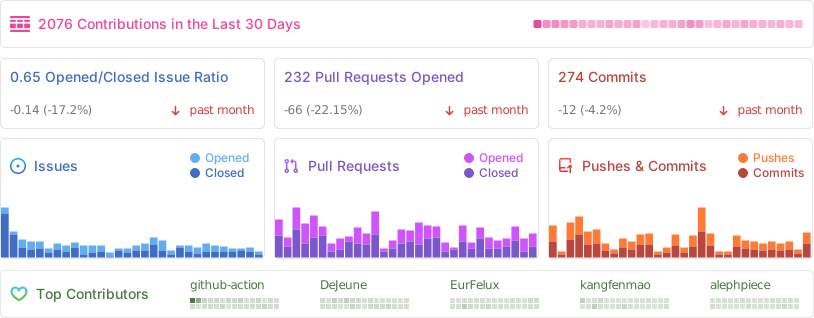
📊 GitHub Stats
⭐️ Star History
📜 License
The Cherry Studio Community Edition is governed by the standard GNU Affero General Public License v3.0 (AGPL-3.0), available at https://www.gnu.org/licenses/agpl-3.0.html.
Use of the Cherry Studio Community Edition for commercial purposes is permitted, subject to full compliance with the terms and conditions of the AGPL-3.0 license.
What people ask about cherry-studio
What is CherryHQ/cherry-studio?
CherryHQ/cherry-studio is subagents for the Claude AI ecosystem. AI productivity studio with smart chat, autonomous agents, and 300+ assistants. Unified access to frontier LLMs It has 52.9k GitHub stars and its last recorded update is dated 2026-10-23.
How do I install cherry-studio?
You can install cherry-studio by cloning the repository (https://github.com/CherryHQ/cherry-studio) or following the README instructions on GitHub. ClaudeWave also provides quick install blocks on this page.
Is CherryHQ/cherry-studio safe to use?
Our security agent has analyzed CherryHQ/cherry-studio and assigned a Trust Score of 100/100 (tier: Verified). See the full breakdown of passed checks and flags on this page.
Who maintains CherryHQ/cherry-studio?
CherryHQ/cherry-studio is maintained by CherryHQ. The last recorded GitHub activity is dated 2026-10-23, with 2106 open issues.
Are there alternatives to cherry-studio?
Yes. On ClaudeWave you can browse similar subagents at /categories/agents, sorted by popularity or recent activity.
Maintain this repo? Show its Trust Score in your README
The badge shows this repository's current Trust Score and verdict, and links back to this page. It follows the catalogue data: nobody can buy or edit the score it displays.
[](https://claudewave.com/en/repo/cherryhq-cherry-studio)<a href="https://claudewave.com/en/repo/cherryhq-cherry-studio"><img src="https://claudewave.com/api/badge/cherryhq-cherry-studio" alt="ClaudeWave Trust Score for CherryHQ/cherry-studio" width="320" height="64"></a>