

Deep Research infrastructure for AI agents.
- ✓Open-source license (Apache-2.0)
- ✓Actively maintained (<30d)
- ✓Clear description
- ✓Topics declared
- ✓Documented (README)
claude mcp add mcp-server -- python -m cluefinch{
"mcpServers": {
"mcp-server": {
"command": "python",
"args": ["-m", "pip"]
}
}
}MCP Servers overview
# Cluefinch MCP
<!-- mcp-name: io.github.cluefinch/mcp -->
**Deep Research infrastructure for AI agents.**
Cluefinch MCP gives AI agents a complete toolkit for working with the web through the Model Context Protocol (MCP).
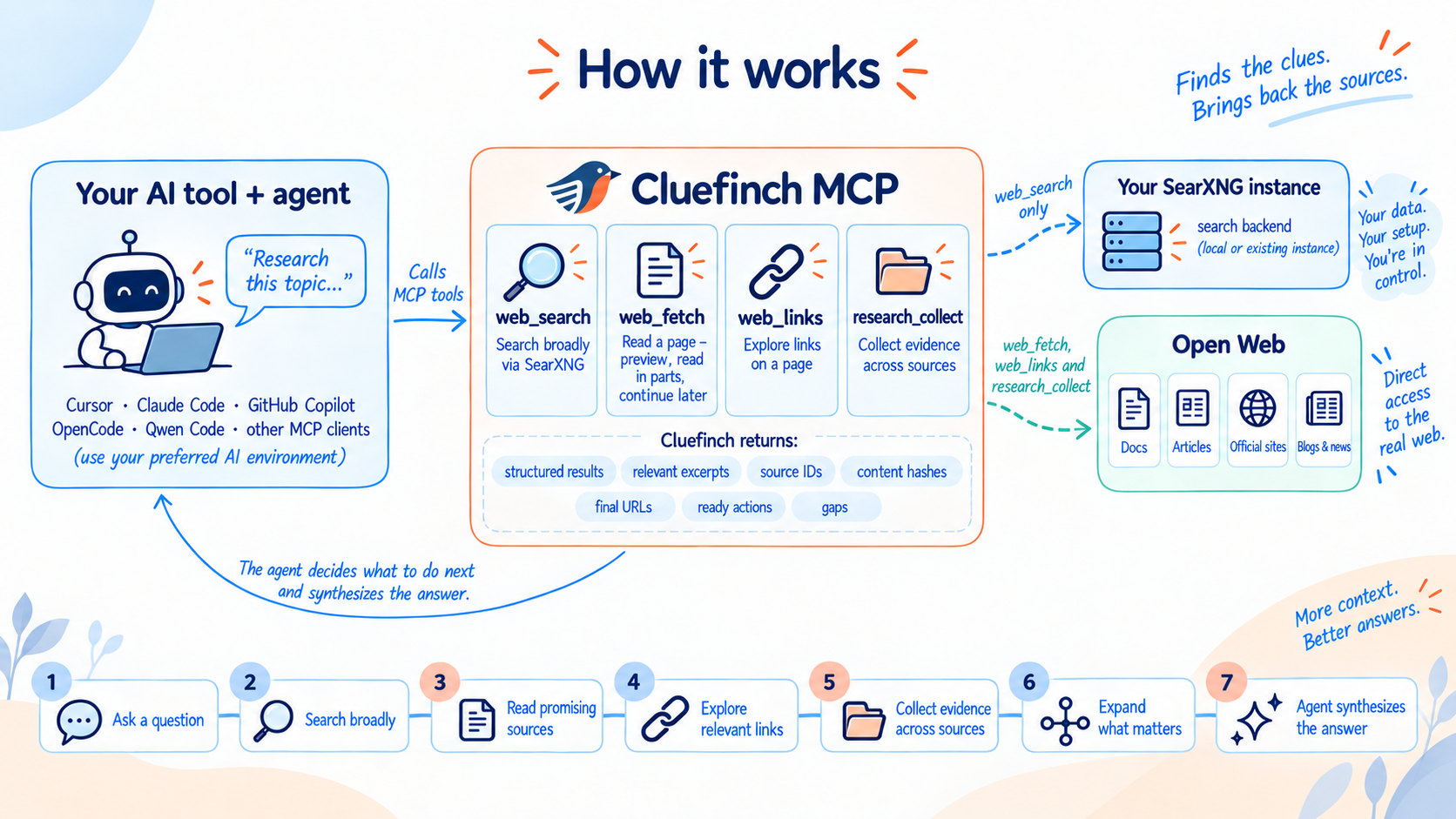
With Cluefinch, an agent can search the web, read pages, navigate between related sources, and carry out in-depth research.
Cluefinch MCP can make the internet part of your AI agent's workspace — from finding a single fact to carrying out complex, multi-step research across multiple sources.
Cluefinch MCP is completely free to use and requires no paid subscription. It works with AI agents whether they are powered by local LLMs or cloud-based models, and does not require a commercial search API or a subscription to a cloud-hosted Deep Research service.
Cluefinch MCP does not impose its own limits on the number of search queries or research runs.
Your agent gets the tools it needs to work effectively with the web, while you retain control over how those tools are used. Cluefinch integrates easily with MCP-compatible AI tools and fits into the workflow you already use.
## What Cluefinch MCP can do
### Web Search
Cluefinch MCP lets an agent search the internet through your own SearXNG instance.
The agent can formulate and refine search queries, use different search engines, restrict searches by language or domain, and issue follow-up or revised queries when needed.
### Web Reading
Once a useful link is found, the agent can open the page through Cluefinch MCP and receive cleaned text ready for model processing.
Large pages do not have to be loaded into the model's context all at once. The agent can read them in chunks, continue from a specific position, and request additional context only when it is actually needed.
### Source Navigation
After finding a useful page, the agent can inspect its HTTP/HTTPS links and use the source's own structure to continue the research: move through documentation sections and report chapters, follow pagination, open related pages, and reach primary materials — without returning to a search engine at every step.
### Deep Research
Cluefinch MCP gives the agent the tools to carry out multi-source research workflows.
The agent can pursue several lines of inquiry at once, work with both search results and known URLs, gather material from different sources, examine the most relevant parts of long documents, and deepen the investigation as new questions emerge.
The agent remains in control of the research process: it decides what to search for next, which sources deserve closer inspection, how to interpret the collected material, and when there is enough evidence to produce an answer.
The depth of the research — from a quick product lookup to complex, multi-stage analysis — depends on the task, the model, and the user's instructions.
## Quick Start
Cluefinch MCP requires [Python](https://www.python.org/downloads/) **3.12.4 or later**.
### 1. Install Cluefinch MCP
```sh
python -m pip install cluefinch
```
After installation, make sure the `cluefinch` executable is available through the `PATH` environment variable.
On Windows:
```powershell
where.exe cluefinch
```
On macOS and Linux:
```sh
command -v cluefinch
```
If `cluefinch` is not found, add the directory containing the installed executable to `PATH`.
### 2. Start SearXNG
Cluefinch uses SearXNG as its search backend. If you do not already have your own SearXNG instance, the repository includes a ready-to-use local configuration example:
- `examples/searxng/compose.yaml`
- `examples/searxng/settings.yml`
To run the example, you need [Docker](https://www.docker.com/) with Docker Compose support.
Download these files into a separate directory and create a `.env` file alongside them with a random `SEARXNG_SECRET`.
On macOS and Linux:
```sh
printf 'SEARXNG_SECRET=%s\n' "$(openssl rand -hex 32)" > .env
```
On Windows PowerShell:
```powershell
$secret = -join ((1..64) | ForEach-Object { '{0:x}' -f (Get-Random -Maximum 16) })
"SEARXNG_SECRET=$secret" | Set-Content -Encoding ascii .env
```
Then start SearXNG with Docker Compose:
```sh
docker compose up -d
```
By default, the local SearXNG instance will be available at:
```text
http://127.0.0.1:8081
```
### 3. Connect Cluefinch MCP to your AI tool
Cluefinch connects easily to popular AI tools and runs as a standard local MCP server over `stdio`.
Ready-to-use connection examples are provided in the next section.
## Integrating with AI tools
Cluefinch MCP uses the standard local MCP `stdio` transport, so in most clients you only need to specify the `cluefinch` command.
Below are minimal examples of integrating Cluefinch with some popular AI tools. Cluefinch can also be used with other clients that support local MCP servers over `stdio`.
The examples below use SearXNG at `http://127.0.0.1:8081`, as shown in the Quick Start section above.
If your SearXNG instance does not use the default address, pass `MCP_SEARCH_SEARXNG_URL` through the MCP server environment in your client's configuration.
### Cursor
Add Cluefinch to your project's `.cursor/mcp.json` or to Cursor's global MCP configuration:
```json
{
"mcpServers": {
"cluefinch": {
"type": "stdio",
"command": "cluefinch"
}
}
}
```
After restarting the MCP connection, Cursor will discover the Cluefinch tools and can use them in agent tasks.
### Claude Code
Cluefinch can be added with a single command:
```sh
claude mcp add --scope user cluefinch -- cluefinch
```
To verify the connection:
```sh
claude mcp list
```
### Codex
Add Cluefinch with:
```sh
codex mcp add cluefinch -- cluefinch
```
To verify the connection:
```sh
codex mcp list
```
### GitHub Copilot in VS Code
Add the local MCP server to `.vscode/mcp.json`:
```json
{
"servers": {
"cluefinch": {
"type": "stdio",
"command": "cluefinch"
}
}
}
```
Cluefinch will then become available to GitHub Copilot in agent mode as a set of MCP tools.
### OpenCode
Add Cluefinch to `opencode.jsonc`:
```jsonc
{
"$schema": "https://opencode.ai/config.json",
"mcp": {
"cluefinch": {
"type": "local",
"command": ["cluefinch"],
"enabled": true
}
}
}
```
### Qwen Code
Add Cluefinch to `~/.qwen/settings.json` for user-level configuration, or to `.qwen/settings.json` for a specific project:
```json
{
"mcpServers": {
"cluefinch": {
"command": "cluefinch",
"args": []
}
}
}
```
After restarting Qwen Code, you can verify the connection with the `/mcp` command.
### OpenClaw
Add Cluefinch with:
```sh
openclaw mcp add cluefinch --command cluefinch
```
Or configure it manually in `openclaw.json`:
```json
{
"mcp": {
"servers": {
"cluefinch": {
"command": "cluefinch",
"transport": "stdio"
}
}
}
}
```
To verify the connection:
```sh
openclaw mcp probe cluefinch
```
### Hermes Agent
Add Cluefinch to the `config.yaml` file used by your active Hermes profile:
```yaml
mcp_servers:
cluefinch:
command: "cluefinch"
args: []
```
Restart Hermes after saving the configuration.
## Configuring agent behavior
The agent formulates search queries, selects sources, and manages the research process using the available Cluefinch MCP tools. You can define your own rules for that process through instructions in [`AGENTS.md`](https://github.com/cluefinch/mcp-server/blob/v0.1.4/AGENTS.md) or equivalent settings in your AI tool.
Those instructions can govern both ordinary searches and deep, multi-stage research, including how individual Cluefinch MCP tools should be used.
For example, you can ask the agent to begin with a research plan, run several refinement queries through `web_search`, use `web_links` to navigate chapters and related pages, prioritize primary sources, and read large documents incrementally with `web_fetch`.
For multi-source collection and initial filtering, the agent can use `research_collect`. Your instructions can also define rules for reusing already collected context, checking conflicting sources, limiting additional search iterations, and keeping factual evidence separate from interpretation.
The repository includes an [`AGENTS.md`](https://github.com/cluefinch/mcp-server/blob/v0.1.4/AGENTS.md) file with a ready-made example of this kind of Deep Research workflow. You can use it as a starting point, simplify it for quick research, or adapt it to your own tasks, model, and output requirements.
## Cluefinch MCP tools
At the MCP level, Cluefinch exposes four complementary tools that take an agent from web search to reading specific sources and then to multi-source research.
### `web_search`
`web_search` runs searches through the configured SearXNG instance and returns links to potentially useful sources.
The agent can control the number of results, choose search engines and language, use Safe Search, restrict the search to a particular domain, or exclude unwanted domains. Cluefinch also reports when one or more SearXNG engines fail to respond, so the agent does not mistake an incomplete result set for a complete one.
### `web_fetch`
`web_fetch` reads web pages directly. Cluefinch downloads the HTML from the specified URL, extracts the main text, converts it to Markdown, and returns only the portion the agent needs.
The agent can first request a small preview of the page to judge whether the source is useful, then continue reading only if needed. A long document can be read incrementally from a chosen position. Cluefinch returns `next_start` and a ready-to-use `continuation` action, so the agent does not need to calculate the next position manually. Along with the content, it receives the metadata needed to continue navigating the same retaineWhat people ask about mcp-server
What is cluefinch/mcp-server?
+
cluefinch/mcp-server is mcp servers for the Claude AI ecosystem. Deep Research infrastructure for AI agents. It has 0 GitHub stars and its last recorded update is dated 2026-10-04.
How do I install mcp-server?
+
You can install mcp-server by cloning the repository (https://github.com/cluefinch/mcp-server) or following the README instructions on GitHub. ClaudeWave also provides quick install blocks on this page.
Is cluefinch/mcp-server safe to use?
+
Our security agent has analyzed cluefinch/mcp-server and assigned a Trust Score of 95/100 (tier: Verified). See the full breakdown of passed checks and flags on this page.
Who maintains cluefinch/mcp-server?
+
cluefinch/mcp-server is maintained by cluefinch. The last recorded GitHub activity is dated 2026-10-04, with 0 open issues.
Are there alternatives to mcp-server?
+
Yes. On ClaudeWave you can browse similar mcp servers at /categories/mcp, sorted by popularity or recent activity.
Deploy mcp-server to your cloud
Ship this repo to production in minutes. Each platform spins up its own environment with editable env vars.
Maintain this repo? Add a badge to your README
Drop the badge into your GitHub README to show it's tracked on ClaudeWave. Each badge links back to this page and reflects the live Trust Score.
[](https://claudewave.com/repo/cluefinch-mcp-server)<a href="https://claudewave.com/repo/cluefinch-mcp-server"><img src="https://claudewave.com/api/badge/cluefinch-mcp-server" alt="Featured on ClaudeWave: cluefinch/mcp-server" width="320" height="64" /></a>More MCP Servers

Fair-code workflow automation platform with native AI capabilities. Combine visual building with custom code, self-host or cloud, 400+ integrations.

User-friendly AI Interface (Supports Ollama, OpenAI API, ...)

An open-source AI agent that brings the power of Gemini directly into your terminal.

Real-time global intelligence dashboard. AI-powered news aggregation, geopolitical monitoring, and infrastructure tracking in a unified situational awareness interface

🕷️ An adaptive Web Scraping framework that handles everything from a single request to a full-scale crawl! Don't be shy, join here: https://discord.gg/EMgGbDceNQ and follow here for daily tips and tricks: https://x.com/Scrapling_dev

The fastest path to AI-powered full stack observability, even for lean teams.