

MCP server for Substack: rich drafts, Notes, analytics, and consented subscriber management across publications. Long-form posts stay draft-only; Notes publish immediately. Used regularly by multiple newsletters, includes a CLI.
- ✓Open-source license (MIT)
- ✓Actively maintained (<30d)
- ✓Clear description
- ✓Topics declared
- ✓Documented (README)
claude mcp add substack-mcp -- npx -y playwright{
"mcpServers": {
"substack-mcp": {
"command": "npx",
"args": ["-y", "playwright"]
}
}
}MCP Servers overview
<div align="center"> # substack-mcp Create and manage your Substack newsletter from your AI assistant or terminal. Prepare rich drafts, search your archive, publish Notes, inspect analytics, and manage explicitly consented free subscribers across publications. Review and publish long-form posts in Substack. [](LICENSE) [](https://www.typescriptlang.org/) [](https://www.npmjs.com/package/@conorbronsdon/substack-mcp) [](https://modelcontextprotocol.io/) [](https://github.com/conorbronsdon/substack-mcp/actions/workflows/hol-plugin-scanner.yml) [](https://chainofthought.show/?utm_source=github&utm_medium=referral&utm_campaign=repo-readme&utm_content=substack-mcp) [](https://x.com/ConorBronsdon) </div> --- 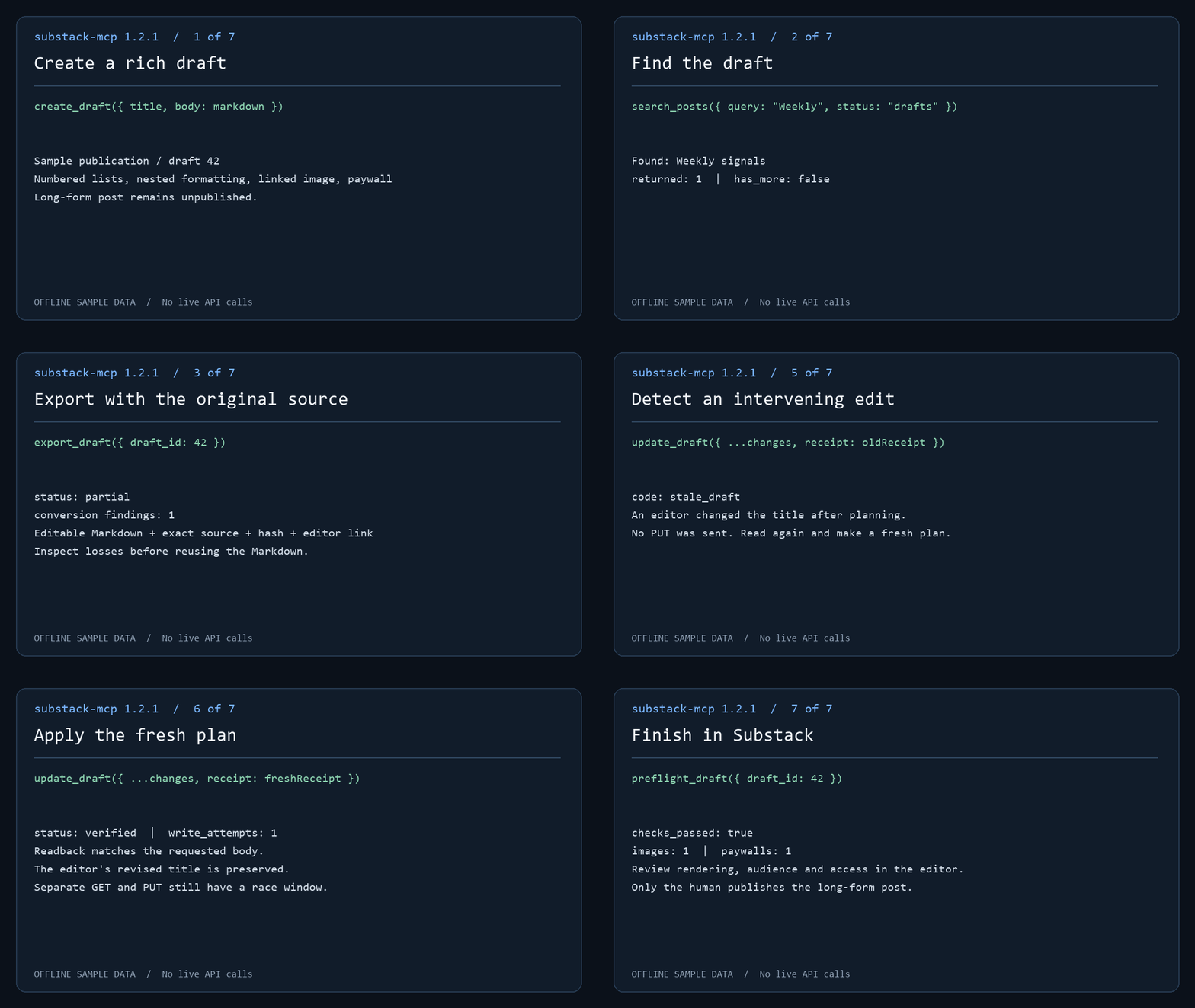 The demo runs actual MCP handlers against offline sample data. No live API calls or publication occur. Follow the [draft workflow](docs/workflow.md) to create, find, export and review a post. **Safe by design — with one loud exception:** This server cannot publish or delete long-form posts. Post tools create and edit drafts only; you review and publish manually through Substack's editor. The exception is Substack **Notes**: `create_note` and `create_note_with_link` publish short-form Notes immediately, because Notes have no draft state on Substack. Treat the Note tools as public-publish actions — there is no preview step and no undo from this server. The split is proportionate review, the piece of trust infrastructure for agents this server cares most about: the high-stakes surface gets a human gate, and the exception is stated loudly. This server imposes no Bestseller-status check. Use an authenticated account with permission to manage the publication; individual operations depend on your Substack access. Connect through local stdio or self-hosted HTTP. <a href="https://glama.ai/mcp/servers/conorbronsdon/substack-mcp"> <img width="380" height="200" src="https://glama.ai/mcp/servers/conorbronsdon/substack-mcp/badge" alt="substack-mcp MCP server" /> </a> For 1.0 setup coverage and account eligibility, see [compatibility](docs/compatibility.md). Maintainers can use the [release checklist](docs/release-checklist.md) and [distribution inventory](docs/distribution.md). **Contents:** [Quick start](#quick-start) · [Setup](#setup) · [Tools](#tools) · [Operator CLI](docs/operator-cli.md) · [Draft workflow](docs/workflow.md) · [Export](docs/export.md) · [Markdown](docs/authoring.md) · [Multiple publications](#multiple-publications) · [Transports](docs/http-transport.md) · [Compatibility](docs/compatibility.md) ## Quick start 1. **Install and sign in.** Browser login needs the optional Playwright dependency: ```bash npm install @conorbronsdon/substack-mcp playwright npx playwright install chromium npx substack-mcp login https://yourblog.substack.com --user-id 12345 ``` Use your own account's user ID. The session is saved only after a bounded authenticated read succeeds. To paste credentials instead, see [Option B](#option-b--get-your-credentials-manually). 2. **Verify a read.** `npx substack-mcp doctor --json --check-auth` makes one bounded read per publication. It confirms read access, not your user ID or write permission. 3. **Connect your MCP client.** Add the server to [Claude Desktop or Claude Code](#2-configure-your-mcp-client), or use the [Codex plugin](#codex-plugin). Environment variables take precedence; omit them to use the stored browser-login session. Then ask your assistant: "How many Substack subscribers do I have?" 4. **Prepare a draft for review.** Follow the [draft workflow](docs/workflow.md): `create_draft`, `search_posts`, `export_draft`, `preflight_draft`, then `plan_draft_update` and `update_draft`. Long-form posts stay unpublished drafts until you publish them in Substack's editor. `create_note` and `create_note_with_link` publish immediately. ## Community walkthrough Jonathan Price's [I used Codex to connect ChatGPT to Substack. Then it drafted this post.](https://craftandcontext.substack.com/p/i-used-codex-to-connect-chatgpt-to-substack) walks through using Codex to install the MCP locally, connecting ChatGPT through OpenAI's Secure MCP Tunnel, and creating a private draft for manual publication. He used the connection to create the draft of the guide itself. The guide documents his September 18, 2026 setup with version 1.2.0. Its reported `get_post` 404 is fixed in 1.2.1. Client interfaces and access requirements can change; use the [setup instructions below](#setup) for this package's current configuration. This is a community walkthrough, not a hosted service provided by this project. ## Setup Requires **Node.js 22 or newer** (CI covers Node 22 and 24). Browser login additionally requires Playwright. You can supply credentials two ways: paste them as env vars (below), or run the optional **browser login** which captures and stores them for you. ### Option A — Browser login (optional, no manual cookie copying) Install the server and optional Playwright dependency together in a local tools directory, then sign in: ```bash npm install @conorbronsdon/substack-mcp playwright npx playwright install chromium npx substack-mcp login https://yourblog.substack.com --user-id 12345 ``` `substack-mcp-login` remains a supported alias. Missing publication URL and user ID are prompted. Supply your own account's user ID; a post author's byline does not verify your identity. The browser opens for sign-in, including any CAPTCHA. Only a cookie applicable to the publication API is captured, and a bounded authenticated read must succeed before saving. This verifies read access, not the configured user ID or permission to write. Without `--profile`, login saves `~/.substack-mcp/session.json` (directory override: `SUBSTACK_MCP_HOME`). The server uses this legacy session when publication credential environment variables and `SUBSTACK_PROFILES` are unset. **Storage:** sessions use AES-256-GCM with a key derived from the OS account and machine. File permissions request `0600`; Windows access also depends on directory ACLs. This is a machine-bound file, not an OS keychain or secret vault. Code running as your OS user can derive the key. Use environment credentials if your MCP client manages secrets for you. #### Named profiles and migration ```bash npx substack-mcp login https://yourblog.substack.com --user-id 12345 --profile work npx substack-mcp profiles list # Copy an existing legacy session without changing its file: npx substack-mcp profiles migrate --name personal ``` Keys start with a lowercase ASCII letter and contain only lowercase letters, digits and hyphens, up to 64 characters. Existing profiles require explicit `--force` to replace. List output contains keys, readability status, publication origins and file save times; it excludes cookies and user IDs. Unreadable profiles remain visible but cannot be selected. Save time records local persistence, including migration; it is not token issuance or expiration time. Listing is bounded to 32 profiles. Profile storage requires a local filesystem supporting hard links (such as NTFS or a typical Linux filesystem), so creation can install a complete encrypted file without overwriting an existing name. FAT/exFAT and some network mounts are not supported: set `SUBSTACK_MCP_HOME` to a suitable local directory. Do not use `--force` to work around an unsupported filesystem. Set `SUBSTACK_PROFILES=work,personal` in your MCP client's environment to select up to 32 distinct profiles. Remove all publication credential variables first: combining profile selection with legacy or named credential variables is an error, including empty variables. Missing, corrupt or invalid selected profiles stop startup; they never fall back to another account. Profiles on disk are never activated by discovery. With multiple profiles, tools require an explicit publication key and CLI reads require `--publication`. To roll back, unset `SUBSTACK_PROFILES` and restore your previous environment configuration. Migration preserves the legacy session byte-for-byte. These files use the existing encryption format; an OS keychain is not currently supported. Run `substack-mcp status --json` for offline configuration diagnostics or `substack-mcp doctor --check-auth --json` for a bounded read per selected account. ### Option B — Get your credentials manually Open your Substack in a browser, then: 1. **Session token:** Navigate to your publication, open DevTools → Application → Cookies → copy the value of `connect.sid` (URL-encoded string starting with `s%3A`) 2. **User ID:** Use the numeric ID of your signed-in Substack account from your authenticated account data. Do not use a publication post's byline ID: publications can have multiple authors. This server does not independently verify the supplied ID. 3. **Publication URL:** Your Substack URL, including custom domain if you have one (e.g., `https://newsletter.yourdomain.com` or `https://yourblog.substack.com`) ### 2. Configure your MCP client #### Claude Desktop Add to your `claude_desktop_config.json`: ``
What people ask about substack-mcp
What is conorbronsdon/substack-mcp?
+
conorbronsdon/substack-mcp is mcp servers for the Claude AI ecosystem. MCP server for Substack: rich drafts, Notes, analytics, and consented subscriber management across publications. Long-form posts stay draft-only; Notes publish immediately. Used regularly by multiple newsletters, includes a CLI. It has 35 GitHub stars and its last recorded update is dated 2026-09-18.
How do I install substack-mcp?
+
You can install substack-mcp by cloning the repository (https://github.com/conorbronsdon/substack-mcp) or following the README instructions on GitHub. ClaudeWave also provides quick install blocks on this page.
Is conorbronsdon/substack-mcp safe to use?
+
Our security agent has analyzed conorbronsdon/substack-mcp and assigned a Trust Score of 95/100 (tier: Verified). See the full breakdown of passed checks and flags on this page.
Who maintains conorbronsdon/substack-mcp?
+
conorbronsdon/substack-mcp is maintained by conorbronsdon. The last recorded GitHub activity is dated 2026-09-18, with 11 open issues.
Are there alternatives to substack-mcp?
+
Yes. On ClaudeWave you can browse similar mcp servers at /categories/mcp, sorted by popularity or recent activity.
Deploy substack-mcp to your cloud
Ship this repo to production in minutes. Each platform spins up its own environment with editable env vars.
Maintain this repo? Add a badge to your README
Drop the badge into your GitHub README to show it's tracked on ClaudeWave. Each badge links back to this page and reflects the live Trust Score.
[](https://claudewave.com/repo/conorbronsdon-substack-mcp)<a href="https://claudewave.com/repo/conorbronsdon-substack-mcp"><img src="https://claudewave.com/api/badge/conorbronsdon-substack-mcp" alt="Featured on ClaudeWave: conorbronsdon/substack-mcp" width="320" height="64" /></a>More MCP Servers

Fair-code workflow automation platform with native AI capabilities. Combine visual building with custom code, self-host or cloud, 400+ integrations.

User-friendly AI Interface (Supports Ollama, OpenAI API, ...)

An open-source AI agent that brings the power of Gemini directly into your terminal.

Real-time global intelligence dashboard. AI-powered news aggregation, geopolitical monitoring, and infrastructure tracking in a unified situational awareness interface

🕷️ An adaptive Web Scraping framework that handles everything from a single request to a full-scale crawl! Don't be shy, join here: https://discord.gg/EMgGbDceNQ

The fastest path to AI-powered full stack observability, even for lean teams.