

Constraint validation engine for design tokens with mathematical rigor Visibility: ✅ Public
claude mcp add design-constraint-validator -- npx -y design-constraint-validator{
"mcpServers": {
"design-constraint-validator": {
"command": "npx",
"args": ["-y", "design-constraint-validator"]
}
}
}MCP Servers overview
# Design Constraint Validator (DCV)
> Mathematical constraint validator for design systems — ensuring consistency, accessibility, and logical coherence.
[](https://www.npmjs.com/package/design-constraint-validator)
[](https://www.npmjs.com/package/design-constraint-validator)
[](https://github.com/CseperkePapp/design-constraint-validator/actions/workflows/ci.yml)
[](https://github.com/CseperkePapp/design-constraint-validator/actions/workflows/sbom.yml)
[](SECURITY.md)
[](LICENSE)
[](#)
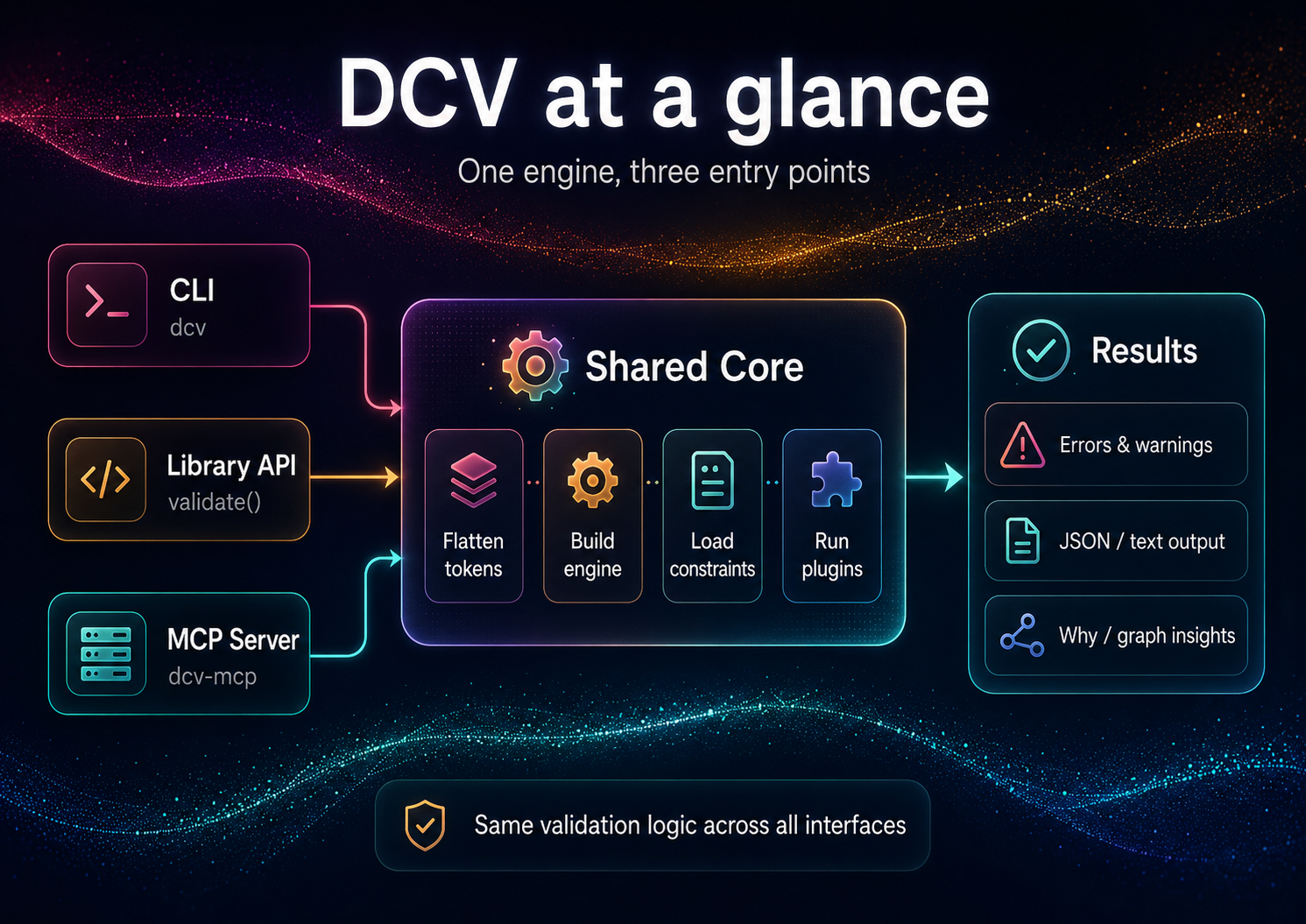
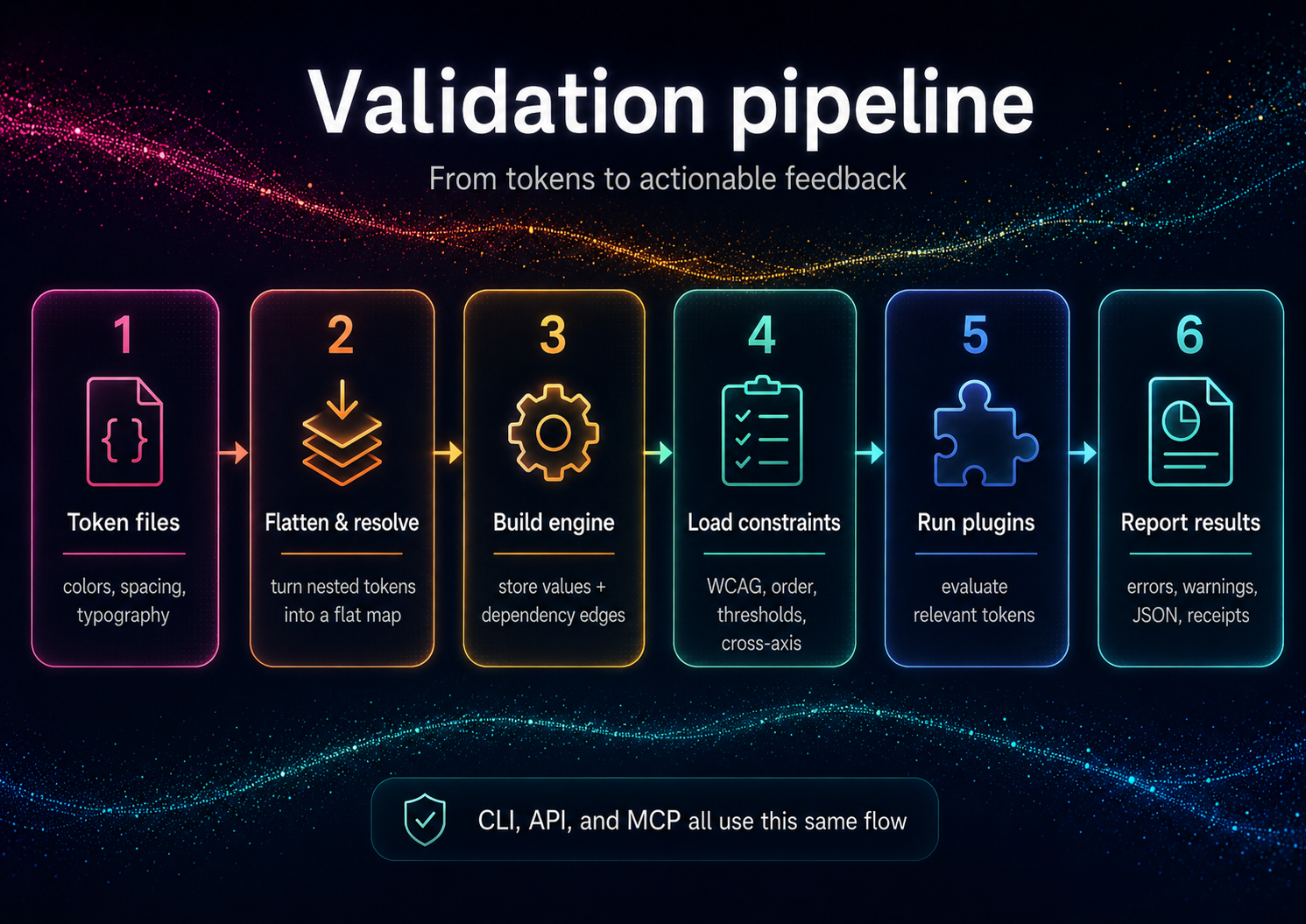
**Design Constraint Validator (DCV)** validates design constraints across token sets and styles:
- ✅ **Accessibility:** WCAG text contrast, perceptual lightness floor/ceilings
- ✅ **Order & Monotonicity:** increasing typography scales, spacing hierarchies
- ✅ **Thresholds & Policies:** min/max ranges, cross-axis guards (size × weight × contrast)
- ✅ **Graph Intelligence:** Hasse/poset graph export; "why" explanations with implicated edges
This is **not** a schema linter; it's a **reasoning validator** for values and relationships.
---
## Installation
```bash
# Local (recommended)
npm i -D design-constraint-validator
# One-off run, no install (the bin name `dcv` belongs to an unrelated package)
npx design-constraint-validator --help
```
After a local install, the shorter `dcv` bin is available (e.g. `npx dcv --help`).
**Requirements:** Node.js ≥ 18.x (ESM)
---
## Quick Start
DCV validates **your** tokens against **your** constraints. From an empty directory:
```bash
# 1. Your design tokens (DTCG-style "$value")
cat > tokens.json <<'JSON'
{
"color": {
"text": { "$value": "#888888" },
"bg": { "$value": "#999999" }
}
}
JSON
# 2. Your constraints — auto-discovered as dcv.config.json in the cwd
cat > dcv.config.json <<'JSON'
{
"constraints": {
"enableBuiltInWcagDefaults": false,
"enableBuiltInThreshold": false,
"wcag": [
{ "foreground": "color.text", "background": "color.bg", "ratio": 4.5, "description": "Body text on background" }
]
}
}
JSON
# 3. Validate (positional path or --tokens; exits non-zero on violations)
npx design-constraint-validator validate tokens.json --summary table
# Explain one token (the tokenId is required)
npx design-constraint-validator why color.text --tokens tokens.json --format table
# Export the dependency graph
npx design-constraint-validator graph --tokens tokens.json --format mermaid > graph.mmd
```
> These one-offs use the full package name because the bare `dcv` bin name on npm
> belongs to an unrelated package. After `npm i -D design-constraint-validator`,
> use the shorter `npx dcv …`.
**Example output** (`validate`):
```text
validate: 1 error(s), 0 warning(s)
ERROR wcag-contrast color.text|color.bg @ Body text on background — Contrast 1.24:1 < 4.5:1
scope rules warnings errors
------ ----- -------- ------
global 1 0 1
```
Exit code is `1` when violations are found, `0` when clean (use `--fail-on off` to always exit `0`). The built-in WCAG/threshold defaults target the bundled example token ids, so disable them (as above) when validating your own token names.
---
## Programmatic API
```ts
import { validate } from 'design-constraint-validator';
// Synchronous. Point at files, or pass `tokens` / `constraints` inline.
const result = validate({
tokensPath: './tokens.json',
configPath: './dcv.config.json', // omit to auto-discover dcv.config.json in the cwd
});
if (!result.ok) {
for (const v of result.violations) {
console.log(`[${v.ruleId}] ${v.message}`);
}
process.exitCode = 1;
}
```
See **[API Reference](docs/API.md)** for complete programmatic usage.
---
## Use from AI agents (MCP)
DCV ships a second binary, `dcv-mcp`, that exposes the validator over MCP stdio for agent clients. Add it to a Claude Desktop or generic MCP client config like this:
```json
{
"mcpServers": {
"dcv": {
"command": "npx",
"args": ["-y", "--package", "design-constraint-validator", "dcv-mcp"]
}
}
}
```
The server exposes six read-only, JSON-returning tools:
- `validate` - validate inline `tokens` or a `tokensPath` against inline `constraints` or a config file.
- `why` - explain provenance, aliases, dependencies, dependents, and alias chain for one token id.
- `graph` - return token dependency `nodes` and `edges`.
- `list-constraints` - enumerate the active constraints (WCAG pairs, thresholds, order/lightness scales, cross-axis) for the given input.
- `explain` - turn a violation into plain-English text plus machine-readable facts.
- `suggest-fix` - compute a verified satisfying value for a violation (WCAG color, threshold/monotonic boundary) without writing anything.
The three derivation tools (`list-constraints`, `explain`, `suggest-fix`) stay read-only — they return suggestions; applying them is up to you (`dcv set` / `dcv patch`). See **[AI Guide](docs/AI-GUIDE.md)** for the full agent loop.
Tool failures are returned as structured JSON: `{ "ok": false, "error": { "code": "...", "message": "..." } }`.
---
## Documentation
### For Everyone
- **[Getting Started](docs/Getting-Started.md)** - 5-minute tutorial
- **[Features & Complete Guide](docs/Features.md)** - All features, examples, and FAQ
- **[Examples](docs/Examples.md)** - Sample projects and use cases
### For Users
- **[Constraints](docs/Constraints.md)** - All 5 constraint types in detail
- **[CLI Reference](docs/CLI.md)** - Complete command documentation
- **[Configuration](docs/Configuration.md)** - Config file options
- **[Concepts](docs/Concepts.md)** - Core terminology and defaults
### For Developers
- **[API Reference](docs/API.md)** - Programmatic usage
- **[Architecture](docs/Architecture.md)** - Internal design
- **[Adapters](docs/Adapters.md)** - Input/output formats
### Additional Resources
- **[Prior Art / Method](docs/prior-art/)** - Design rationale (Decision Themes, receipts)
- **[AI Guide](docs/AI-GUIDE.md)** - Using DCV with ChatGPT/Claude/Copilot
- **[Contributing](CONTRIBUTING.md)** - Contribution guidelines
- **[Security](SECURITY.md)** - Supply chain security measures
---
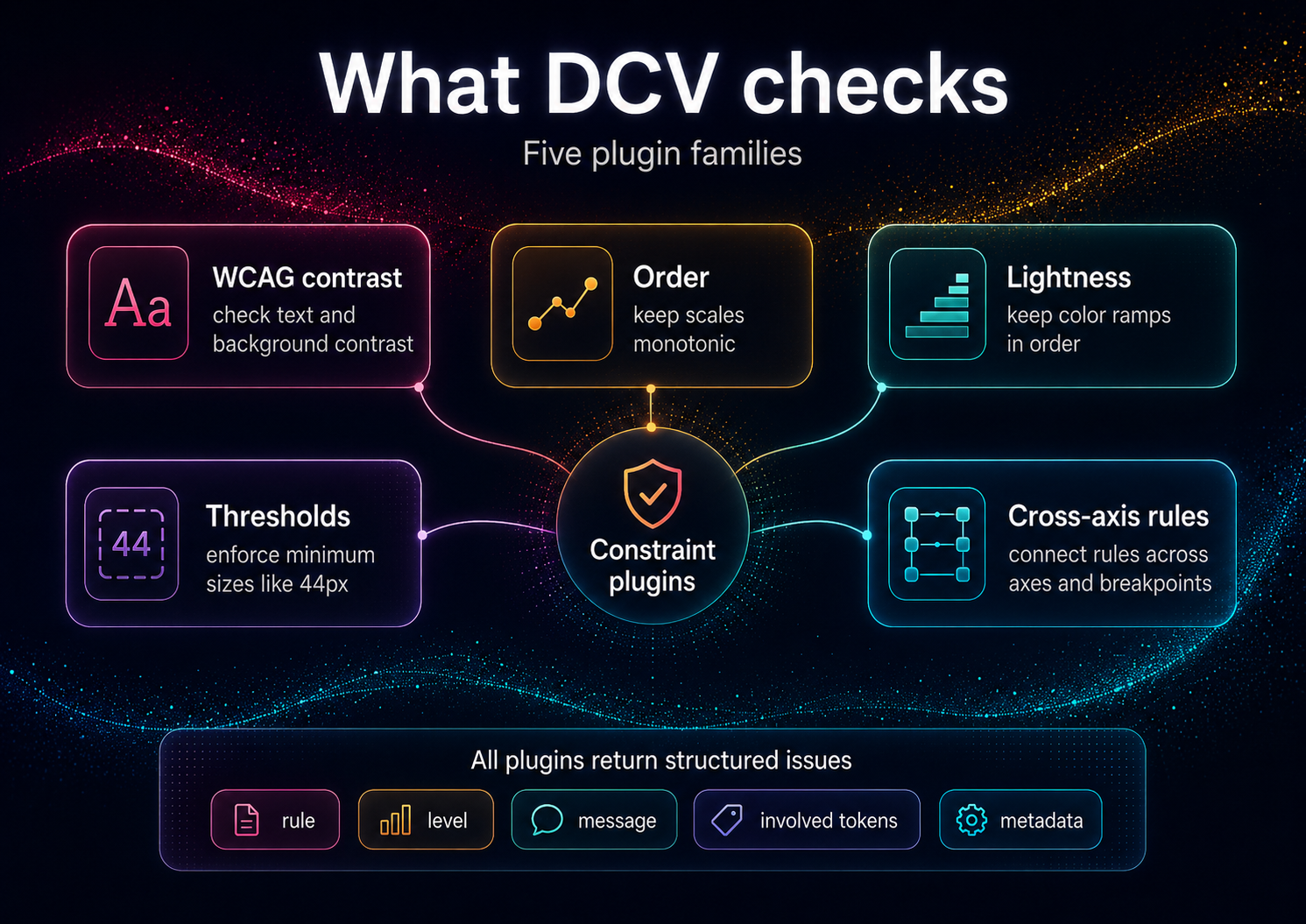
## Why Constraints, Not Conventions?
Conventional linters catch **schema** issues ("has a value, has a type").
**DCV** enforces **relationships** that matter to users and brand integrity:
- Legible contrast under all themes and states
- Proper hierarchical spacing/typography (monotonic scales)
- Coherent cross-axis behavior (e.g., weight increases with size where needed)
- Policy conformance (AA/AAA, internal thresholds)
This transforms tokens from "bags of numbers" into a **formal design system**.
---
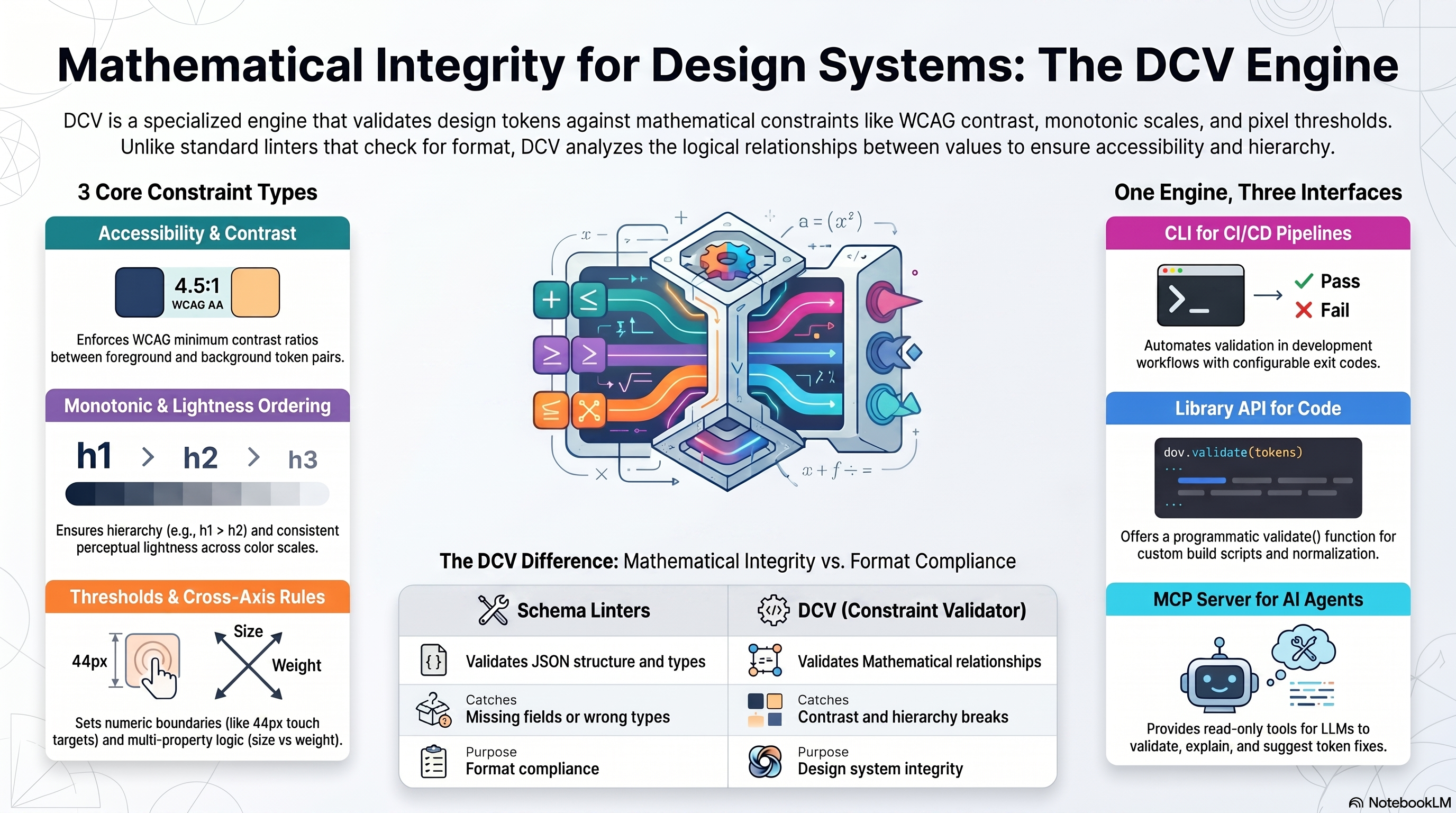
## Comparison: Schema Linters vs DCV
| Feature | Schema Linters | DCV |
|---------|----------------|-----|
| **Validates** | JSON structure, types | Mathematical relationships, accessibility |
| **Catches** | Missing fields, wrong types | Contrast violations, hierarchy breaks |
| **Purpose** | Format compliance | Design system integrity |
| **Examples** | DTCG schema validator | WCAG checks, monotonic scales |
> DCV is not affiliated with Anima's `design-tokens-validator` (schema-focused).
---
## Input Formats
DCV accepts **token JSON** (flat or nested) and optional **policy JSON**.
Adapters normalize common ecosystems:
- **Style Dictionary** - See [examples/style-dictionary/](examples/style-dictionary/)
- **Tokens Studio JSON** - See [examples/tokens-studio/](examples/tokens-studio/)
- **DTCG** (Design Tokens Community Group) — reads the **2025.10 stable spec** (structured sRGB colors, structured dimensions, `{alias}` references, `$extensions` passthrough; non-sRGB spaces warn rather than mis-calculate; composite types out of scope). See [examples/dtcg/](examples/dtcg/)
Full adapter documentation: **[Adapters](docs/Adapters.md)**
---
## DCV & DecisionThemes
DCV is the **standalone validation engine** — use it for any token system.
**DecisionThemes** (coming 2026) is a complete design system framework built on DCV:
- **5-axis decision model** (Tone, Emphasis, Size, Density, Shape)
- **VT/DT pipeline** (Value Themes + DecisiWhat people ask about design-constraint-validator
What is CseperkePapp/design-constraint-validator?
+
CseperkePapp/design-constraint-validator is mcp servers for the Claude AI ecosystem. Constraint validation engine for design tokens with mathematical rigor Visibility: ✅ Public It has 0 GitHub stars and was last updated today.
How do I install design-constraint-validator?
+
You can install design-constraint-validator by cloning the repository (https://github.com/CseperkePapp/design-constraint-validator) or following the README instructions on GitHub. ClaudeWave also provides quick install blocks on this page.
Is CseperkePapp/design-constraint-validator safe to use?
+
CseperkePapp/design-constraint-validator has not been audited yet by our security agent. Review the original repository on GitHub before using it in production.
Who maintains CseperkePapp/design-constraint-validator?
+
CseperkePapp/design-constraint-validator is maintained by CseperkePapp. The last recorded GitHub activity is from today, with 0 open issues.
Are there alternatives to design-constraint-validator?
+
Yes. On ClaudeWave you can browse similar mcp servers at /categories/mcp, sorted by popularity or recent activity.
Deploy design-constraint-validator to your cloud
Ship this repo to production in minutes. Each platform spins up its own environment with editable env vars.
Maintain this repo? Add a badge to your README
Drop the badge into your GitHub README to show it's tracked on ClaudeWave. Each badge links back to this page and reflects the live Trust Score.
[](https://claudewave.com/repo/cseperkepapp-design-constraint-validator)<a href="https://claudewave.com/repo/cseperkepapp-design-constraint-validator"><img src="https://claudewave.com/api/badge/cseperkepapp-design-constraint-validator" alt="Featured on ClaudeWave: CseperkePapp/design-constraint-validator" width="320" height="64" /></a>More MCP Servers

Fair-code workflow automation platform with native AI capabilities. Combine visual building with custom code, self-host or cloud, 400+ integrations.

User-friendly AI Interface (Supports Ollama, OpenAI API, ...)

An open-source AI agent that brings the power of Gemini directly into your terminal.

The fastest path to AI-powered full stack observability, even for lean teams.

🕷️ An adaptive Web Scraping framework that handles everything from a single request to a full-scale crawl!

⭐AI-driven public opinion & trend monitor with multi-platform aggregation, RSS, and smart alerts.🎯 告别信息过载,你的 AI 舆情监控助手与热点筛选工具!聚合多平台热点 + RSS 订阅,支持关键词精准筛选。AI 智能筛选新闻 + AI 翻译 + AI 分析简报直推手机,也支持接入 MCP 架构,赋能 AI 自然语言对话分析、情感洞察与趋势预测等。支持 Docker ,数据本地/云端自持。集成微信/飞书/钉钉/Telegram/邮件/ntfy/bark/slack 等渠道智能推送。