

MCP server for AlbumentationsX image augmentation workflows
claude mcp add albu-mcp -- npx -y skills{
"mcpServers": {
"albu-mcp": {
"command": "npx",
"args": ["-y", "skills"]
}
}
}MCP Servers overview
# AlbumentationsX MCP Model Context Protocol server for [AlbumentationsX](https://github.com/albumentations-team/AlbumentationsX): inspect datasets, preview augmentations, refine them with visual feedback, and export reproducible pipelines. <!-- mcp-name: io.github.dKosarevsky/albu-mcp --> [](https://github.com/dKosarevsky/albu-mcp/actions/workflows/ci.yml) [](https://pypi.org/project/albumentationsx-mcp/) [](pyproject.toml) [](https://registry.modelcontextprotocol.io/v0.1/servers?search=io.github.dKosarevsky/albu-mcp) [](https://skills.sh/dKosarevsky/albu-mcp) 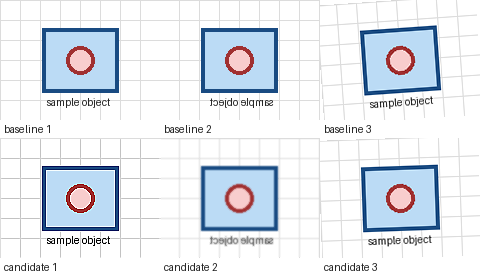 Ask an MCP host for several robustness variants, reject an excessive result such as `too_noisy:high`, compare the adjusted batch previews, and export the accepted pipeline. ## Install ### Claude Desktop [Download the latest `albumentationsx-mcp.mcpb`](https://github.com/dKosarevsky/albu-mcp/releases/latest/download/albumentationsx-mcp.mcpb), install it from **Settings -> Extensions -> Advanced settings**, and select separate image and artifact directories. ### Other MCP Hosts Run the published server with bounded local access: ```bash uvx --from albumentationsx-mcp albumentationsx-mcp \ --allowed-root /absolute/path/to/images \ --artifact-root /absolute/path/to/albu-artifacts ``` `run_first_preview` requires the default `full` or `dataset` capability profile. The smaller `review` profile uses the explicit validate/render fallback in the usage guide, or you can restart with `dataset` or `full`; see [configuration](docs/CONFIGURATION.md). Copyable host configurations are in [the install guide](docs/INSTALL.md). The repository also contains a native Codex plugin bundle. `npx skills add dKosarevsky/albu-mcp` installs agent guidance, not the MCP server. ## First Preview After connecting the server, ask your host: ```text Run the host smoke check. If preview_ready is true, call run_first_preview for /absolute/path/to/images with low intensity and at most 8 images. Show me the contact sheet. When I mention a specific result, call trace_preview_variant before adjusting it. ``` `run_host_smoke_check` returns `preview_ready` and a `preview_request_template`. If resource reads are unavailable, call `get_workflow_example` with `example_id="client-smoke"`. Follow the [First 10 Minutes guide](docs/FIRST_10_MINUTES.md). Detailed guided and advanced workflows, including the explicit `validate_preview_request` fallback, batch previews, and how to compare preview runs, are in [Usage](docs/USAGE.md). Give concrete feedback such as `too_noisy:high` or `exposure_too_weak:medium` before accepting a result. If setup fails, read `albumentationsx://diagnostics/guide` and call `diagnose_environment` for bounded remediation actions. ## Capabilities - Transform discovery, schemas, recipes, and pipeline validation. - Classification, detection, segmentation, OCR, bbox, mask, keypoint, and dataset-quality workflows. - Deterministic previews, contact sheets, annotation overlays, comparison, ranking, and reports. - Interactive MCP Apps review with a text-only fallback for other hosts. - Structured feedback, tuning sessions, and Python, JSON, or YAML export. - Stable agent workflow resources, prompts, diagnostics, and reviewed contract snapshots. The server does not execute arbitrary Python, fetch remote images, overwrite datasets, or train models. Reads are restricted by `--allowed-root`; generated files stay under `--artifact-root`. ## Integrations - [Official Albumentations MCP guide](https://albumentations.ai/docs/integrations/mcp/) - [Official MCP Registry entry](https://registry.modelcontextprotocol.io/v0.1/servers?search=io.github.dKosarevsky/albu-mcp) - [skills.sh agent skill](https://skills.sh/dKosarevsky/albu-mcp) - [Upstream documentation PR](https://github.com/albumentations-team/AlbumentationsX/pull/289) ## Documentation - [Install and host configuration](docs/INSTALL.md) - [Runtime settings and capability profiles](docs/CONFIGURATION.md) - [First 10 minutes](docs/FIRST_10_MINUTES.md) - [Usage](docs/USAGE.md) and [recipes](docs/RECIPES.md) - [MCP Apps review](docs/MCP_APPS_REVIEW.md) and [compatibility policy](docs/COMPATIBILITY.md) - [Documentation index](docs/INDEX.md) - [CHANGELOG.md](CHANGELOG.md) - [server.json](server.json): public MCP Registry metadata. ## Development ```bash uv sync --all-extras --dev uv run pytest uv run ruff check . uv run ruff format --check . uv run ty check ``` Licensed under [AGPL-3.0-or-later](LICENSE).
What people ask about albu-mcp
What is dKosarevsky/albu-mcp?
+
dKosarevsky/albu-mcp is mcp servers for the Claude AI ecosystem. MCP server for AlbumentationsX image augmentation workflows It has 6 GitHub stars and was last updated today.
How do I install albu-mcp?
+
You can install albu-mcp by cloning the repository (https://github.com/dKosarevsky/albu-mcp) or following the README instructions on GitHub. ClaudeWave also provides quick install blocks on this page.
Is dKosarevsky/albu-mcp safe to use?
+
dKosarevsky/albu-mcp has not been audited yet by our security agent. Review the original repository on GitHub before using it in production.
Who maintains dKosarevsky/albu-mcp?
+
dKosarevsky/albu-mcp is maintained by dKosarevsky. The last recorded GitHub activity is from today, with 0 open issues.
Are there alternatives to albu-mcp?
+
Yes. On ClaudeWave you can browse similar mcp servers at /categories/mcp, sorted by popularity or recent activity.
Deploy albu-mcp to your cloud
Ship this repo to production in minutes. Each platform spins up its own environment with editable env vars.
Maintain this repo? Add a badge to your README
Drop the badge into your GitHub README to show it's tracked on ClaudeWave. Each badge links back to this page and reflects the live Trust Score.
[](https://claudewave.com/repo/dkosarevsky-albu-mcp)<a href="https://claudewave.com/repo/dkosarevsky-albu-mcp"><img src="https://claudewave.com/api/badge/dkosarevsky-albu-mcp" alt="Featured on ClaudeWave: dKosarevsky/albu-mcp" width="320" height="64" /></a>More MCP Servers

Fair-code workflow automation platform with native AI capabilities. Combine visual building with custom code, self-host or cloud, 400+ integrations.

User-friendly AI Interface (Supports Ollama, OpenAI API, ...)

An open-source AI agent that brings the power of Gemini directly into your terminal.

The fastest path to AI-powered full stack observability, even for lean teams.

Real-time global intelligence dashboard. AI-powered news aggregation, geopolitical monitoring, and infrastructure tracking in a unified situational awareness interface

🕷️ An adaptive Web Scraping framework that handles everything from a single request to a full-scale crawl!