

Annotated screenshots for AI agents: Skitch-style arrows, numbered steps, boxes, labels, solid redaction
- ✓Open-source license (AGPL-3.0)
- ✓Actively maintained (<30d)
- ✓Clear description
- ✓Topics declared
- ✓Documented (README)
claude mcp add ainotate -- npx -y skills{
"mcpServers": {
"ainotate": {
"command": "npx",
"args": ["-y", "skills"]
}
}
}MCP Servers overview
<h1>
<picture>
<source media="(prefers-color-scheme: dark)" srcset="https://raw.githubusercontent.com/dontpayfull/AInotate/main/docs/brand/ainotate-logo-dark.png">
<img alt="AInotate" src="https://raw.githubusercontent.com/dontpayfull/AInotate/main/docs/brand/ainotate-logo.png" width="360">
</picture>
</h1>
**Annotated screenshots for AI agents: the agent shows you the button instead of describing where it is.**
[](https://github.com/dontpayfull/AInotate/actions/workflows/tests.yml)
[](https://pypi.org/project/ainotate/)
[](https://pypi.org/project/ainotate/)
[](https://github.com/dontpayfull/AInotate/blob/main/LICENSE)
[](https://github.com/dontpayfull/AInotate/blob/main/skills/ainotate/references/mcp.md)
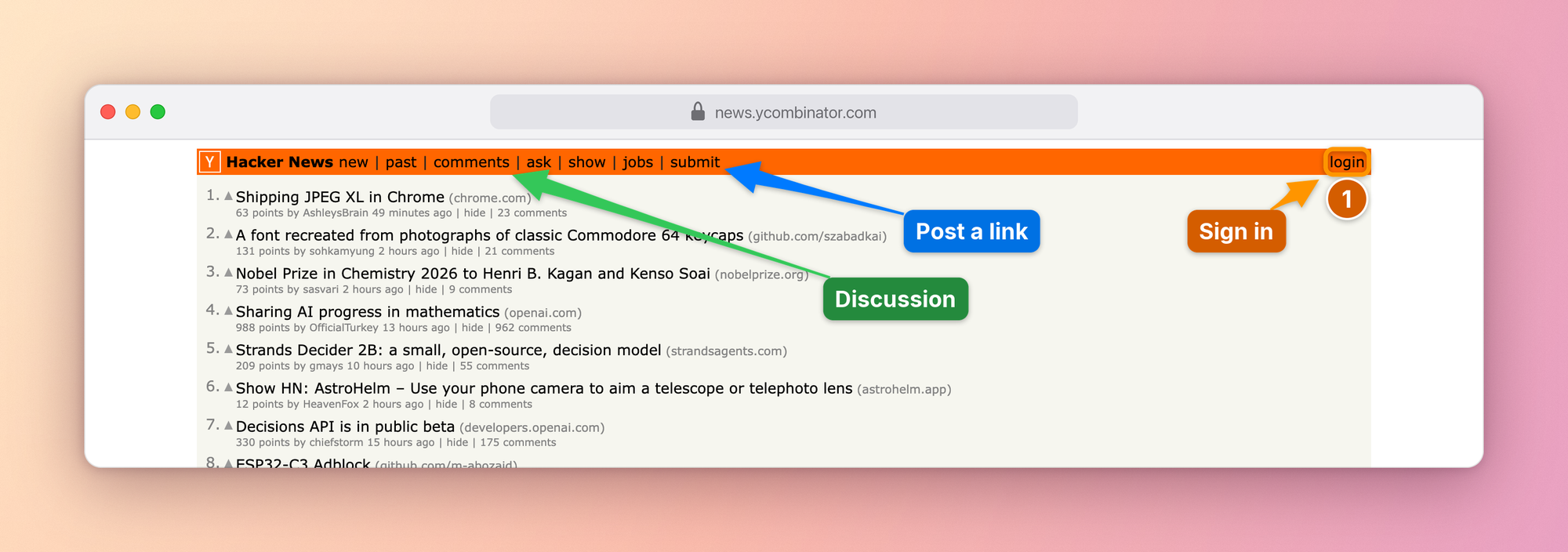
Ask an agent how to post a link on Hacker News and you usually get
directions: the orange bar at the top, the last link after *jobs*. With
AInotate it sends the picture above instead and says "click *submit*,
where the blue arrow points".
It captures a web page, a window or a screenshot you already have, finds
the elements you mean, draws numbered steps, arrows, boxes and labels
where they hide the least, blacks out emails and tokens, and looks at the
result before sending it. It works in Claude Code, Cowork, Claude Desktop,
Codex, Gemini CLI, Cursor and any other MCP client, and from the command
line or Python.
We built it at [DontPayFull](https://www.dontpayfull.com) because our own
agents kept answering "where is it?" with a paragraph. A picture with a
number on the right button settles the question in a second, in a chat,
a ticket or a guide.
## What it is for
- **"Where is it?"** Settings, menus, buttons that hide behind icons. The
agent answers with the screen itself, the control boxed and numbered.
- **"Walk me through it."** One image per step, in the order to follow;
`ainotate guide` turns them into a Markdown, HTML or PDF guide.
- **"Your turn."** A permission switch, a 2FA code, a payment or consent
screen: the agent does not click for you. It shows exactly what to press
and says what the click does.
- **Bug reports and tickets.** What is wrong, outlined in red, what is
right in green, emails and tokens blacked out before anyone sees them.
- **Docs and changelogs.** Screenshots that point at the thing the text
talks about, re-shot from the same spec when the UI changes; before and
after plates for a change.
## Set it up in your agent
**1. Install**, one of:
| With | Command |
|---|---|
| Homebrew (macOS) | `brew install dontpayfull/tap/ainotate` |
| pipx or uv (Python 3.10+) | `pipx install "ainotate[all]"` or `uv tool install "ainotate[all]"` |
| Claude plugin or Desktop extension | nothing to install first: step 2 brings AInotate along |
Then `ainotate doctor` checks the machine and prints the exact fix for
anything missing, including the one command that downloads Chromium for
web capture. To update later: `brew upgrade ainotate`, `pipx upgrade
ainotate` or `uv tool upgrade ainotate`; the plugin with `/plugin
marketplace update ainotate`; the Desktop extension by opening the newer
`.mcpb` from Releases.
**2. Connect it** to the agent you use:
| Agent | How |
|---|---|
| Claude Code | `/plugin marketplace add dontpayfull/AInotate`, then `/plugin install ainotate@ainotate`: skill and MCP server in one step |
| Cowork | Customize > Plugins > Add marketplace > `dontpayfull/AInotate`, then install AInotate |
| Claude Desktop | download `ainotate-<version>.mcpb` from [Releases](https://github.com/dontpayfull/AInotate/releases/latest) and open it: a one-click extension |
| Codex | `codex plugin marketplace add dontpayfull/AInotate`, then `codex plugin add ainotate@ainotate`: skill and MCP server |
| Gemini CLI | `gemini extensions install https://github.com/dontpayfull/AInotate`: skill and MCP server |
| Cursor | [](https://cursor.com/install-mcp?name=ainotate&config=eyJjb21tYW5kIjoidXZ4IiwiYXJncyI6WyItLWZyb20iLCJhaW5vdGF0ZVthbGxdIiwiYWlub3RhdGUiLCJtY3AiXX0=) (needs [uv](https://docs.astral.sh/uv/)), plus the skill below |
| VS Code, Cline, other MCP clients | command `ainotate`, arguments `mcp` (stdio); also listed in the [MCP Registry](https://registry.modelcontextprotocol.io) as `io.github.dontpayfull/ainotate`; agents can follow [llms-install.md](https://github.com/dontpayfull/AInotate/blob/main/llms-install.md) |
```json
{"mcpServers": {"ainotate": {"command": "ainotate", "args": ["mcp"]}}}
```
AInotate runs on your own computer: Cowork reaches it through the Claude
desktop app, so keep the app open while a task uses it. The plugin starts
the installed `ainotate`, or runs it with `uvx` when it is not installed.
The **skill** teaches an agent when and how to annotate: pick a source,
find exact positions, annotate, read the image to verify, deliver. The
plugin brings it along; without the plugin it ships with the package:
```bash
ainotate install-skill # Claude Code and Codex (~/.claude/skills, ~/.agents/skills)
ainotate install-skill --zip ~/Desktop # a ZIP for Claude Desktop, Cowork, claude.ai:
# Customize > Skills > Upload a skill
npx skills add dontpayfull/AInotate # any agent the skills CLI knows (Cursor, Windsurf, ...)
```
Config paths for every OS, permissions and the tool list:
[skills/ainotate/references/mcp.md](https://github.com/dontpayfull/AInotate/blob/main/skills/ainotate/references/mcp.md).
**3. Ask.** "Show me where to switch Wikipedia to dark mode." The agent
captures the page, annotates it, checks it and sends the image. With the
skill it also does this on its own whenever an answer depends on where
something is on the screen: a "how do I" question, a visual bug, a
before/after of a change.
## Gallery
Every image below was made in one `shoot` call against a public site:
open the page, find the elements, place the labels, draw, frame. The specs
are in [docs/images/specs](https://github.com/dontpayfull/AInotate/tree/main/docs/images/specs).
| | |
|---|---|
| 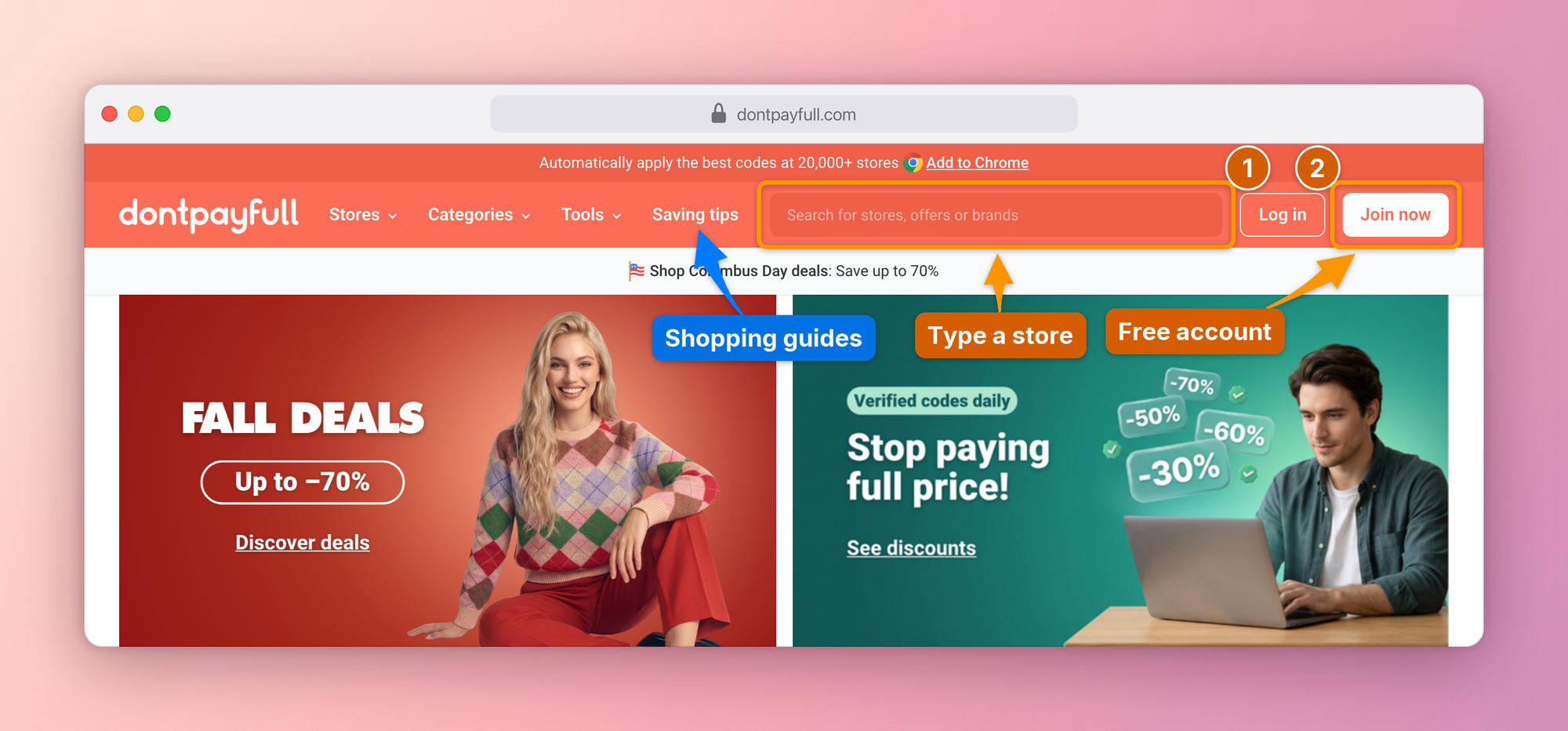 | 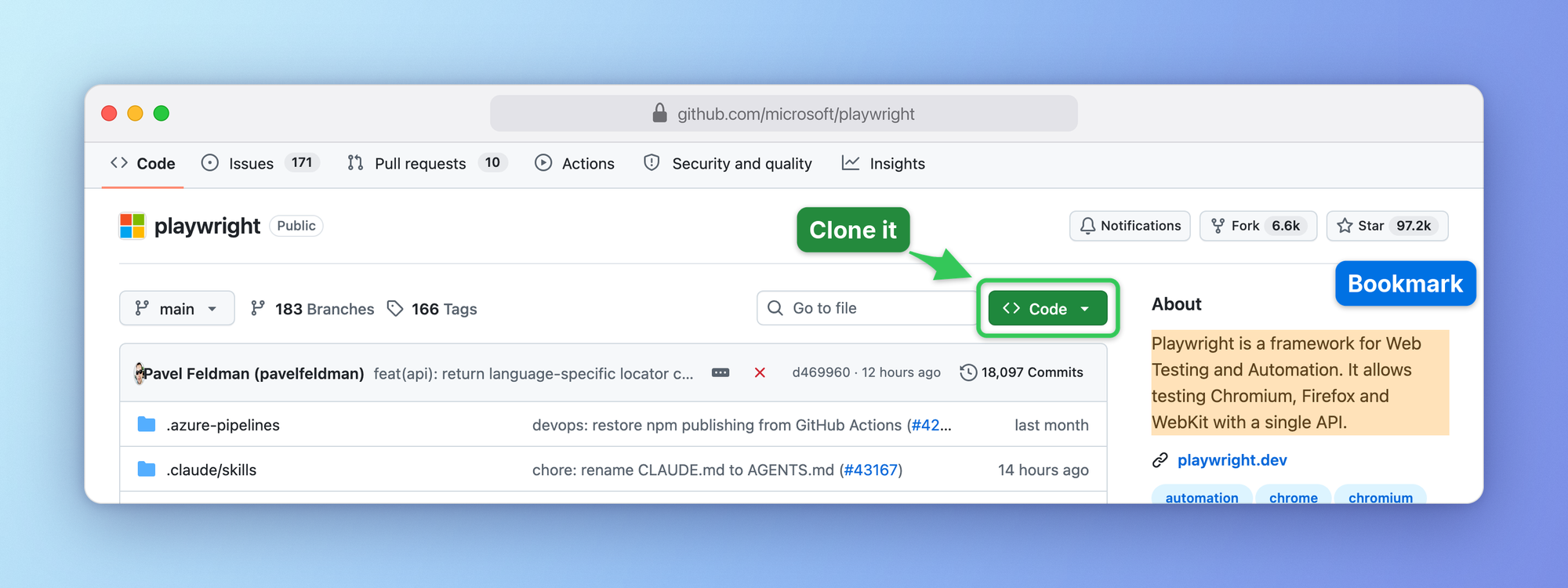 |
| **Numbered steps** on the busy header of [DontPayFull](https://www.dontpayfull.com), coupons for 20,000+ stores | **Box, arrow and highlight** on GitHub |
| 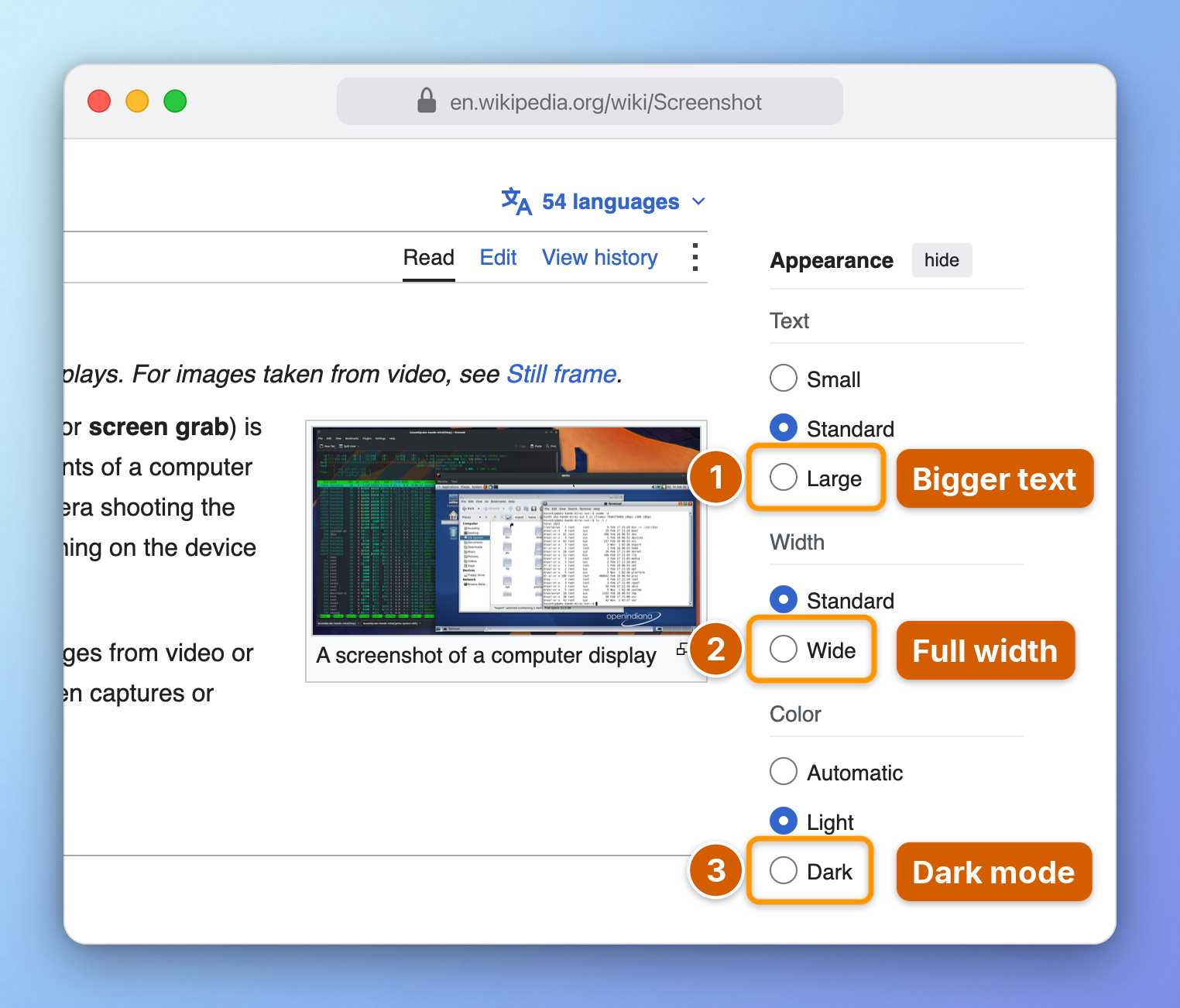 | 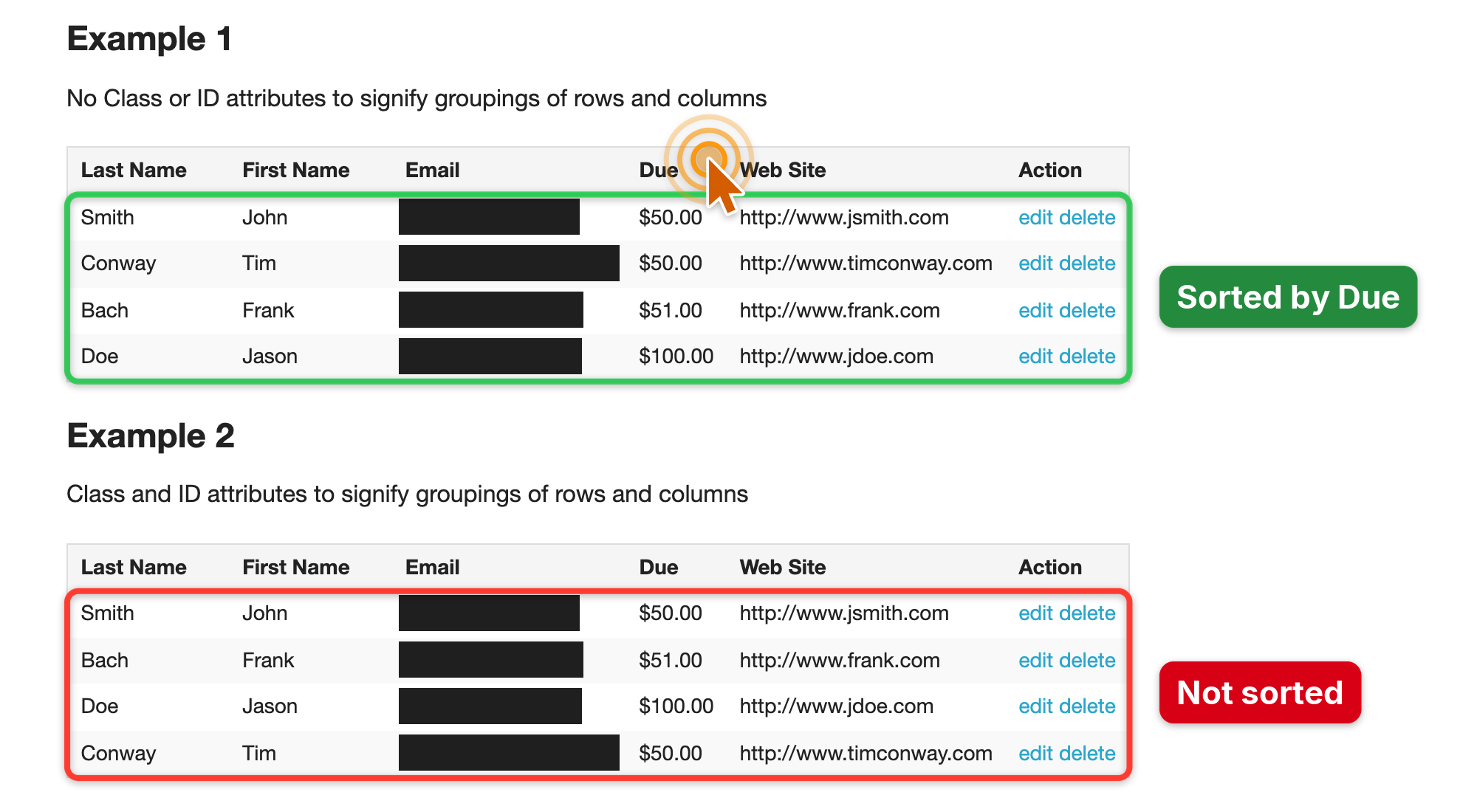 |
| **Step-by-step guide** with browser chrome and a gradient frame | **Bug report**, emails redacted automatically by the privacy scan |
| 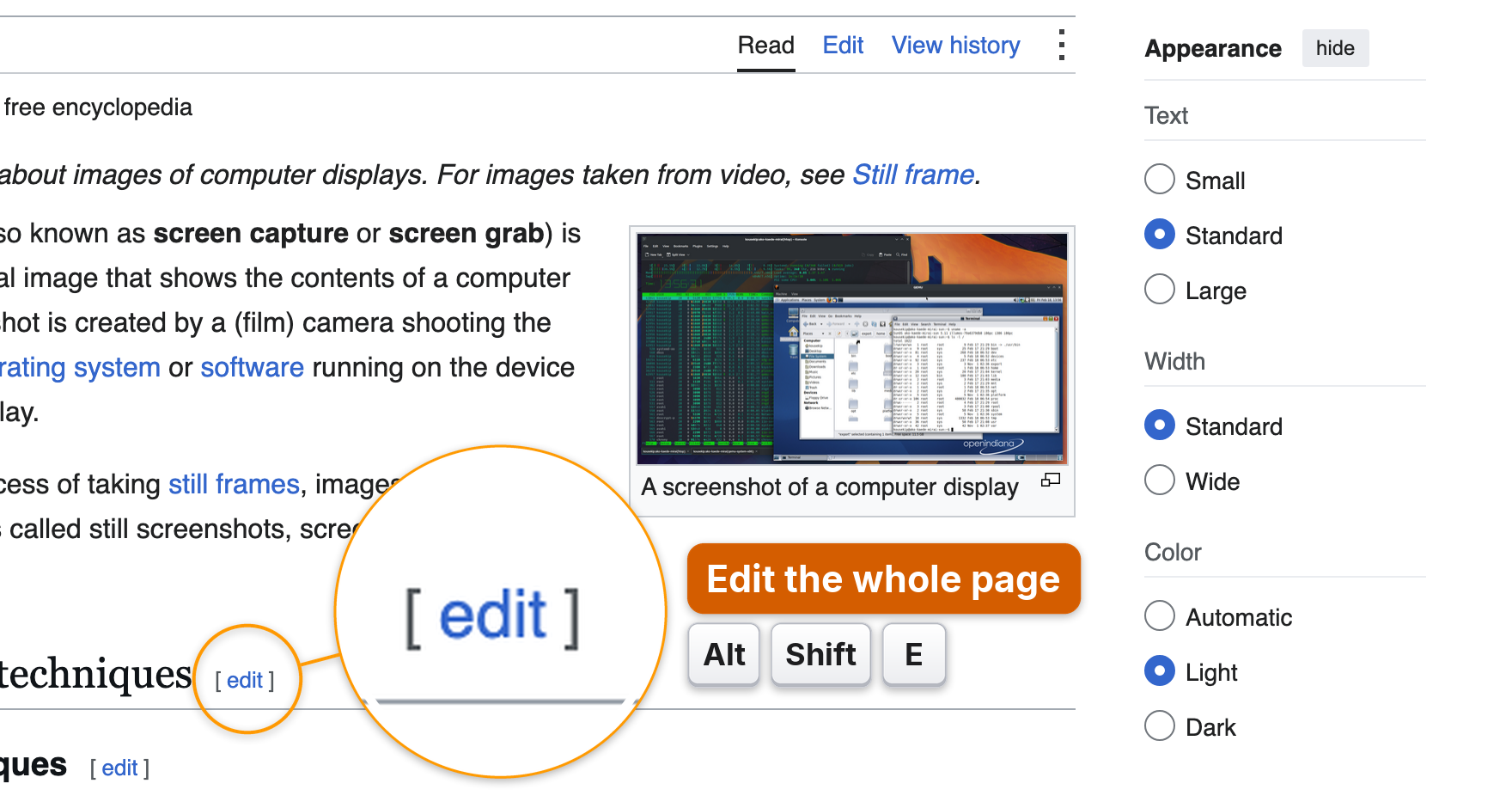 | 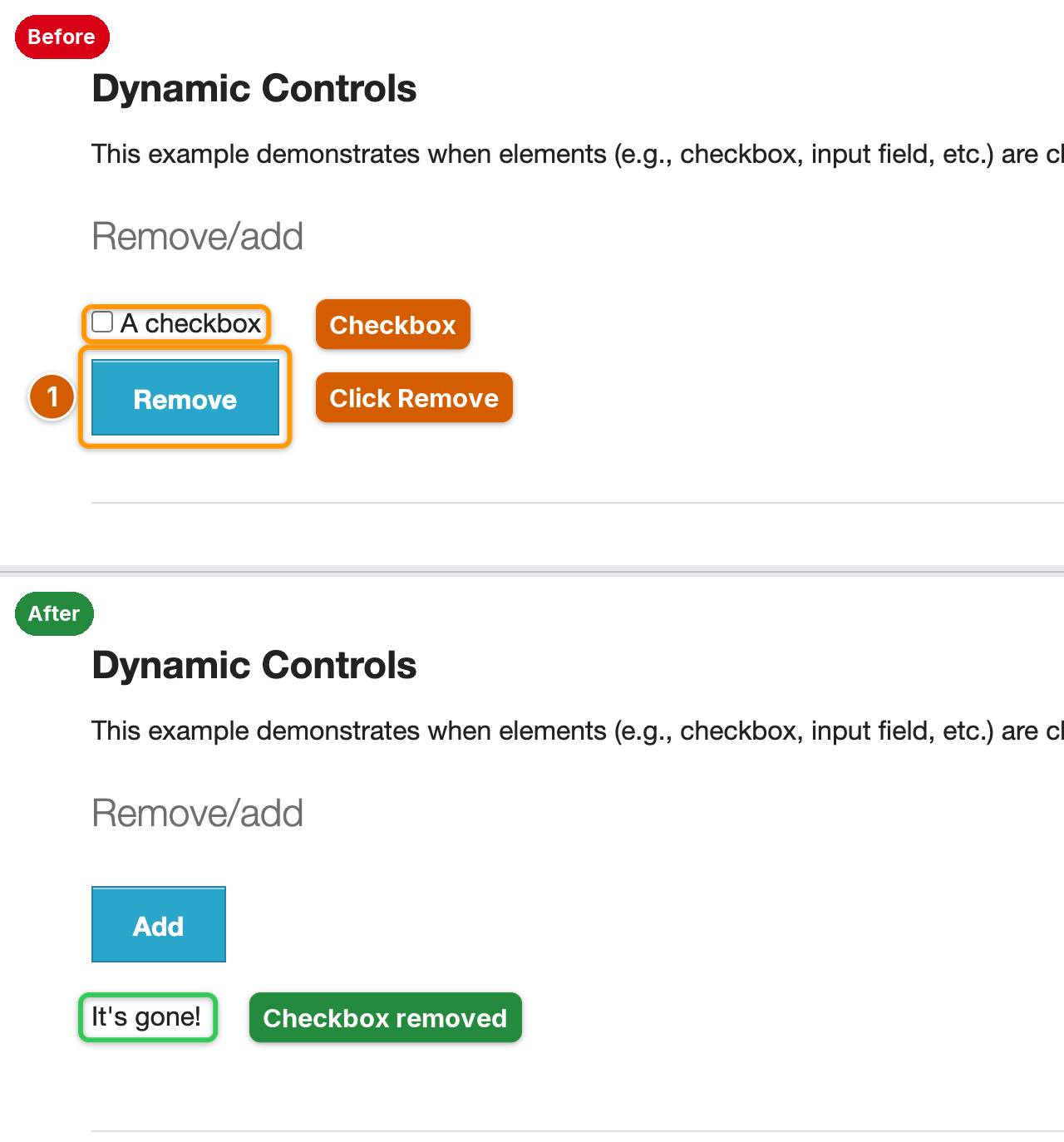 |
| **Magnifier and keycaps** for tiny controls and shortcuts | **Before / after** plate from two shots |
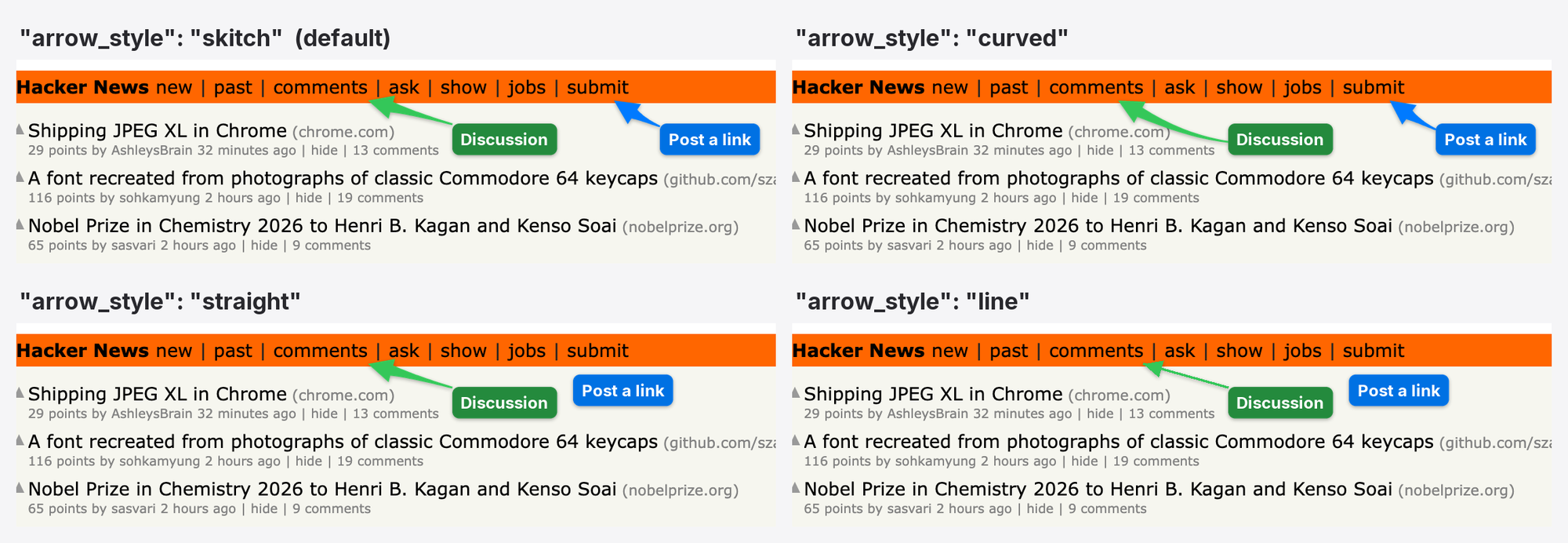
<p align="center"><b>Four arrow styles</b>: <code>skitch</code> (default: straight when the way is clear, a gentle bend when it is long and diagonal, a curve around text), <code>curved</code>, <code>straight</code>, <code>line</code></p>
<p align="center">
<img src="https://raw.githubusercontent.com/dontpayfull/AInotate/main/docs/images/phone.png" width="360" alt="Wikipedia on a phone-sized viewport with the menu and search buttons numbered">
<br><b>Phone preset</b>: mobile viewport, touch and user agent
</p>
## Labels that stay off the content

A label dropped at a fixed spot next to its target usually lands on the
text the reader needs. AInotate places every label itself:
- It maps the page content first (text, icons, lines, images) and tries
hundreds of spots per label. Empty space near the target wins; a spot
over text is used only when the frame has no free room.
- Arrows are priced too: a long arrow, or one that crosses text, another
label or another mark, loses to a shorter, cleaner one. When the
straight path crosses text, the arrow curves around it.
- All labels are planned together, so the first one cannot take the only
clean spot a later one needs.
- Step badges sit on the corner of their box that covers the least.
The image is never enlarged to make room. IfWhat people ask about AInotate
What is dontpayfull/AInotate?
+
dontpayfull/AInotate is mcp servers for the Claude AI ecosystem. Annotated screenshots for AI agents: Skitch-style arrows, numbered steps, boxes, labels, solid redaction It has 3 GitHub stars and its last recorded update is dated 2026-10-10.
How do I install AInotate?
+
You can install AInotate by cloning the repository (https://github.com/dontpayfull/AInotate) or following the README instructions on GitHub. ClaudeWave also provides quick install blocks on this page.
Is dontpayfull/AInotate safe to use?
+
Our security agent has analyzed dontpayfull/AInotate and assigned a Trust Score of 95/100 (tier: Verified). See the full breakdown of passed checks and flags on this page.
Who maintains dontpayfull/AInotate?
+
dontpayfull/AInotate is maintained by dontpayfull. The last recorded GitHub activity is dated 2026-10-10, with 1 open issues.
Are there alternatives to AInotate?
+
Yes. On ClaudeWave you can browse similar mcp servers at /categories/mcp, sorted by popularity or recent activity.
Deploy AInotate to your cloud
Ship this repo to production in minutes. Each platform spins up its own environment with editable env vars.
Maintain this repo? Add a badge to your README
Drop the badge into your GitHub README to show it's tracked on ClaudeWave. Each badge links back to this page and reflects the live Trust Score.
[](https://claudewave.com/repo/dontpayfull-ainotate)<a href="https://claudewave.com/repo/dontpayfull-ainotate"><img src="https://claudewave.com/api/badge/dontpayfull-ainotate" alt="Featured on ClaudeWave: dontpayfull/AInotate" width="320" height="64" /></a>More MCP Servers

Fair-code workflow automation platform with native AI capabilities. Combine visual building with custom code, self-host or cloud, 400+ integrations.

User-friendly AI Interface (Supports Ollama, OpenAI API, ...)

An open-source AI agent that brings the power of Gemini directly into your terminal.

Real-time global intelligence dashboard. AI-powered news aggregation, geopolitical monitoring, and infrastructure tracking in a unified situational awareness interface

🕷️ An adaptive Web Scraping framework that handles everything from a single request to a full-scale crawl! Don't be shy, join here: https://discord.gg/EMgGbDceNQ and follow here for daily tips and tricks: https://x.com/Scrapling_dev

The fastest path to AI-powered full stack observability, even for lean teams.