

Read-only TestLink MCP server with safety gates
- ✓Open-source license (MIT)
- ✓Actively maintained (<30d)
- ✓Clear description
- ✓Documented (README)
claude mcp add testlink-mcp -- npx -y testlink-mcp{
"mcpServers": {
"testlink-mcp": {
"command": "npx",
"args": ["-y", "testlink-mcp"]
}
}
}MCP Servers overview
# testlink-mcp
An AI-friendly, safety-first Model Context Protocol server for TestLink 1.9.20. It exposes normalized discovery and analysis tools, bounded cursor pagination, structured output, and preview-before-apply writes over stdio.
This repository is a clean implementation based on TestLink's public XML-RPC interface and the public MCP SDK. It has no dependency on a private TestLink package or private source tree.
## Highlights
- Starts without credentials so MCP clients can discover all tools, resources, and prompts.
- Explicit deterministic demo mode for evaluation and onboarding.
- `structuredContent`, `outputSchema`, tool annotations, cursor pagination, and stable error codes.
- Attachment metadata only; attachment content and base64 payloads are removed.
- Writes disabled by default. There is no delete tool.
- Every apply requires `confirm: true`, an unexpired single-use 10-minute preview, and an unchanged server snapshot.
- Side-effect calls are never automatically retried; apply attempts are written to a redacted operation ledger.
- Runtime guard blocks unsupported/EOL odd Node releases and security patch levels below the declared floor.
## Safe write demo
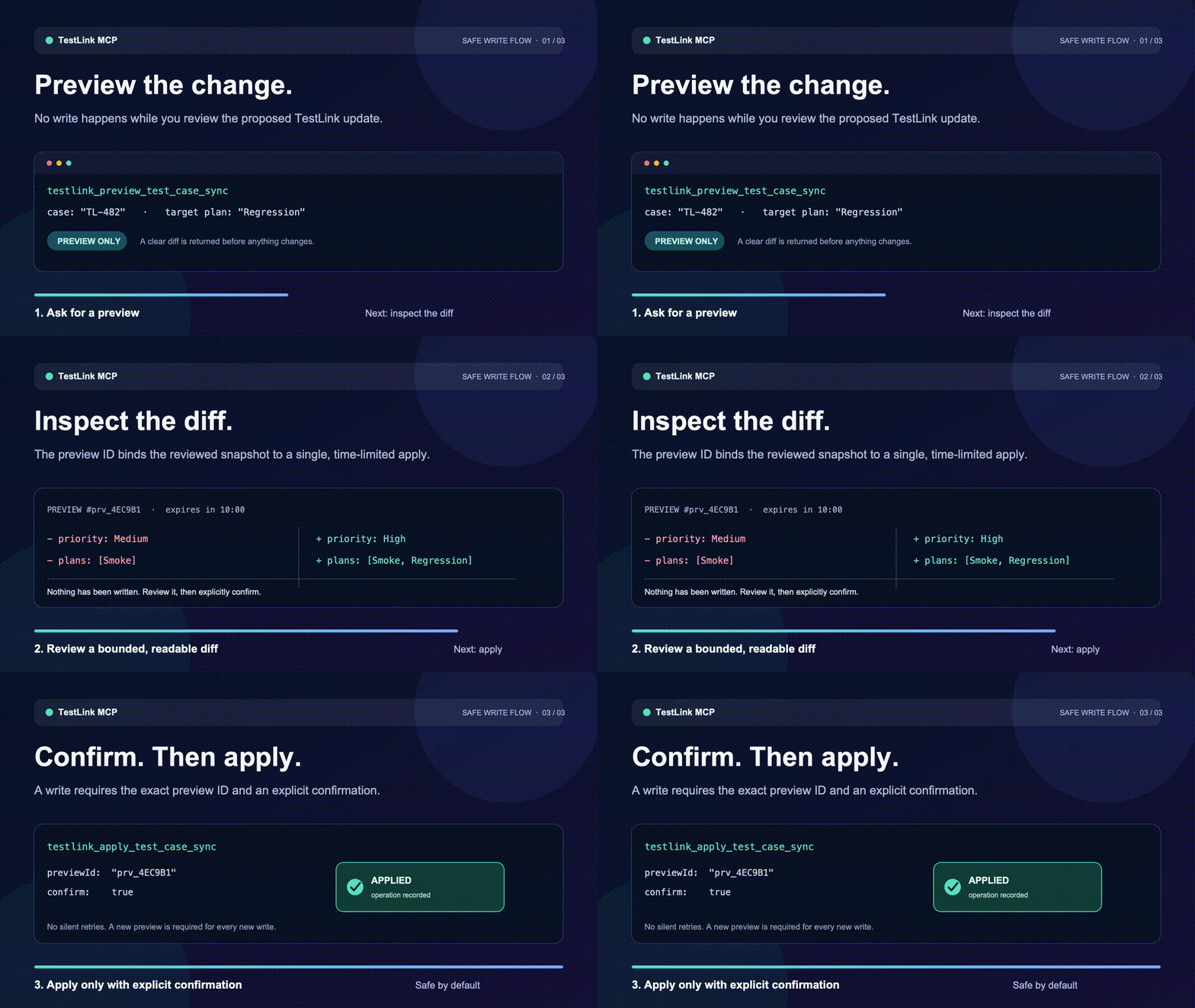
The demo uses synthetic data only. It shows the required safety boundary:
**Preview** a proposed change, **inspect** the bounded diff, then call apply
with the exact preview ID and `confirm: true`. No write happens during preview.
The editable source frames are in
[`docs/assets/testlink-safety`](https://github.com/Eason0in/testlink-mcp/tree/main/docs/assets/testlink-safety).
## Requirements
- Node.js `^22.23.2 || ^24.18.1 || ^26.5.1`
- TestLink 1.9.20 with its XML-RPC API enabled
The development and container baseline is Node 24.19.0 LTS. CI also runs Node 22.23.2 and 26.7.0.
## Quick start
```bash
nvm use
npm ci
npm run build
TESTLINK_DEMO_MODE=true node dist/cli.js
```
Future npm invocation after publication:
```bash
npx -y testlink-mcp@1.0.3
```
MCP client configuration:
```json
{
"mcpServers": {
"testlink": {
"command": "npx",
"args": ["-y", "testlink-mcp@1.0.3"],
"env": {
"TESTLINK_URL": "https://testlink.example.com/testlink",
"TESTLINK_DEV_KEY": "your-testlink-dev-key"
}
}
}
}
```
Do not put real credentials in tracked files. Copy `.env.example` to an ignored `.env`, or inject environment variables from your MCP client/secret manager.
## Tools
| Workflow | Tool | Purpose |
| --- | --- | --- |
| Start | `testlink_get_server_capabilities` | Check configuration, compatibility, demo mode, and write policy |
| Explore | `testlink_list_projects` | List projects |
| Explore | `testlink_list_test_plans` | List plans in a project |
| Explore | `testlink_list_builds` | List builds in a plan |
| Explore | `testlink_list_test_suites` | Walk one suite level |
| Analyze | `testlink_search_test_cases` | Search cases in a bounded project/suite scope |
| Analyze | `testlink_get_test_case` | Retrieve one normalized case |
| Analyze | `testlink_list_test_case_attachments` | Retrieve safe attachment metadata |
| Analyze | `testlink_get_traceability` | Inspect requirement links and membership in one required test plan |
| Analyze | `testlink_get_execution_history` | Inspect recent execution evidence |
| Validate | `testlink_validate_test_case` | Find incomplete or ambiguous case content |
| Preview | `testlink_preview_test_case_sync` | Preview create/update and plan memberships |
| Apply | `testlink_apply_test_case_sync` | Apply an unchanged confirmed sync preview |
| Preview | `testlink_preview_execution_result` | Preview passed/failed/blocked reporting |
| Apply | `testlink_apply_execution_result` | Apply an unchanged confirmed result preview |
All tools return:
```json
{
"ok": true,
"data": {},
"meta": {
"source": "testlink",
"requestId": "..."
}
}
```
Failures use `ok: false` with `{ code, message, retryable, details? }`. Consumers should branch on `error.code`, not message text.
## Safe write workflow
1. Search for an existing case and retrieve its current version.
2. Validate the desired test case.
3. Call the relevant preview tool.
4. For a create, provide the TestLink `authorLogin`; `desiredCase.suiteId`,
`summary`, and `steps` are also required by TestLink 1.9.20.
5. Show `proposedChanges` to the user and obtain explicit confirmation.
6. Call apply with the preview ID and `confirm: true` within 10 minutes.
7. A confirmed apply consumes its preview before any side effect. After any
success, conflict, or failure, create and review a new preview before trying
again.
8. If apply returns `OUTCOME_UNKNOWN`, do not retry. The remote write may have
succeeded; reconcile the TestLink case, plan membership, or execution result
first.
Enable writes only in the server process that should perform them:
```bash
TESTLINK_WRITE_ENABLED=true npx -y testlink-mcp@1.0.3
```
The default ledger path is `~/.local/state/testlink-mcp/operations.jsonl`. Override it with `TESTLINK_LEDGER_PATH`. Before a remote write, the server persists an `attempted` row; it then records `applied` or `outcome_unknown`. The ledger contains hashes and redacted outcomes, not developer keys.
## Configuration
| Variable | Default | Meaning |
| --- | --- | --- |
| `TESTLINK_URL` | unset | TestLink base URL or complete XML-RPC endpoint |
| `TESTLINK_DEV_KEY` | unset | Personal TestLink API key |
| `TESTLINK_DEMO_MODE` | `false` | Use deterministic local demo data |
| `TESTLINK_WRITE_ENABLED` | `false` | Permit confirmed apply tools |
| `TESTLINK_REQUEST_TIMEOUT_MS` | `30000` | Request timeout, 100–300000 ms |
| `TESTLINK_MAX_RESPONSE_BYTES` | `5242880` | Maximum XML response size |
| `TESTLINK_LEDGER_PATH` | user state directory | Redacted JSONL operation ledger |
| `NODE_EXTRA_CA_CERTS` | unset | Optional additional CA bundle; TLS verification remains enabled |
Demo mode is explicit and wins over remote configuration:
```bash
TESTLINK_DEMO_MODE=true TESTLINK_WRITE_ENABLED=true node dist/cli.js
```
## Development
```bash
npm ci
npm run check
npm test
npm run eval
npm run build
npm audit --omit=dev --audit-level=high
npm pack --dry-run
```
The offline tool-selection eval checks that common user intents select search, validation, preview, and apply tools distinctly. It is deterministic and does not send data to an external model.
## Docker
The image runs as a non-root user and uses Node 24.19.0. Build without pushing:
```bash
docker buildx build --platform linux/amd64,linux/arm64 --tag testlink-mcp:local --output type=oci,dest=testlink-mcp.oci.tar .
```
Future image name after approval and publication: `ghcr.io/eason0in/testlink-mcp:1.0.3`.
## Release policy
Version 1.0.3 is release-ready but publication remains an explicit action. The
protected release workflow requires a signed version tag, reruns the complete
test/eval/audit/SBOM/package gates, publishes npm with provenance, publishes a
multi-architecture GHCR image with SBOM and provenance, creates a GitHub
Release, and finally publishes the validated MCP Registry entry.
A separate protected live-smoke workflow verifies the installed package against
a real TestLink 1.9.20 instance using read-only calls. Its URL and developer key
must be stored as environment secrets and are never written to logs.
The package manifest and `server.json` share the MCP name `io.github.Eason0in/testlink-mcp`. Registry validation can be run without publishing:
```bash
mcp-publisher validate server.json
```
The account-side setup and submission data for npm, the MCP Registry, Glama,
and MCP.so are tracked in [Marketplace submission checklist](docs/marketplace-submission.md).
## Public references
- [TestLink 1.9.20 source and release branch](https://github.com/TestLinkOpenSourceTRMS/testlink-code/tree/testlink_1_9_20_fixed)
- [Model Context Protocol TypeScript SDK](https://github.com/modelcontextprotocol/typescript-sdk)
- [Official MCP Registry publisher commands](https://github.com/modelcontextprotocol/registry/blob/main/docs/reference/cli/commands.md)
## License
MIT
What people ask about testlink-mcp
What is Eason0in/testlink-mcp?
+
Eason0in/testlink-mcp is mcp servers for the Claude AI ecosystem. Read-only TestLink MCP server with safety gates It has 0 GitHub stars and its last recorded update is dated 2026-08-24.
How do I install testlink-mcp?
+
You can install testlink-mcp by cloning the repository (https://github.com/Eason0in/testlink-mcp) or following the README instructions on GitHub. ClaudeWave also provides quick install blocks on this page.
Is Eason0in/testlink-mcp safe to use?
+
Our security agent has analyzed Eason0in/testlink-mcp and assigned a Trust Score of 87/100 (tier: Trusted). See the full breakdown of passed checks and flags on this page.
Who maintains Eason0in/testlink-mcp?
+
Eason0in/testlink-mcp is maintained by Eason0in. The last recorded GitHub activity is dated 2026-08-24, with 2 open issues.
Are there alternatives to testlink-mcp?
+
Yes. On ClaudeWave you can browse similar mcp servers at /categories/mcp, sorted by popularity or recent activity.
Deploy testlink-mcp to your cloud
Ship this repo to production in minutes. Each platform spins up its own environment with editable env vars.
Maintain this repo? Add a badge to your README
Drop the badge into your GitHub README to show it's tracked on ClaudeWave. Each badge links back to this page and reflects the live Trust Score.
[](https://claudewave.com/repo/eason0in-testlink-mcp)<a href="https://claudewave.com/repo/eason0in-testlink-mcp"><img src="https://claudewave.com/api/badge/eason0in-testlink-mcp" alt="Featured on ClaudeWave: Eason0in/testlink-mcp" width="320" height="64" /></a>More MCP Servers

Fair-code workflow automation platform with native AI capabilities. Combine visual building with custom code, self-host or cloud, 400+ integrations.

User-friendly AI Interface (Supports Ollama, OpenAI API, ...)

An open-source AI agent that brings the power of Gemini directly into your terminal.

Real-time global intelligence dashboard. AI-powered news aggregation, geopolitical monitoring, and infrastructure tracking in a unified situational awareness interface

The fastest path to AI-powered full stack observability, even for lean teams.

🕷️ An adaptive Web Scraping framework that handles everything from a single request to a full-scale crawl!