

Read/write MCP server for Intervals.icu — training data, planning, and structured workout generation.
- ✓Open-source license (MIT)
- ✓Actively maintained (<30d)
- ✓Clear description
- ✓Topics declared
- ✓Documented (README)
claude mcp add intervals-icu-mcp -- uvx intervals-icu-mcp{
"mcpServers": {
"intervals-icu-mcp": {
"command": "uvx",
"args": ["intervals-icu-mcp"],
"env": {
"INTERVALS_ICU_API_KEY": "<intervals_icu_api_key>"
}
}
}
}INTERVALS_ICU_API_KEYMCP Servers overview
<!-- mcp-name: io.github.hhopke/intervals-icu-mcp -->
# Intervals.icu MCP Server
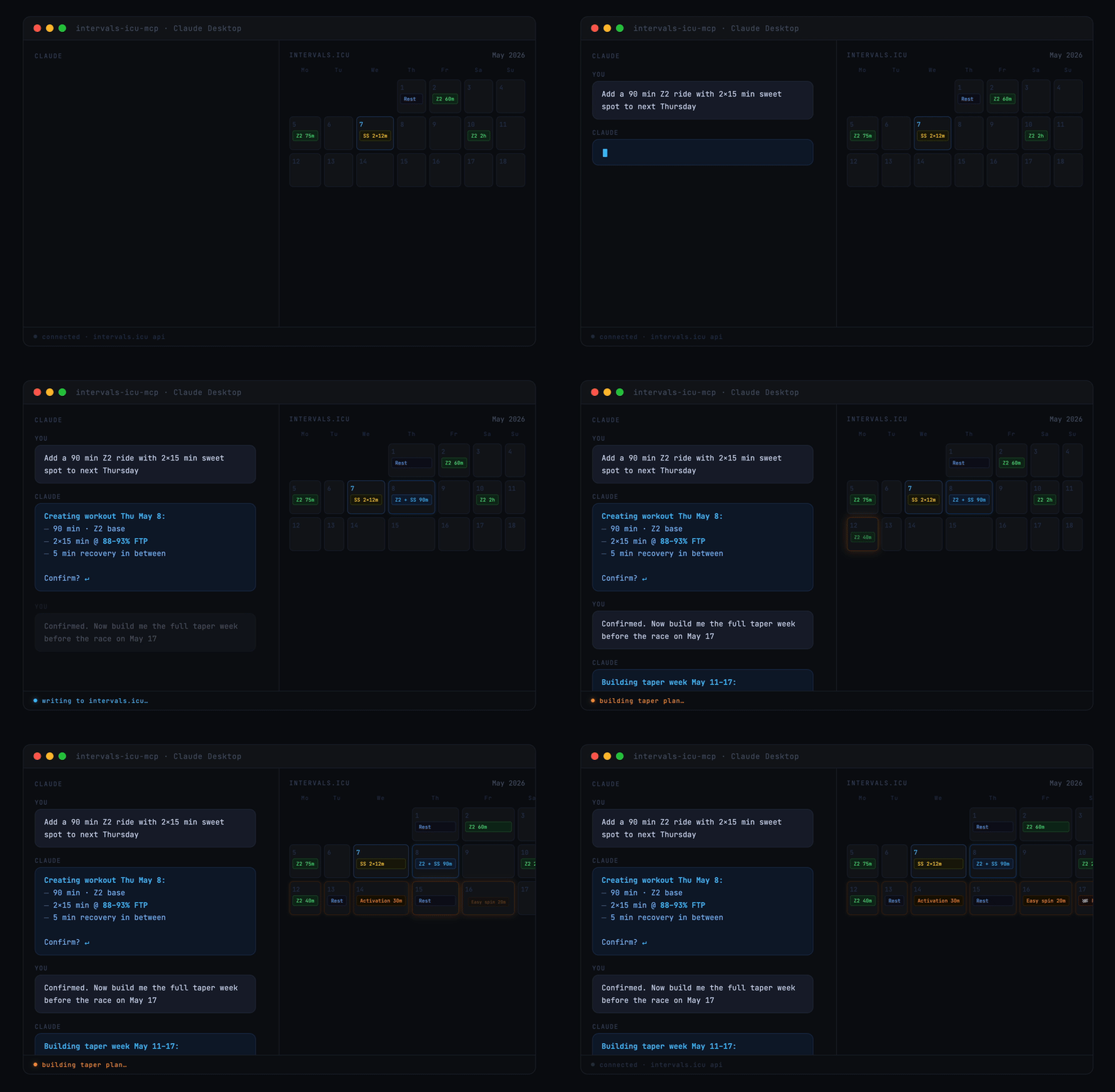
A Model Context Protocol (MCP) server for Intervals.icu integration. Access your training data, wellness metrics, and performance analysis through Claude, ChatGPT, and other LLMs.
> Originally based on [eddmann/intervals-icu-mcp](https://github.com/eddmann/intervals-icu-mcp) (MIT licensed). This project is an independent continuation with significant bug fixes and new features — see [CHANGELOG.md](https://github.com/hhopke/intervals-icu-mcp/blob/main/CHANGELOG.md) for details.
[](https://github.com/hhopke/intervals-icu-mcp/actions/workflows/test.yml)
[](https://glama.ai/mcp/servers/hhopke/intervals-icu-mcp)
[](https://github.com/hhopke/intervals-icu-mcp/blob/main/LICENSE)
[](https://github.com/hhopke/intervals-icu-mcp/pkgs/container/intervals-icu-mcp)
## Overview
62 tools spanning activities, activity analysis, activity messages, athlete profile, wellness, events/calendar, performance curves, workout library, gear, sport settings, and custom items — plus 4 MCP Resources (athlete profile, workout syntax, event categories, custom item schemas) and 7 MCP Prompts (training analysis, recovery check, weekly planning, and more). See [Available Tools](#available-tools) for the per-category breakdown.
## Quick Start
<a href="https://cursor.com/en/install-mcp?name=intervals-icu&config=eyJjb21tYW5kIjoidXZ4IiwiYXJncyI6WyJpbnRlcnZhbHMtaWN1LW1jcCJdLCJlbnYiOnsiSU5URVJWQUxTX0lDVV9BUElfS0VZIjoiIiwiSU5URVJWQUxTX0lDVV9BVEhMRVRFX0lEIjoiIn19"><picture><source media="(prefers-color-scheme: dark)" srcset="https://cursor.com/deeplink/mcp-install-dark.svg"><img alt="Install in Cursor" src="https://cursor.com/deeplink/mcp-install-light.svg"></picture></a>
Or for Claude Desktop, in 30 seconds:
1. Get your [API key and athlete ID](#intervalsicu-api-key-setup)
2. Add this to your Claude Desktop config:
```json
{
"mcpServers": {
"intervals-icu": {
"command": "uvx",
"args": ["intervals-icu-mcp"],
"env": {
"INTERVALS_ICU_API_KEY": "your-api-key-here",
"INTERVALS_ICU_ATHLETE_ID": "i123456"
}
}
}
}
```
3. Restart Claude and ask *"Show me my activities from the last 7 days."*
Prefer Claude Code, Cursor, or ChatGPT? See [Client Configuration](#client-configuration). Want to run from source or with Docker? See [Installation & Setup](#installation--setup).
## Prerequisites
Install [uv](https://github.com/astral-sh/uv) — it handles Python, dependencies, and execution in one tool. `brew install uv` on macOS/Linux, or `powershell -c "irm https://astral.sh/uv/install.ps1 | iex"` on Windows. From there, `uvx` fetches Python and the package automatically. Docker is also supported as an alternative.
## Intervals.icu API Key Setup
Before installation, obtain your Intervals.icu API key:
1. Go to https://intervals.icu/settings → **Developer** → **Create API Key**.
2. Copy the key, and note your **Athlete ID** from your profile URL (format: `i123456`).
## Installation & Setup
**Nothing to install separately if you use the recommended setup.** `uvx` (which ships with `uv`) automatically downloads and caches the `intervals-icu-mcp` package the first time your MCP client launches it — just paste the config snippet from [Client Configuration](#client-configuration) into your client and you're done.
<details>
<summary><b>Alternative: from source</b> — for development or local modifications</summary>
```bash
git clone https://github.com/hhopke/intervals-icu-mcp.git
cd intervals-icu-mcp
uv sync
uv run intervals-icu-mcp-auth # interactive credential setup; or create .env manually:
# INTERVALS_ICU_API_KEY=your_api_key_here
# INTERVALS_ICU_ATHLETE_ID=i123456
```
Then point your MCP client at this checkout — see the **From source** snippet inside each client below.
</details>
<details>
<summary><b>Alternative: Docker</b></summary>
```bash
docker build -t intervals-icu-mcp .
# Interactive credential setup (creates intervals-icu-mcp.env in the current directory):
touch intervals-icu-mcp.env # pre-create the file so Docker mounts it as a file, not a dir
docker run -it --rm \
-v "$(pwd)/intervals-icu-mcp.env:/app/.env" \
--entrypoint= intervals-icu-mcp:latest \
python -m intervals_icu_mcp.scripts.setup_auth
```
Or create `intervals-icu-mcp.env` manually (same format as the `.env` above).
Then point your MCP client at the Docker image — see the **Docker** snippet inside each client below.
</details>
## Client Configuration
The server speaks MCP over stdio and works with any compliant client. Click a client to expand. If you followed Quick Start (uvx), use the first config block; if you used the source or Docker alternative above, use the matching variant inside the same collapsible.
<details>
<summary><b>Claude Desktop</b></summary>
Add to your configuration file:
- macOS: `~/Library/Application Support/Claude/claude_desktop_config.json`
- Windows: `%APPDATA%\Claude\claude_desktop_config.json`
```json
{
"mcpServers": {
"intervals-icu": {
"command": "uvx",
"args": ["intervals-icu-mcp"],
"env": {
"INTERVALS_ICU_API_KEY": "your-api-key-here",
"INTERVALS_ICU_ATHLETE_ID": "i123456"
}
}
}
}
```
**From source** (requires `git clone` + `uv sync` + `uv run intervals-icu-mcp-auth`):
```json
{
"mcpServers": {
"intervals-icu": {
"command": "uv",
"args": ["run", "--directory", "/ABSOLUTE/PATH/TO/intervals-icu-mcp", "intervals-icu-mcp"]
}
}
}
```
**Docker**:
```json
{
"mcpServers": {
"intervals-icu": {
"command": "docker",
"args": ["run", "-i", "--rm", "-v", "/ABSOLUTE/PATH/TO/intervals-icu-mcp.env:/app/.env", "intervals-icu-mcp:latest"]
}
}
}
```
</details>
<details>
<summary><b>Claude Code</b></summary>
Register the server as a user-scoped MCP server:
```bash
claude mcp add intervals-icu --scope user \
--env INTERVALS_ICU_API_KEY=your-key \
--env INTERVALS_ICU_ATHLETE_ID=i123456 \
-- uvx intervals-icu-mcp
```
Then in any Claude Code session, run `/mcp` to confirm `intervals-icu` is connected.
</details>
<details>
<summary><b>Cursor</b></summary>
Add to `~/.cursor/mcp.json` (or the project-local `.cursor/mcp.json`):
```json
{
"mcpServers": {
"intervals-icu": {
"command": "uvx",
"args": ["intervals-icu-mcp"],
"env": {
"INTERVALS_ICU_API_KEY": "your-api-key-here",
"INTERVALS_ICU_ATHLETE_ID": "i123456"
}
}
}
}
```
Restart Cursor and open *Settings → MCP* to verify the server is listed.
</details>
<details>
<summary><b>ChatGPT</b> — requires a paid plan, Developer Mode, and a publicly reachable URL <em>(walkthrough not yet verified end-to-end)</em></summary>
ChatGPT's custom MCP connector flow requires running the server over HTTP and exposing it via a tunnel, then registering the URL in ChatGPT's Developer Mode settings. See [docs/chatgpt-connector.md](https://github.com/hhopke/intervals-icu-mcp/blob/main/docs/chatgpt-connector.md) for the full walkthrough, plan-tier requirements, and security notes.
</details>
## Usage
Ask Claude to interact with your Intervals.icu data in natural language. A few starter prompts:
```
"Show me my activities from the last 30 days"
"Am I overtraining? Check my CTL, ATL, and TSB"
"How's my recovery this week? Show HRV and sleep trends"
"Create a sweet spot cycling workout for tomorrow"
"What's my 20-minute power and FTP?"
```
For the full catalogue of example prompts by category, see [docs/examples.md](https://github.com/hhopke/intervals-icu-mcp/blob/main/docs/examples.md).
## Available Tools
62 tools, 4 resources, and 7 prompt templates. One-line summary below — full reference in [docs/tools.md](https://github.com/hhopke/intervals-icu-mcp/blob/main/docs/tools.md).
| Category | Tools | Summary |
|---|---|---|
| [Activities](https://github.com/hhopke/intervals-icu-mcp/blob/main/docs/tools.md#activities-12-tools) | 12 | Query, search, update, delete, download activities |
| [Activity Analysis](https://github.com/hhopke/intervals-icu-mcp/blob/main/docs/tools.md#activity-analysis-8-tools) | 8 | Streams, intervals, best efforts, histograms |
| [Activity Messages](https://github.com/hhopke/intervals-icu-mcp/blob/main/docs/tools.md#activity-messages-2-tools) | 2 | Read and post notes/comments/coach feedback on activities |
| [Athlete](https://github.com/hhopke/intervals-icu-mcp/blob/main/docs/tools.md#athlete-3-tools) | 3 | Profile, CTL/ATL/TSB analysis, and fitness chart time-series |
| [Wellness](https://github.com/hhopke/intervals-icu-mcp/blob/main/docs/tools.md#wellness-3-tools) | 3 | HRV, sleep, recovery metrics |
| [Events / Calendar](https://github.com/hhopke/intervals-icu-mcp/blob/main/docs/tools.md#events--calendar-11-tools) | 11 | Planned workouts, races, notes, ATP periodization (bulk ops supported) |
| [Performance / Curves](https://github.com/hhopke/intervals-icu-mcp/blob/main/docs/tools.md#performance--curves-3-tools) | 3 | Power, HR, and pace curves with zones |
| [Workout Library](https://github.com/hhopke/intervals-icu-mcp/blob/main/docs/tools.md#workout-library-2-tools) | 2 | Browse workout folders and training plans |
| [Gear Management](https://github.com/hhopke/intervals-icu-mcp/blob/main/docs/tools.md#gear-management-6-tools) | 6 | Track equipment and maintenance reminders |
| [Sport Settings](https://github.com/hhopke/intervals-icu-mcp/blob/main/docs/tools.md#sport-settings-5-tools) | 5 | FTP, FTHR, pace thresholds, and zones |
| [Custom Items](https://githuWhat people ask about intervals-icu-mcp
What is hhopke/intervals-icu-mcp?
+
hhopke/intervals-icu-mcp is mcp servers for the Claude AI ecosystem. Read/write MCP server for Intervals.icu — training data, planning, and structured workout generation. It has 64 GitHub stars and its last recorded update is dated 2026-09-10.
How do I install intervals-icu-mcp?
+
You can install intervals-icu-mcp by cloning the repository (https://github.com/hhopke/intervals-icu-mcp) or following the README instructions on GitHub. ClaudeWave also provides quick install blocks on this page.
Is hhopke/intervals-icu-mcp safe to use?
+
Our security agent has analyzed hhopke/intervals-icu-mcp and assigned a Trust Score of 95/100 (tier: Verified). See the full breakdown of passed checks and flags on this page.
Who maintains hhopke/intervals-icu-mcp?
+
hhopke/intervals-icu-mcp is maintained by hhopke. The last recorded GitHub activity is dated 2026-09-10, with 17 open issues.
Are there alternatives to intervals-icu-mcp?
+
Yes. On ClaudeWave you can browse similar mcp servers at /categories/mcp, sorted by popularity or recent activity.
Deploy intervals-icu-mcp to your cloud
Ship this repo to production in minutes. Each platform spins up its own environment with editable env vars.
Maintain this repo? Add a badge to your README
Drop the badge into your GitHub README to show it's tracked on ClaudeWave. Each badge links back to this page and reflects the live Trust Score.
[](https://claudewave.com/repo/hhopke-intervals-icu-mcp)<a href="https://claudewave.com/repo/hhopke-intervals-icu-mcp"><img src="https://claudewave.com/api/badge/hhopke-intervals-icu-mcp" alt="Featured on ClaudeWave: hhopke/intervals-icu-mcp" width="320" height="64" /></a>More MCP Servers

Fair-code workflow automation platform with native AI capabilities. Combine visual building with custom code, self-host or cloud, 400+ integrations.

User-friendly AI Interface (Supports Ollama, OpenAI API, ...)

An open-source AI agent that brings the power of Gemini directly into your terminal.

Real-time global intelligence dashboard. AI-powered news aggregation, geopolitical monitoring, and infrastructure tracking in a unified situational awareness interface

The fastest path to AI-powered full stack observability, even for lean teams.

🕷️ An adaptive Web Scraping framework that handles everything from a single request to a full-scale crawl!