

Free SEO Audit MCP server for Claude - captures and stores all the raw data you need for a complete technical SEO audit. Google Search Console + a first-party crawl + DataForSEO + Majestic SEO merged into one prioritised audit.
- ✓Open-source license (Apache-2.0)
- ✓Actively maintained (<30d)
- ✓Clear description
- ✓Topics declared
- ✓Documented (README)
claude mcp add seo-audit -- npx -y @houtini/seo-audit-console{
"mcpServers": {
"seo-audit": {
"command": "npx",
"args": ["-y", "@houtini/seo-audit-console"]
}
}
}MCP Servers overview
<p align="center">
<img src="https://raw.githubusercontent.com/houtini-ai/seo-audit/master/assets/logo.png" width="120" height="120" alt="SEO Audit Console" />
</p>
# SEO Audit Console - the technical SEO audit MCP server for Claude
**A technical SEO audit you can hold a conversation with - built from your own Search Console data and a live crawl of your site, run inside Claude.**
[](https://www.npmjs.com/package/@houtini/seo-audit-console)
[](./LICENSE)
[](https://modelcontextprotocol.io)
[](https://nodejs.org)
Almost every technical SEO audit I've been handed in twenty years is a crawler's opinion, and a crawler only ever sees half the picture. It tells you what your site *says*. It has nothing to say about what Google *did* about it: which queries you rank for, which pages earn the impressions, where the clicks land.
This one brings the other half. SEO Audit Console runs inside Claude, pulls your **Google Search Console** history, crawls your site properly, and joins the two so every finding carries the traffic at stake. A hundred and eleven checks, ranked by the clicks the fix could recover rather than how alarming the check sounds, and it writes the fix for you: the 301 rule, the JSON-LD, the internal links. The core audit needs nothing but your own Search Console; **DataForSEO** and **Majestic** slot in later, when your questions grow into competitors and link building. Your data stays on your machine.
**Built by [Houtini](https://houtini.com).** We build automation for the grunt work of digital marketing - the data collection, the crawling, the merging, the checking - so your team's time goes on the thinking, the strategy and the client work that needs a human. This plugin is that idea applied to the technical SEO audit.
> **New to MCPs, or not sure where to start?** The **[Getting started guide](manual/getting-started.md)** takes you from a completely fresh machine (no Node, no Git, never heard of a service account) to your first audit - every step screenshotted, including the one everyone misses. Ten minutes, honestly.
```console
you › run an SEO audit on mysite.com
⣾ search console 1.8M rows synced (19s - incremental)
⣾ crawl 868 pages · HTTP/2 · robots-polite · 8 parallel
⣾ link graph internal PageRank · click depth · in-degree
✓ 143 checks · 220 findings · ranked by expected clicks per dev-hour
#1 CTR far below position-expected /pricing XL
#2 Page losing clicks (trend) site-wide XL
#3 Keyword cannibalisation "project management app" L
#4 Robots-blocked page earning traffic /category/guides L
you › generate the fix for #1 ▍
```
[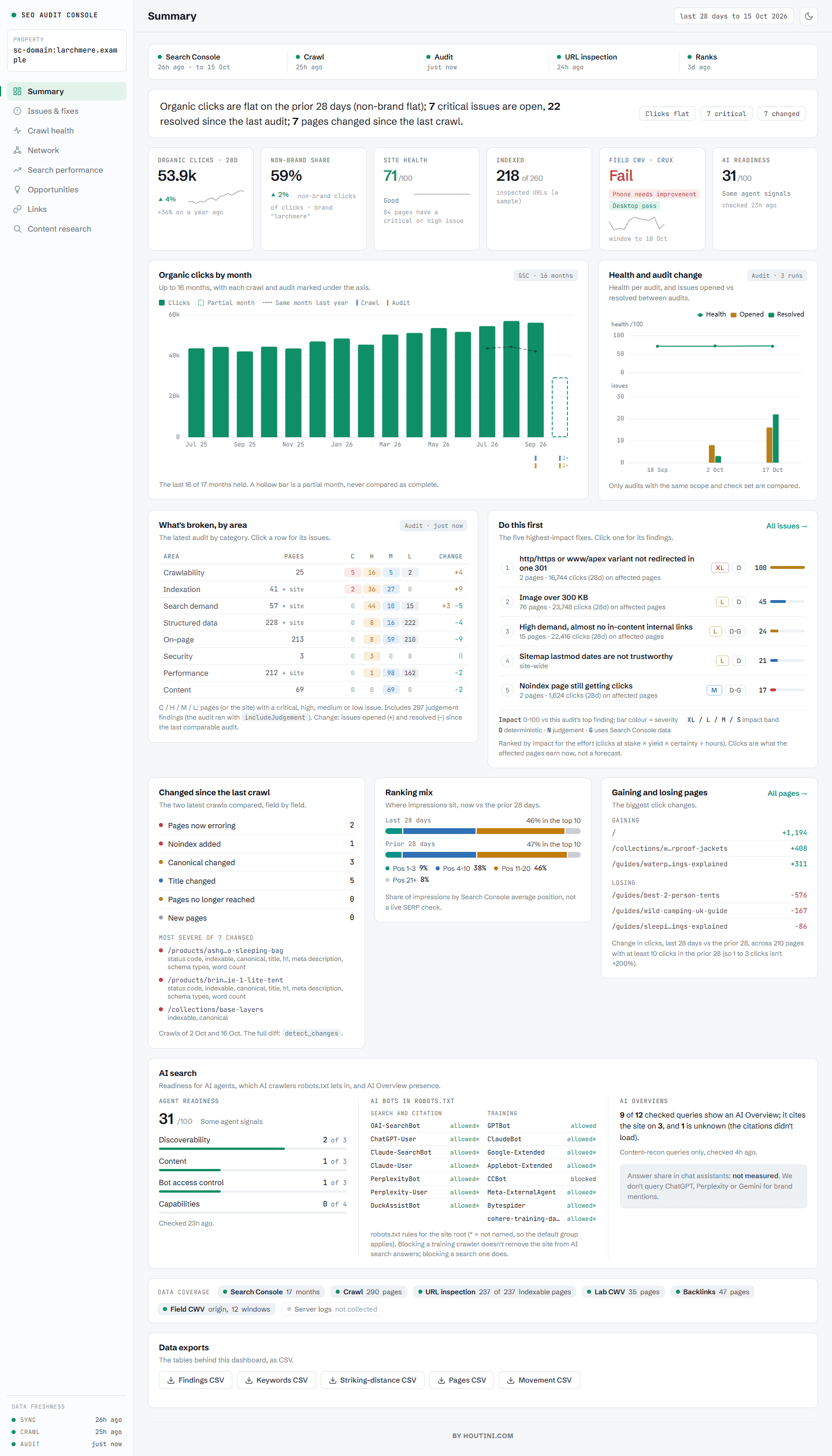](https://github.com/houtini-ai/seo-audit)
[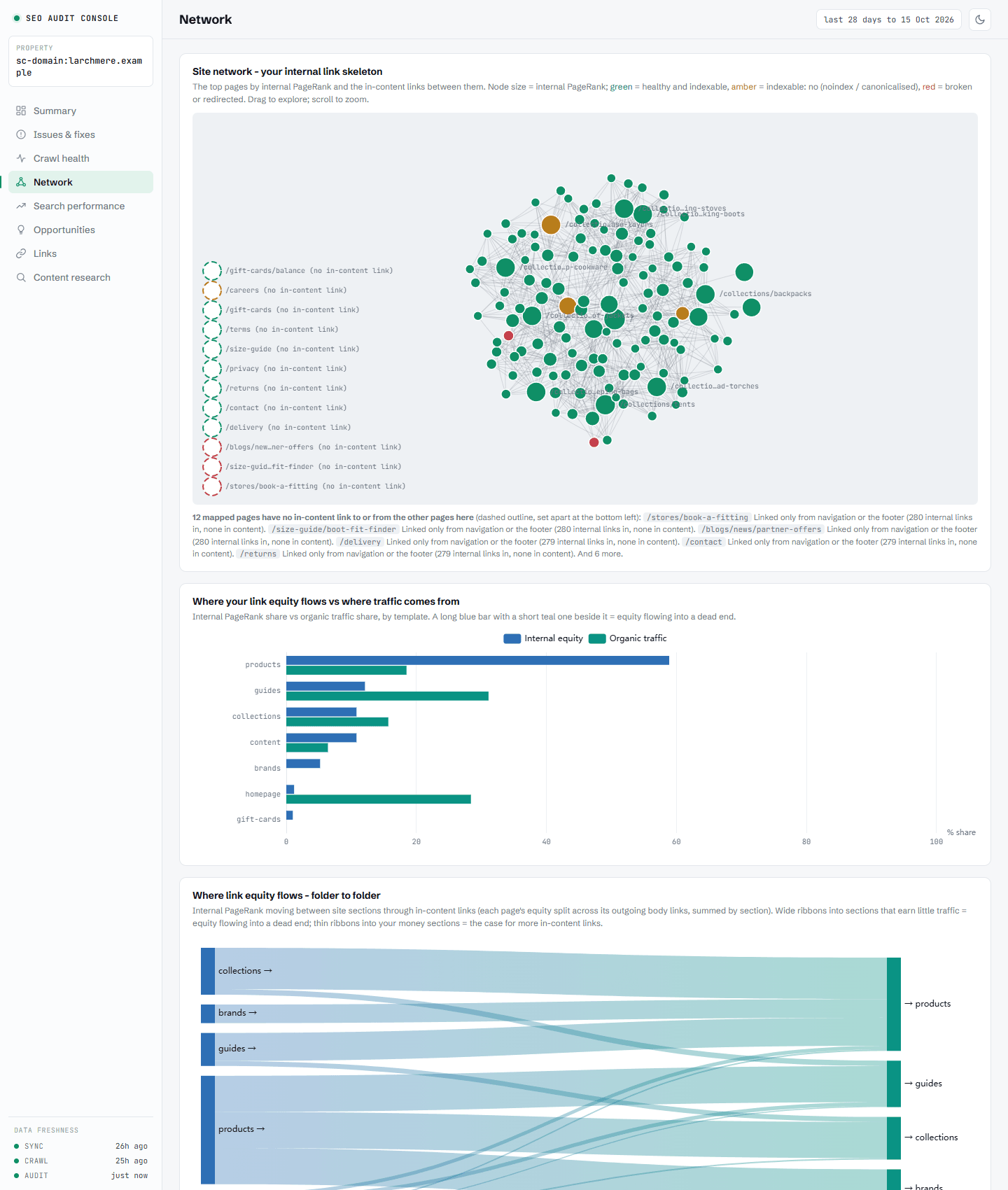](https://github.com/houtini-ai/seo-audit)
## Quick start
It's on npm, so there's nothing to clone or build. You need Node.js 20 or newer and a Search Console property you own.
**Claude Desktop** - add this to `claude_desktop_config.json`, then restart Claude:
```json
{
"mcpServers": {
"seo-audit-console": {
"command": "npx",
"args": ["-y", "@houtini/seo-audit-console"],
"env": {
"GOOGLE_APPLICATION_CREDENTIALS": "C:/path/to/service-account.json",
"DATAFORSEO_USERNAME": "",
"DATAFORSEO_PASSWORD": "",
"MAJESTIC_API_KEY": "",
"CRUX_API_KEY": ""
}
}
}
}
```
The first line is required. The others are optional: paste your key between the quotes, or **leave them empty to switch the tier off**. DataForSEO and Majestic are paid tiers; `CRUX_API_KEY` is field Core Web Vitals from a free Google API key restricted to the Chrome UX Report API. Empty means off. Template text such as `your-key-here`, `<your key>` or `changeme` is treated as empty too, and the server's log says so in one line (e.g. `MAJESTIC_API_KEY looks like a placeholder; Majestic tier disabled.`), so a tier you expected that stays off is worth a look at the log.
**Claude Code** - one command (add `--env DATAFORSEO_USERNAME=…` and the others the same way if you use them):
```bash
claude mcp add seo-audit-console --env GOOGLE_APPLICATION_CREDENTIALS=C:/path/to/service-account.json -- npx -y @houtini/seo-audit-console
```
`GOOGLE_APPLICATION_CREDENTIALS` alone is the whole core audit. The step everyone misses: the JSON key belongs to a Google Cloud service account, and that account's email has to be **added as a user on your property** in Search Console, or the tool can't see any of your data. [Getting started](manual/getting-started.md) walks through it with screenshots, plus the one-click Claude Desktop extension and the build-from-source route.
Then ask Claude: *"list properties"*, *"refresh mysite.com"*, *"run an SEO audit"*.
## Opening the dashboard
Once a property has been refreshed or audited, there are three ways to see it:
| You want | Ask Claude | What you get |
|---|---|---|
| A quick look in the chat | *"show me the dashboard for mysite.com"* | The dashboard drawn inside the conversation (`get_dashboard`) |
| The full dashboard in your browser | *"open the dashboard for mysite.com"* | A link such as `http://127.0.0.1:53817/dashboard?siteUrl=…` (`open_dashboard`). Click it. It reads the local database live, so reload after each refresh |
| Something to send a client | *"export the report for mysite.com"* | One self-contained HTML file (`export_report`) |
You often don't need to ask: when a refresh, crawl, sync or audit finishes, the reply says the dashboard is updated and includes the browser link. The link is local to your machine (it only answers on `127.0.0.1`), and the port changes each time the server starts, so use the link from the latest reply. Add `&theme=dark` for dark mode, or `&redact=1` to blur the numbers for a screenshot.
**Running it under Docker or the Docker MCP gateway?** The browser link points at a port inside the container, which your browser can't reach. Run the dashboard as its own small container on a fixed port instead, on the same data volume:
```bash
docker run -d --name seo-audit-dashboard --restart unless-stopped -p 127.0.0.1:8788:8788 -e SAC_DATA_DIR=/data -e SAC_DASHBOARD_BIND=0.0.0.0 -e SAC_DASHBOARD_PORT=8788 -v seo-audit-data:/data node:22-slim npx -y -p @houtini/seo-audit-console seo-audit-dashboard
```
Then open `http://127.0.0.1:8788/dashboard?siteUrl=sc-domain:mysite.com`. Use the volume name your MCP server writes to. In Git Bash on Windows, put `MSYS_NO_PATHCONV=1` in front of the command so `/data` isn't rewritten as a Windows path. More in [dashboard.md](manual/dashboard.md).
## The manual
This README is the story and the quick start. The detail lives in the manual:
| Page | What's in it |
|---|---|
| [Getting started](manual/getting-started.md) | Install, the GSC service-account setup (and the step everyone misses), Claude Desktop and Claude Code config, your first audit, troubleshooting |
| [Tool reference](manual/tools.md) | Every tool: what it does, inputs, joins, an example prompt |
| [The check registry](manual/checks.md) | All 143 checks with what each catches, its D/N label, and the fix |
| [Composition](manual/composition.md) | The join keys, the grains, and fourteen recipes for asking your own questions across the data |
| [Competitive analysis](manual/competitive.md) | The Semrush-replacement workflows, DataForSEO setup, link intersect with the Majestic Trust Flow tier, and the real costs |
| [SEO Recon](manual/recon.md) | Why a page is losing: the live SERP + AI-Overview citation verdict, the competitor diff, and the trackable to-do ledger |
| [DataForSEO functions](manual/dataforseo.md) | Every DataForSEO-backed tool grouped by API module - Keywords, SERP, Labs, Backlinks, OnPage - each with its endpoint and cost |
| [Majestic functions](manual/majestic.md) | The optional Trust Flow tier - what it adds, and how `link_intersect` and `pull_backlinks` use it |
| [Dashboard & reports](manual/dashboard.md) | The eight tabs, what each chart shows, the browser dashboard (and its standalone version for Docker), and the shareable export |
## Surprisingly little has changed in twenty years
The technical audit I was writing for clients in 2006 is, structurally, the audit most agencies still sell today. A crawler runs, a template fills, a 60-page PDF lands. Everything a crawler could find, in severity order, with no idea which findings are worth money and which are cosmetic.
What *has* changed is what's possible. Google gives every site owner a complete record of its search reality - which queries, which pages, how many impressions, where you ranked. Your crawl tells you what your site says. Search Console tells you what Google did about it. And in my experience, the gap between those two datasets is where nearly all of the recoverable traffic hides.
So that's what I built. SEO Audit Console is a [Model Context Protocol](https://modelcontextprotocol.io) server that merges your **Search Console history** with a **first-party crawl of your site** (and, when you want it, **DataForWhat people ask about seo-audit
What is houtini-ai/seo-audit?
+
houtini-ai/seo-audit is mcp servers for the Claude AI ecosystem. Free SEO Audit MCP server for Claude - captures and stores all the raw data you need for a complete technical SEO audit. Google Search Console + a first-party crawl + DataForSEO + Majestic SEO merged into one prioritised audit. It has 57 GitHub stars and its last recorded update is dated 2026-10-17.
How do I install seo-audit?
+
You can install seo-audit by cloning the repository (https://github.com/houtini-ai/seo-audit) or following the README instructions on GitHub. ClaudeWave also provides quick install blocks on this page.
Is houtini-ai/seo-audit safe to use?
+
Our security agent has analyzed houtini-ai/seo-audit and assigned a Trust Score of 95/100 (tier: Verified). See the full breakdown of passed checks and flags on this page.
Who maintains houtini-ai/seo-audit?
+
houtini-ai/seo-audit is maintained by houtini-ai. The last recorded GitHub activity is dated 2026-10-17, with 1 open issues.
Are there alternatives to seo-audit?
+
Yes. On ClaudeWave you can browse similar mcp servers at /categories/mcp, sorted by popularity or recent activity.
Deploy seo-audit to your cloud
Ship this repo to production in minutes. Each platform spins up its own environment with editable env vars.
Maintain this repo? Add a badge to your README
Drop the badge into your GitHub README to show it's tracked on ClaudeWave. Each badge links back to this page and reflects the live Trust Score.
[](https://claudewave.com/repo/houtini-ai-seo-audit)<a href="https://claudewave.com/repo/houtini-ai-seo-audit"><img src="https://claudewave.com/api/badge/houtini-ai-seo-audit" alt="Featured on ClaudeWave: houtini-ai/seo-audit" width="320" height="64" /></a>More MCP Servers

Reverse engineer anything with agents, from app behavior down to native binaries.

Fair-code workflow automation platform with native AI capabilities. Combine visual building with custom code, self-host or cloud, 400+ integrations.

User-friendly AI Interface (Supports Ollama, OpenAI API, ...)

An open-source AI agent that brings the power of Gemini directly into your terminal.

Real-time global intelligence dashboard. AI-powered news aggregation, geopolitical monitoring, and infrastructure tracking in a unified situational awareness interface

🕷️ A Web Scraping framework that handles everything from a single request to a full-scale crawl! Don't be shy, join here: https://discord.gg/EMgGbDceNQ and follow here for daily tips and tricks: https://x.com/Scrapling_dev