

Structured Word and PowerPoint automation for .NET and coding agents, with validated plans, MCP, tracked changes, and SharePoint
- ✓Open-source license (MIT)
- ✓Actively maintained (<30d)
- ✓Clear description
- ✓Topics declared
- ✓Documented (README)
- !Install pipes a remote script into a shell (curl | sh)
git clone https://github.com/ilia-sokolov/OfficeAgent.NETMCP Servers overview
# OfficeAgent.NET
<!-- mcp-name: io.github.ilia-sokolov/officeagent -->
[](https://github.com/ilia-sokolov/OfficeAgent.NET/actions/workflows/build.yml)
[](https://www.nuget.org/packages/OfficeAgent.Core)
[](https://www.nuget.org/packages/OfficeAgent.Core)
[](LICENSE)
Give coding agents a structured way to create and edit real Word documents,
PowerPoint decks, and Excel workbooks. OfficeAgent.NET turns an agent's intent into typed, validated
operations and applies them directly to OOXML packages while preserving document
structure.
Use it to generate documents and presentations, make targeted edits, update tables,
styles, and images, or manage comments and review state. The engine ships as an MCP
server, Microsoft Agent Framework tools, and a .NET API, with filesystem, SharePoint,
session, and inline document workflows.
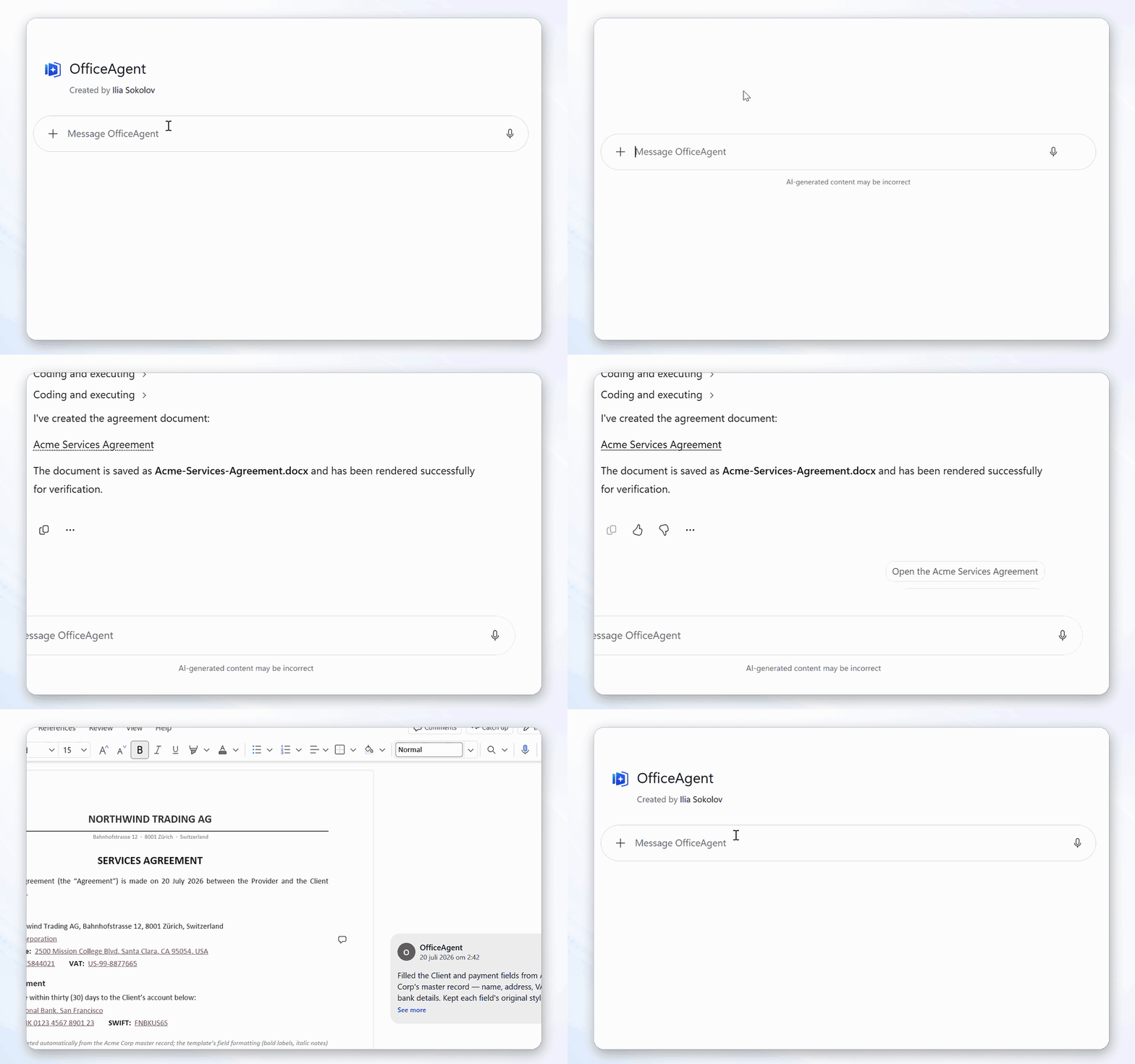
One example is a targeted Word edit whose result remains reviewable:
## What this project does
An Office Open XML file is a package of related XML parts. A small change
can affect runs, styles, numbering, comments, content controls, or revision
markup. OfficeAgent.NET handles that document-specific work. The model works
with structured document data and JSON-serialisable operations such as "replace
this clause as a tracked change" or "add a row to this table."
The same engine is available in three forms:
- an MCP server for agents that support the Model Context Protocol;
- tools for Microsoft Agent Framework and `Microsoft.Extensions.AI`;
- a .NET API for applications that want to control the workflow directly.
It supports Word `.docx`, PowerPoint `.pptx`, and Excel `.xlsx`; one client routes
each document to the module that handles it. See [Scope and limitations](#scope-and-limitations) before choosing
it for a workflow that depends on Office's layout or calculation engine.
### What you can build
| Area | Supported workflows |
| --- | --- |
| Word creation and editing | Create `.docx` files; inspect and change text, paragraphs, tables, images, styles, content controls, headers, footers, notes, page setup, and document properties |
| Word review | Read and manage comments, preserve or resolve review state, set one revision identity per plan, and record supported edits as tracked revisions |
| PowerPoint creation and editing | Build or update decks with slides, layouts, text, tables, native editable charts, images, media, notes, comments, sections, transitions, and animations |
| Excel inspection and editing | Inspect worksheets, tables, and bounded ranges; find raw or displayed values; set cells and formulas; append table rows; manage cell notes |
| Template generation | Bind unique Word content-control tags or PowerPoint shape names, expand repeating Word table rows, and create bounded batches with one receipt per output |
| Word comparison | Compare supported free-body paragraph text read-only and produce a snapshot-bound native redline plan only when all other package content is unchanged |
| Agent and application integration | Use MCP over stdio or HTTP, Microsoft Agent Framework tools, or the direct .NET API, with SHA-256 apply receipts and host-supplied audit actors |
| Document access | Work with bounded filesystem roots, SharePoint, in-memory sessions, or self-contained inline content |
## Choose a starting point
| I want to... | Start here |
| --- | --- |
| Try a targeted Word edit | [Try a Word edit](#try-a-word-edit) |
| Create a Word document from scratch | [Create a document](docs/getting-started.md#create-a-document-instead) |
| Create or edit a PowerPoint deck | [PowerPoint support](docs/powerpoint.md) |
| Inspect or edit an Excel workbook | [Excel support](docs/excel.md) |
| Connect Codex, Claude Code, Copilot Studio, or Microsoft 365 Copilot | [Deployment and client setup](docs/deployment.md) |
| Use OfficeAgent from C# | [Getting started](docs/getting-started.md) |
| Add tools to a Microsoft Agent Framework agent | [Agent integration](docs/agent-integration.md) |
| Host the MCP server or use SharePoint | [MCP server](docs/mcp-server.md) and [document providers](docs/document-providers.md) |
| Add per-user hosted connection authorization | [Hosted gateway reference](samples/HostedGateway/) |
| Add optional PDF/page-image rendering | [Visual rendering](docs/rendering.md) |
| Edit documents with no storage configured | [Documents with no storage](docs/mcp-server.md#documents-with-no-storage) |
| Run a tracked-review workflow | [Optional word-document-review skill](skills/word-document-review/SKILL.md) |
| Build a contract-review agent | [ContractReview sample](samples/ContractReview/) |
| Populate quote templates or compare Word documents | [Template and comparison workflows](docs/document-workflows.md) |
| Check support, compatibility, or security policy | [Support](SUPPORT.md) and [security](SECURITY.md) |
| Contribute | [Contributing](#contributing) |
## Try a Word edit
This small workflow demonstrates that OfficeAgent can change an existing OOXML file
without flattening its structure. It uses tracked changes because the result is easy to
verify in Word; review is one part of the broader document operation set.
Install the server. The published package command is:
```bash
dotnet tool install --global OfficeAgent.Mcp
```
Make a folder for the agent to work in and download the
[sample contract](samples/documents/services-agreement.docx) into it — a fictional services
agreement with a clause to change, a table, an open comment, and a pending redline:
```bash
mkdir -p ~/officeagent-documents
curl -Lo ~/officeagent-documents/services-agreement.docx \
https://raw.githubusercontent.com/ilia-sokolov/OfficeAgent.NET/main/samples/documents/services-agreement.docx
```
PowerShell:
```powershell
$officeAgentDocuments = Join-Path $env:USERPROFILE "officeagent-documents"
New-Item -ItemType Directory -Force $officeAgentDocuments | Out-Null
Invoke-WebRequest `
https://raw.githubusercontent.com/ilia-sokolov/OfficeAgent.NET/main/samples/documents/services-agreement.docx `
-OutFile (Join-Path $officeAgentDocuments "services-agreement.docx")
```
Any `.docx` of your own works too — the sample just gives you something with a comment and a
pending revision already in it.
Register the server with Claude Code, pointed at that folder and nothing else:
```bash
claude mcp add \
--env OfficeAgent__FileSystemConnections__0__ConnectionId=documents \
--env OfficeAgent__FileSystemConnections__0__RootPath=$HOME/officeagent-documents \
--transport stdio \
officeagent -- officeagent-mcp --stdio
```
PowerShell:
```powershell
claude mcp add `
--env OfficeAgent__FileSystemConnections__0__ConnectionId=documents `
--env "OfficeAgent__FileSystemConnections__0__RootPath=$officeAgentDocuments" `
--transport stdio `
officeagent -- officeagent-mcp --stdio
```
For this review-specific workflow, you can optionally install the
[word-document-review skill](docs/skill-installation.md) before starting the client.
Then ask:
> In services-agreement.docx, change the payment terms from thirty days to forty-five days.
Open the file in Word. Clause 3 now reads **forty-five days** as a tracked change you can
accept or reject, and everything else — the table, the comment, the redline that was
already there — is exactly as it was. This demonstrates a key engine property: apply the
requested operation while preserving unrelated package content.
[What else the sample is good for](samples/documents/README.md) — reviewing comments,
accepting revisions, editing the table.
Next, try [creating a Word document](docs/getting-started.md#create-a-document-instead),
[generating a PowerPoint deck](docs/powerpoint.md#generating-a-deck), or using the
[direct .NET workflow](docs/getting-started.md).
### If it does not work
| | |
| --- | --- |
| `claude mcp list` shows officeagent as failed | Check `RootPath` is an absolute path to a directory that exists. |
| The agent says it cannot find the document | Use a relative name, or an absolute path that still resolves inside `RootPath`. |
| `io-error` on save | Close the file in Word, then check filesystem permissions and the available disk space. |
## Configure broader workflows
The quick start above is deliberately the smallest thing that works. Four settings extend it:
| Setting | Adds |
| --- | --- |
| `OfficeAgent__AllowCreation=true` | `create_document`, so "draft a project brief in brief.docx" makes a new file instead of failing |
| `OfficeAgent__FileSystemConnections__0__AllowedExtensions__0=.docx` plus `OfficeAgent__FileSystemConnections__0__AllowedExtensions__1=.pptx` | Word and PowerPoint on one connection. Declaring this list replaces the `.docx` default. Set `OfficeAgent__FileSystemConnections__0__DefaultChangeMode=Direct` for decks, and send `"mode": "Tracked"` explicitly for reviewable Word edits on that mixed connection. |
| `OfficeAgent__EphemeralConnectionId=session` | Names the in-memory session connection explicitly. With no configuration at all the server already falls back to one - this is for running it alongside storage, or under a different id |
| `OfficeAgent__AllowInlineContent=true` | Tools that carry the document as base64, for a single self-contained call |
Past a couple of settings, use a file instead — the same `OfficeAgent` section, where a list
is a list:
```json
{
"OfficeAgent": {
"AllowCreation": true,
"FileSystemConnections": [
{
"ConnectionId": "documents",
"RootPath": "C:\\officeagent-documents",
"AlWhat people ask about OfficeAgent.NET
What is ilia-sokolov/OfficeAgent.NET?
+
ilia-sokolov/OfficeAgent.NET is mcp servers for the Claude AI ecosystem. Structured Word and PowerPoint automation for .NET and coding agents, with validated plans, MCP, tracked changes, and SharePoint It has 22 GitHub stars and its last recorded update is dated 2026-09-12.
How do I install OfficeAgent.NET?
+
You can install OfficeAgent.NET by cloning the repository (https://github.com/ilia-sokolov/OfficeAgent.NET) or following the README instructions on GitHub. ClaudeWave also provides quick install blocks on this page.
Is ilia-sokolov/OfficeAgent.NET safe to use?
+
Our security agent has analyzed ilia-sokolov/OfficeAgent.NET and assigned a Trust Score of 87/100 (tier: Trusted). See the full breakdown of passed checks and flags on this page.
Who maintains ilia-sokolov/OfficeAgent.NET?
+
ilia-sokolov/OfficeAgent.NET is maintained by ilia-sokolov. The last recorded GitHub activity is dated 2026-09-12, with 4 open issues.
Are there alternatives to OfficeAgent.NET?
+
Yes. On ClaudeWave you can browse similar mcp servers at /categories/mcp, sorted by popularity or recent activity.
Deploy OfficeAgent.NET to your cloud
Ship this repo to production in minutes. Each platform spins up its own environment with editable env vars.
Maintain this repo? Add a badge to your README
Drop the badge into your GitHub README to show it's tracked on ClaudeWave. Each badge links back to this page and reflects the live Trust Score.
[](https://claudewave.com/repo/ilia-sokolov-officeagent-net)<a href="https://claudewave.com/repo/ilia-sokolov-officeagent-net"><img src="https://claudewave.com/api/badge/ilia-sokolov-officeagent-net" alt="Featured on ClaudeWave: ilia-sokolov/OfficeAgent.NET" width="320" height="64" /></a>More MCP Servers

Fair-code workflow automation platform with native AI capabilities. Combine visual building with custom code, self-host or cloud, 400+ integrations.

User-friendly AI Interface (Supports Ollama, OpenAI API, ...)

An open-source AI agent that brings the power of Gemini directly into your terminal.

Real-time global intelligence dashboard. AI-powered news aggregation, geopolitical monitoring, and infrastructure tracking in a unified situational awareness interface

🕷️ An adaptive Web Scraping framework that handles everything from a single request to a full-scale crawl!

The fastest path to AI-powered full stack observability, even for lean teams.