

Computer use for Hyprland - MCP server giving AI agents native hands on your Wayland desktop. No ydotool, no root, no portals.
- ✓Open-source license (MIT)
- ✓Actively maintained (<30d)
- ✓Clear description
- ✓Topics declared
- ✓Documented (README)
claude mcp add hypruse -- uvx hypruse{
"mcpServers": {
"hypruse": {
"command": "uvx",
"args": ["hypruse"]
}
}
}MCP Servers overview
<!-- mcp-name: io.github.IlyasKhallouki/hypruse --> # hypruse **Computer use for [Hyprland](https://hypr.land).** An [MCP](https://modelcontextprotocol.io) server that gives AI agents native hands on your Wayland desktop: workspaces, windows, mouse, keyboard, screenshots. No ydotool daemon. No root. No portals. No X11. 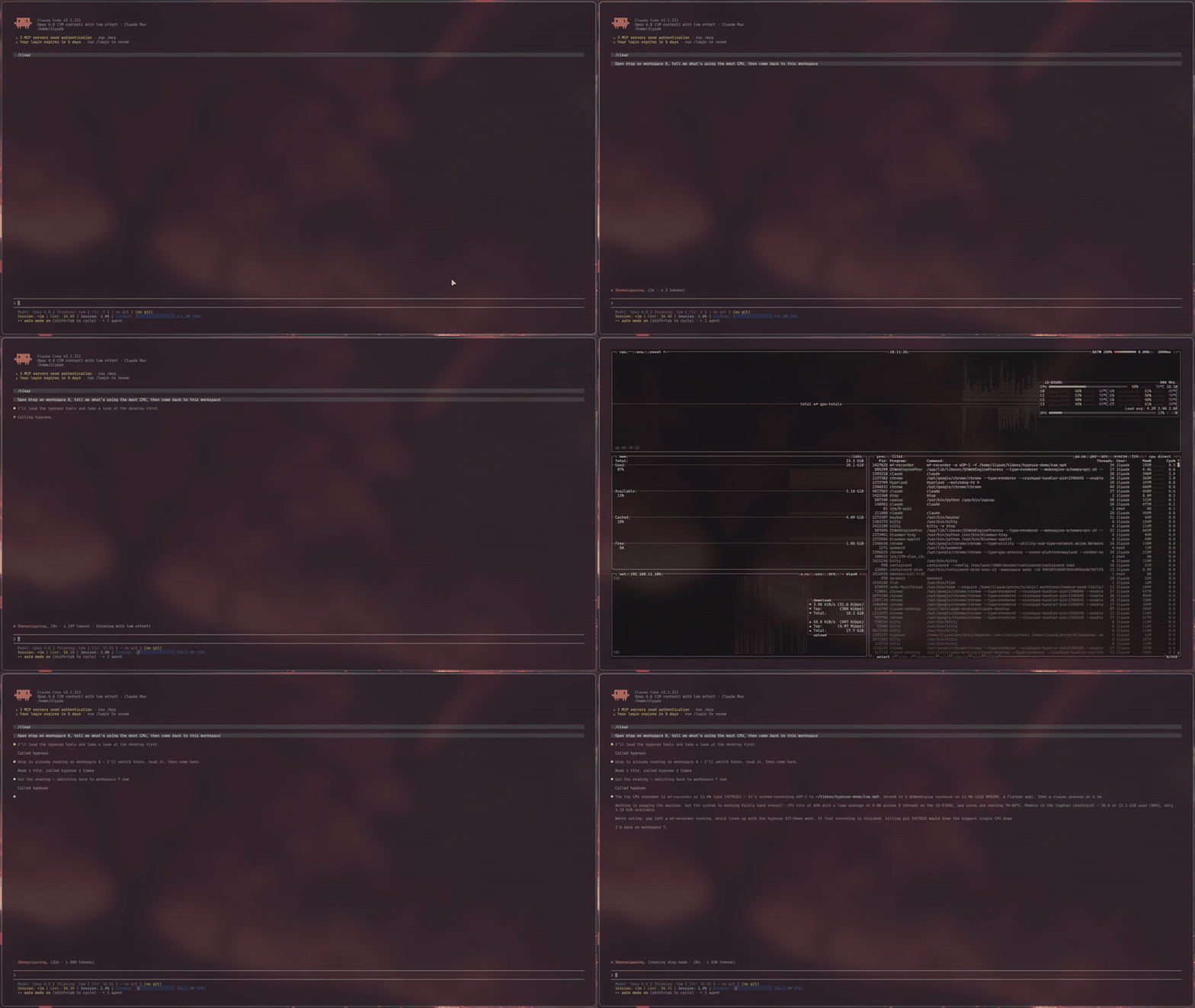 ## Why Computer use exists on macOS and Windows. On Linux there is effectively nothing: the Claude Desktop Linux beta explicitly ships **without** screen control, Anthropic's reference implementation is an X11 container, and the existing Wayland attempts lean on setuid uinput hacks or GNOME-only portals. Meanwhile Hyprland already exposes everything an agent needs, better than any accessibility bridge: a complete IPC surface for state and window management, and first-class Wayland protocols for input. hypruse just wires them to MCP: - **Semantic first.** `desktop` returns the real window/workspace tree (addresses, classes, titles, geometry) in one call. The agent switches workspaces and focuses windows the way you do (instantly, over IPC), not by squinting at pixels. - **Vision when it matters.** Screenshots of a monitor, an exact window crop, or a zoomed region, with the geometry/scale metadata to map any pixel back to a clickable coordinate: a coarse-to-fine loop [grounded in the GUI-agents research](#research). - **Native input.** Clicks and scrolls are spoken directly over the Wayland wire (`zwlr_virtual_pointer_v1`); typing goes through `wtype`'s virtual keyboard with a proper XKB keymap, unicode-safe on any layout. ## How it works ``` agent (Claude Code, or any MCP client) │ stdio ▼ hypruse ├── hyprctl -j ········▶ desktop state: monitors, workspaces, windows, layers ├── hyprctl dispatch ··▶ focus / move / close / launch / movecursor ├── grim ··············▶ screenshots: monitor, window crop, region ├── busctl (AT-SPI) ···▶ accessibility tree: named controls, current │ values, exact coords (ui / marks / click_ui) ├── wtype ·············▶ keyboard (zwp_virtual_keyboard_v1, real XKB keymap) └── raw Wayland wire ··▶ click & scroll (zwlr_virtual_pointer_v1) ``` Optional binaries gate two more tools: `imagemagick` draws the numbered overlay for `marks`, and `wl-clipboard` backs the opt-in `clipboard` tool. Design decisions: - **No ydotool / uinput.** That path needs a daemon, udev rules or root, and types US scancodes that break on other layouts. hypruse is just another Wayland client of your compositor, same standing as `wlrctl`. - **No portals.** `xdg-desktop-portal-hyprland` does not implement the RemoteDesktop portal (InputCapture is capture, not injection), so anything built on libei/portals silently degrades on Hyprland. hypruse doesn't try. - **Cursor positioning through the compositor's own cursor dispatcher** (global logical coordinates, exact on any monitor layout), with only button/axis events on the virtual pointer, sidestepping the known multi-monitor bugs of absolute virtual-pointer motion ([hyprwm/Hyprland#6749](https://github.com/hyprwm/Hyprland/issues/6749)). ## Tools | tool | what it does | |---|---| | `desktop` | One-call semantic snapshot: monitors, workspaces, windows (address/class/title/geometry), active window, cursor, and layer surfaces (launchers, bars, notification popups) with a best-effort kind and geometry. A listed layer is one the compositor tracks, not one you can see: transparent and dormant surfaces are reported too, so screenshot when visibility matters | | `screenshot` | Focused monitor, exact window crop by address, or `x,y,WxH` region; returns image + coordinate-mapping metadata; fast JPEG by default (`lossless=true` for PNG); `stable=true` waits for the frame to settle | | `zoom` | Native-resolution re-capture around an estimated point (optionally clamped to a window): the precision step before clicking small controls, same metadata contract | | `ui` | Read a window's accessibility tree (AT-SPI, GTK/Qt apps that expose one) and return clickable elements by name with exact global coordinates, no screenshot; reports current values too (typed text, slider position, checkbox state); falls back to vision when an app exposes nothing | | `marks` | Set-of-Marks capture: the window screenshot with every accessible control drawn as a numbered mark, plus a JSON legend (role, name, current value, exact click point per number); needs ImageMagick for the drawing, degrades to the legend alone without it | | `click_ui` | Click a control by accessible NAME or by a `marks` number in one call: the coordinate comes from the tree, the click goes through the real pointer (visible, same safety guarantees); an ambiguous name returns the candidates instead of guessing | | `pointer` | move / click / drag / scroll (discrete wheel notches) in global coordinates | | `keyboard` | Type literal text (unicode-safe) or press app-level combos (`ctrl+shift+t`, `esc`, `F5`); optional `window` address focuses the target first so keystrokes land in the right app. Compositor binds (`super+...`) go through `use_bind`, not here | | `hypr` | Switch workspace, focus/move/close windows, fullscreen, floating (pure IPC, milliseconds; `close_window` also waits up to 1s for the destroy event, so its result and `then=` observation reflect the close instead of racing it) | | `launch` | Start an app (optionally silent on another workspace), block on its actual `openwindow` event, return its address; detects single-instance apps (browsers) whose window ignores exec rules and moves it to the requested workspace | | `binds` | The user's own keybinds, decoded (`SUPER+Q`, action, description); the agent runs one with `use_bind` | | `use_bind` | Execute a keybind by combo (`SUPER+F`), running its bound action, so the agent drives the owner's own launchers and shortcuts. Not available for binds in a Lua `hyprland.lua`: those are anonymous closures Hyprland exposes no way to call, so `binds` shows them as action `lua` and `use_bind` says so instead of failing cryptically | | `sequence` | Run an ordered list of actions (pointer/keyboard/click_ui/hypr/wait_for) in one call; stops the moment the desktop changes in a way the current step did not expect, so a click/type/enter micro-sequence costs one round-trip instead of several | | `wait_for` | Block on real compositor events (window open/close, workspace change, title change, layer surfaces appearing/closing, urgency, screen sharing on/off) with a match filter and timeout; a filtered wait whose condition already holds (window already gone, workspace already active, layer already mapped) answers instantly with `already: true` instead of missing an event that fired before it subscribed. Replaces sleep-and-hope in multi-step automations | | `clipboard` | Read or write the text clipboard via `wl-clipboard`; opt-in, exists only with `HYPRUSE_CLIPBOARD=1` in the server env | The acting tools (`pointer`, `keyboard`, `click_ui`, `hypr`, `use_bind`, `sequence`) take an optional `then` argument that appends the result to the same call, so the agent sees the effect without a second round-trip: `then='desktop'` adds a fresh semantic snapshot (~20 ms, cheap, best for window/focus changes), `then='screenshot'` a stable capture (best for visual changes), `then='ui'` the acted-on window's controls with their current values (a few hundred exact tokens, best after typing or toggling; `click_ui` reads the window it clicked even if the click handed focus to a dialog, the others read the focused window), `then='none'` nothing (the default everywhere except `sequence`, which defaults to `'desktop'`). Every tool is also a shell verb (`hypruse desktop`, `hypruse click_ui Save --window 0x...`) for agents that run commands instead of MCP, with a skill that teaches them: see [Shell verbs and the agent skill](#shell-verbs-and-the-agent-skill). ## Features The tools group into five capabilities, ordered most-reliable-and-cheapest first. An agent that reaches for them in this order is both faster and more accurate, and many tasks never need a screenshot at all. ### 1. Semantic desktop control (start here) `desktop` returns the entire window and workspace tree in one call: every window's address, class, title, and geometry, the active window, the cursor, and any layer surfaces the compositor is tracking (launchers, bars, notification popups). `hypr` and `launch` then act on it over IPC in milliseconds: switch workspace, focus/move/close/fullscreen/float a window by address, or start an app. **Use it well:** never take a screenshot to find or arrange windows. Read `desktop`, act on the address you want. `launch` blocks on the real `openwindow` event and hands back the new window's address, so there is nothing to poll or guess; it also relocates single-instance apps (browsers) that ignore workspace rules. ### 2. Click controls by name, no pixels When an app exposes an accessibility tree (most GTK and Qt apps), you can target controls by name instead of by pixel. `ui` lists every control with its exact global coordinate, and reports the current value of the controls that carry one: the text in a field, a slider's percentage, a checkbox's state. `click_ui` resolves a name and clicks it in one call, through the real cursor (so the beacon and every safety guarantee still apply). `marks` draws numbered marks over a screenshot with a legend, for when you want to see the options first and then `click_ui(mark=N)`. **Use it well:** reach for `click_ui name="Save"` before estimating any pixel, since it is exact and spends no image. Read a form's state with `ui` (did the box actually tick?) instead of screenshotting it. An ambiguous name returns the candidates rather than guessing. When an app exposes no tree (terminals, canvas apps, Electron/Chrome without `-
What people ask about hypruse
What is IlyasKhallouki/hypruse?
+
IlyasKhallouki/hypruse is mcp servers for the Claude AI ecosystem. Computer use for Hyprland - MCP server giving AI agents native hands on your Wayland desktop. No ydotool, no root, no portals. It has 24 GitHub stars and its last recorded update is dated 2026-09-13.
How do I install hypruse?
+
You can install hypruse by cloning the repository (https://github.com/IlyasKhallouki/hypruse) or following the README instructions on GitHub. ClaudeWave also provides quick install blocks on this page.
Is IlyasKhallouki/hypruse safe to use?
+
Our security agent has analyzed IlyasKhallouki/hypruse and assigned a Trust Score of 95/100 (tier: Verified). See the full breakdown of passed checks and flags on this page.
Who maintains IlyasKhallouki/hypruse?
+
IlyasKhallouki/hypruse is maintained by IlyasKhallouki. The last recorded GitHub activity is dated 2026-09-13, with 0 open issues.
Are there alternatives to hypruse?
+
Yes. On ClaudeWave you can browse similar mcp servers at /categories/mcp, sorted by popularity or recent activity.
Deploy hypruse to your cloud
Ship this repo to production in minutes. Each platform spins up its own environment with editable env vars.
Maintain this repo? Add a badge to your README
Drop the badge into your GitHub README to show it's tracked on ClaudeWave. Each badge links back to this page and reflects the live Trust Score.
[](https://claudewave.com/repo/ilyaskhallouki-hypruse)<a href="https://claudewave.com/repo/ilyaskhallouki-hypruse"><img src="https://claudewave.com/api/badge/ilyaskhallouki-hypruse" alt="Featured on ClaudeWave: IlyasKhallouki/hypruse" width="320" height="64" /></a>More MCP Servers

Fair-code workflow automation platform with native AI capabilities. Combine visual building with custom code, self-host or cloud, 400+ integrations.

User-friendly AI Interface (Supports Ollama, OpenAI API, ...)

An open-source AI agent that brings the power of Gemini directly into your terminal.

Real-time global intelligence dashboard. AI-powered news aggregation, geopolitical monitoring, and infrastructure tracking in a unified situational awareness interface

🕷️ An adaptive Web Scraping framework that handles everything from a single request to a full-scale crawl!

The fastest path to AI-powered full stack observability, even for lean teams.