

Road cartography for Python: turn road edges (OSM, osmnx, GeoPandas) into styled, interactive, offline HTML maps (MapLibre) with Street View
- ✓Open-source license (MIT)
- ✓Actively maintained (<30d)
- ✓Clear description
- ✓Topics declared
- ✓Documented (README)
claude mcp add roadstyle -- uvx roadstyle-mcp{
"mcpServers": {
"roadstyle": {
"command": "uvx",
"args": ["roadstyle-mcp"]
}
}
}MCP Servers overview
<p align="center">
<img src="https://raw.githubusercontent.com/Khoshkhah/roadstyle/main/assets/roadstyle-logo.svg" alt="roadstyle logo" width="96">
</p>
<h1 align="center">roadstyle</h1>
<p align="center">
<b>Beautiful, interactive road maps from Python.</b><br>
One offline HTML file with real road cartography, Google Street View and a JavaScript API.
</p>
<p align="center">
<a href="https://pypi.org/project/roadstyle/"><img src="https://img.shields.io/pypi/v/roadstyle.svg" alt="PyPI"></a>
<a href="https://pypi.org/project/roadstyle/"><img src="https://img.shields.io/pypi/pyversions/roadstyle.svg" alt="Python versions"></a>
<a href="https://github.com/Khoshkhah/roadstyle/actions/workflows/test.yml"><img src="https://github.com/Khoshkhah/roadstyle/actions/workflows/test.yml/badge.svg?branch=main" alt="Tests"></a>
<a href="https://khoshkhah.github.io/roadstyle/"><img src="https://img.shields.io/badge/docs-khoshkhah.github.io%2Froadstyle-ff6b35.svg" alt="Docs"></a>
<a href="https://github.com/Khoshkhah/roadstyle/blob/main/LICENSE"><img src="https://img.shields.io/badge/license-MIT-blue.svg" alt="License: MIT"></a>
</p>
<p align="center">
<a href="#install">Install</a> ·
<a href="#quickstart">Quickstart</a> ·
<a href="#gallery">Gallery</a> ·
<a href="https://khoshkhah.github.io/roadstyle/maps/live.html"><b>Live map</b></a> ·
<a href="#for-ai-agents">AI agents</a> ·
<a href="https://khoshkhah.github.io/roadstyle/">Documentation</a>
</p>
## Why roadstyle
- **Real road cartography.** Casing and fill, widths that change with zoom, street names, one-way
arrows, tunnels drawn under and bridges over, and optional 3D bridge decks.
- **One offline file.** Map, data and styling in a single HTML page: open it without a server,
email it, or put it on any website.
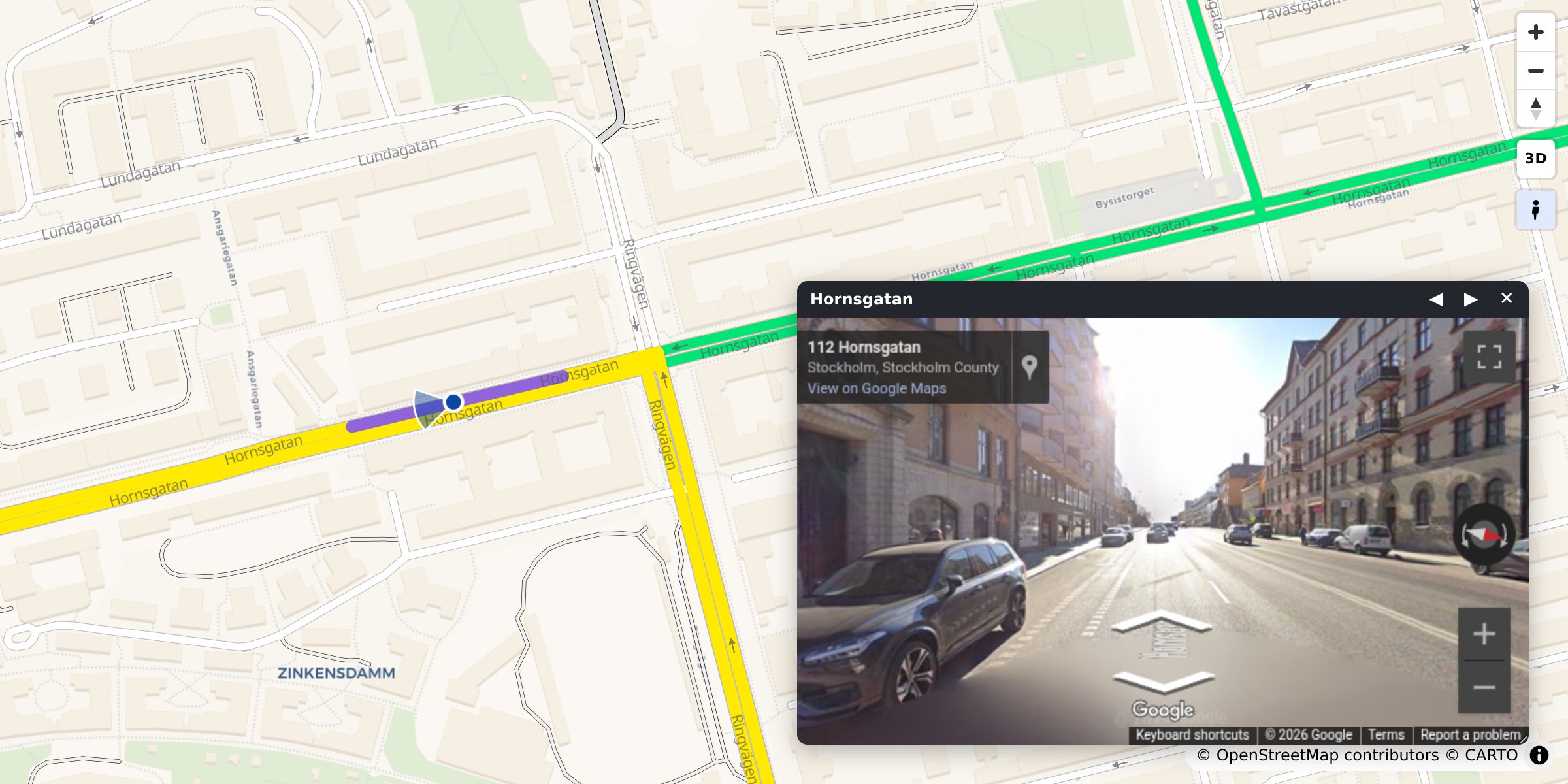
- **Street View built in.** Click any road to see it in Google Street View, facing the way it runs.
- **Any road data.** A GeoDataFrame, a file, DuckDB, Arrow, [osmnx](https://osmnx.readthedocs.io/)
or [duckOSM](https://github.com/Khoshkhah/duckOSM).
- **Colour by your data.** Speed, traffic or any column, with a legend and a menu of colourings.
- **Scriptable.** A `window.rs*` JavaScript API and events for your own dashboard.
- **Ready for AI agents.** An MCP server and an agent skill.
## Install
```bash
pip install roadstyle # core
pip install "roadstyle[all]" # + studio, numeric ramps, vector tiles, lonboard, DuckDB, …
```
Python ≥ 3.10. Individual extras and the dev setup: [Install](https://khoshkhah.github.io/roadstyle/get-started/#install).
## Quickstart
**From OpenStreetMap, no data needed.** Any place, with [osmnx](https://osmnx.readthedocs.io/) (`pip install osmnx`):
```python
import osmnx as ox
import roadstyle as rs
G = ox.graph_from_place("Tartu, Estonia", network_type="drive", simplify=False)
G = ox.simplify_graph(G, edge_attrs_differ=["bridge", "tunnel"]) # keep tunnels and bridges apart
rs.render_edges(ox.graph_to_gdfs(G, nodes=False)).save("tartu.html")
```
**From your own data.** Any file or GeoDataFrame with line geometry and a `highway` column:
```python
import geopandas as gpd
import roadstyle as rs
edges = gpd.read_file("edges.gpkg") # LineStrings + a `highway` column, any CRS
rs.render_edges(edges).save("map.html") # open map.html: no server (Street View needs one)
```
**More looks:**
```python
rs.render_edges(edges, basemap="dark_matter", view_3d=True) # dark, 3D bridge decks
rs.render_edges(edges, palette="carto", basemap="positron") # the classic OSM look
rs.render_edges(edges, color_by="aadt", cmap="viridis") # colour by your data
rs.render_edges(edges, palette="mono", color_options={ # several colourings,
"Traffic": {"color_by": "aadt", "cmap": "viridis"}, # switched in the browser
"Speed": {"color_by": "maxspeed_kmh", "cmap": "magma"}})
rs.render_edges(edges, tiles=True) # 100k+ edges
rs.render_dashboard(edges).save("dashboard.html") # map + query sidebar
rs.render_street_view(edges).save("street_view.html") # map and Street View side by side
```
No Python? `roadstyle edges.gpkg -o map.html --basemap dark_matter`, or click through it in the
workbench: `pip install "roadstyle[studio]" && roadstyle studio`.
## Gallery
<table>
<tr>
<td width="33%" valign="top"><a href="https://khoshkhah.github.io/roadstyle/gallery/"><img src="https://raw.githubusercontent.com/Khoshkhah/roadstyle/main/docs/img/gallery/road_look.jpg" alt="The road map look" width="100%"></a><br><b>The road map look</b><br><sub><code>rs.render_edges(edges)</code></sub></td>
<td width="33%" valign="top"><a href="https://khoshkhah.github.io/roadstyle/gallery/"><img src="https://raw.githubusercontent.com/Khoshkhah/roadstyle/main/docs/img/gallery/bridges_tunnels.jpg" alt="Bridges and tunnels" width="100%"></a><br><b>Bridges and tunnels</b><br><sub><code>rs.render_edges(edges)</code></sub></td>
<td width="33%" valign="top"><a href="https://khoshkhah.github.io/roadstyle/gallery/"><img src="https://raw.githubusercontent.com/Khoshkhah/roadstyle/main/docs/img/gallery/colour_by_data.jpg" alt="Colour by your data" width="100%"></a><br><b>Colour by your data</b><br><sub><code>color_by="maxspeed_kmh"</code></sub></td>
</tr>
<tr>
<td width="33%" valign="top"><a href="https://khoshkhah.github.io/roadstyle/gallery/"><img src="https://raw.githubusercontent.com/Khoshkhah/roadstyle/main/docs/img/gallery/bridges_3d.jpg" alt="3D bridges" width="100%"></a><br><b>3D bridges</b><br><sub><code>view_3d=True</code></sub></td>
<td width="33%" valign="top"><a href="https://khoshkhah.github.io/roadstyle/gallery/"><img src="https://raw.githubusercontent.com/Khoshkhah/roadstyle/main/docs/img/gallery/street_view.jpg" alt="Street View" width="100%"></a><br><b>Street View</b><br><sub><code>click a road</code></sub></td>
<td width="33%" valign="top"><a href="https://khoshkhah.github.io/roadstyle/gallery/"><img src="https://raw.githubusercontent.com/Khoshkhah/roadstyle/main/docs/img/gallery/dashboard.jpg" alt="Dashboard" width="100%"></a><br><b>Dashboard</b><br><sub><code>rs.render_dashboard(edges)</code></sub></td>
</tr>
</table>
Every look with its code: **[the gallery](https://khoshkhah.github.io/roadstyle/gallery/)**.
## What goes in
Only `geometry` and `highway` are required. Other columns switch features on:
| Column | Powers |
|---|---|
| `geometry` (LineString, any CRS) | the edges. Each edge is **directed**: a two-way road is two edges with reversed geometry |
| `highway` (OSM class) | colour, width, casing, draw order |
| `name` | street labels, popup title |
| `oneway` | direction arrows |
| `bridge` / `tunnel` / `layer` | grade separation: tunnels below, bridges on decks above |
| `edge_id` | popups; 64-bit ids stay exact |
| anything else | shown in the popup, queryable from JavaScript |
[duckOSM](https://github.com/Khoshkhah/duckOSM) (`duckosm export-gis`) exports exactly this, and
[osmnx](https://osmnx.readthedocs.io/) edges work as they are: `rs.render_edges(ox.graph_to_gdfs(G, nodes=False))`.
## Drive it from JavaScript
The saved page exposes `window.rs*` functions and `rs:*` events:
```js
const ids = rsQuery(p => p.maxspeed_kmh > 30); // feature ids whose properties match
rsColor(ids, "#ff00aa"); rsFocus(ids); // paint them, fit the camera
document.addEventListener("rs:select", e => console.log(e.detail.properties));
```
Every function and event: [JavaScript API](https://khoshkhah.github.io/roadstyle/reference/javascript/).
## For AI agents
**MCP server.** Lets any MCP-capable AI app (Claude Code, Claude Desktop, Cursor, …) draw road maps
without writing code: `render_place("Tartu, Estonia")`, `render_file("roads.gpkg")` and `snapshot`.
Each saves an HTML map and returns its path plus a PNG preview the agent can look at.
```bash
claude mcp add roadstyle -- uvx roadstyle-mcp
```
<details>
<summary>Claude Desktop, and where the maps go</summary>
In `claude_desktop_config.json`:
```json
{"mcpServers": {"roadstyle": {"command": "uvx", "args": ["roadstyle-mcp"]}}}
```
Maps are saved in `~/roadstyle-maps/`. The PNG preview needs Chromium, once:
`uvx --from roadstyle-mcp playwright install chromium`.
</details>
**Claude Code plugin.** The MCP server and the skill below in one install:
```text
/plugin marketplace add Khoshkhah/roadstyle
/plugin install roadstyle@roadstyle
```
**For agents that write code:**
- [`skills/roadstyle/SKILL.md`](https://github.com/Khoshkhah/roadstyle/blob/main/skills/roadstyle/SKILL.md): a
skill for agents that *use* roadstyle (the one call, the data contract, the JS API, the traps).
Install it for Claude Code:
```bash
mkdir -p ~/.claude/skills/roadstyle && curl -fsSL -o ~/.claude/skills/roadstyle/SKILL.md \
https://raw.githubusercontent.com/Khoshkhah/roadstyle/main/skills/roadstyle/SKILL.md
```
- [`AGENTS.md`](https://github.com/Khoshkhah/roadstyle/blob/main/AGENTS.md): for agents working *on* this repo.
- [`llms.txt`](https://khoshkhah.github.io/roadstyle/llms.txt): the docs site as a link list for LLMs.
## API keys
Both keys are optional. roadstyle works without them, just with less.
- **CARTO**, for the default base map. Without a key its tiles are stamped *API KEY REQUIRED*;
set `CARTO_API_KEY`, or use a keyless base map (`esri_street`, `esri_dark_gray`, `osm`, `blank`).
- **Google Maps**, for Street View. Street View works with no key. A key adds a **Linked** mode:
a real panorama, with the map marker walking and turning with you.
<details>
<summary>Setting up the CARTO key</summary>
The default base map (`voyager`) and `positron` and `dark_matter` come
What people ask about roadstyle
What is Khoshkhah/roadstyle?
+
Khoshkhah/roadstyle is mcp servers for the Claude AI ecosystem. Road cartography for Python: turn road edges (OSM, osmnx, GeoPandas) into styled, interactive, offline HTML maps (MapLibre) with Street View It has 1 GitHub stars and its last recorded update is dated 2026-10-18.
How do I install roadstyle?
+
You can install roadstyle by cloning the repository (https://github.com/Khoshkhah/roadstyle) or following the README instructions on GitHub. ClaudeWave also provides quick install blocks on this page.
Is Khoshkhah/roadstyle safe to use?
+
Our security agent has analyzed Khoshkhah/roadstyle and assigned a Trust Score of 95/100 (tier: Verified). See the full breakdown of passed checks and flags on this page.
Who maintains Khoshkhah/roadstyle?
+
Khoshkhah/roadstyle is maintained by Khoshkhah. The last recorded GitHub activity is dated 2026-10-18, with 0 open issues.
Are there alternatives to roadstyle?
+
Yes. On ClaudeWave you can browse similar mcp servers at /categories/mcp, sorted by popularity or recent activity.
Deploy roadstyle to your cloud
Ship this repo to production in minutes. Each platform spins up its own environment with editable env vars.
Maintain this repo? Add a badge to your README
Drop the badge into your GitHub README to show it's tracked on ClaudeWave. Each badge links back to this page and reflects the live Trust Score.
[](https://claudewave.com/repo/khoshkhah-roadstyle)<a href="https://claudewave.com/repo/khoshkhah-roadstyle"><img src="https://claudewave.com/api/badge/khoshkhah-roadstyle" alt="Featured on ClaudeWave: Khoshkhah/roadstyle" width="320" height="64" /></a>More MCP Servers

Reverse engineer anything with agents, from app behavior down to native binaries.

Fair-code workflow automation platform with native AI capabilities. Combine visual building with custom code, self-host or cloud, 400+ integrations.

User-friendly AI Interface (Supports Ollama, OpenAI API, ...)

An open-source AI agent that brings the power of Gemini directly into your terminal.

Real-time global intelligence dashboard. AI-powered news aggregation, geopolitical monitoring, and infrastructure tracking in a unified situational awareness interface

🕷️ A Web Scraping framework that handles everything from a single request to a full-scale crawl! Don't be shy, join here: https://discord.gg/EMgGbDceNQ and follow here for daily tips and tricks: https://x.com/Scrapling_dev