

MCP server for generating LPC character spritesheets (Universal LPC Character Generator)
- ✓Actively maintained (<30d)
- ✓Clear description
- ✓Topics declared
- ✓Documented (README)
- !Licence file present but not machine-readable
- !Install pipes a remote script into a shell (curl | sh)
claude mcp add lpc-character-mcp -- uvx lpc-character-mcp{
"mcpServers": {
"lpc-character-mcp": {
"command": "uvx",
"args": ["lpc-character-mcp"]
}
}
}MCP Servers overview
# LPC Character Generator — MCP
<!-- mcp-name: io.github.kyuza1/lpc-character-mcp -->
*English · [Português](https://github.com/kyuza1/lpc-character-mcp/blob/main/README.pt-BR.md)*
[](https://github.com/kyuza1/lpc-character-mcp/actions/workflows/tests.yml)
[](https://pypi.org/project/lpc-character-mcp/)
An MCP server that builds LPC pixel-art character spritesheets — the same parts as the
[Universal LPC Spritesheet Character Generator](https://liberatedpixelcup.github.io/Universal-LPC-Spritesheet-Character-Generator/) —
and exports them ready for **Godot**, **Unity** and the **web** (Phaser/PixiJS).
Ask in plain language ("make a tanned blacksmith with a leather apron and a hammer") and
your assistant assembles the character, shows an animated preview in the chat and saves
the files.

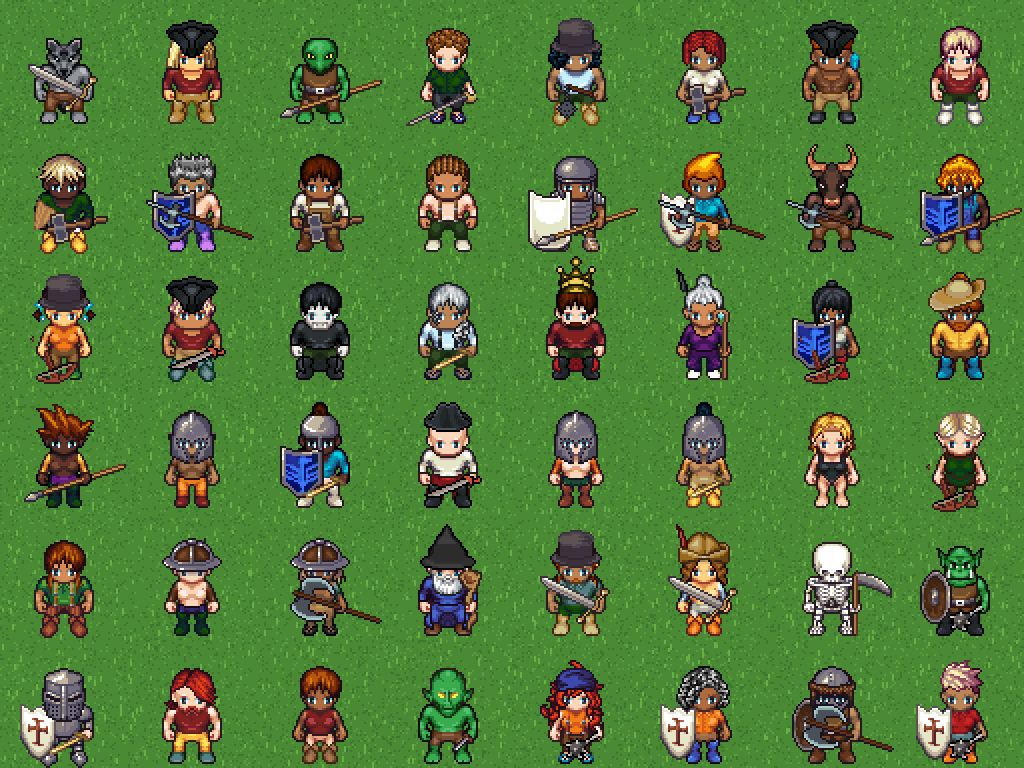
*Every character above was generated by this MCP — themed ones (knight, viking, wizard,
skeleton, orc, legionary, pirate, king...) and random ones.*

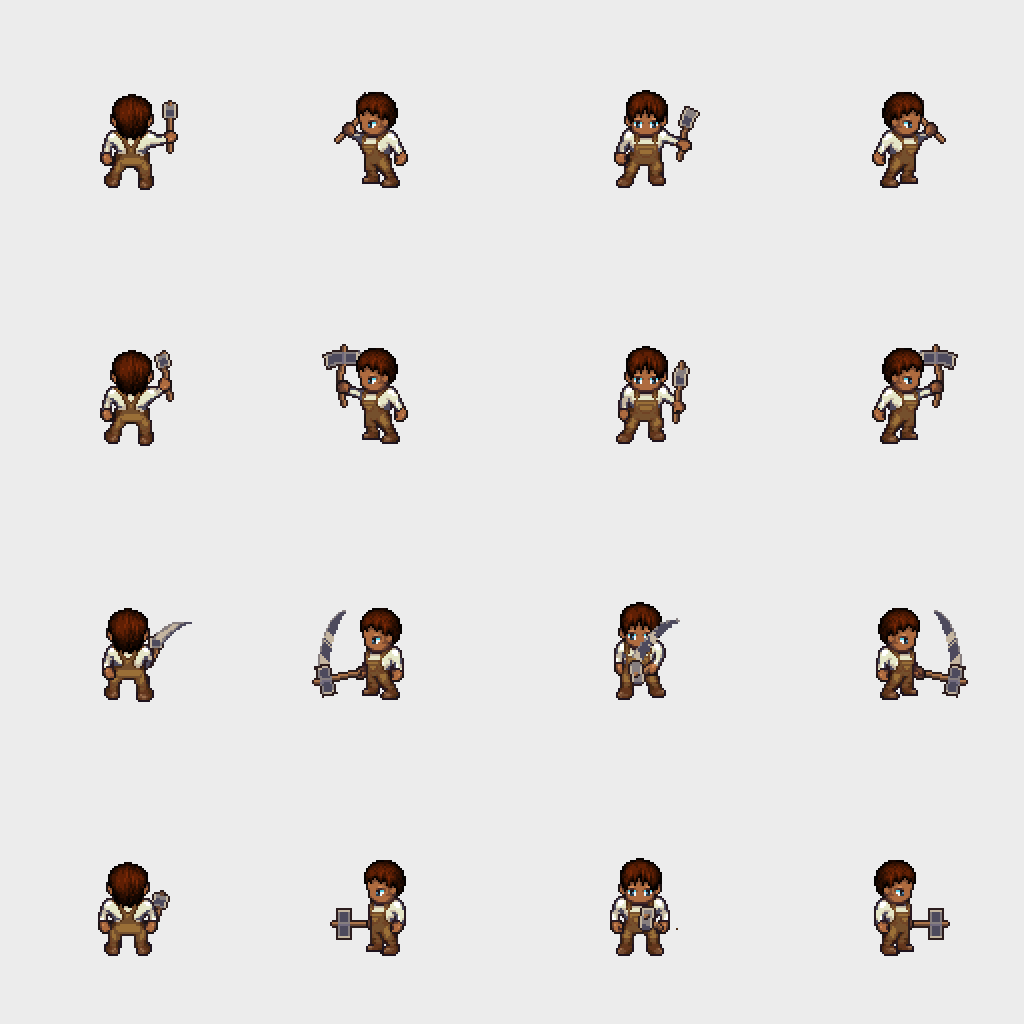
The in-chat preview (`preview_character`) is an animated GIF — here a blacksmith hammering:
## Installation
You need **[uv](https://docs.astral.sh/uv/getting-started/installation/)** and **Git**.
uv fetches the right Python and the package by itself — nothing to clone, no
dependencies to install.
1. Install uv (once):
- Windows: `powershell -c "irm https://astral.sh/uv/install.ps1 | iex"`
- macOS/Linux: `curl -LsSf https://astral.sh/uv/install.sh | sh`
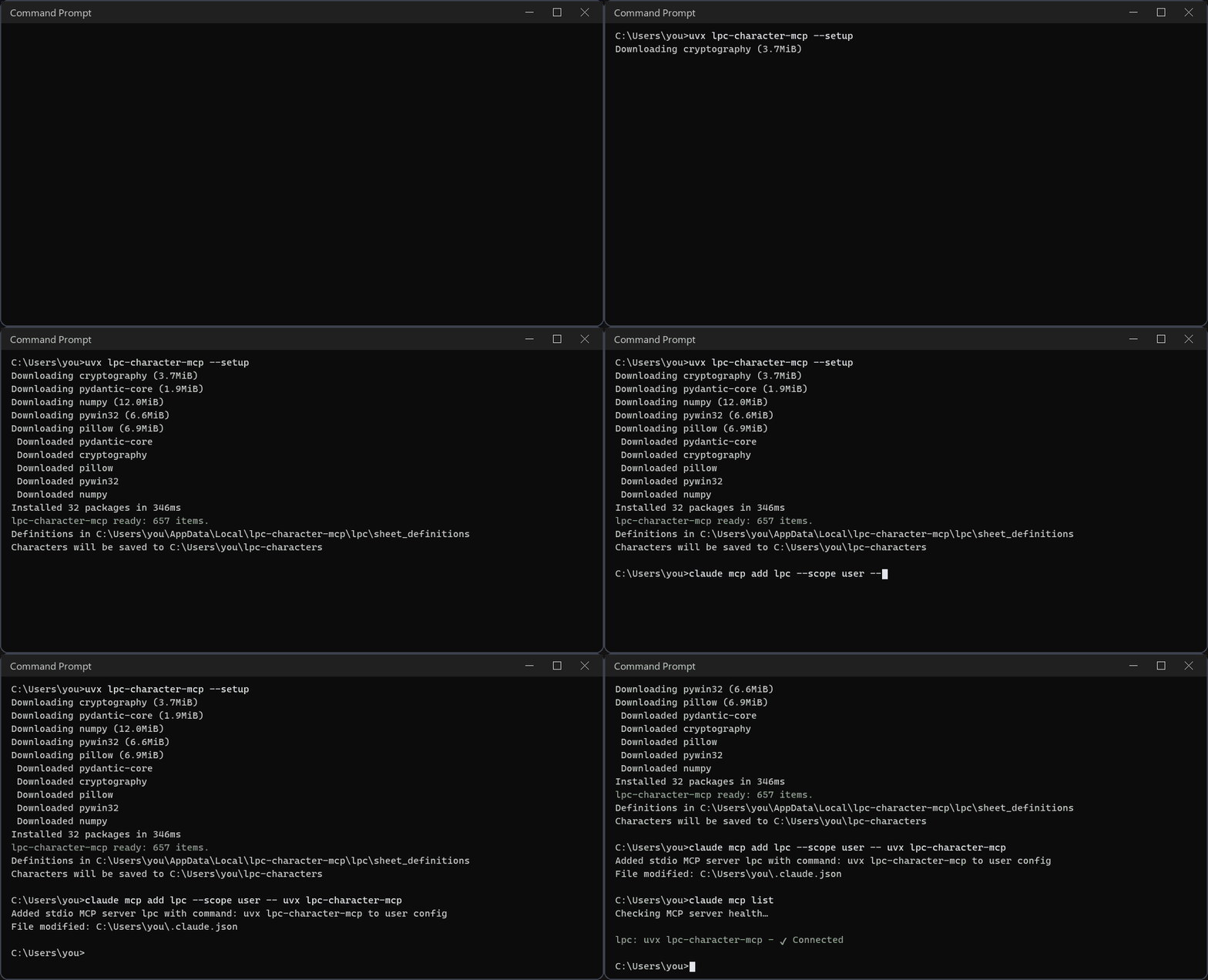
2. Prepare the server (downloads the item definitions, ~10 s, only once):
```
uvx lpc-character-mcp --setup
```
3. Register it in your assistant (below). The command is always `uvx lpc-character-mcp`.
To run the latest code straight from GitHub, replace `uvx lpc-character-mcp` with
`uvx --from git+https://github.com/kyuza1/lpc-character-mcp lpc-character-mcp` in any example.
Characters are saved to `~/lpc-characters` (on Windows, `C:\Users\<you>\lpc-characters`).
Set `LPC_OUTPUT_DIR` to change it — for example, to your Godot/Unity sprites folder.
`lpc-character-mcp --where` prints every folder in use. Messages are in English; set
`LPC_LANG=pt` for Portuguese.
### Claude Code
```
claude mcp add lpc --scope user -- uvx lpc-character-mcp
```
### Claude Desktop
**One click:** download `lpc-character-mcp.mcpb` from the
[latest release](https://github.com/kyuza1/lpc-character-mcp/releases/latest) and open it
(or drag it into **Settings → Extensions**). You can pick the output folder and language
during install.
Or add it by hand in **Settings → Developer → Edit config** (`claude_desktop_config.json`):
```json
{
"mcpServers": {
"lpc": { "command": "uvx", "args": ["lpc-character-mcp"] }
}
}
```
### Codex (OpenAI)
```
codex mcp add lpc -- uvx lpc-character-mcp
```
Or edit `~/.codex/config.toml` (on Windows, `%USERPROFILE%\.codex\config.toml`):
```toml
[mcp_servers.lpc]
command = "uvx"
args = ["lpc-character-mcp"]
startup_timeout_sec = 60
```
Check with `codex mcp list`. The same file is used by the Codex VS Code extension.
### Antigravity (Google)
In the agent panel click **…** → **MCP Servers** → **Manage MCP Servers** →
**View raw config** and add to `mcp_config.json` (`~/.gemini/config/mcp_config.json`;
on Windows, `%USERPROFILE%\.gemini\config\mcp_config.json`):
```json
{
"mcpServers": {
"lpc": { "command": "uvx", "args": ["lpc-character-mcp"] }
}
}
```
Save and click **Refresh** on the MCP Servers page. In the Antigravity CLI, use `/mcp`.
### Directories
Listed on [Smithery](https://smithery.ai/servers/digitalinovadora/lpc-character-mcp),
[Glama](https://glama.ai/mcp/servers/kyuza1/lpc-character-mcp) and the [official MCP Registry](https://registry.modelcontextprotocol.io/v0/servers?search=io.github.kyuza1/lpc-character-mcp)
as `io.github.kyuza1/lpc-character-mcp`, which clients and directories that read the
registry pick up automatically.
### Other MCP clients
Any client that runs **stdio** servers works with the same `uvx lpc-character-mcp` command.
### Without uv (pip)
```
pip install lpc-character-mcp
lpc-character-mcp --setup
```
Then register the `lpc-character-mcp` command (no arguments) in your assistant.
### Tips
- **Free disk space:** `lpc-character-mcp --clear-cache` deletes cached images
(`--clear-cache 30` only those unused for 30 days).
- **Update:** `uvx lpc-character-mcp@latest --version`
- **App can't find `uvx`:** use the full path (`where uvx` on Windows, `which uvx` elsewhere).
## Example requests
- "Make a tanned blacksmith with a leather apron and a hammer, export for Godot"
- "Show me an animated preview of him hammering"
- "Generate 10 random villagers with seed 1, with Unity files"
- "Open this link and generate the character: https://liberatedpixelcup.github.io/...#sex=male&body=..."
- "Which aprons have an idle animation for the male body?"
## Tools
| Tool | What it does |
|---|---|
| `generate_character(items, body_type, animations, filename, layout, split, export, prefer_complete, output_dir)` | Builds the PNG, the credits, the animation report and (optionally) engine files |
| `preview_character(items, body_type, animation, animated)` | In-chat preview: animated GIF with the 4 directions |
| `search_items(query, category, body_type, animation, type_name, complete_only)` | Searches items with filters; complete items first |
| `get_item(item_id)` | Colors, variants, multi-color parts and the animations available per body |
| `list_categories` | Lists item categories |
| `random_character(body_type, seed, fixed_items)` | Rolls a random character |
| `generate_batch(count, body_types, seed, prefix, fixed_items, ..., output_dir)` | Generates many random NPCs at once |
| `from_site_url(url)` / `to_site_url(items, body_type)` | Reads / builds generator site links (including old links); `from_site_url` also takes the site's "Export to Clipboard (JSON)" |
| `update_definitions(clear_image_cache)` | Pulls new items and palettes from the official repository |
| `clear_cache(older_than_days, dry_run)` | Deletes cached images (or only those unused for N days) |
Example `items`:
```json
[
{"id": "body/body", "color": "bronze"},
{"id": "head/heads/human/heads_human_male"},
{"id": "hair/short/hair_plain", "color": "dark_brown"},
{"id": "torso/shirts/longsleeve/torso_clothes_longsleeve", "color": "white"},
{"id": "torso/aprons/torso_aprons_overalls", "variant": "leather"},
{"id": "legs/pants/legs_cuffed", "color": "white"},
{"id": "feet/boots/feet_boots_basic", "color": "brown"},
{"id": "tools/tool_hammer", "color": ["steel", "walnut"]}
]
```
### Colors
- `"color": "blonde"` — one color (see `colors` in `get_item`).
- `"color": ["steel", "walnut"]` — multi-part items (head and handle, armor and belt...).
Parts are listed in `color_parts` from `get_item`; `null` keeps a part's default.
- Head, ears, nose and other skin items without a color inherit the body color.
- One item per type, like the site: asking for two hairstyles keeps the last one (and
says so in `warnings`).
### Where to save
`output_dir` saves straight into a folder — e.g. your game's sprites folder:
"generate the blacksmith in C:/my-game/art/npcs and export for Godot". Otherwise files go
to `LPC_OUTPUT_DIR` or `~/lpc-characters`.
### Layout and parts
- `layout: "standard"` (default) — same as the site: 832px wide, every animation always on
the same row (walk at y=512, slash at y=768...). Oversized animations go below y=3456.
- `layout: "compact"` — only the requested animations, stacked.
- `split` — also saves pieces: `"animation"` (one PNG per animation), `"frame"` (one PNG
per frame in `<name>_frames/<animation>/<direction>_NN.png`) and/or `"item"` (one sheet
per item, for swapping outfits in-game). Accepts a list: `["animation", "frame"]`.
### Oversized animations
Big weapons and tools (swords, spears, hammer, axe, bow...) use 128 or 192px frames. They
are added automatically when their base animation is requested (asking for `slash` with
the hammer also produces `tool_hammer`).
## Complete animations
Not every LPC item has art for all 15 animations (e.g. the apron has no `idle`, `run`,
`jump`...). In those animations the item simply disappears. To avoid surprises:
- **Every result warns you.** `generate_character` always returns `animation_check`:
```json
"animation_check": {
"complete": false,
"incomplete_items": {
"torso/aprons/torso_aprons_apron": {
"missing": ["climb", "idle", "jump", "sit", "emote", "run", ...],
"complete_alternatives": ["torso/aprons/torso_aprons_overalls", ...]
}
},
"summary": "ATENÇÃO: nem todas as animações ficaram completas: Apron não tem ..."
}
```
The preview, batches and the web demo warn too.
- **`prefer_complete: true`** replaces each incomplete item with the closest item that has
every animation, keeping the color (e.g. apron → overalls). Replacements are listed in
`replaced`. The assistant is told to ask you first.
- **Search puts complete items first.** `search_items` lists them first, shows
`missing_animations` for the others and accepts `complete_only: true`. `get_item` shows
what is missing and suggests `complete_alternatives`.
- **Random characters only use complete items.**
Not counted What people ask about lpc-character-mcp
What is kyuza1/lpc-character-mcp?
+
kyuza1/lpc-character-mcp is mcp servers for the Claude AI ecosystem. MCP server for generating LPC character spritesheets (Universal LPC Character Generator) It has 0 GitHub stars and its last recorded update is dated 2026-09-28.
How do I install lpc-character-mcp?
+
You can install lpc-character-mcp by cloning the repository (https://github.com/kyuza1/lpc-character-mcp) or following the README instructions on GitHub. ClaudeWave also provides quick install blocks on this page.
Is kyuza1/lpc-character-mcp safe to use?
+
Our security agent has analyzed kyuza1/lpc-character-mcp and assigned a Trust Score of 72/100 (tier: OK). See the full breakdown of passed checks and flags on this page.
Who maintains kyuza1/lpc-character-mcp?
+
kyuza1/lpc-character-mcp is maintained by kyuza1. The last recorded GitHub activity is dated 2026-09-28, with 0 open issues.
Are there alternatives to lpc-character-mcp?
+
Yes. On ClaudeWave you can browse similar mcp servers at /categories/mcp, sorted by popularity or recent activity.
Deploy lpc-character-mcp to your cloud
Ship this repo to production in minutes. Each platform spins up its own environment with editable env vars.
Maintain this repo? Add a badge to your README
Drop the badge into your GitHub README to show it's tracked on ClaudeWave. Each badge links back to this page and reflects the live Trust Score.
[](https://claudewave.com/repo/kyuza1-lpc-character-mcp)<a href="https://claudewave.com/repo/kyuza1-lpc-character-mcp"><img src="https://claudewave.com/api/badge/kyuza1-lpc-character-mcp" alt="Featured on ClaudeWave: kyuza1/lpc-character-mcp" width="320" height="64" /></a>More MCP Servers

Fair-code workflow automation platform with native AI capabilities. Combine visual building with custom code, self-host or cloud, 400+ integrations.

User-friendly AI Interface (Supports Ollama, OpenAI API, ...)

An open-source AI agent that brings the power of Gemini directly into your terminal.

Real-time global intelligence dashboard. AI-powered news aggregation, geopolitical monitoring, and infrastructure tracking in a unified situational awareness interface

🕷️ An adaptive Web Scraping framework that handles everything from a single request to a full-scale crawl! Don't be shy, join here: https://discord.gg/EMgGbDceNQ and follow here for daily tips and tricks: https://x.com/Scrapling_dev

The fastest path to AI-powered full stack observability, even for lean teams.